 10
10Pond
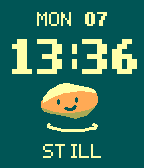
FacesI had a Pebble Time years ago. Now I have a Time 2, and I wanted to make a little something for the community that brought these watches back. So I made Pond. It’s a watchface with a smiling stone sitting in some water. It tells the time, too. You can keep your pond to yourself or join a shared pond through the Pebble app settings. Two quick wrist twists drop a pebble into it. Someone else might see your ripple, and you might see theirs. Nothing needs answering. The gesture is a bit fiddly at the moment. Think a quick back-and-forth wrist motion, rather than tapping the screen. Repeat it within two seconds if you want to cancel an accidental plop. You can change your stone’s shape and colour, reduce motion, set quiet hours, or keep everything silent. Gentle vibrations are optional and limited to four incoming ripples a day, at least 90 minutes apart. Incoming ripples stay silent during your first 24 hours; the preview and optional confirmation tick work sooner. This is an early release, tested mainly on my Time 2. I’d love feedback from other wrists, especially about the gesture and battery life. Bug reports and code contributions are very welcome. Free, open source, and made by Monocursive. The stone helped very little. https://pond.monocursive.com https://github.com/monocursive/pond
 1
1benzaiflow
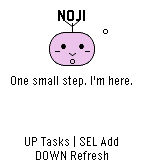
Dailybenzaiflow brings Noji, your quiet companion, to your wrist. See your tasks, catch a new thought, and put the phone away. • Browse active tasks, with pinned tasks first, and open a task for its details and estimated minutes. • Add a task by dictation on supported watches, write with the watch buttons, or choose a small essential. Review before saving. • Capture while your phone is out of reach: once paired, the app keeps up to three unsent tasks on the watch for retry when you reconnect. • Bring your Noji’s shape, color and expression with you. SETUP A benzaiflow account is required. After installing, open the app’s settings in the Pebble phone app, sign in, and choose “Connect my Pebble.” The Pebble phone app provides the internet connection for syncing. Learn more: https://benzaiflow.com LANGUAGES & LIMITS The watch interface is English; pairing is available in English and French. Task text supports UTF-8; button entry uses a Latin ASCII alphabet. Dictation requires a compatible watch and an available phone transcription service. This first release supports browsing and adding tasks; completion, deletion and reminders are not available on the watch. Support: support@benzaiflow.com Privacy: https://benzaiflow.com/privacy