 1
Daykin
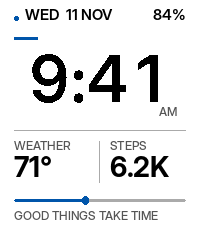
FacesA watchface that feels alive. Designed exclusively for Pebble Time 2. Time deserves more than numbers on a screen. Meet DAYKIN — a beautifully minimal, intelligent, and personal watchface that brings together timeless design, useful information, and a little personality. Built around one simple philosophy: everything you need, nothing you don't. TIME TAKES CENTER STAGE Enjoy bold, custom-designed digital typography with exceptional clarity. No distracting shadows, unnecessary animations, or cluttered dashboards. Just the time, presented beautifully. A WATCHFACE THAT MOVES WITH YOUR DAY Meet Day Pulse — a subtle visual timeline that follows the rhythm of your day. DAYKIN adapts to the time, weather, and your activity, presenting meaningful information without overwhelming your screen. BEAUTIFULLY PERSONAL Make DAYKIN your own in seconds. Six color experiences: Automatic, Paper, Ink, Ocean, Amber, and Berry. Smart information: Choose between essential information, weather, and activity-focused displays. Three personalities: Quiet, Warm, or Playful. Adaptive appearance: Automatically transition between daytime and nighttime colors. No complicated setup. No endless menus. Just thoughtful customization. MORE THAN A WATCHFACE DAYKIN takes advantage of your Pebble Time 2's capabilities: Spoken time: Optional hourly voice announcements through the watch's built-in speaker. Signature chimes: Gentle audio or vibration to mark the hour. Smart weather: Temperature, conditions, sunrise, sunset, and weather-aware information. Health at a glance: Steps, available heart-rate readings, and daily activity progress. Wrist-tap glance: Temporarily reveal additional information with an optional wrist gesture. Battery awareness: Charge information and automatic low-battery safeguards. Contextual personality: Small, thoughtful messages that change throughout your day. DESIGNED TO RESPECT YOUR BATTERY Beautiful shouldn't mean power-hungry. DAYKIN prioritizes efficient minute-based updates, restrained rendering, cached weather, and optional sound and gesture features. No continuous decorative animations. No unnecessary background activity. SIMPLE BY DEFAULT. PERSONAL BY CHOICE. DAYKIN is designed to look great the moment you install it. Customize the essentials through your Pebble phone app, or simply leave everything as it is. Good to know: Weather requires a connected phone and internet access. Health information depends on available watch readings. Hourly sounds operate while the watchface is active and respect applicable quiet and mute settings. Actual battery life varies with usage. Made exclusively for Pebble Time 2. Designed and developed by Pebble Pusher.
 2
Chaos
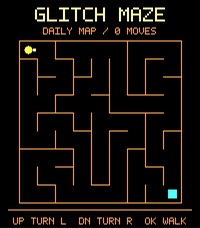
GamesChaOS — A Pocket Playground for Pebble Time 2 Tiny games. Odd adventures. A little chaos on your wrist. Meet your pixel companion, beat an arcade challenge, explore strange encounters, or compose a tiny tune. ChaOS turns your Pebble Time 2 into an offline playground filled with personality, collectibles, and things to discover. Open it for a quick distraction or stay for another high score. Your pixel pal will be there either way. MEET YOUR PIXEL PAL Boop, feed, dress up, and give your companion a power nap. Discover five characters—Cat, Blob, Robot, Frog, and Fox—and unlock new pals and headwear as you play. Your pal never dies. There are no missed-day punishments, streak penalties, or purchases required to unlock cosmetics. Play at your own pace. FOUR GAMES, FOUR DIFFERENT CHALLENGES Byte Dodge: Dodge falling blocks, collect gold, and survive an increasingly hectic run. Signal Match: Watch the sequence and repeat it as the pattern grows. How many rounds can you remember? Glitch Maze: Find your way through a generated daily maze, with trail markers to help you navigate. Pulse Lock: Stop the moving marker inside the target zone. Open five locks before you run out of chances. Completed high scores are saved locally. No online leaderboard or account required. EXPLORE SOMETHING STRANGE Take a three-encounter expedition, making a choice at every stop. Discover 12 encounter types and collect 12 souvenir cards. Earn XP, unlock cosmetics, collect 12 achievement badges, and complete three optional daily quests. There is always something to work toward—but nothing punishes you for taking a break. MAKE A LITTLE NOISE Create your own eight-step melody in Sound Lab. Mix notes and rests, choose between two synth voices and three tempos, then play your creation through the watch’s speaker. Optional game sounds and adjustable volume add another layer of fun. Prefer silence? Every activity remains usable without audio. A TERMINAL WITH PERSONALITY Try commands such as “sudo meow,” consult a questionable oracle, roll a D20, or see what your pal supposedly has to say. Six commands and 56 curated message pairs bring the mischief. This is playful, offline fiction—not a real command shell or AI chatbot. TINY TOYS AND QUIET MOMENTS Roll a ball into targets in Tilt Toy, using motion controls or the button alternative. For a slower moment, open Quiet Space for a one-minute visual pause. MAKE IT YOURS Choose from six themes: Neon, Candy, Arcade, Ice, Paper, and Midnight. Adjust sound, vibration, touch, motion effects, and other preferences directly on the watch. Buttons work throughout the app. Optional touch adds taps and swipes without replacing the physical controls. OFFLINE BY DESIGN Once installed, ChaOS needs no internet connection, in-app account, or phone companion. There are no ads or analytics, and it does not access your location, microphone, or health data. Progress, completed high scores, collectibles, music patterns, and preferences are saved on the watch. BATTERY-CONSCIOUS OPTIONS Idle pause, reduced-motion settings, and an automatic low-battery mode help limit unnecessary activity. Sound and touch are disabled by default; enable them inside ChaOS settings. Games, sound, and sensors use additional battery while active.
 1
Dashboard+
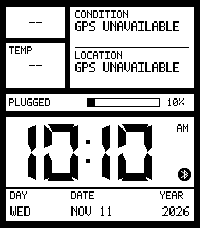
FacesGive your Pebble Time 2 a clean, retro-inspired digital display with the information that matters to you. LCD Dashboard+ combines crisp, shadow-free clock digits with customizable layouts, weather, activity information, battery insights, and optional spoken-time announcements. Keep it minimal or build your own information-packed dashboard—all from the settings in your Pebble phone app. Make it yours Start with one of five presets: Essential, Health, Weather, Travel, or Full Dashboard. Choose a balanced layout, a bigger clock, or more space for information. Pick a color theme or customize individual areas, then decide which details to display. Everyday choices stay straightforward, with advanced options available when you need them. Hear the time Enable hourly announcements to hear the time through your Time 2’s speaker. Prefer something subtler? Choose a soft chime or vibration instead. Spoken announcements use an included English voice and work without an internet connection, with adjustable volume and quiet hours. Useful information at a glance Display current weather, feels-like temperature, daily highs and lows, wind, humidity, sunrise and sunset, or a six-hour forecast. Switch to activity information such as steps, step-goal progress, distance, active calories, sleep, and the latest available heart-rate reading. You can also display a second clock or choose your own combination of two statistics. Understand your battery See your current charge alongside estimated daily battery use or estimated time remaining. Battery insights learn from your watch’s discharge history and show “LEARNING” until enough information is available. Designed with battery-conscious defaults Minute-based clock updates, cached weather, and automatic low-battery behavior help avoid unnecessary activity. Seconds, blinking, gestures, animations, and hourly audio are optional, so you decide which extras to enable. Good to know Weather updates require a connected phone with internet access and either location permission or manually entered coordinates. Health information depends on available watch readings and permissions. Hourly announcements are off by default and work only while LCD Dashboard+ is active at the hour. They respect system mute, Quiet Time, configured quiet hours, and battery-saver behavior. Battery estimates reflect the whole watch—not this watchface alone—and are not a guarantee of remaining runtime. The second clock uses a fixed UTC offset, which must be adjusted manually for daylight-saving changes. Optional audio and frequent display updates can increase battery use.