PENTA turns Pebble Time 2 into a small musical instrument. Touch a pad, slide into the next, and tilt your wrist to shape the sound. Record a chord progression, put a bass line beneath it, add a melody, and finish with a beat. The watch makes the sound through its own speaker, and your little composition stays on your wrist.

(Small beta, stuff can go unexpectedly, things can go boom, though probably not. For any questions, suggestions, complaints, stories of forgotten lands and faraway shores - feel free to mail me).

Here is the whole story, from your first note to your first four-part loop.

THE FIRST NOTE

Open PENTA and touch any of the five outer pads. Slide to another pad to change what you play. Move your finger toward or away from the center for expression within a pad.

Tap the center to move between Chord, Bass, Lead and Drum. The CH, BA, LD and DR tabs along the bottom select those parts directly. You can also choose a part through Settings, then Sound, then Role.

The screen reads one touch at a time. A single pad can play a whole chord, and latch and the looper let several notes sound together.

THE FOUR PARTS

Chord gives each pad a place in the harmony. In C major, clockwise from the top, the pads are I, ii, IV, V and vi. With the default seventh voicings, those become Cmaj7, Dm7, Fmaj7, G7 and Am7. Shared notes are kept where possible when you change chords, helping a progression move smoothly.

Bass follows the harmonic roots. Record it beneath a chord progression or play a bass line by itself.

Lead offers five notes that follow the current chord. A playing chord loop can guide the melody while you improvise. For a pentatonic layout instead, open Settings, then Harmony, then Lead Map.

Drum gives you kick, snare, hat, tom and clave. All five percussion sounds are synthesized on the watch.

THE BUTTONS

The touch surface plays the pads. The physical buttons handle the supporting jobs.

Tap the middle button to open Settings. Hold it for about two-thirds of a second to arm or finish recording. The same hold works from a settings menu and returns you to the playing screen.

By default, Up toggles latch and Down starts or stops the loop. Latch keeps a played note or chord sounding after you lift your finger. You can also toggle latch by holding the center of the wheel for just over half a second, then releasing it. A quick center tap changes part instead.

Make Up and Down your own through Settings, then Buttons. Each can be assigned to Off, Play/Stop, Latch, Volume Up, Volume Down, Next Role, Previous Role, Center Wrist, Motion On/Off, Metronome or Stop All. Neither button selects a pad or plays a note.

Inside settings, Up and Down move between rows. Tap middle to open a row or edit its value. While editing, Up increases and Down decreases; tap middle again to confirm. Back returns, keeping the current value.

On the playing screen, press Back while sounding or armed to stop everything. Press Back when idle to exit. A long Back press is handled by the watch operating system.

THE HARMONY

Open Settings, then Harmony, to choose your key, scale, chord style and register.

PENTA offers all 12 keys and four scales: Major, Natural Minor, Dorian and Mixolydian. Chord styles are Triad, Seventh, Ninth, Sus2, Sus4 and Sixth. Ninth voicings use four notes and omit the fifth.

For a moving pattern within a chord, turn on the arpeggiator. Choose Up, Down, Pendulum or Random order, with an eighth-note or sixteenth-note rate. Harmony also contains the lead mapping and latch settings.

THE SIX SOUNDS

Choose a melodic part, then open Settings, Sound and Preset. Each melodic part remembers its own choice.

Felt is rounded and softly decaying. Glass is clearer, with a fading bell-like partial. Velvet is gently detuned, with a slower attack and release. Reed has a firmer, sustained pulse-and-triangle character. Pluck has a quick transient and short decay. Pulse is a compact, sustained electronic tone.

Drum uses the Compact Kit. Sound also contains the selected part's level, overall volume, tone, resonance and effects. A new preset applies to new note attacks; notes already sounding finish with their original sound.

Eight voices are shared between the four parts. A six-voice option is also available in Sound. With dense layers, a new note may replace an older voice.

THE SPACE BETWEEN THE NOTES

Reverb adds a short, damped room around the sound. Echo adds a short repeating delay. Space combines the original ambience and echo character. Set their base amounts under Settings, then Sound.

To make effects respond to you, open Settings, then Motion. X tilt, Y tilt, movement energy and touch radius each offer the same choices: Off, Tone, Bend, Vibrato, Resonance, Space, Tremolo, Volume, Reverb and Echo.

Open a source, select its destination, then set Amount between -100 and +100. A negative amount reverses the direction, and zero removes that source's contribution. These routes shape the shared sound, including a playing loop.

A fresh installation starts with X tilt controlling Tone and Y tilt controlling Bend. Try changing X to Reverb with Amount 45 and Y to Echo with Amount 35. Play a chord, move gently, and listen to the space change. Swap the axes, choose something else, or turn either route off. The assignment is yours.

For a comfortable neutral position, hold your wrist still for a moment and select Center Wrist in Motion. PENTA measures tilt relative to that position using the accelerometer. Motion can be disabled. Flick gestures can be Off, Strum, Accent or Shaker, with three sensitivity levels.

THE FIRST LOOP

Begin with Chord. Open Settings, then Looper, and choose Tempo and Length. Try 100 BPM and two bars for your first pass.

Return to the pads and hold the middle button to arm recording. The first pad you touch starts the clock. Play a short progression. Recording continues around the loop until you hold middle again to finish.

Now switch to Bass. While the loop plays, hold middle to overdub, add your line, then hold middle to finish. Repeat with Lead and Drum. Down, with its default assignment, stops or restarts playback.

The looper has four parts and lengths of 1, 2 or 4 bars. Tempo runs from 40 to 200 BPM. Add swing or a metronome, and mute individual parts in Looper to hear different combinations. Clear Part clears the selected part after confirmation.

Recording stores musical events on a sixteenth-note grid, including how long notes are held. Each part has one event per grid slot; a new event in an occupied slot replaces the old one. Wrist motion stays live and is not recorded as automation. Recording captures your pad performance, not microphone audio.

KEEPING AN IDEA

Open Settings, then System, then Save Session to store the current settings and pattern. Saving this way stops playback. Idle changes also save automatically, and normal exit saves. The next launch restores the session silently, ready for you to press Play.

PENTA keeps one session. There is no song library, audio export or undo history. Recording over a part or clearing it changes that session, so finish and save an idea before moving on.

INK, PAPER AND A LITTLE HELP

Choose the dark Ink theme or light Paper theme through Settings, System and Theme. Settings also includes an on-watch Help section. Audio timing information is available through System, then Diagnostics.

If you cannot hear anything, check the watch's system volume and Quiet Time, then PENTA's volume and part level. A notification or another app can interrupt the speaker; return to PENTA and start playing again. Back stops everything when you need a clean start. If sound breaks up, try a lower volume and note the preset and whether a loop was playing.

WHAT YOU NEED

PENTA v0.2 is made for Pebble Time 2, using its touch surface and built-in speaker. This release does not support other Pebble models. It needs no account, companion app, internet connection or subscription to play.

IN THIS RELEASE

v0.2 brings touch-only pad performance, configurable supporting buttons, the same destination choices for both tilt axes, and independent Reverb and Echo routing. Chord changes now retain their full voicing, and more efficient drawing keeps audio refills responsive during rapid playing.
 2
2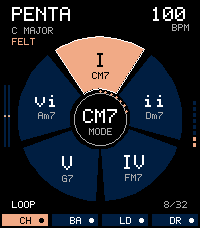 17
17 15
15 58
58 34
34