 5
5Stamina
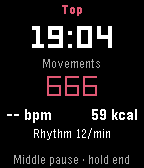
Health & FitnessStamina is a private wellness tracker for your intimate life, solo or with a partner. It measures rhythm, heart rate and estimated calories, and shows how a session affects your sleep and the start of your day. All data stays on your watch. No account, no cloud. Only if you turn on timeline pins, their short text is sent. TRACK • Motion detection counts movements and shows your rhythm per minute • Heart rate every second: average, min, max • Calorie estimate from movement and heart rate • Mark the peak moment with a button press or swipe UNDERSTAND • Sleep afterwards: time to fall asleep, duration, deep sleep, compared with your normal nights • Start of the day: steps, activity and heart rate in the 4 hours after a morning session, plus a short mood check-in • Charts per day, week and month, solo and partner • 59 achievements for milestones, records and streaks PARTNER MODE • Teach the watch your own positions (name them by voice), with live detection and time share per position • Optional partner initials SMART AND DISCREET • Auto start with optional time window • Calibration adapts detection to you • Display light options, touch controls on Pebble Time 2 • Optional timeline pins (sent via the Rebble timeline server) • Neutral wording on the watch, 19 languages TIP: Wear the watch on the hand that does the movement. Detection works best there. This is a beta (0.6). Intended for adults. Values are estimates, not medical advice. Vibe coded from start to store. That is the only reason it exists alongside a full time job. Support development: buymeacoffee.com/SIDEffects
 1
1PTZ Remote
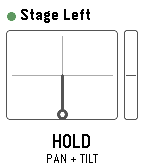
Tools & UtilitiesDrive Panasonic PTZ cameras from your wrist - with the buttons or by tilting the watch. PTZ Remote controls Panasonic AW-series cameras through their HTTP interface. Your phone does the talking, so the camera only has to be reachable on the same network. No extra software, no computer in between. Two ways to drive: - Buttons: up and down work the selected axis, a short press on select switches between TILT, PAN, ZOOM and FOCUS. - Motion: hold select as a dead-man switch and tilt your wrist. Zero is the posture you start from, so any comfortable arm position works - even with your elbow bent, in the dark next to the desk. Let go and the camera stops. Also included: presets with a confirmation before overwriting, up to 8 cameras to switch between, adjustable speed and tilt sensitivity, and an optional still image from the camera. That preview is not a live feed - the link to the watch carries about 1.6 KB per second, so one frame takes one to three seconds. Enough to check the framing, not to judge it. Nothing keeps moving unattended: the dead-man switch, a short arming delay so a tap does nothing, a watchdog on the phone that stops the camera if the watch goes quiet mid-move, and a stop when the app closes. Beta: camera control is tested against real hardware. The preview is not verified on a camera yet and is switched off by default; it needs JPEG transmission enabled in the camera's web menu. Runs on Pebble Time 2, Pebble Time and Pebble 2. Cameras are set up in the app settings on your phone. Vibe coded from start to store. That is the only reason it exists alongside a full time job. The app is free and has no ads. If you enjoy it, a coffee is much appreciated: https://buymeacoffee.com/SIDEffects
 8
8Heart Rate FX
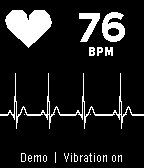
Tools & UtilitiesYour pulse as a trace, a sound and a light. Heart Rate FX turns your watch into a bedside monitor. It reads the optical sensor and shows every beat three ways at once: a sweeping ECG-style trace, a short monitor beep through the speaker, and the backlight swelling in time with your heart. Where the watch reports the interval between two measured beats, the app follows those intervals rather than an averaged number, so the rhythm on screen is the rhythm in your chest. The status line says "Live" then. FEATURES - Sweeping trace that draws a P-QRS-T complex for every beat - Monitor beep at 880 Hz, held on a stream so the amplifier cannot click between beats - Backlight that pulses with the beat, in any colour, at an adjustable floor - Vibration click on every beat, for quiet rooms and watches with no speaker - Beep pitch, volume, trace speed and trace colour adjustable - Demo pulse for showing the app without a sensor - English, German, French, Spanish, Italian, Dutch, Portuguese, Polish, Swedish BUTTONS - Select: vibration on or off - Up: sound on or off - Down: step through what the backlight does - Down, held: demo pulse on or off Settings live in the Pebble app on your phone, under the gear next to Heart Rate FX. The speaker and the colour backlight exist only on the Pebble Time 2. Other watches get the trace and the vibration, and leave the backlight alone. This is not a medical device. The trace is drawn from the intervals the watch measures; it is a picture of your pulse, not a recorded ECG. Vibe coded from start to store. That is the only reason it exists alongside a full time job. The app is free and has no ads. If you enjoy it, a coffee is much appreciated: https://buymeacoffee.com/SIDEffects
 1
1HELO Remote
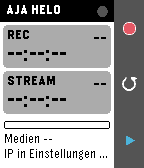
Tools & UtilitiesHELO Remote turns your Pebble into a remote control for the AJA HELO H.264 streaming and recording encoder. The Pebble app on your phone talks to the HELO over Wi-Fi through its REST API, so the watch shows the live status and sends commands with a single press. Features - Start and stop recording and streaming - Live status: recording and streaming state, run time, free media in percent, device temperature - Device name and connection dot in the header (green OK, red unreachable, yellow wrong password) - Stopping needs a second press within 4 seconds, so nothing stops by accident - Short vibration on start, double on stop, long on an error state (can be switched off) - Settings in the Pebble phone app: HELO address, HTTP port, password (only if user authentication is enabled on the HELO), polling interval 1 to 15 s - Seven languages (EN, DE, FR, ES, IT, PT, NL), following the watch language automatically - Optional timeline pin per recording and stream, with duration once stopped Controls - UP: start recording; while recording, press twice to stop - SELECT: refresh now (also cancels a pending stop) - DOWN: start or stop streaming (same confirmation) - BACK: exit Requirements: the phone must reach the HELO over HTTP, i.e. same network, no HTTPS. Works with HELO and HELO Plus. Runs on Pebble Time 2, Pebble Time and Pebble 2. Vibe coded from start to store. That is the only reason it exists alongside a full time job. The app is free and has no ads. If you enjoy it, a coffee is much appreciated: https://buymeacoffee.com/SIDEffects
 4
4Toggl Timer
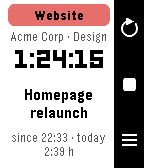
Tools & UtilitiesStart, stop and switch your Toggl Track timers from your wrist. Toggl Timer puts your Toggl Track time tracking on the Pebble. See the running entry with project, client, elapsed time and today's total, stop it with one press, or start the next one from your favourites, your recent entries or the project list. A timer stopped on the phone shows up on the watch within half a minute. Features • Status screen with project colour, description, running time and daily total • Favourite tiles: up to four entries you use every day, one tap to start • Recent entries and all projects, with the time booked today • Voice dictation of a new description, then pick the project (Pebble Time 2) • Touch: tap to open the picker, swipe left for the previous entry, swipe right to stop (Pebble Time 2) • Reminders: the watch wakes the app when a timer runs longer than you want or late in the evening, and optionally on weekday mornings when nothing is running • Optional rounding to 5, 15 or 30 minutes when stopping • Launcher glance with the running entry and its duration • Languages: English, German, French, Italian, Spanish (follows the watch) Buttons UP refresh · SELECT start/stop, hold to dictate · DOWN favourites or list Setup Open the settings in the Pebble app and paste your Toggl API token (found at the bottom of track.toggl.com/profile). Type "demo" as the token to try the app with sample data. Works with every Pebble; dictation and touch need the Pebble Time 2. Not affiliated with Toggl. Vibe coded from start to store. That is the only reason it exists alongside a full time job. The app is free and has no ads. If it makes your day a little easier, a coffee is much appreciated: https://buymeacoffee.com/SIDEffects
 19
19Theremin
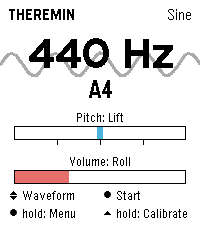
Tools & UtilitiesPlay a theremin on your wrist: raise your hand for pitch, twist it for volume. Theremin turns the Pebble Time 2 into an instrument you play without touching it. Just like the original, the position of your hand shapes the sound: raising and lowering your hand changes the pitch, twisting your wrist controls the volume. The tone is synthesized in real time and played through the watch's speaker. Features - Four waveforms: sine, triangle, square, sawtooth - Vibrato in three depths or driven by the tremble of your hand - Reverb in three room sizes - Up to four octaves of range, selectable lowest note - Snap to scales: chromatic, major, minor, pentatonic, or play continuously like a real theremin - Freely assignable control axes: lift, roll or compass, each invertible - Adjustable sensitivity, portamento and volume - Automatic calibration on launch: hold the watch still for a second and you're set - Live readout of frequency and note name, with the animated waveform in the background - Noise gate switches the speaker off during silence - Every setting available on the watch or conveniently in the Pebble phone app - Seven languages (EN, DE, FR, ES, IT, PT, NL) Controls - SELECT: sound on or off - UP and DOWN: waveform - Long SELECT: settings - Long UP: recalibrate the neutral position Tip: Keep the watch still for a moment when the app starts; that pose becomes the middle of the pitch range. Tilted towards you is loud, tilted away silent. Pebble Time 2 only (needs the speaker). Compass mode is experimental. Vibe coded from start to store. That is the only reason it exists alongside a full time job. The app is free and has no ads. If you enjoy it, a coffee is much appreciated: https://buymeacoffee.com/SIDEffects