QuickRemind — voice-first reminders for your Pebble.

Just raise your wrist and speak: "remind in 20 minutes to call mom" or
"remind me at 3 pm to leave" and QuickRemind sets a reminder that alerts you
until you dismiss it.

FEATURES
• Voice dictation — say the time and what to remember, no typing
• English & Turkish — pick your language in settings (set your phone's
  dictation language to match)
• Relative delays — "5 minutes", "1 hour 30 minutes", "2 hours to leave"
• Exact clock times — "at 3 pm", "at 5:30 pm", "at 17:45" (12- or 24-hour)
• Audible alarm — alerts you with sound and/or vibration until dismissed,
  even if the app is closed
• Alert patterns — pick from 10 built-in styles, including vibration rhythms
  (Pulse, Nudge Nudge, Jackhammer, Gentle) and real tunes played through the
  Pebble Time 2 speaker (Reveille, Mario, Ode to Joy, Twinkle Twinkle, Für
  Elise) with rich polyphonic harmony
• Alert mode — choose Vibration only, Sound only, or Sound & vibration
• Quick launch — assign QuickRemind to a watchface quick-launch button and it
  jumps straight into voice dictation, so a reminder is just a button-press and
  a sentence away (optional, off by default)
• Timeline pins — optionally add each reminder to your Pebble timeline as a pin
  with its own reminder notification (optional, off by default)
• Up to 8 reminders, sorted soonest-first
• Adjustable notification strength (Low / Medium / High) for buzz and volume
• Configurable trigger phrases from the phone settings

CONTROLS
• Touchscreen on Pebble Time 2 — tap the mic to add, tap a reminder to delete
• Button navigation on all other Pebbles — Up/Down to move, Select to open,
  Select to delete, Back to cancel

Sound requires the built-in speaker on Pebble Time 2; every other model alerts
with vibration. Works on Pebble Time 2, Time, Time Steel, Time Round, and
Pebble 2 — any Pebble with a microphone. Non-touch devices are fully supported
via the physical buttons.

Bugs & suggestions: support@sinaware.com
 47
47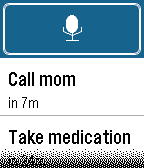 83
83