BatteryAlert
Sina Gülşen
Watchapp
Description
BatteryAlert — get a buzz or beep when your Pebble battery hits the levels you
care about.

Tick one or more battery levels and BatteryAlert watches your battery for you.
When the charge crosses a level you chose — charging up to it (great as a "stop
charging at 80%" reminder) or draining down to it (a low-battery warning) —
your watch alerts you until you dismiss it.

FEATURES
• Tick any of the levels from 10% to 100% (default 80%) — set as many as you like
• Fires in both directions — charging up to a level or draining down to it
• Alerts only on an actual crossing while you're being watched
• Alert mode — Vibration only, Sound only, or Sound & vibration
• Audible alarm — alerts you with sound and/or vibration until dismissed
• Alert patterns — pick from 10 built-in styles, including vibration rhythms
  (Pulse, Nudge Nudge, Jackhammer, Gentle) and real tunes played through the
  Pebble Time 2 speaker (Reveille, Mario, Ode to Joy, Twinkle Twinkle, Für
  Elise) with rich polyphonic harmony
• Adjustable notification strength (Low / Medium / High) for buzz and volume
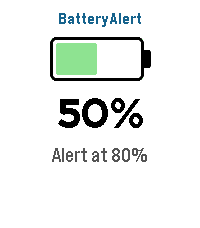
• At-a-glance screen — battery icon, current percentage, charging bolt, and
  your configured alert levels

CONTROLS
• Touchscreen on Pebble Time 2 — tap anywhere to close the app
• Button navigation on all other Pebbles — Back to exit
• Alarm screen — tap, Select, or Back to dismiss

Sound requires the built-in speaker on Pebble Time 2; every other model alerts
with vibration. Works on Pebble Time 2, Time, Time Steel, Time Round, and
Pebble 2.

Bugs & suggestions: support@sinaware.com
- DeveloperSina Gülşen
- CategoryTools & Utilities
- PlatformsTime/Time Steel, Time Round, 2, 2 Duo, Time 2, Round 2 (scaled)
- Updated2026-09-07
- Version1.6.0