 3
Muse Chat
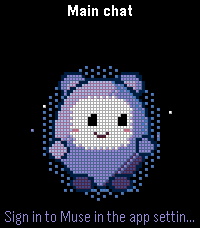
Tools & UtilitiesBefore you install: 1. Turn on the plugin preview in the Pebble phone app: Settings > Plugins. Muse Chat's settings page and its bundled plugin need it. 2. You need a Muse account (muse.ai) and a computer to connect it once: a. On the computer, sign in to muse.ai in a browser (Chrome, Edge or Firefox). b. Open the developer tools (F12) > Application (Firefox: Storage) > Cookies > https://muse.ai, and copy the Value of the cookie named hatch_sess. c. In the Pebble app, open Muse Chat > Settings, paste it into the field and tap "Save and connect". hatch_sess is your Muse sign-in: move it to your phone only in a way only you can see, and don't share it. Read and reply to your Muse chats from your wrist. - Chats: open Main chat or any of your side chats, read the conversation, and switch chats from the watch. - Reply: send a quick reply with one press, or dictate a message. Edit the quick replies in the settings. - Avatar: your Muse appears on the watch as an animated pixel avatar. It listens while you dictate, works while Muse thinks, writes along while the reply comes in, and cheers when it arrives. Ask Muse to design its own avatar from the settings page. - Text size: small, medium or large text for the conversation. Black, white or gray background. - English and Japanese, following your phone's language. How to use: - Main screen (the avatar): Up opens the conversation history, Down opens quick replies, Select opens the chat list, and long-pressing Select starts voice dictation. - History: scroll with Up/Down, press Select to reload the latest conversation, long-press Select to dictate. - A quick reply is sent as soon as you pick it. You can edit the phrases in the settings. - Pick a chat in the chat list to switch to it. Privacy: the Muse session you paste goes straight to the app's bundled plugin, which keeps it in the phone's secure storage. It is never sent to the watch, shown on screen or written to logs, and the field is cleared once you save. The app talks only to Muse's own services (muse.ai and its chat server hatch.metaaivm.com). The developer runs no servers and collects nothing. Muse Chat is an unofficial personal project. It is not made, endorsed or supported by Meta or by Core Devices. It uses Muse's web interface, so a change on Muse's side can stop it working until it is updated. For Pebble Time 2 and Pebble Round 2.
 26
Wadokei
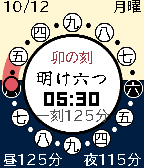
FacesA Japanese temporal-hour watchface: day and night are each split into six, so the hours stretch and shrink with the seasons. 日の出・日の入りから昼と夜を六等分する、江戸の不定時法のウォッチフェイス。 A watchface that tells time the way Edo-period Japan did, with temporal hours (futeijihō). Daytime, from dawn (Ake-mutsu) to dusk (Kure-mutsu), and night, from dusk to the next dawn, are each divided into six "koku". The face shows which koku it is now, such as Kure-mutsu (dusk) or Yo-kokonotsu (midnight), together with its zodiac sign. Because day and night are always split into six, the length of a koku changes with the seasons. In Tokyo a daytime koku lasts about 2 h 26 min at the summer solstice and a night koku about 1 h 34 min. At the winter solstice they swap: about 1 h 37 min by day and 2 h 23 min at night. The watch calculates sunrise and sunset from your latitude and longitude every day, so the koku always match your place and season. The dial is the sun's 24-hour path. It turns each day so that solar noon sits at the top, and the horizon line drawn between sunrise and sunset divides sky from ground. The koku markers around the edge are spaced wider on the day side and closer on the night side (the other way round in winter), so you can see the length of a koku at a glance. The red disc is the sun right now, and the orange band marks the current koku. In the center: zodiac sign, koku name (with "han" for its second half), the current time, and the length of the current koku On rectangular screens, the corners show the date and weekday, and today's daytime and night koku lengths Day and night can begin at sunrise and sunset, or follow the Edo-period Kansei calendar rule: the sun 7°21′40″ below the horizon (about 36 minutes before sunrise and after sunset) Location comes from your phone or from coordinates you enter. Once received, it is stored on the watch, which recalculates every day even when your phone is away The watchface itself is in Japanese: koku names are drawn in a brush-style font. The Japanese fonts are bundled with the app, so no language pack is needed. The settings page appears in English or Japanese, following your phone's language. 江戸時代の時刻「不定時法」で時を示すウォッチフェイスです。 明け六つから暮れ六つまでの昼と、暮れ六つから翌朝の明け六つまでの夜を、それぞれ六つの「刻」に分けます。いまが「暮れ六つ」なのか「夜九つ」なのか、干支とあわせて表示します。 一刻の長さは季節によって伸び縮みします。東京では夏至の昼の一刻が約2時間26分、夜は約1時間34分。冬至になると昼が約1時間37分、夜が約2時間23分と逆転します。日の出・日の入りは緯度経度から時計の上で毎日計算するので、場所と季節に合った刻がわかります。 文字盤は24時間で一周する太陽の軌道です。南中が真上に来るよう毎日回り、日の出と日の入りを結ぶ地平線で空と地を塗り分けます。外周に並ぶ刻の丸は、昼側では間隔が広く夜側では狭く(冬は逆に)なり、一刻の長さがそのまま目に見えます。赤い丸が今の太陽、橙の帯が今いる刻です。 中央に干支(酉の刻)、刻の名(明け六つ・昼九つ・暮れ六つ…。刻の後半は「暮れ六つ半」)、今の時刻、今の一刻の長さ 長方形の画面では、四隅に日付・曜日と、今日の昼・夜それぞれの一刻の長さ 昼と夜の境目は「日の出・日の入り」と、江戸の寛政暦にならった「太陽が地平線下 7°21′40″(日の出の約36分前・日の入りの約36分後)」から選べます 場所はスマホの位置情報か、手動で入力した緯度・経度。位置を一度受け取れば時計に保存され、スマホと離れていても毎日計算し直します 刻の名は筆文字で表示します。日本語フォントをアプリに同梱しているので、時計に言語パックが入っていなくても表示できます。設定画面はスマホの言語に合わせて日本語か英語で表示します。 Privacy Your location is sent only to your watch, to calculate sunrise and sunset. It is never sent to any server There is no developer server. All communication stays between your phone and your watch Supported watches Pebble Time / Time Steel (basalt), Pebble Time Round (chalk), Pebble 2 (diorite), Pebble Time 2 (emery), Pebble 2 Duo (flint), Pebble Round 2 (gabbro) License and credits This watchface is released under the Creative Commons Attribution-ShareAlike 4.0 International License (CC BY-SA 4.0). The dial design is based on Horizon Watch Face by JR Mobley (© 2015, 2016 JR Mobley, CC BY-SA 4.0, https://github.com/jrmobley/horizon-watchface). Changes include replacing the hour marks with temporal-hour koku, moving the sunrise and sunset calculation onto the watch, and adding Japanese text. Fonts: Yuji Syuku (© The Yuji Project Authors) and BIZ UDPGothic (© Google), both under the SIL Open Font License 1.1 Sunrise and sunset formula: NOAA Global Monitoring Laboratory
 15
Haiku-face
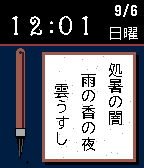
Facesいまの季節・天気・時間帯を、LLM が一句に詠むウォッチフェイス。 A watchface that turns this moment — season, weather, time of day — into a haiku written by an LLM. 短冊と筆をあしらった和風のウォッチフェイスです。 Claude または ChatGPT が、いまこの瞬間を一句に詠み、短冊の上に表示します。 ※Claude(Anthropic)または OpenAI の API キーが必要です。ご自身のアカウントで取得し、設定画面に入力してください。また日本語表示には日本語言語パックの導入が必要です。 句は朝・昼・夜など時間帯が変わるたびに新しく詠み直されます。詠むときには次の情報を手がかりにします。 - 日付、曜日(平日・休日)、二十四節気 - 時間帯(未明、夜明け前、朝ぼらけ、朝、昼、午後、夕暮れ、薄暮、宵、夜更け)と、日の出・日の入りからの経過 - 現在地の天気。予報の分類ではなく、体感温度・湿度・風・降水から「肌寒い」「空気が湿って重い」といった体感で伝えます - 月齢と月相(夜で、月が空に出ているときだけ) - 市区レベルの地名(都心か、海辺の町か) - 今日の歩数(Pebble Health) - 直前に詠んだ句。同じ言葉や着想を繰り返さないようにします A watchface in Japanese style, with a tanzaku poem slip and brush. Claude or ChatGPT composes a haiku about this moment and writes it on the slip. Note: You'll need an API key from Anthropic (Claude) or OpenAI. Get one with your own account and enter it in the settings screen. Japanese text also requires the Japanese language pack to be installed. A new haiku is composed each time the part of day changes — morning, midday, night, and so on. Here's what it draws on: Date, weekday or weekend, and the traditional solar term Part of day (small hours, before dawn, first light, morning, midday, afternoon, sunset, dusk, evening, late night) and how far it is from sunrise or sunset The weather where you are — not as a forecast category, but as it feels, drawn from apparent temperature, humidity, wind, and precipitation: chilly, or heavy with damp air Moon age and phase, but only at night, when the moon is up The neighborhood, at ward or city level — city center, or a town by the sea Today's step count, from Pebble Health The previous haiku, so it doesn't repeat the same words or ideas - Weather: Open-Meteo (https://open-meteo.com/) - Place names: BigDataCloud reverse-geocode-client - Brush fonts: Yuji Syuku and Yuji Mai (The Yuji Project Authors), Reggae One (The Reggae Project Authors), all under the SIL Open Font License 1.1