Billable Hours
ciabattarichri
Watchapp
Description
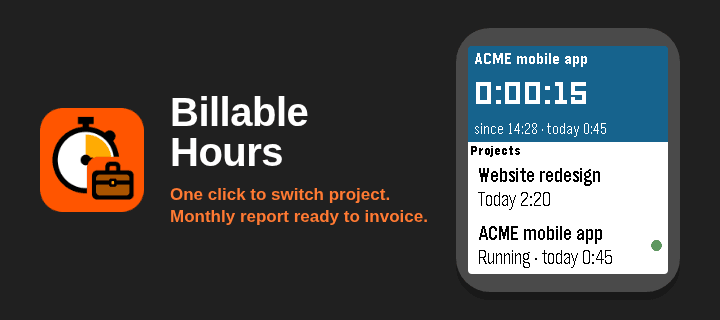
BILLABLE HOURS - track the hours you bill, project by project, from your wrist.

Made for freelancers and consultants who are paid by the hour, with a different rate for each client. Select a project and its timer starts; select another one and the first stops by itself. At the end of the month you have a ready-made report with the hours of every day, the totals per project and the amount to invoice.


WHAT IT DOES

- ONE-BUTTON PROJECT SWITCHING: starting a project stops the previous one and saves it.
- CONFIRMATION BEFORE STARTING OR SWITCHING, so a timer never starts by mistake (can be turned off).
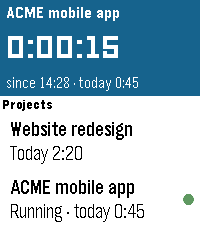
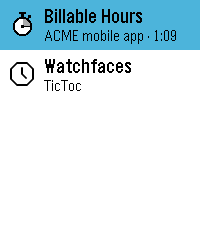
- THE TIMER KEEPS COUNTING WITH THE APP CLOSED. The launcher shows the running project and the elapsed time.
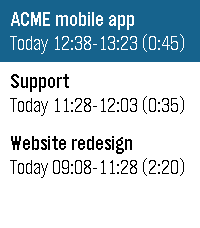
- TODAY'S HOURS for every project, right in the list.
- SUMMARY SCREEN: hours and amount for today and for this month, and the sync status.
- FIX MISTAKES ON THE WATCH: "Stopped at...", "Started at...", edit start and end, delete, and create a past session by hand.
- FULL HISTORY ON THE PHONE: edit, add or delete any session, month by month.
- MONTHLY REPORT: hours day by day for each project, total hours, hourly rates, amounts and grand total to invoice.
- EXPORT to Excel (CSV), plain text, clipboard or email.
- AUTOMATIC BACKUP TO YOUR OWN GOOGLE SHEET, with a report sheet for every month and a monthly summary. Plus backup files you can save and import.
- WORKS OFFLINE: the watch syncs with the phone as soon as it is back in range.
- ENGLISH AND ITALIAN, custom currency symbol, follows the watch Text Size setting.
- TOUCH SCREEN (Pebble Time 2, Pebble Round 2): drag to scroll the project list. Every action uses the buttons, so an accidental touch never starts anything.
- Pebble Time, Time Steel, Time Round, Pebble 2, Pebble 2 Duo, Pebble Time 2, Pebble Round 2.


GETTING STARTED

1. SET UP YOUR PROJECTS. In the Pebble app on your phone open the settings of Billable Hours. In the Projects tab add your projects with their hourly rate (up to 12 active projects, names up to 23 characters) and tap Save.

2. SET UP THE BACKUP (strongly recommended, 5 minutes, once). In Settings > Backup follow the guide "How to set it up": create a Google Sheet on a computer, paste the script (you can copy it from the app), deploy it as a web app, then paste its URL and your secret word in the app. From then on every change is copied to your sheet.


HOW TO USE IT ON THE WATCH

- START OR SWITCH: select a project and press SELECT, then confirm with SELECT (DOWN or BACK cancel). If another project was running it is stopped and saved.
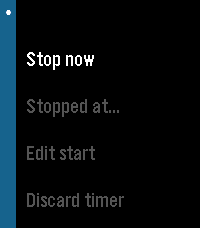
- RUNNING TIMER: the card at the top shows the project, the elapsed time and today's total. Press SELECT on it for: Stop now, Stopped at..., Edit start, Discard timer.
- LONG-PRESS A PROJECT:
  Start now.
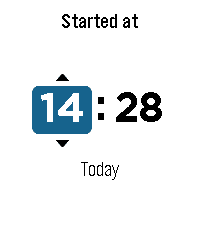
  Started at... - you started earlier than you pressed: if you forgot to switch, the previous session is shortened automatically.
  Create... - add a session by hand: choose start, end, confirm. Sessions that overlap others are refused, so time is never counted twice.
- MORE > SUMMARY: today and this month, hours and amount, and the phone status (Synced / Offline).
- MORE > RECENT SESSIONS: edit start, edit end or delete recent sessions.
- THE TIME PICKER shows whether the chosen time is Today or Yesterday: "Stopped at 18:00" the next morning means yesterday at 18:00. If a time is not possible (in the future, or overlapping another session) the app moves it to the nearest valid time and tells you ("Adjusted to...").


ON THE PHONE (Billable Hours settings in the Pebble app)

- PROJECTS: name, hourly rate, order, archive.
- SESSIONS: every session of the month; change project, date and times, delete, or add one.
- REPORT: choose the month and see each day's hours per project, total hours, rates, amounts and the grand total. Share it as Excel (CSV) or text, copy it, or email it.
- SETTINGS: language (Automatic, English, Italiano), currency symbol, CSV format (Europe or US/UK), confirmation before starting a timer, backup.


THE GOOGLE SHEET

Besides the raw data, the sheet contains:
- SUMMARY: one row per month with hours and amount per project, total hours and total to invoice.
- REPORT YYYY-MM: one sheet per month with every day of the month by project, totals, rates, amounts and the list of sessions.
Rates of closed months stay frozen, so invoiced amounts never change. Add your own sheets for formulas or pivot tables: the app never touches them.


IMPORTANT - KEEP YOUR DATA SAFE

- Removing the app from the Pebble app DELETES ALL ITS DATA, on the phone and on the watch. Set up the Google Sheet backup, or save a backup file regularly.
- TO UPDATE THE APP, install the new version over the old one, WITHOUT REMOVING IT FIRST.
- After a reinstall, open the settings and enter the Google Sheet URL and secret word again (or import a backup file): everything comes back, including the running timer.


PRIVACY

Your data stays on your phone and, if you set up the backup, in your own Google Sheet. Internet access is used only to reach your sheet (script.google.com). Nothing is sent anywhere else.- Developerciabattarichri
- CategoryTools & Utilities
- PlatformsTime/Time Steel, Time Round, 2, 2 Duo, Time 2, Round 2
- Permissions
- Updated2026-11-09
- Version0.7.0