 25
25Theremin
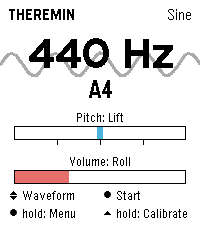
Tools & UtilitiesPlay a theremin on your wrist: raise your hand for pitch, twist it for volume. Theremin turns the Pebble Time 2 into an instrument you play without touching it. Just like the original, the position of your hand shapes the sound: raising and lowering your hand changes the pitch, twisting your wrist controls the volume. The tone is synthesized in real time and played through the watch's speaker. Features - Four waveforms: sine, triangle, square, sawtooth - Vibrato in three depths or driven by the tremble of your hand - Reverb in three room sizes - Up to four octaves of range, selectable lowest note - Snap to scales: chromatic, major, minor, pentatonic, or play continuously like a real theremin - Freely assignable control axes: lift, roll or compass, each invertible - Adjustable sensitivity, portamento and volume - Automatic calibration on launch: hold the watch still for a second and you're set - Live readout of frequency and note name, with the animated waveform in the background - Noise gate switches the speaker off during silence - Every setting available on the watch or conveniently in the Pebble phone app - Seven languages (EN, DE, FR, ES, IT, PT, NL) Controls - SELECT: sound on or off - UP and DOWN: waveform - Long SELECT: settings - Long UP: recalibrate the neutral position Tip: Keep the watch still for a moment when the app starts; that pose becomes the middle of the pitch range. Tilted towards you is loud, tilted away silent. Pebble Time 2 only (needs the speaker). Compass mode is experimental. Vibe coded from start to store. That is the only reason it exists alongside a full time job. The app is free and has no ads. If you enjoy it, a coffee is much appreciated: https://buymeacoffee.com/SIDEffects
 40
40Home Assistant on your Wrist
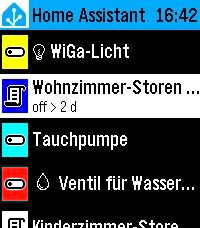
Tools & UtilitiesEasy access to your Home Assistant instance This is a fork of "Home Assistant WS" but enhanced with many new features: - Easy Favorites Pinning - Edit the favorites directly on the smart phone - Favorites Colors - Assign colors to your favorites for easier handling - Security - The Home Assistant Token is only stored on the watch (not sent to the remote configuration page for security hardening) - Backup and Restore - Settings import/export for easy backup and restore - UI enhancements
 5
5BORK
GamesBORK! BORK! BORK! (BORKs when a button is pressed. Also BORKs when opened via quick launch for faster BORKing! Bork sound from https://pixabay.com/sound-effects/nature-dog-bark-effect-382711/)
 19
19Bibble
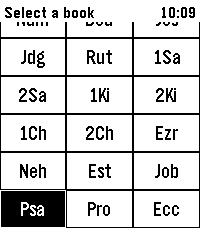
DailyA Bible app for Pebble with modern features Hold Select to dictate a Book, Chapter, or Verse, e.g. "Psalms 23". Or dictate a word or phrase, e.g. "God so loved the world" to jump to John 3:16
 6
6Space Salvage
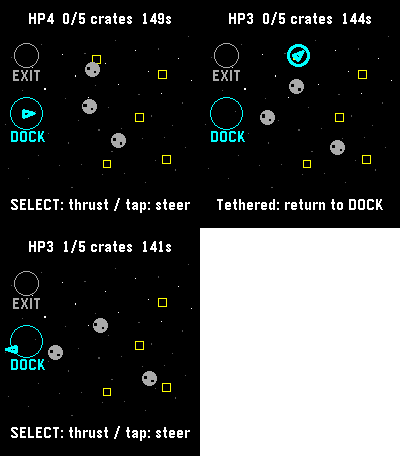
GamesFive crates. One battered tug. Bring the cargo home, then reach the exit before the clock or your hull runs out. Steer through drifting rocks, catch crates with your tether, and return them to the dock. Tap a destination or use the buttons to steer and thrust. A run has a 150-second limit. Save and exit to continue later. For Pebble Time 2 and Round 2. Touch requires firmware 4.33.2 or later; buttons remain available. By Luke Steuber.
 8
8Rosetta
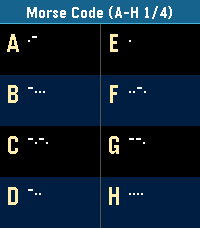
Tools & UtilitiesPocket Rosetta: The Wrist Decryptor for Pebble Turn your Pebble into the ultimate field manual for cryptographers, geocachers, escape-room addicts, and vintage sci-fi fans. Pocket Rosetta puts over 20 essential scripts, historic alphabets, and substitution ciphers directly on your e-paper display—no internet connection required. Whether you're tapping out an SOS, decoding ancient stone tablets, or cracking an encrypted transmission mid-run, cycle through complete reference tables and quick translation lookups with just the side buttons. Classic Signals & Radio: Morse Code, NATO Phonetic Alphabet, Flag Semaphore, Naval Flags Historic Scripts & Glyphs: Egyptian Hieroglyphs (Names & Glyphs), Cuneiform, Elder Runes (Names & Letters) Alphabets & Transliterations: Greek (Names, Letters, Written), Cyrillic/Azbuka (Names, Letters, Written) Ciphers & Cryptography: ROT13 / Caesar Shift, Atbash, Baconian Cipher, Polybius / Tap Code, Pigpen Cipher, A1Z26 Numeric Binary, Tactile & Geek Culture: 5-Bit Binary, Braille, and Alienese (Futurama) Fast, battery-friendly, and lightweight. Keep centuries of secret communication strapped right to your wrist.
 12
12Minesweeper Hex
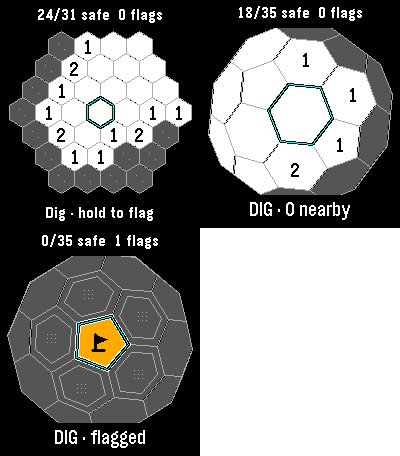
GamesClassic, Infinite and 3D minesweeper in one watch app. Each mode keeps its own board. Every launch offers a mode choice, then resumes that board where you left off. Classic has 37 cells and six mines: reveal all 31 safe cells to win. Hexsweeper 3D wraps 42 cells around a sphere, including twelve pentagons. Rotate it and uncover all 35 safe cells. Infinite lets you pan across a continuing hex field and build your safe-cell count, with no final board. Numbers count neighboring mines. Flag suspected mines, then select an open clue to chord when the neighboring flag count matches. Incorrect flags can lose the game. Your first dig and its neighbors are safe. Amber tiles and black pennants distinguish flags. Tap to aim; Select digs and hold Select flags. Drag pans Infinite or rotates 3D. Every mode also works with buttons. Infinite retains 64 explored 8-by-8 chunks; it warns when history is full and preserves existing discoveries. No account or connection required. For Pebble Time 2 and Round 2. Touch requires firmware 4.33.2; button controls remain available. By Luke Steuber.
 10
10Micro Moria
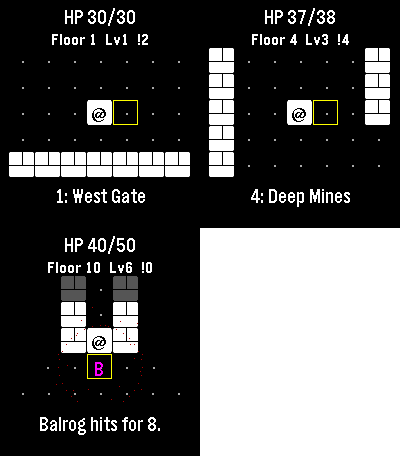
GamesI lost countless hours as a kid to a text Rogue derivative also themed after Moria, and I’m already zoned into playing it on the watch. Descend ten floors through Moria, collect treasure and equipment, and face the Balrog at the Bridge of Khazad-dum. Goblins pursue you, orc archers prepare ranged attacks, and cave trolls strike hard. Bump an enemy to fight. Play a few turns and come back later: the watch automatically saves your floor, position, enemies, health and gear. Gold and purchased equipment survive death or a return to camp. Spend gold between expeditions on blades, mail and lembas packs. Defeat the Balrog and take the final exit to unlock New Game+, up to five harder tiers. Up and Down turn; Select steps. Back opens healing, waiting and camp. Step onto stairs to choose whether to descend. Touch also moves you. No timer, account or connection required. For Pebble Time 2 and Round 2. Touch requires firmware 4.33.2; button controls remain available. By Luke Steuber.
 7
7Micro Dose
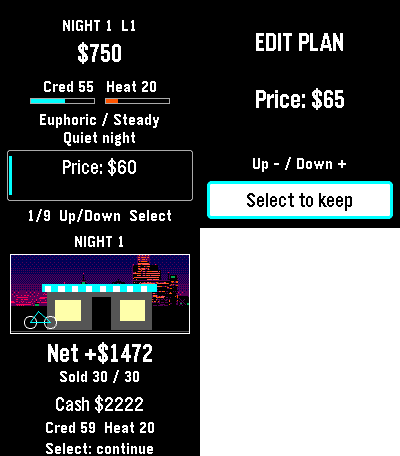
GamesRemember that drug game on your graphing calculator? ... that. A fictional calculator-era underworld economy. Read the night’s forecast, set price, quantity, quality and distribution, then run the night and see what happened. Climb six career levels from Runner to Empire. Earn profits, buy districts and fronts, and unlock new distribution routes. Career shows your next unfinished goal. Lay low reduces heat while your fronts still bring in income. Build the Empire by earning $60,000 net, owning all six districts and three fronts, and keeping heat below 60. You can keep playing afterward. Negative cash or heat at 100 ends the campaign. Up and Down browse; Select edits or acts. Progress saves automatically. For Pebble Time 2 and Round 2. Touch requires firmware 4.33.2; button controls remain available. By Luke Steuber.
 26
26Pebble Golf
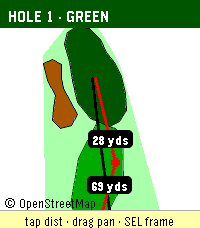
Health & FitnessPebble Golf turns your watch into a golf rangefinder, digital scorecard, and tap-to-measure course map, all live on your wrist. Supported languages: English, Français, Deutsch, Español, Italiano, Português. Pebble Golf turns your Pebble into a golf rangefinder and digital scorecard. Pick a nearby course, choose your tee, and see live distance to the front, center, and back of every green, right on your wrist. Keep score hole-by-hole with par, handicap, strokes, and putts; view a hole map drawn from OpenStreetMap (tap to measure to any point on the touchscreen Pebble Time 2); and browse, edit, or delete your past rounds offline. Playing somewhere that isn't listed? Create a custom course by name and hole count. Finished rounds pin to your Pebble timeline and can export as CSV or to a webhook. Distances come from OpenGolfAPI and OpenStreetMap geometry, with an honest fallback when full data isn't available (a card-yardage number is never shown as a live measurement). Your phone handles GPS and networking; the watch keeps working offline for scoring, the map, and history. Course and map data (c) OpenStreetMap contributors and OpenGolfAPI, under the Open Database License (ODbL). Found a bug, or want to tell me the greens read too fast? Report it or leave feedback on GitHub: https://github.com/chrissnyder2337/pebble-golf. Feedback is genuinely welcome (yes, even the picky kind). And if this app saved you from pacing off yardage like it's 1995, you can buy me a coffee: https://www.buymeacoffee.com/ChrisSnyder. It helps support my time. Even a fraction of what you'd tip the beer-cart person is hugely appreciated, and let's be honest, that's a rounding error next to your green fee. Français Pebble Golf transforme votre Pebble en télémètre de golf et carte de score numérique. Choisissez un parcours à proximité, sélectionnez votre té, et voyez la distance en direct jusqu'à l'avant, au centre et à l'arrière de chaque green, directement à votre poignet. Notez votre score trou par trou avec le par, le handicap, les coups et les putts ; consultez un plan du trou tiré d'OpenStreetMap (touchez pour mesurer vers n'importe quel point sur la Pebble Time 2 tactile) ; et parcourez, modifiez ou supprimez vos parties passées hors ligne. Vous jouez sur un parcours absent de la liste ? Créez un parcours personnalisé par nom et nombre de trous. Les parties terminées s'épinglent à votre timeline Pebble et peuvent s'exporter en CSV ou vers un webhook. Les distances proviennent d'OpenGolfAPI et de la géométrie OpenStreetMap, avec un repli honnête lorsque les données complètes ne sont pas disponibles (un yardage de carte n'est jamais présenté comme une mesure en direct). Votre téléphone gère le GPS et le réseau ; la montre continue de fonctionner hors ligne pour le score, le plan et l'historique. Données de parcours et de carte (c) les contributeurs d'OpenStreetMap et OpenGolfAPI, sous la licence Open Database License (ODbL). Deutsch Pebble Golf macht aus deinem Pebble einen Golf-Entfernungsmesser und eine digitale Scorecard. Wähle einen Platz in der Nähe, wähle deinen Tee und sieh die Live-Distanz zum vorderen, mittleren und hinteren Teil jedes Grüns, direkt am Handgelenk. Zähle Loch für Loch mit Par, Handicap, Schlägen und Putts; sieh dir eine aus OpenStreetMap gezeichnete Lochkarte an (auf der Pebble Time 2 mit Touch zum Messen antippen); und durchsuche, bearbeite oder lösche deine früheren Runden offline. Du spielst auf einem Platz, der nicht gelistet ist? Lege einen eigenen Platz per Name und Lochzahl an. Beendete Runden werden an deine Pebble-Timeline geheftet und lassen sich als CSV oder an einen Webhook exportieren. Die Distanzen stammen von OpenGolfAPI und der OpenStreetMap-Geometrie, mit einem ehrlichen Rückgriff, wenn keine vollständigen Daten verfügbar sind (eine Karten-Yardage wird nie als Live-Messung dargestellt). Dein Handy übernimmt GPS und Netzwerk; die Uhr funktioniert offline weiter für Score, Karte und Verlauf. Platz- und Kartendaten (c) OpenStreetMap-Mitwirkende und OpenGolfAPI, unter der Open Database License (ODbL). Español Pebble Golf convierte tu Pebble en un telémetro de golf y una tarjeta de puntuación digital. Elige un campo cercano, selecciona tu tee y ve la distancia en directo a la parte delantera, central y trasera de cada green, directamente en tu muñeca. Anota hoyo a hoyo con par, hándicap, golpes y putts; consulta un mapa del hoyo dibujado a partir de OpenStreetMap (toca para medir a cualquier punto en la Pebble Time 2 táctil); y revisa, edita o borra tus rondas pasadas sin conexión. ¿Juegas en un sitio que no está en la lista? Crea un campo personalizado por nombre y número de hoyos. Las rondas terminadas se fijan en tu timeline de Pebble y se pueden exportar como CSV o a un webhook. Las distancias provienen de OpenGolfAPI y la geometría de OpenStreetMap, con un respaldo honesto cuando no hay datos completos disponibles (un número de yardas de tarjeta nunca se muestra como una medición en directo). Tu teléfono gestiona el GPS y la red; el reloj sigue funcionando sin conexión para la puntuación, el mapa y el historial. Datos de campo y de mapa (c) colaboradores de OpenStreetMap y OpenGolfAPI, bajo la Open Database License (ODbL). Italiano Pebble Golf trasforma il tuo Pebble in un telemetro da golf e una scorecard digitale. Scegli un campo vicino, seleziona il tuo tee e guarda la distanza in tempo reale dalla parte anteriore, centrale e posteriore di ogni green, direttamente al polso. Segna buca per buca con par, handicap, colpi e putt; consulta una mappa della buca tracciata da OpenStreetMap (tocca per misurare verso qualsiasi punto sul Pebble Time 2 touch); e sfoglia, modifica o elimina i tuoi giri passati offline. Giochi in un posto non in elenco? Crea un campo personalizzato per nome e numero di buche. I giri completati si fissano alla tua timeline Pebble e si possono esportare in CSV o verso un webhook. Le distanze provengono da OpenGolfAPI e dalla geometria di OpenStreetMap, con un ripiego onesto quando non sono disponibili dati completi (un numero di iarde da scorecard non viene mai mostrato come misura in tempo reale). Il telefono gestisce GPS e rete; l'orologio continua a funzionare offline per il punteggio, la mappa e la cronologia. Dati di campo e di mappa (c) collaboratori di OpenStreetMap e OpenGolfAPI, con licenza Open Database License (ODbL). Português O Pebble Golf transforma o teu Pebble num telémetro de golfe e num cartão de pontuação digital. Escolhe um campo próximo, seleciona o teu tee e vê a distância em direto até à frente, ao centro e às costas de cada green, diretamente no pulso. Marca buraco a buraco com par, handicap, tacadas e putts; consulta um mapa do buraco desenhado a partir do OpenStreetMap (toca para medir até qualquer ponto no Pebble Time 2 tátil); e percorre, edita ou apaga as tuas voltas anteriores offline. A jogar num sítio que não está na lista? Cria um campo personalizado por nome e número de buracos. As voltas terminadas são fixadas na tua timeline Pebble e podem ser exportadas como CSV ou para um webhook. As distâncias vêm do OpenGolfAPI e da geometria do OpenStreetMap, com um recurso honesto quando não há dados completos disponíveis (um número de jardas do cartão nunca é mostrado como uma medição em direto). O teu telemóvel trata do GPS e da rede; o relógio continua a funcionar offline para a pontuação, o mapa e o histórico. Dados de campo e de mapa (c) colaboradores do OpenStreetMap e OpenGolfAPI, sob a Open Database License (ODbL).
 1
1Days Counter
Tools & UtilitiesCount the days since — or until — any event, right on your wrist. Full description: Days Since turns your watch into a simple, no-fuss day counter. Pick a name and a date for an event, and your watch shows "DAYS SINCE" (or "DAYS UNTIL," if the date's in the future) with a live count that updates automatically every day. Set up to 8 counters at once — track a work anniversary, a habit streak, a countdown to a trip, whatever matters to you — and cycle between them right on the watch with the Up and Down buttons. No phone required once it's set up. Features: Up to 8 independent counters Easy date picker in settings — no fiddly typing Counts up automatically, or down for future dates Cycle through counters with Up/Down Works fully offline, updates once a day
 12
12Rozkład jazdy pociągów Polish Trains
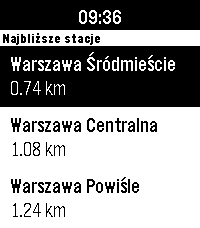
DailyNever miss your train again! The app shows the closest stations and departures with delays, platform and track numbers. It primarily uses the custom backend in `rozklad_backend/` directory, which serves the data from the official [PKP PLK PDP API](https://pdp-api.plk-sa.pl/swagger/index.html), and falls back to the unofficial [API Bilkom](https://kalkulatorkolejowy.pl/bilkom) when the custom backend is unreachable or does not know a station. The app bases on [PebbleRail](https://github.com/jccit/pebblerail). If you find any bugs or have any ideas for improvements, please open an issue on GitHub with the appropriate label. Pull requests are also very welcome 😉 Tags: PKP, SKM, WKD, Polish, Poland, train, timetable
 21
21FastForge
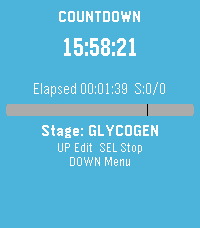
Health & FitnessTrack intermittent fasting from your wrist. Start and monitor fasts with a clear timer, use quick presets for common schedules, and review history and streak-friendly stats when you need context. Adjust settings to match how you fast, and export a backup when you want your data elsewhere. Built for Pebble so glances stay fast and the phone stays in your pocket.
 5
5Delta Notes
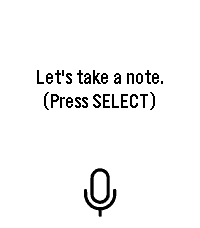
Tools & UtilitiesDictate a note on your wrist and have it saved straight into your own self-hosted Obsidian vault. Requires your own n8n instance — not a standalone note-taking app. Delta Notes turns your Pebble into a voice inbox for Obsidian. Press SELECT (or tap the mic icon on a touchscreen model), say your note, and it lands as a plain Markdown file in your vault's Watch Inbox/ folder within seconds — no phone typing, no manual copy-paste. This requires infrastructure you run yourself: a self-hosted n8n instance and an Obsidian vault reachable from wherever you run the companion mcp-obsidian tool (Docker Compose included). If you don't already run n8n, budget 15–20 minutes for the one-time setup — full guide in the GitHub repo's docs/SETUP.md. If you're not planning to self-host a backend, this app won't do anything useful for you. What it does do, once set up: dictation via your watch's built-in cloud speech recognizer, a direct authenticated webhook to your n8n (no third-party service in between), and a note that syncs to your other devices the same way any other vault change does. Open source, AGPLv3 licensed. github.com/Delta-43/pebble-watch-obsidian-notes
 3
3Abakusapp
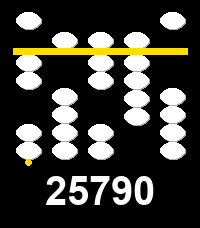
Tools & UtilitiesAbakusapp is a hands-on soroban (Japanese abacus) number-entry toy for Pebble's touch-capable watches (Pebble Time 2, Pebble Round 2). Five vertical stacks let you dial in any 5-digit number: swipe a bead towards the separator bar to activate it -- and everything between it and the bar -- or swipe away to deactivate; tap for a quick +/-1. A long horizontal swipe clears everything. Works with buttons too, on every Pebble: Select picks a stack, Up/Down adjusts it, long-press Select clears. The current number is always echoed as plain digits below the stacks. Stone/background/separator colors are configurable from the phone's Settings screen. This is an experimental first project built specifically to learn Pebble's new touch/gesture API. It's done with the skill (see https://repebble.com/blog/spring-2026-pebble-app-contest) using Claude.