 6
6TapScore
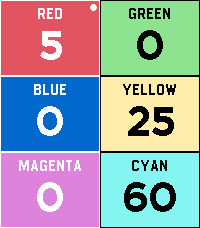
Tools & UtilitiesTOUCH SUPPORT! Ditch the pen and paper on game night. TapScore is a lightweight, friction-free score counter designed to get out of the way so you can focus on playing. No configuration menus, player naming screens, or complex rulesets—just launch the app and start tapping. Key Features Up to 6 Players: Color-coded layout lets everyone see standings at a single glance. Instant Touch Controls: Tap directly on a player's region to quickly add or subtract points. Touch control for super fast score adding! Full Hardware Button Support: Smooth navigation via Pebble’s physical buttons, ensuring full backward compatibility and blind control without touching the screen. Zero Setup: Open the app and you’re already tracking scores. Persistent State: Never lose your game progress if your watch sleeps or you accidentally exit.
 2.7K
2.7KSleep as Android
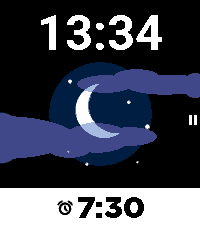
Health & FitnessSleep as Android Alarm clock with sleep cycle tracker now fully integrated with Pebble. Comfortable wrist-tracking though Pebble's build-in accelerometer. Wakes you in optimal sleep phase with a silent vibe-alarm. Remote pausing, snoozing, dismiss. Battery optimized - weeks of battery life with 8h sleep daily.
 214
214Wristotle
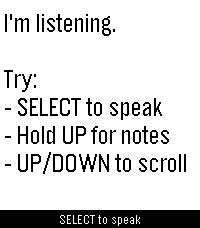
DailyWristotle turns your Pebble's dictation button into a voice command surface. Press the button, speak, and the Wristotle companion app on your Android phone handles it — calls, texts, reminders, alarms, music, notes, tasks, weather, sports, world clock, calculator, and an Ask-Agent path — then sends the answer back to your wrist. Replies arrive as chat bubbles, and lookup-style answers render as full-screen cards: a colored band shows the action and an icon shows the subject, so you can read the result at a glance. Highlights - Voice commands straight from the dictation button — no extra hardware - Full-screen reply cards for sports, weather, and meetings - Browse your notes and tasks right on the watch - Set and view alarms on the watch (phone / watch / both) - Optional spoken replies on supported watches (Pebble Time 2) - Configurable buttons — bind SELECT and long-press Up/Down to Dictation, Menu, Notes, or Tasks - Optional colour theme and chat bubbles Requires the free Wristotle companion app on your Android phone (works with microPebble or Core Devices). Everything runs on-device by default — no account, no tracking. AGPLv3. Companion app + setup guide: https://wristotle.codeberg.page/ Needs a Pebble with a mic (basalt, chalk, diorite, emery, flint, gabbro — not aplite).
 4
4DownTime: Voice Crosswords
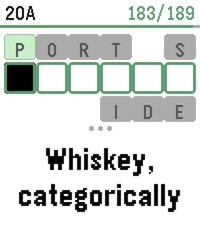
GamesDownTime is an offline collection of 200 new crossword puzzles (9,000+ clues), supporting dictation for speech-to-text, or bespoke on-watch typing. It uses a custom crossword engine which displays one clue at a time to maximize legibility, and a tuned voice interpreter to increase dictation accuracy. Includes two crossword sizes: Mini (7x7) Regular (15x15) And two difficulties: Peaceful Challenging For maximum accuracy, it's recommended to use the Cloud provider for Pebble speech recognition (available in the Pebble app settings). However, we also support spelling out individual letters via voice dictation, which is easier for local models to parse. Or, use the on-screen swiping to type text! Special thanks to Nicole Feng (nzfeng on Github) for providing the "MsFit Crossword Dataset"!
 15
15Still Alive
GamesPortal end credits song 'Still Alive' Runs entirely on device, a little over 700 kilobytes Credits run after song due to screen size. I was too lazy to try to fit the ASCII art onto the screen as well. "Still Alive" and all Portal characters, music, and content are the property of Valve Corporation. Most of the data came from this repo: https://github.com/errorer/Portal_StillAlive_Python
 7
7MARC Tracker
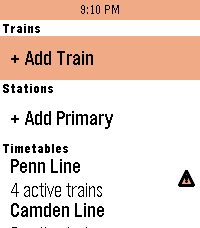
Tools & Utilities"Oh hi MARC!" MARC Tracker is a real-time MARC (Maryland Area Rail Commuter) and VRE (Virginia Railway Express) train status app, allowing you to follow trains on all 5 DMV-area regional passenger railroad lines at the touch of a button. Features: - See upcoming stops, arrival times, and estimated delays for all trains. - View current service alerts for MARC trains (VRE service alerts not currently supported) - Favorite up to 4 trains and 2 stations for quick glances, or scroll through the timetables to view every active, scheduled, completed, and canceled train today. - Works with Pebble Time 2, Pebble Round 2, Pebble 2 Duo, Pebble 2, Pebble Time Round, Pebble Time, and Pebble Time Steel. Originally inspired by the MARC Map app for iOS by Quinn Patwardhan and Pebble apps for many other regional rail services. Uses Maryland Department of Transportation (MDOT) and Virginia Railway Express (VRE) data but is not in any way affiliated with or endorsed by MDOT, MARC, or VRE.
 0
0SleepMode
Tools & UtilitiesSleepMode Screen is black with only the time displayed. Buttons for up, down and select don't work so you don't press them by accident while sleeping. Pressing on the back button for 2 seconds stops the app. (Standard Pebble behavior) Alarm clock works. With vibrations and/or sound (if applicable) (except when Quiet Time is on) Made for and tested on Pebble Time 2
 11
11Cardia
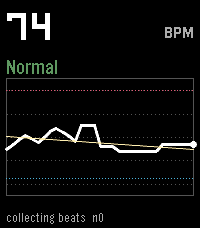
Health & FitnessA PebbleOS watchapp that watches your heart rate more closely than the system does by default and flags three things: sustained high rate, sustained low rate, and irregularly-irregular rhythm (the pattern linked to atrial fibrillation).
 6
6Hourly Chime
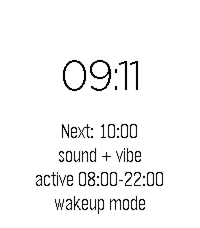
NotificationsA PebbleOS watchapp that chimes on the hour with the speaker and/or the vibration motor. Runs on Pebble Time 2 (emery) and Pebble 2 Duo (flint) — the two watches with a speaker.
 2
2xDrip CGM
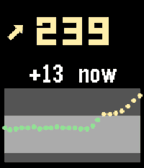
DailyA Pebble quick-launch app that shows your xDrip+ CGM data — number, trend, delta and a 2-hour graph. It is not a watchface, so you can run any watchface and still get a glucose glance on demand. Uses the local XDrip web service to enable - xDrip+ → Settings → Inter-app settings → enable xDrip Web Service.
 19
19Super Productivity
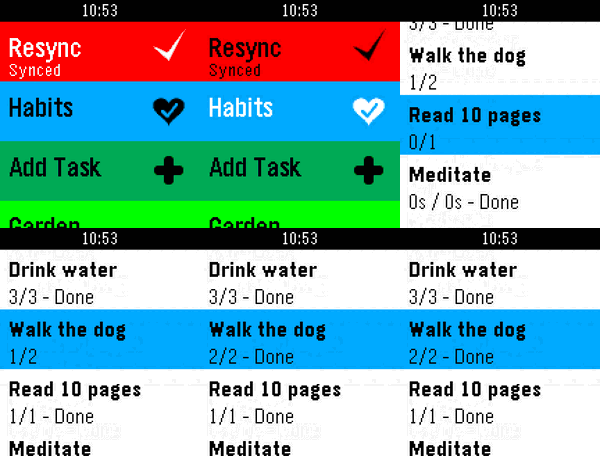
DailyA PebbleOS watchapp that shows your active tasks from Super Productivity — optionally grouped by project — and lets you mark them done, track time, dictate new tasks by voice, and track habits, all from your wrist, synced through Super Productivity's own SuperSync server. --Navigation and Functionality -Up and down buttons to scroll through the habits and task list -Select (Middle button) --Click once to toggle Done/In-progress --Long hold to start time tracking when on tasks and habits --Long hold to append a note when on the notes screen --Double click to show task and project notes, plus a task's tags (shown above its notes) --To show projects and project notes you must enable "Group tasks by project" in settings -Back returns to the prior screen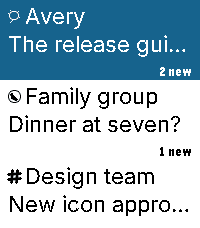 10
10Beepster
NotificationsAn independent, free, open-source Beeper client for Pebble Time 2. Read chats, dictate replies, use saved replies and bitmap emoji, and view full-width photos. Reactions appear beneath messages with sender indicators. Larger service icons and wider sender stripes distinguish conversations. Supported GIFs play short, reduced-detail loops; YouTube links can show thumbnail cards. Photos preserve their proportions, with scrolling and low-memory fallbacks. Choose Natural, High contrast or Original processing without changing source attachments. GIFs may fall back to a still; one attachment per message is supported. Videos do not play. Browse in 12-conversation batches with swipe selection and automatic boundary loading. The current list stays visible while the next batch arrives. Returning from a chat preserves your older page. Jump to newest returns to the top. Navigation briefly pauses during transfer. Customize themes, buttons, saved replies and link visibility. Archive conversations and delete messages for yourself where supported, with confirmation. iMessage message deletion remains disabled; archiving is available. Optional Hermes/OpenClaw Approve, Deny and supported Always controls work in explicitly linked agent chats. Decisions use physical buttons only, with Always confirmation. Check the agent result after sending a decision. Requires macOS 14+, Beeper Desktop, Organik Apps Pebble Connector 0.8.7+, and Tailscale on Mac and phone. Keep the Mac awake. iPhone is the tested setup. Update Connector first, choose Beepster → Set up service, then reopen phone settings. Connector guides permission setup for protected Apple Messages attachments. Final media changes passed automated and emulator checks; physical-watch media confirmation remains pending. Install: https://geezuschrotch.github.io/beepster/INSTALL Feedback: https://github.com/GeezusChrotch/beepster/issues
 123
123License Revoked
GamesGTA meets Goat Simulator meets SNES FX-chip graphics — an open-world crime sandbox. Two islands, a causeway. Steal cars, run people down, rob the gun store, and lose the police in a parking garage. No missions — cause mayhem and get away with it. * Controls with one hand: thumbstick on the touchscreen, buttons to turn and fire * Money comes off bodies. Spend it at the gun store, or the strip club * Drive a taxi and pick up fares if you'd rather earn it honestly * Police escalate: arrests first, then guns, then a helicopter and SWAT if you keep it up * Steal the police helicopter
 9
9GPS Memo
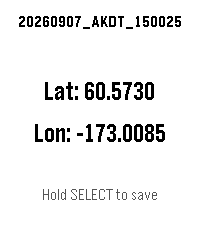
Tools & UtilitiesSave a GPS coordinate with a timestamp, right from your wrist. GPS Memo shows your current latitude and longitude on screen — hold the SELECT button to log an entry with the exact time down to the second. Review or clear your saved entries anytime from the app's settings page on your phone. Simple, offline-first location logging — no accounts, no cloud sync, just your watch and your data. Built with the help of AI. Tested on hardware on: - Pebble Time 2 - Android (OxygenOS 16.0.05) - iOS (Xs Max, 18.7.5) (last tested 260908)
 9
9Notesy
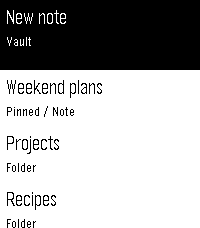
Tools & UtilitiesYour Obsidian vault, on your wrist. Free, MIT open source, public beta. Dictate new notes or append to existing ones. Quick Dictate captures a 15-second recording; Stitch joins sections into longer notes. Speak a search term to find likely notes. Browse folders and notes, sort by name/date/tag, pin favorites and hide folders. Read complete task text, check tasks and open linked notes. Local photos, Excalidraw drawings and PDF pages fill the reader width with correct proportions. PDFs are read-only without zoom; limits are 20 MB and 1,000 pages. Choose Natural, High contrast or Original image processing. Customize themes, fonts, colors, Select, long presses and Double Back. Up and Down always navigate. Touch uses tap to highlight, then tap again to open. REQUIRED MAC DOWNLOAD: https://github.com/GeezusChrotch/organik-pebble-connector/releases/latest Requires macOS 14+ and compatible Organik Apps Connector 0.8.1+. Keep an always-on Mac awake, online and running Connector. Select your local Obsidian vault in Connector. Install and connect Tailscale on BOTH the Mac and paired phone in the same private network for access at home or away. Sleeping/offline Macs cannot sync. iPhone is the tested setup. No Obsidian plugin, subscription, Notesy account or analytics. Local attachments use your private connection. Web links may be fetched for page titles; remote images and full plugin layouts are unsupported. Setup and privacy: https://github.com/GeezusChrotch/notesy