 13
13Interval Coach
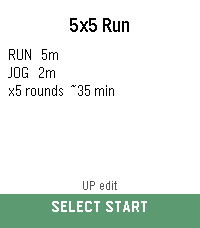
Health & FitnessSet it. Start it. Stay in flow. Set up your interval workout, press start, and let your Pebble guide the session. Interval Coach gives you custom run, jog, walk and rest phases with rounds, a big colour-coded timer, progress tracking, and vibration cues that move you through each phase without needing to stare at the screen. Create and edit workouts on the watch or from the phone settings page, then start the full session with one simple action. Pause, resume, restart a phase, skip ahead, or finish early using Pebble’s buttons. Optional 3-second warnings and post-workout summaries help keep each session clear and controlled. Great for running intervals, HIIT, strides, walk/run workouts and any timed session where you want less fiddling and more flow.
 6
6PulseTime Public Beta
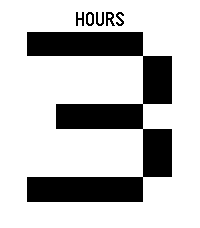
DailyA clock you can feel, with guided practice and huge high-contrast digits. A friend who is visually impaired asked me to build a way to feel the time. That request became PulseTime. Press a button to feel the current time; during lessons and time checks, one large black-and-white numeral follows each vibration group. This is a public beta. I would like to hear what works, what feels confusing, and what you would change. Send feedback and ideas to luke@lukesteuber.com. The store download is version 1.2.0, which tells the time. Signals 1.3.0 is a separate testing candidate for Time 2, 2 Duo, and Round 2; the features below are not yet included in the store download. Your first time check 1. Install the app, then open PulseTime from your watch's app list. The first launch opens Learn pattern. 2. Press Down for the 3:32 hours lesson. Down again reaches the minute phrase, then Down once more reaches the whole answer. Select plays the current example; press it again to stop. Replay as often as you like. 3. Keep Terse Quarter / Standard to start. Three hour pulses, a pause, and two quarter pulses mean about 3:30. The default answer covers 3:30–3:44; it does not give exact minutes. The visual clock still shows the current minute. 4. Down advances through the guide, Up goes back, and Back leaves it. Press Down on the final Ready page to finish. Hold Select from the clock to return to learning or choose Practice. Everyday controls On the app's clock, Select tells the whole time, Up tells hours, and Down tells minutes. Press the same reply button again to stop; another reply button replaces the answer. Hold Select for learning and settings. Holding Up or Down changes the haptic language. To ask from your watchface, open the watch's Settings > Quick Launch > Up and choose PulseTime. Repeat for Down if wanted. Hold a bound button from your watchface to ask the time. Both shortcuts initially tell the whole time; the app cannot assign those system shortcuts automatically. Choose Hold Select > Display > Bright / bold for large black digits on white. Dark layouts invert the colors. Exact-minute patterns and slower playback are available when you want them. Haptic hours use 1–12 without an AM/PM signal. The open clock also responds to one detected knock or flick. The optional Flick to tell time phone setting uses two taps to launch the app from another watchface; it starts off. There is no special touch spot: try two light knocks on the same part of the bezel or case, about half a second apart. Wait for the vibration to finish before retrying. Use Select inside lessons and menus. Help shape the next version Tell me your watch model, pattern and speed, the time you expected, and what you felt. Hard-to-read labels, confusing controls, missed taps, and rhythms that blur together are all useful feedback. Signals: testing the next version I am testing short, replayable vibration phrases for information beyond time. A six-hour rain forecast becomes three equal windows: quiet for dry, sparse patter for light rain, and denser patter for heavier rain. Opening and closing cues distinguish a dry forecast from an unavailable reading. A shorter summary identifies the first wet window and strongest predicted rain. An authenticated HTTPS source can supply service health or three ordered samples. The Drummer example distinguishes healthy, busy, degraded, down, and unknown. A failed connection means unknown, not a confirmed outage. Old readings remain labeled, and checking a source is an explicit action rather than a background alert. The candidate includes named lessons, visible pulse timing, stock-inspired references, and a recognition exercise. A three-step walkthrough enables weather and explains the Pebble phone app's location permission. Weather uses an approximate phone position; fixed places and custom HTTPS feeds are under Advanced. There is no Drummer token input. Feed credentials stay on the phone. Pattern comfort and recognition still need physical-watch testing. Playback currently controls timing, not per-step strength. Contact luke@lukesteuber.com if you would like to help test on Time 2, 2 Duo, or Round 2. Known beta limits - The app's phone settings can retain older values after a missed watch update. Saving can restore those older choices, including the haptic language. Check every option before saving, then verify the language on the watch and replay a known lesson. Reopening the phone form alone does not guarantee a refresh. - Terse Quarter's minutes-only :00 and :15 can feel alike. Use the whole-time answer if uncertain. - Watch menus do not speak their labels, and Practice does not separately announce its target time. First-use assistance may be needed; independent blind onboarding remains unverified. - The app has installed successfully on Time 2 and 2 SE. Pattern recognition still needs wearer feedback. Round layouts have emulator coverage; round hardware checks are pending. Store screenshots show emulators. Supports Time / Time Steel, Time Round, 2 / 2 SE, Time 2, 2 Duo, and Round 2. The original 2013 Pebble and Pebble Steel are not supported. The clock and lessons work offline after installation. Optional pattern tones require Time 2 or 2 Duo; the other supported models use vibration. Created by Luke Steuber. MIT licensed.
 1
1Treinreisplanner
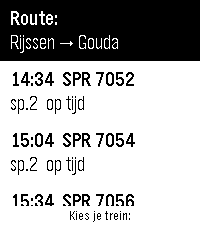
DailyLet op: pure vibecode. Heb de meeste bugs er proberen uit te halen, maar dit is vooral een persoonlijk project wat toch nog wel handig is geworden. Als je vragen hebt, kun je me vinden op Discord: Matthijs3545 Volg je treinreis live op je pols. Kies een trein in het vertrekoverzicht en Treinreisplanner begeleidt je hele reis: een compacte tijdlijn met elk traject, overstappen met wachttijd, sporen rechts uitgelijnd, kleurbalken met de drukteverwachting en oranje markering bij vertraging of spoorswijziging. Rode waarschuwingen verschijnen als een trein (deels) is geannuleerd of je overstap niet meer haalbaar is. De watch trilt 5 minuten voordat je bij je overstapstation aankomt. Ben je bezig met een reis, maar moet je een andere app openen? Sla je voortgang op door de middelste knop in te houden. Bij het heropenen van de app ga je verder met je actieve reis, ook uren later. Meerdere routes instelbaar via de ingebouwde webconfig; wisselen kan met de middelste knop. Let op: op Android kunnen achtergrondupdates stoppen als je telefoon vergrendeld is - houd de Pebble-app actief tijdens je reis. Alleen treinverbindingen (bus, tram en metro worden niet ondersteund). Mogelijk in de toekomst nieuwe versie met online backend. Vereist een gratis NS-app API-sleutel (apiportal.ns.nl).
 47
47BatteryAlert
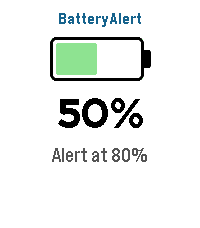
Tools & UtilitiesBatteryAlert — get a buzz or beep when your Pebble battery hits the levels you care about. Tick one or more battery levels and BatteryAlert watches your battery for you. When the charge crosses a level you chose — charging up to it (great as a "stop charging at 80%" reminder) or draining down to it (a low-battery warning) — your watch alerts you until you dismiss it. FEATURES • Tick any of the levels from 10% to 100% (default 80%) — set as many as you like • Fires in both directions — charging up to a level or draining down to it • Alerts only on an actual crossing while you're being watched • Alert mode — Vibration only, Sound only, or Sound & vibration • Audible alarm — alerts you with sound and/or vibration until dismissed • Alert patterns — pick from 10 built-in styles, including vibration rhythms (Pulse, Nudge Nudge, Jackhammer, Gentle) and real tunes played through the Pebble Time 2 speaker (Reveille, Mario, Ode to Joy, Twinkle Twinkle, Für Elise) with rich polyphonic harmony • Adjustable notification strength (Low / Medium / High) for buzz and volume • At-a-glance screen — battery icon, current percentage, charging bolt, and your configured alert levels CONTROLS • Touchscreen on Pebble Time 2 — tap anywhere to close the app • Button navigation on all other Pebbles — Back to exit • Alarm screen — tap, Select, or Back to dismiss Sound requires the built-in speaker on Pebble Time 2; every other model alerts with vibration. Works on Pebble Time 2, Time, Time Steel, Time Round, and Pebble 2. Bugs & suggestions: support@sinaware.com
 1
1Remindery
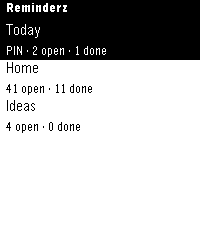
Tools & UtilitiesRemindery brings Apple Reminders to Pebble Time and Pebble Time 2. Browse lists, check or reopen reminders, dictate new items, and delete with confirmation. Pin favorite lists and browse every reminder in 50-item pages. Long selected titles scroll. Menus start at the top; touch uses tap to focus, then tap again to activate. Buttons work too. Silent 15-second refresh is optional. Phone Settings offers themes, fonts, colors, saved presets, and customizable short/long presses and Double Back. REQUIRED MAC DOWNLOAD: https://github.com/GeezusChrotch/organik-pebble-connector/releases/latest Use the Developer ID signed/notarized Organik Apps Pebble Connector from GitHub while the Mac App Store version is under review. Keep an always-on Mac awake, online, and running the Connector. Install Tailscale on BOTH the Mac and paired phone, on the same private tailnet, for access at home or away. Sleeping the Mac or quitting the Connector stops access. The watch does not connect directly to iCloud. Allow full Apple Reminders access on the Mac. Scan the Connector's QR code on the phone, copy pairing details there, and paste them into Pebble → Remindery → Settings. No Universal Clipboard needed. Requires macOS 14+, Apple Reminders lists on that Mac, and a working Pebble dictation service for voice entry. iPhone is the tested setup. Displays up to 30 lists. Free, MIT open source. No developer cloud, ads, analytics, public Funnel, or router port forwarding.
 25
25Where am I?
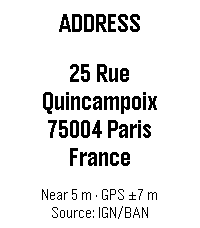
DailyFind out your location at a glance. Where Am I? uses your phone’s GPS to show the nearest street address directly on your Pebble. When an exact match is unavailable, it selects the closest known building or house number and clearly displays both its distance from your position and the current GPS accuracy. Press SELECT whenever you want a fresh location. Your previous address remains visible while the update is in progress, so the screen never goes blank. Use the UP or DOWN button to switch to the detailed position screen with latitude, longitude, altitude, and accuracy. Features: • Nearest address, building, or house number • Distance and GPS accuracy shown separately • Latitude, longitude, altitude, and accuracy screen • Address source displayed on the watch • IGN/BAN address lookup in France • Optional Geoapify worldwide lookup with OpenStreetMap fallback • Manual refresh with the previous result kept on screen • English, French, and Spanish support • Optimized layouts for rectangular and round Pebble displays, including Emery and Gabbro A phone connection, location permission, and internet access are required for address lookup. Geoapify is optional and can be enabled by entering a free API key in the app settings.
 58
58Guitar Pitch
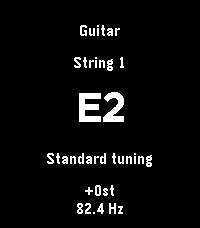
Tools & UtilitiesPitch reference for guitar, bass, and ukulele using speakers. Global transpose. Choose tunings. Manual: * Select or tap to start playback. * Long select for parameters. * Up/down to change string. Not yet tested on real hardware
 16
16Tarot Reader
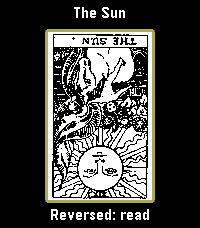
DailyI've been stuck on tarot art lately, so now there's an entire deck on your wrist. All 78 cards. This seemed reasonable at the time. Draw one card, lay out a Celtic Cross, or try a three-card reading or a scattered table of five to seven cards. Turn them over one at a time. The last reading stays where you left it. Select reveals a card, then opens its meaning. Hold Select to enlarge the artwork; Up and Down move through it. Back takes you out one step. You can turn reversals off in the menu. Pamela Colman Smith's original black-and-white illustrations, with A. E. Waite's upright and reversed meanings from 1910. The language is very much from 1910. Everything lives on the watch and works offline. Adapted by Luke Steuber for Ambient Time.
 3
3benzaiflow
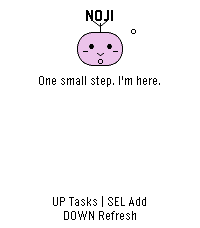
Dailybenzaiflow brings Noji, your quiet companion, to your wrist. See your tasks, catch a new thought, and put the phone away. • Browse active tasks, with pinned tasks first, and open a task for its details and estimated minutes. • Add a task by dictation on supported watches, write with the watch buttons, or choose a small essential. Review before saving. • Capture while your phone is out of reach: once paired, the app keeps up to three unsent tasks on the watch for retry when you reconnect. • Bring your Noji’s shape, color and expression with you. SETUP A benzaiflow account is required. After installing, open the app’s settings in the Pebble phone app, sign in, and choose “Connect my Pebble.” The Pebble phone app provides the internet connection for syncing. Learn more: https://benzaiflow.com LANGUAGES & LIMITS The watch interface is English; pairing is available in English and French. Task text supports UTF-8; button entry uses a Latin ASCII alphabet. Dictation requires a compatible watch and an available phone transcription service. This first release supports browsing and adding tasks; completion, deletion and reminders are not available on the watch. Support: support@benzaiflow.com Privacy: https://benzaiflow.com/privacy
 12
12Werkbank
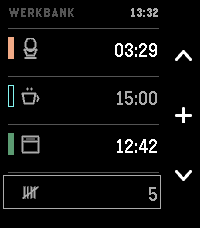
DailyThree timers and a tally counter, for when your hands are already busy. In a kitchen or a workshop you often can't look at a screen or type a label: your hands are covered in dough, or holding something. Three tracks, side by side. The question this screen answers is not "how long has this one got" but "which of these finishes first" — a comparison, so all three are shown at the same size and scale at once. A carousel hides two of them; a ring of arcs distorts them. This is a list. Each track has its own colour — the label you never have to set. USING IT Up / Down — choose a track. Select — set a time; or start, pause, resume, acknowledge. The middle icon always shows what the button will do next. While setting: Up and Down change the time, and holding a button runs through it. The step grows with the value — ten seconds under a minute, half a minute up to ten, then whole minutes. Select starts it. Back keeps the time without starting it. Select, held — give the track a pictogram. Eleven, each one a thing that takes time: an egg, a pot, an oven, a bowl for dough to rise, a cup to steep, a brush for paint to dry, a clamp for glue to set, laundry, a tablet, an hourglass for anything else, and a blank to remove one. Naming stays optional; a timer starts without a label, always. Down, held — reset. On a track that empties it, even mid-run; on the counter it returns to zero. Never a short press; the pictogram survives. No text entry — the watch has no keyboard. No configuration page either: roughly half of those in the Pebble catalogue no longer load. A running track has a filled bar, a set one a hollow bar. That difference is a shape, not a shade: in sunlight two bright tones stop being two tones, a shape survives. When a timer ends, the watch tells you which one, with its colour and its pictogram, and at what time it actually ended — not "now". If it was in a drawer when it happened, "now" would be a lie. This works with the app closed. It vibrates. It does not beep. The Pebble Time 2 is the first Pebble with a speaker, and a timer that sounds off in a shared kitchen is an intrusion into a room, not just a wrist. Silence is the default, not a setting to find. The counter at the bottom counts to 9999, one press each — rows, reps, batches, laps. No phone required, ever. No companion app, no network access, no account, no adverts, no tracking. Everything runs on the watch — which is also why nothing here can be switched off by a server in five years' time.
 17
17DICE QUEST
GamesDICE QUEST — A Dice Dungeon RPG Roll your way through six stages of an ancient dungeon and face the Abyssal Dragon King at its heart. Every battle comes down to three dice — read the roll, then decide how to act. Combat Land a Pair or Triple, then press SELECT to attack Triple — critical hit, plus a bonus potion and a full heal, instantly when the dice stop Pair — a solid hit Straight (any three numbers in a row, any order) — an automatic full dodge, resolved the instant the dice stop Roll anything else, and SELECT triggers a guard attempt instead: roll over 10 and you halve the damage ("GRD"), roll 10 or under and you take it all Items Potion — heals 15 HP, tucked away in dungeon dead ends, and one of your Triple rewards ★ Triple Item — guarantees your next roll comes up Triple (one per stage) ■ Pair Item — guarantees your next roll comes up Pair (one per stage) How to Play Dungeon: UP / DOWN to turn, SELECT to move forward or confirm a prompt Battle, 1st roll: UP to start rolling, UP again to stop Battle, reroll: DOWN to start rolling, DOWN again to stop SELECT to confirm your roll and act Hold SELECT to open your item bag — UP / DOWN to choose, SELECT to use How far can you roll?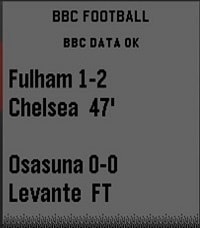 2
2BBC Live Football Scores
DailyLive football fixtures and scores from BBC Sport, displayed clearly on your Pebble Time 2. Automatically refreshes every 5 minutes, with SELECT for a manual refresh.
 38
38AgroWeather (now with radar!)
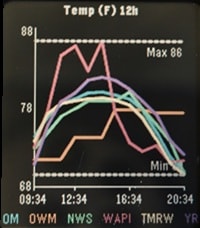
Tools & UtilitiesAgroWeather - Aggregate Weather I was tired of inaccurate weather and wasn't sure what service to believe. One moment a weather service could be spot on and the next be way off. To solve for this I made AgroWeather, a multi API weather app. It displays weather info from multiple sources on the same graph so you can estimate for yourself what is likely to happen. All 6 APIs are free but you may need to create an account/api key for some. Use as many or as few as you would like. ***Note: This app is still in early alpha testing. Any suggestions appreciated. APIs Currently supported: (I may add more if I get enough hearts) Open-Meteo OpenWeatherMap NOAA / NWS WeatherAPI.com Tomorrow.io Yr.no Graphs: (Please suggest others if you have a need) Temperature Feels Like Humidity % Precipitation % Precipitation amount Cloud % Pressure Wind Speed Gust Speed New Feature: Weather Radar - This feature is not an aggregate of data but still useful. It fetches global radar coverage from RainViewer composited over an OpenStreetMap base map tile, using GPS or the geocoded manual location. The watch stores 4 frames, picked as 4 evenly-spaced points across whatever recent frames RainViewer's metadata endpoint returns. Frames are fetched and sent to the watch sequentially and looped. The animation starts as soon as the first frame arrives and keeps incorporating older frames as they arrive; it automatically stops when you navigate away from the Radar screen and restarts when you navigate back onto it. This all happens using just Pebble C and Pebble JS. There are no special companion apps or external servers to draw and send the radar to the watch :). How to use: 1. Go into the pebble app and click on AgroWeather. 2. Click the Settings button. 3. Check the box to use GPS or Enter your location info 4. Select your units. 5. Check the box of the APIs you would like to use 6. If using one of the APIs that require a key, enter your key in the appropriate field Pebble Controls: UP / DOWN = Cycle through the Graphs / Weather Radar SELECT = Cycle through the times (3hr, 6hr, 12hr, 24hr, 2 day, 3 day) BACK = Exit
 4
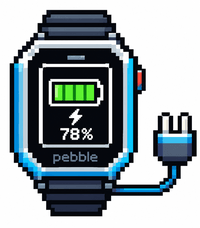
4Battery Charge
Tools & UtilitiesYou can see your battery status while charging
 41
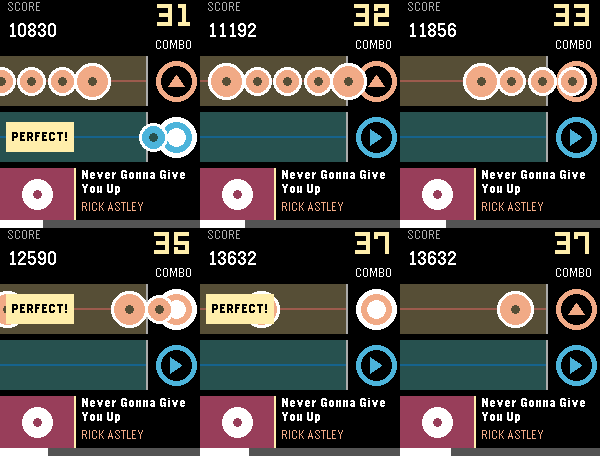
41Rockbeat
GamesA simple rhythm game. Just hit the UP or SELECT button to the melody! Right now you can play the following songs: Never Gonna Give You Up — Rick Astley You Are Not Alone — M. Jackson Golden — HUNTR/X Love Story - Taylor Swift Merry-Go-Round of Life - Joe Hisaishi Let me know what other songs you want to add to the list! This game requires a speaker, so it works only on the Pebble Time 2 and Pebble 2 Duo.