 4
4BusVibe
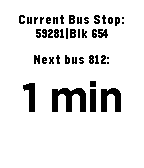
DailyVisually-impaired friendly watchapp that tells the arrival times of buses at the bus stop you're at using vibrations. Usage: Selecting the bus: Up / Down - Select the current digit of the bus number. The number of vibrations that follows is the currently displayed number. Select - Move on to the next digit, starting from 0. If there are already 3 digits, this confirms the bus number. (Long press) Select - Confirm the bus number. Selecting bus stop, before selecting bus number: (Long press) Up / Down - Go up or down the list of 10 nearest bus stops, displayed at the top of the screen. The closest bus stop is selected by default. (Long press) Select - Refresh bus timing.
 7
7UIUCUMTD
DailyThis app will get the 6 nearest bus stops near you and tell you when the bus is coming at each stop. Please email issues/bugs to me! I am always looking to improve the app. Added loading screens (v1.4) Improved algorithm by a bit to speed up loading data (v1.3) Fixed some location errors (v1.2) Updated to improve on getting location (v1.1) Initial release of the CUMTD bus app (v1.0)
 39
39My SF Bay Transit
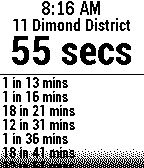
NotificationsWarning: 511.org has announced a data outage lasting several weeks in June/July until their new servers goes on-line. We apologize in advance for this disruption. Please use the My Bus (for AC Transit, Muni, and Dumbarton) or My BART Pebble apps during this period. Real-time arrivals for these San Francisco Bay Area transit agencies: AC Transit, BART, Caltrain, Dumbarton Express, Marin Transit, SF MUNI, SamTrans, VTA, Vine (Napa County) and WestCAT. With built-in stop lookup by 511.org. Repeatedly press select button to choose your preferred route at a stop.
 58
58My BART
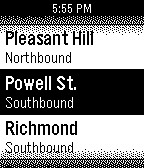
NotificationsGet realtime BART train arrivals. Scroll to a station, press LONG SELECT to switch between northbound and southbound. Press SELECT to see the next few arrival times of the various lines. Automatically updates every minute. The stops you pick frequently move to the top of the list. Summary of arrival times is followed by full details.
 34
34EasyWake
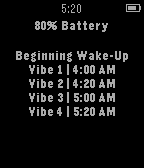
DailyEasyWake makes waking up in the morning much less stressful. Instead of almost having a heart attack every morning from your alarm, you can use EasyWake to wake up peacefully. EasyWake tries to slowly wake you up by sending short vibrations in a repeated pattern. It sends vibrations at 4:00, 4:20, 5:00, 5:20, 5:40, and 6:00 AM. All you have to do is leave EasyWake open on your Pebble Watch while you sleep. The app is set to fully wake you up at 6:00 AM, so you do not need to set an alarm on your watch. Wake up easy with EasyWake. *If popular request, I will add a way to set what time you want to wake up :)
 80
80RemindMe
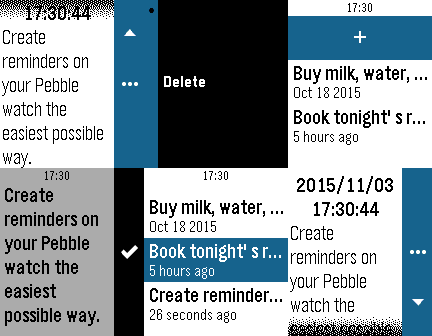
DailyCreate reminders on your Pebble watch the easiest possible way. ## Idea Dumb, repetitive and mechanical tasks (doing the dishes, taking a shower, driving to work, jogging, what-have-you) are always a good opportunity for my mind to wander, and often the times when ideas sprout and *to-do*'s come back to mind. When those ideas come up, my usual way to treat them is to postpone them to after the task at hands, as I'm probably not in a position to take notes (hands are wet, or on the wheel, etc.). Unfortunately, most of the times I fail to remember the idea when I get in better disposition to write it down, or to process it. **RemindMe** is my solution to this problem. My own digital way, always on my wrist, to tie a knot to my handkerchief, to tie a string around my index finger, or to throw a slipper, a book, or any other unusual item in the middle of the room's floor. ## How it works At the moment **RemindMe**'s main screen is a list of all your notes, which you can enter to display in full or delete, and a way to add dictated notes. I suggest you link a Quick Launch button to **RemindMe**, so that you can open the "new note" dictation screen in only one long click from your watchface. ## Features Version 1.0 only includes a quick note system that allows you to create time-stamped text notes.
 5
5Cube Scrambler
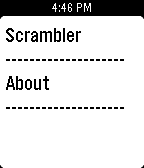
Tools & UtilitiesA convenient cube scrambler right on your wrist! Currently available scramblers: 3x3 (Random State)
 26
26SportsOfficial
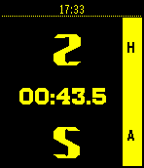
Health & FitnessSportsOfficial is a scorekeeping app which allows users to keep track of score and time for nearly any sport! The app includes stopwatch functionality to keep track of the time of a sporting event, as well as score keeping functionality for two teams. Users can keep track of scores for two teams by using either the Up button (Home Team) or Down button (Away Team). The app supports single clicks, double clicks, and long clicks to change the score. Clicks can be customized for most sports by changing the score increments to match any sport (for instance, 1, 2, and 3 points for basketball or 1, 3, and 6 points for football). This the perfect app for score keepers, referees, or sport enthusiasts! To-Do: - Make this page way better looking. Notes: - This is my first published app of any kind, so if you find any bugs or have any feature requests please let me know! - This app began life as a school project; I want to thank TJ Taylor and Javier Lores who I worked with on the project and who helped write that version of the app.
 12
12Malaysia Showtimes
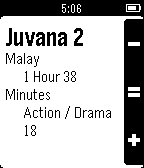
DailyMalaysia Showtimes allows you to easily browse for the movie showtimes right on your wrist. This app only works for all major cinemas across Malaysia. Movie showtimes provided by showtimes.my.
 6
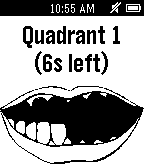
6BrushTimer
Health & FitnessBrushTimer guides you through brushing your teeth. (This app was made by a 10 year old)
 9
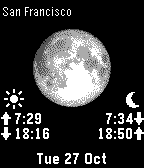
9Moon Calendar Watch
DailyMoon Calendar Watch provides quick and easy access to Moon Phases and times of Sunrise, Sunset, Moonrise and Moonset. The app determines your GPS location and calculates the precise Moon and Sun data at your location. Click Up / Down for Moon and Sun data of the next day. Double click Down to play an animation of the Moon Phase Calendar to get a quick overview. This Pebble app can be used without connection to your phone. But you should run the phone app Moon Calendar Watch (Android or iPhone) once per week to update the Moon data on your watch.
 6
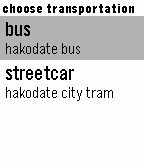
6public transportation timetable of hakod
Dailytimetable for pubric transport of hakodate hokkaido japan. "bus" indicates 4 of nearest schedule departure time more than present. "streetcar" indicates the schedule departure time nearer than selected time. 函館の公共交通機関の時刻表を表示するアプリです。出発地と到着地を選ぶと、バスならば現在から最も近い時間のものを最大4つまで表示します。 電車は出発時刻を選択することで一番近いもの、加えて目的地の予定到着時刻も表示します。
 7
7DeadFish
Tools & UtilitiesThis is a Deadfish interpreter for Pebble! Deadfish is a very odd interpreted programming language created by Jonathan Todd Skinner. It was released under public domain and was originally programmed in C, but now it has been since ported to many other programming languages. Deadfish has a way to output things but it has no way to input them! It has only a few commands, only four in total. - Press "Up" for the "i" command (increment accumulator) - Press "Down" for the "d" command (decrement accumulator) - Press "Select" for the "s" command (square accumulator) - Press "Back" for the "o" command (output accumulator) Additionaly you may also: - Long press "Select" to delete your program - Long press "Back" to exit the application Please refer to the Deadfish website for more details about programming in Deadfish: http://esolangs.org/wiki/deadfish ❤ Give us a heart if you like Deadfish! The Deadfish logo comes from clker.com. We are NOT affiliated with Jonathan Todd Skinner, esolangs.org nor clker.com
 34
34Project Kraepelin
Health & FitnessA simple app for recording daily activity, sleep, and mood for use in clinical studies. NOTE : Use of this app implies your agreement to share your information as outlined in the privacy policy on the APP WEBSITE link below. We collect de-identified motion, mood, and sleep quality data for clinical research purposes. Features - Daily tracking of step count and calories - Daily mood and sleep quality prompts - 7 day mood and step count history
 124
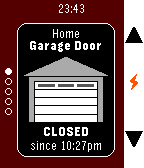
124HomeP - For MyQ Garage Doors & Light Swi
RemotesUnofficial watch app for monitoring and operating Chamberlain/Liftmaster branded MyQ devices over the Internet (Requires MyQ Internet Gateway, usually sold separately) , now including the "MyQ Garage" device, which connects to 3rd party garage doors. Currently supports garage door openers AND light switches - other types of devices may be added soon. - Uses SSL to communicate securely with the official MyQ servers - Does NOT require a companion app on your phone - DOES require your Pebble to be connected to your phone and your phone to have a data connection (bear in mind that you may be on the edge of your home wifi just outside your garage) - Username and password is stored on your phone and are only ever sent to the official MyQ servers. Password is also encrypted on your phone - Up/Down switches devices - Select changes the status of the device - To save Pebble battery it does not constantly monitor the device status except when opening/closing a garage door. To update the status, switch devices with the Up/Down button (even if you only have one device) or reopen the app - Closes automatically after 2 minutes of inactivity to help avoid accidentally operating a device - Assign it to a Quick Launch button in your Pebble settings for easy access