 2
2SG Toto & 4D
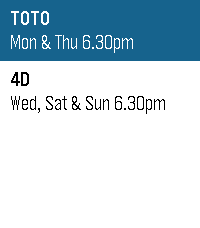
DailyHuat ah! 🎉 Feeling lucky? SG Toto & 4D puts the latest Singapore Pools results right on your wrist. Results are updated shortly after every draw — TOTO on Monday & Thursday, 4D on Wednesday, Saturday & Sunday, 6.30pm sharp. Good luck — may your numbers finally come home!
 2
2WasteWatch
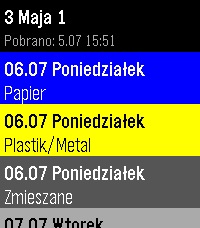
Tools & UtilitiesPersonal app to check my waste collection schedule without pulling out the phone. Shows upcoming dates with color-coded waste types (Bio, Paper, Plastics, Glass, Green, Mixed). Data from kiedywywoz.pl via OCR. Built for Kraków but works with any municipality that uses the kiedywywoz.pl service — just provide the appropriate API token.
 51
51Pebble eReader
Tools & UtilitiesRead EPUB books on your Pebble watch. Upload an EPUB via the in-app settings page, then read chapter-by-chapter with proper headings, progress tracking, and a chapter menu.
 7
7MIDI Recorder
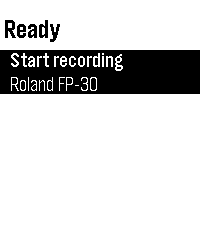
Tools & UtilitiesControl MIDI Recorder from your wrist — start/stop recording with one tap and see the recording time and connected MIDI device at a glance. Pair it with the Sykerö TimeStyle watchface to see your live recording status right on your watchface. Companion to the MIDI Recorder Android app, a Bluetooth MIDI / piano recorder.
 2
2Rasktur
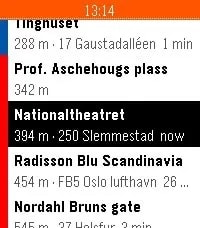
Tools & UtilitiesSee the next buses, trams, metro, trains and ferries departing from stops around you, with live times from Entur's national data. Save the places you actually travel to - home, work, the office in Bergen - and Rasktur pins the closest boarding stop with a service heading that way to the top. Colour-coded by mode, shake to refresh. Works across Pebble, Pebble Time, Time Round, Pebble 2 and Time 2.
 25
25UV Guard
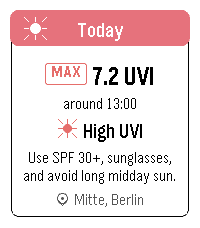
Health & FitnessUV Guard helps you know when the sun is worth taking seriously. Get a quick, glanceable UV forecast on your Pebble with the information that actually matters: how strong UV will get, when it peaks, and whether sunscreen, sunglasses, shade, or covering up is a good idea. The app shows Today and Tomorrow with maximum UVI, peak time, a simple four-part day timeline, and plain-language sun protection advice. It can use your current device location or a manually selected place. UV Guard can remind you before you head out with a morning UV digest, and warn you when the UVI reaches your chosen protection threshold. Forecasts are cached, so the watch can still show the latest available guidance when the phone or network is not ready.
 32
32Pebble Tides
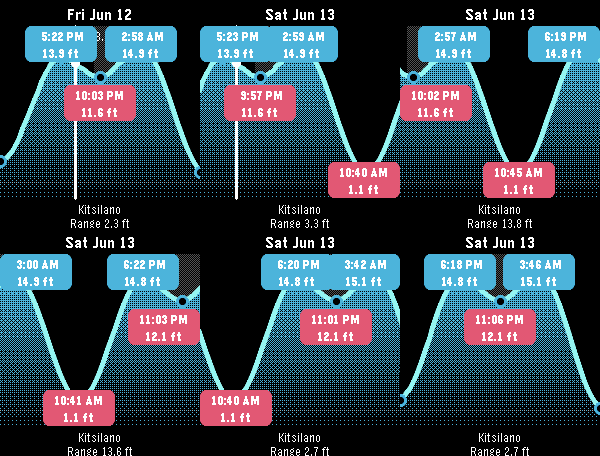
Tools & UtilitiesPebble Tides shows the day's tides at a glance: a graph of the high and low tides with their exact times and heights, the current water level, whether the tide is rising or falling, and optional mid-tide times. It uses your location to pick the nearest tide station and keeps working offline by caching a week of predictions, or pin a region ahead of a trip to cache up to 45 days across a whole area. Features: - Uses your location to pick the nearest tide station - Daily tide graph with high/low times and heights - Current level with a rising/falling indicator - Optional mid-tide times (off by default) - Sunrise and sunset night shading - Step through tides with the buttons; long-press to jump a day, Select to jump to now - Feet or metres, 12 or 24 hour clock, all set from the phone - Caches a week of predictions and refreshes once a day; works with the phone out of range - Pin a region for an upcoming trip: download up to 45 days for every station within a chosen radius, then see the nearest one offline as you move Coverage: Pebble Tides covers - Canada (Fisheries and Oceans Canada, DFO) - United States (NOAA) - Australia and the South Pacific (Bureau of Meteorology, BOM) - United Kingdom, Ireland and the Channel Islands (UK Hydrographic Office, EasyTide) It picks the station nearest you, or the nearest station inside a region you pin for an upcoming trip. If you'd like another region added, let me know and I'm happy to look at adding it. Controls: Up/Down step tides, long-press Up/Down jump a day, Select jumps to now, Back exits.
 0
0BatMon
Tools & UtilitiesDraws a battery graph by recording the level ad midnight.
 7
7MiniMax Balance
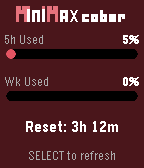
Tools & UtilitiesA Pebble watch app that displays MiniMax Code Plan usage balance. - 5h limit usage percentage with progress bar - Weekly limit usage percentage with progress bar - 5h window reset countdown - Press SELECT to refresh manually - Settings page: API Key, Region (China/Overseas), Theme
 14
14Rock Timer
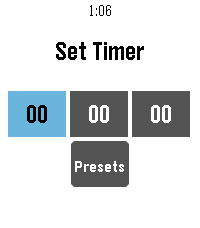
Tools & Utilities• Fork of the official Pebble timer app • Full touchscreen support — inertial drag-to-scroll, long-press / double-tap to select • Configurable timer presets, edited from your phone • Choose your touch activation: long-press, double-tap, or both • Configurable snooze length and alarm vibration • Voice-named timers • Delete confirmation • Developer: snrkl-labs • Built 100% with AI.
 62
627day ICS Calendar
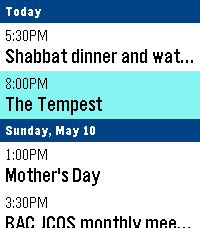
DailyLeave your phone in your pocket. 7-Day ICS Calendar brings your Google Calendar(any ICS should work) directly to your wrist, beautifully organized and always available—even when you're offline. Built from the ground up for speed, reliability, and a native Pebble feel, this app securely bridges your private Google Calendar directly to your watch, ensuring you never miss a meeting. Key Features: AppGlance Support: See your next upcoming meeting directly on your Pebble’s system launcher menu without even opening the app! (Pebble OS 4.0+) Extreme Customization: Long-press the Select button on the main menu to open the Settings. Instantly toggle between Dark/Light Mode, switch to Large Fonts for better readability, or choose to show/hide past events. True Offline Support: Going for a run without your phone? Your events are permanently saved to the watch's internal memory. Close the app, open it later, and your schedule is instantly there. Battery-Conscious Sync: The app uses a smart background caching system to prevent battery drain, waking your phone’s Bluetooth only when you need fresh data. Need an instant update? Just hit "Force Sync" in the settings menu. Scrollable Detail View: Click any event to open a dedicated detail view. Read massive event descriptions and long titles using the physical buttons to scroll, complete with a native top status bar so you never lose track of time. Universal Compatibility: Designed to support all Pebble hardware, including dynamic layout adjustments for the Pebble Time Round and high-contrast mapping for monochrome screens like the Pebble 2. Global Formatting: Fully respects your preference for 12-hour (AM/PM) or 24-hour time formats. How to Setup: 1. Go to your Google Calendar settings on a computer. 2. Find your calendar and scroll down to "Secret address in iCal format." 3. Copy that link and paste it into the App Settings page on the Pebble phone app. 4. Hit Save, and your watch will securely sync your next 7 days! If you enjoy what I am making don't forget to heart the app. If you want to support continued development, consider a donation: https://ko-fi.com/ericmccormick
 14
14Nuovo Multi Timer
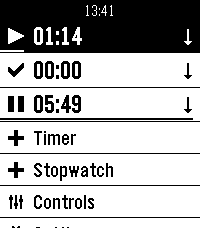
Tools & UtilitiesMulti Timer is simply the best timer and stopwatch app for Pebble. It was developed by Matthew Tole in 2014. Nuovo Multi Timer is an adaption for Pebble Time 2.
 28
28Deep Space Mining Inc.
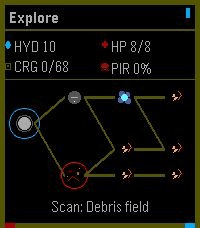
GamesThe outer systems are open, dangerous, and full of things humanity was probably meant to leave buried. You are an independent mining captain trying to survive the corporate frontier: scan unstable asteroid fields, crack valuable rocks, upgrade your ship, and push deeper into hostile space where pirates, alien signals, and something far worse wait in the dark. Deep Space Mining Inc. is a roguelite mining adventure where every expedition is a choice between greed and survival. Fill your cargo hold, survive the return trip, invest in better ships and equipment, then head back out for a deeper, riskier run. The further you go, the richer the rewards, but the frontier does not give anything back for free. Controls: Use **Up** and **Down** to navigate menus, adjust mining power, and steer during encounters. Press **Select** to confirm choices, toggle the mining laser, and fire ship guns. Press **Back** to return or pause. Hold **Back** to exit the app. Supported Devices: Deep Space Mining Inc. is best played on Pebble Time 2 and other higher-memory color Pebble watches. Black-and-white devices and lower-memory systems are supported where possible, but they run a visually reduced version with simpler rendering and fewer effects.
 5
5pebblek
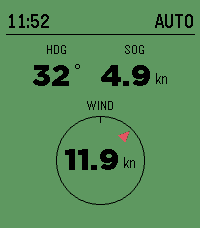
Tools & UtilitiesPebbleK — SignalK boat monitor & autopilot remote PebbleK turns your Pebble into a glanceable helm display and autopilot remote for boats running a SignalK server. Leave the phone in your pocket: heading, speed, wind, and autopilot status are all on your wrist, and you can trim the autopilot without leaving the cockpit. At a glance you get: - Heading (HDG) and speed over ground (SOG) in large, easy-to-read numbers - A wind dial showing apparent wind direction, with wind speed in the center - Autopilot status in the header — and the whole screen turns green the moment the pilot is engaged, so you know your state at a distance Control your autopilot from the buttons: - Up / Down — nudge the course ±1° - Hold Up / Down — jump ±10° - Select — engage AUTO (hold for WIND mode), press again to disengage PebbleK connects through your phone to your SignalK server and the signalk-autopilot plugin, relaying live telemetry to the watch and turning your button presses into autopilot commands. The current time is always shown up top so the watch stays useful on deck. Designed for Pebble Time 2 and Pebble Round 2, with layouts tuned for each display.
 7
7PLC Dipswitch
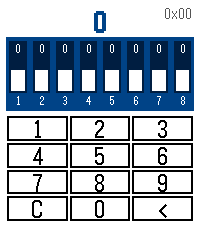
Tools & UtilitiesA simple utility to set or check DIP switches on various electronic equipment such as Modbus nodes. compatible with Time 2 and Round models.