 18
18Disc Golf Counter
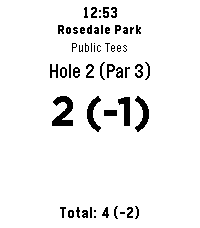
Health & FitnessLeave your phone in the bag and focus on your throw! Disc Golf Counter is the ultimate wrist-based caddie for your Pebble, powered by real-time course data. Unlike simple tally counters, this app uses your phone’s GPS to automatically find the nearest disc golf courses and download the actual scorecard layouts. KEY FEATURES: GPS Course Finder: Automatically detects nearby courses. Smart Layouts: Select the specific layout you are playing (e.g., "Main", "Advanced", "Shorts"). Supports dynamic hole counts (9, 18, 27, etc.). Live Scorecard: Tracks your strokes, current hole Par, and your total score relative to Par (e.g., +2, -1, E). Persistent Storage: Your game is saved automatically. If you exit the app, your score is waiting for you when you return. Readable Interface: Large, high-contrast numbers for easy reading in bright sunlight. CONTROLS: SELECT (Click): Add Stroke SELECT (Long Press): Subtract Stroke (Undo) UP (Click): Next Hole DOWN (Click): Previous Hole UP (Long Press): Refresh GPS / Find Course DOWN (Long Press): Reset Round (Clear Score) COMPATIBILITY: Works on all Pebble models (Original, Steel, Time, Time Steel, Round, 2). Note: This app requires a connection to your phone to fetch course data.
 89
89PureNavi
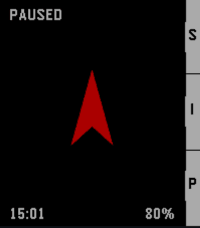
Tools & UtilitiesPureNavi is a minimalist, highly efficient straight-line navi. Instead of distracting you with complex maps, PureNavi delivers navigation in its purest form. A single arrow and the exact distance to your destination. Nothing more. Nothing less. The v2 update introduces a refined hybrid engine that intelligently combines GPS and compass data. This ensures a smooth, stable needle that stays on course whether you are moving at pace or standing still. You can also pin your current position instantly with a single button press. This is perfect for finding your car again or marking any spot you want to return to later. PureNavi navigates exactly as the crow flies. Direct. Clear. Focused.
 422
422Weather Graph
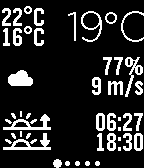
DailyDisplay a graph for the upcoming 24 hours, showing details on temperature, rain precipitation, and wind speed. The interface consists of 7 screens, starting from current conditions, progressing through the next 24 hours, and extending to a 6-day forecast. Rain is displayed as vertical blue bars, with each row representing 1mm of expected precipitation. The temperature line is color-coded: red or blue, depending on whether the temperature is above or below freezing. Additional features include: Wind speed and direction Moon phase Current humidity Daily forecast: Rain precipitation and probability Sunrise and sunset times Weather data can be based on GPS, a fixed location, or voice input. Languages supported for automatic day settings: English French Spanish German Options available: GPS On/Off Fixed Position Metric/Imperial units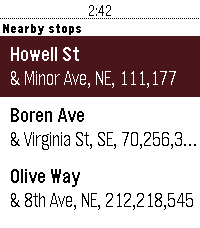 20
20BusGoodCarBad
Tools & UtilitiesPersonally, I know that the #1 thing I use a smartwatch for while in a city is transit information. I know plenty of other folks do the same. With the relaunch of the Pebble infrastructure, I wanted to provide a new solution for the new generation of both Pebble users and Pebble hardware. BusGoodCarBad will show you the info for stops nearest you and your personal favorited stops, too. Just open the app, and you're good to go! It's that simple. Supported regions and transit organizations: - Seattle, Washington (via Puget Sound Region OneBusAway) - New York City (via MTA BusTime) - Portland (via TriMet Web Services) Partially implemented regions and transit organizations: - Boston, Massachusetts (MBTA v3 API) (Works! But it shows you too many stations. Still usable, but needs some work on parsing). This project is a fork of CatchOneBus, developed by Yaoyu Yang and Dian Zhang in 2015 and 2016.
 22
22FlashRead News
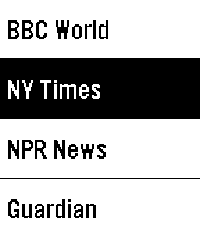
DailyFlashRead News brings RSS feeds to your Pebble using RSVP (Rapid Serial Visual Presentation), a proven speed-reading technique that displays words one at a time, centered on the optimal recognition point. Features: 6 pre-configured news sources (BBC, NY Times, NPR, Guardian, Le Monde, Reuters) Add unlimited custom RSS feeds via phone configuration Adjustable reading speed from 100 to 600 WPM Read headlines, then dive into full article descriptions Optional backlight during reading Navigate between articles with physical buttons Perfect for the small Pebble screen. Free and open source.
 40
40Memos
Tools & UtilitiesA very simple app to connect with your self-hosted Memos server and quickly send thoughts or ideas straight over! Requires dictation. https://github.com/usememos/memos Use keywords such as: check box -> - [ ] title (big/medium/small) -> (#/##/###) new line -> \n hashtag "word" -> add a tag --------------------------------- These take advantage of Memos use of markdown (.md) to 'fancify' your notes. May add the ability to pull your memos from the server to view on your watch at some point. We shall see. I have only tested on the old iOS pebble app, and a pebble time.
 20
20Pebbletracker
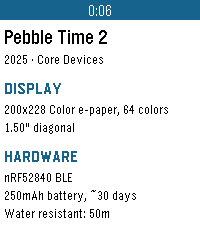
Tools & UtilitiesPebbletracker provides detailed information on every Pebble smartwatch ever made, including items such as processor speed, memory, display type, supported firmware versions, price, storage, and connectivity options.
 542
542Find My Phone
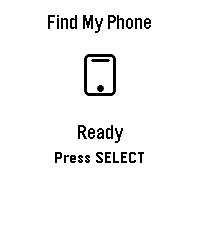
Tools & Utilities## Find My Phone **No companion app required - works directly through the Pebble app!** Never lose your phone again! Find My Phone helps you locate your misplaced phone instantly with a loud, attention-grabbing alarm - right from your wrist. ### Features: - **No Companion App Required** - Works directly through the Pebble app, no extra downloads needed - **One-Button Operation** - Simply press SELECT to activate the alarm - **Customizable Melodies** - Choose from 5 different alarm sounds to suit your preference - **Loud Audio Alert** - Plays a distinctive melody on your phone that's easy to hear - **Visual Feedback** - Animated display shows when the alarm is active - **Haptic Feedback** - Your watch vibrates to confirm the alarm is running - **Continuous Alarm** - Keeps playing until you press SELECT again to stop it ### How to Use: 1. Open the app on your Pebble 2. Press the SELECT button (middle button) 3. Your phone will start playing a loud alarm 4. Follow the sound to find your phone 5. Press SELECT again to stop the alarm ### Customize Your Sound: Access settings through the Pebble app to choose from: - Classic Find (Default) - Pleasant ascending melody - Urgent Alert - Fast alternating tones - Gentle Reminder - Soft repeating pattern - Emergency Siren - Loud alternating siren - Door Chime - Simple two-tone chime ### Perfect For: - Finding your phone under couch cushions - Locating your phone in another room - Quick phone location when you're in a hurry - Anyone who frequently misplaces their phone **Simple. Effective. Essential.** No more frantically searching for your phone. Just press a button and follow the sound! *** **Technical Notes:** - Requires Bluetooth connection between watch and phone - Compatible with Android devices running the Pebble mobile app - No additional apps or subscriptions needed - Settings accessible through the Pebble app configuration *** ### A Note from the Dev (FAQ & Troubleshooting) Hey there! I want this app to be as useful as possible, but because we are working with classic Pebble firmware, there are a few platform limitations I can't bypass. Here is what you need to know: **Q: Does this work on iPhone / iOS?** * **A:** Sadly, no. I would love to bring this to iOS, but Apple's strict background and browser limitations completely block the app from triggering the audio. It is currently strictly for Android. **Q: My watch is buzzing, but the phone is completely silent. Help?** * **A:** Double-check your phone's **media volume**! The app triggers audio through your phone's standard media channel. If your media slider is turned all the way down or muted, the sound won't come through. **Q: Can you make the app automatically turn up my phone's volume or override silent mode?** * **A:** Man, I really wish I could! This is the number one feature I want to add. I actually pushed for an official change to the SDK so app developers could control phone volume, but the system firmware just doesn't support that level of access control right now. If the platform team ever opens up that door, I'll be the first to implement it! Until then, we just have to wait and see.
 48
48Phone Battery Monitor
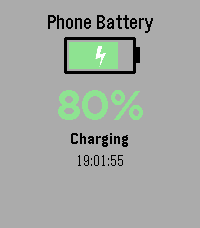
Tools & UtilitiesNever wonder about your phone's charge level again! Monitor your phone's battery directly from your Pebble watch - perfect for when your phone is charging in another room. Key Features: • Real-time battery level display with large, easy-to-read percentage • Visual battery indicator with color-coded status (green/yellow/red) • Animated charging indicator - see at a glance when your phone is plugged in • Instant updates when battery level or charging status changes • Manual refresh with SELECT button • Vibration alert when your phone reaches 100% charge • Current time display • Works on all Pebble models How It Works: Simply install the app and it will automatically connect to your phone. The watch face shows your phone's battery percentage, charging status, and a visual battery icon that fills up as your phone charges. The lightning bolt animation lets you know when charging is active. Perfect For: • Monitoring charging progress from another room • Keeping track of your phone's battery without checking it constantly • Getting notified when your phone is fully charged • Peace of mind when you can't see your phone Requirements: • Pebble watch (all models supported) • Smartphone with Battery Status API support (most modern iOS and Android devices) Stay connected and never miss a charge cycle again!
 18
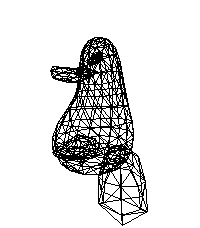
18Penger 3D
GamesIt's just a simple demo app based on Tsoding's "One Formula That Demystifies 3D Graphics" YouTube video for simple perspective-correct 3D rendering using wireframes and one really simple math formula. The video: https://youtu.be/qjWkNZ0SXfo
 13
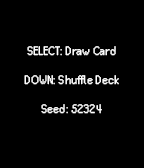
13Better Tarot
GamesA simple tarot card drawing app, for when you need a little magical insight. Draw cards with the middle button, shuffle the deck with Down to get a new random seed.
 46
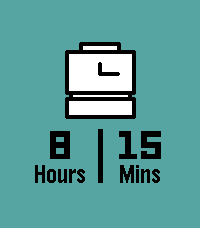
46Punchclock
Tools & UtilitiesInstantly calculate how long you worked today with Punchclock! Input when you started, when you ended, and Punchclock calculates how many hours and minutes you worked, and pushes a pin to your past timeline for reference. Via settings on the phone, configure the default start and end times, and how much time to subtract for breaks. Settings are saved both on the phone (in case you like to switch watches), and saved to the watch (in case your phone isn't nearby).
 9
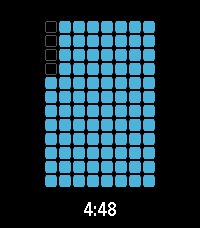
9ripple
Tools & Utilitiesa timer application with a number of visualization options
 24
24Level
Tools & UtilitiesA simple Level measuring tool. - Simply tilt the watch to measure - At 0° Level is a subtle nudge vibration
 198
198Claude
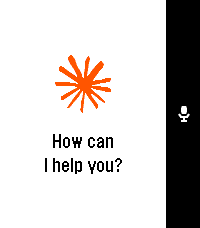
DailyTalk to Claude AI directly from your Pebble smartwatch. Use your watch's built-in dictation to ask questions and get streaming responses from Claude. Good for quick queries when your phone isn't handy, or when you just want to use your Pebble for something it was never meant to do. What it does: - Voice input using Pebble's dictation - Your conversation stays in memory during the session - Built-in web search tool support - Remote MCPs - Configure system prompts to change how Claude responds - Advanced users can point it at custom API endpoints You'll need a Claude API key from Anthropic. Configure it once in the app settings using your Pebble app. This app is an independent third-party client and is not affiliated with, endorsed by, or officially connected to Anthropic. Claude is a trademark of Anthropic. You use this app with your own Anthropic API key and are responsible for any associated costs and usage.