 1
1tandooPEB
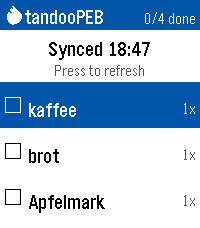
Tools & UtilitiesAnother shopping list for the Pebble Time 2. This one syncs with your Tandoor Recipie Manager (https://github.com/TandoorRecipes/recipes). Only one basic shopping list without catagories is supported. Note that the app was built with opencode using various models; code is AI-generated and should be reviewed before trusting it with data. Usage: - Enter your URL and API token in the settings page on your phone - View open shopping-list items on watch (name + amount) - SELECT an item to check it off; SELECT on "Sync now" row to sync - Long-press DOWN to dictate a new item (stored locally until next sync) - Long-press SELECT to undo the last toggle
 2
2Peep My Phone
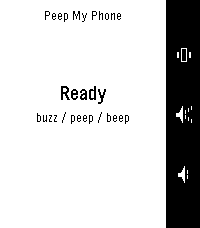
Remotes"Press a button, find your phone." To work in ALL occasions, requires the Android companion app. Lost your phone in the sofa again? Press a button on your Pebble and it peeps — loudly. Peep is built to be heard when nothing else can be. It rings through silent mode, through vibrate, through Do Not Disturb [except DNDs which block alarms], and even with the alarm slider turned all the way down — then restores every setting back exactly as it found it. Three ways to find it, one per button: Peep — the full alarm Beep — a single short chirp, for less intrusive Buzz — vibrate only, for more discrete Press again to stop, or tap Stop on the phone. If your watch wanders out of range mid-alarm it keeps ringing, because the phone is usually the thing that's lost. When something would stop the alarm being heard — a missing permission, or a battery saver that has paused the app — the watch tells you instead of pretending it worked. No iOS version yet.
 0
0Nav Aid
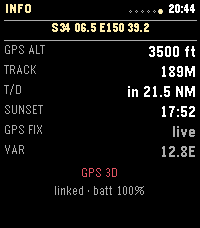
Tools & UtilitiesNav Aid is designed to be a glanceable supplemental information system for navigation and situational awareness in the air. Mostly for GA pilots, but useful for anyone operating in the air. DISCLAIMER: THIS IS NOT AN APPROVED INFORMATION SOURCE, THIS IS SUPPLEMENTAL ONLY AND SHOULD NOT REPLACE OTHER TOOLS / PROCEDURES. THIS WAS ALSO COMPLETELY VIBED, THERE WILL BE BUGS.
 2
2Radiant Lyrics
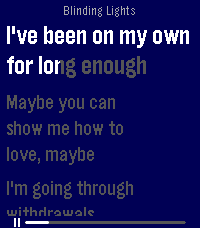
Tools & UtilitiesRelays Radiant Lyrics to your Pebble Time 2!
 7
7Pill Reminder
Health & FitnessApp to remind me to take my pills and track when I do. Has TimeZone toggle to allow to sync easily with home times.
 1
1PTZ Remote
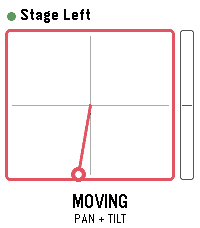
Tools & UtilitiesDrive Panasonic PTZ cameras from your wrist - with the buttons or by tilting the watch. PTZ Remote controls Panasonic AW-series cameras through their HTTP interface. Your phone does the talking, so the camera only has to be reachable on the same network. No extra software, no computer in between. Two ways to drive: - Buttons: up and down work the selected axis, a short press on select switches between TILT, PAN, ZOOM and FOCUS. - Motion: hold select as a dead-man switch and tilt your wrist. Zero is the posture you start from, so any comfortable arm position works - even with your elbow bent, in the dark next to the desk. Let go and the camera stops. Also included: presets with a confirmation before overwriting, up to 8 cameras to switch between, adjustable speed and tilt sensitivity, and an optional still image from the camera. That preview is not a live feed - the link to the watch carries about 1.6 KB per second, so one frame takes one to three seconds. Enough to check the framing, not to judge it. Nothing keeps moving unattended: the dead-man switch, a short arming delay so a tap does nothing, a watchdog on the phone that stops the camera if the watch goes quiet mid-move, and a stop when the app closes. Beta: camera control is tested against real hardware. The preview is not verified on a camera yet and is switched off by default; it needs JPEG transmission enabled in the camera's web menu. Runs on Pebble Time 2, Pebble Time and Pebble 2. Cameras are set up in the app settings on your phone. Vibe coded from start to store. That is the only reason it exists alongside a full time job. The app is free and has no ads. If you enjoy it, a coffee is much appreciated: https://buymeacoffee.com/SIDEffects
 7
7Clock Dude
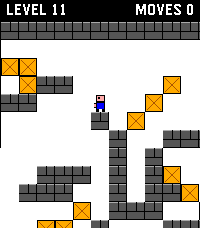
GamesThis is a Time 2 / Round 2 touch-input port of Block Dude, a block-pushing puzzle game written by Brandon Sterner for the TI-83 in 1999, and the reason many of us failed Calculus. The eleven levels included here are his original designs. You are stuck in a walled maze with a door somewhere in it. You can walk, climb a single step, and carry one crate at a time. Getting out means stacking crates into stairs, and the crates you need are rarely where you want them. This port was made from Block Dude CE, the TI-84 Plus CE version by Shaun McFall of Merthsoft Creations, whose non-asset code is released under the Unlicense. For full attribution, credits, and license info, please see the project's github repo.
 4
4Flashcards
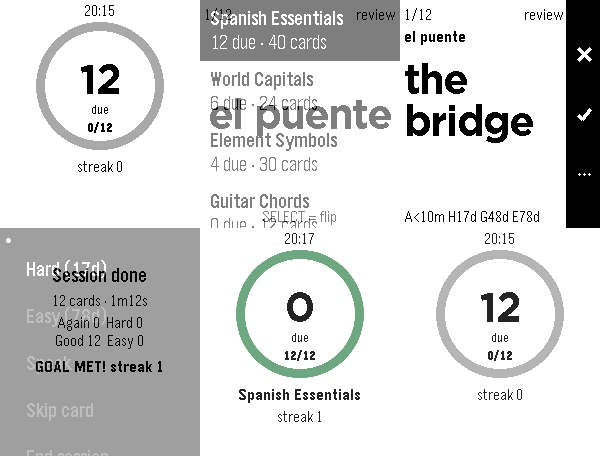
Tools & UtilitiesAnki-style flashcards. Learn anything with a few cards a day. Note: This is an early beta version(that I might not continue developing). Anyway write me a message if you find a bug or something is missing. - One card at a time: flip it, then grade Again, Hard, Good or Easy - Card grading: SM-2, the same scheme as Anki: 1 min, 10 min, 1 day, then gaps grow up to 10 years - Set a daily goal and reach a streak for each day you've committed to it - Up to three reminders a day; the watch wakes itself and opens the app - Decks and cards managed on the phone: add, rename, edit, search, delete - Import by pasting CSV or TSV or picking a file. Supports Anki plain-text exports. - Study with the phone out of range: the watch holds some cards and syncs the grades on reconnect - Cards read aloud through the speaker on Pebble Time 2 and Pebble 2 Duo, with a Google Cloud Text-to-Speech key kept on the phone Pebble Time 2, Pebble Round 2, Pebble 2 Duo
 3
3BCN Bus - live Barcelona bus times
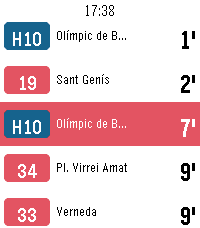
DailyReal-time bus arrivals for Barcelona on your Pebble. See how long until the next bus at any TMB stop without taking your phone out. Favourites— keep the stops you use every day and open them in one press. Nearby — find bus stops near you by GPS, nearest first, with the distance in metres. Search by code — type the stop code printed on the bus stop sign. Open a stop for every line calling there, soonest first, each in its own line colour. Pick a line for its next two buses and where they are headed. Live times from TMB's iBus service, refreshed every half minute, with the clock on screen throughout. Metropolitan AMB lines and Nitbus night buses included. In Catalan, Spanish and English. Works on Pebble Time, Time 2, Time Round, Pebble 2 and Core Devices watches. Unofficial: not affiliated with, endorsed by, or connected to Transports Metropolitans de Barcelona. It reads TMB's public developer API. Bus times are predictions and can be wrong — check the stop sign for the last bus of the night. Keywords: Barcelona, bus, TMB, AMB, iBus, bus times, arrival times, next bus, bus stop, nearby stops, public transport, Nitbus, night bus, Catalonia, transit, real-time. 107
107Music Boss Time
Remotes🎧 Music Boss Time is a premium media controller and media browser disguised as a watch face. Keep it on all day as you go about your daily hustle. Works with all your media/music apps*! Not a Music Boss Deluxe user yet? 🎁 Activate a fully unlocked 3-day free trial - all features included, nothing held back! • Features an album art-focused main screen with the time and date prominently displayed • Track progress ticks away to keep you informed on the current song • Customize visual elements to suit your style, and enjoy built-in media controls, volume support, and customizations for a truly personalized Pebble Music experience • Compatible with all your media apps (Spotify, Youtube, YouTube Music, Netflix, Plex, etc) 🎵 Play, pause, skip, and seek tracks from your Pebble 📺 Control apps casting audio/video to external displays or audio devices (e.g. Netflix, most music apps) ⏩ Manual Seek Mode* - jump within songs, podcasts, audiobooks, long tracks (*except OG Pebble) 🔊 Adjust volume on phone, Bluetooth devices, or while casting ⚡ Assign app-specific custom controls (e.g. Spotify DJ X) 👍 Rate songs (YouTube Music, YouTube, Spotify, more being tested) 🎨 Dynamic album art & themed UI ℹ️ View album art, title, artist, album, volume, and progress 🌈 On color Pebbles and Pebble 2/2 DUO, themes adapt to album art 📱 Watch Compatibility - Every Pebble Supported • Pebble Time, Pebble Time Steel, Pebble Time 2 • Pebble Time Round, Pebble Round 2 • Pebble 2/2HR/2 DUO Full support for album art, themes, customizations, and all features. Original Models: • Original Pebble • Pebble Steel Support album art! Manual Track Seek Mode does not function on the original models. Pebble Companion App Compatibility: • Classic Pebble App / Rebble • New Core Pebble App • microPebble Thank you for your support - whether you’ve been with Music Boss since the early days or you’re just discovering it now! *Media Browsing/Playback has been tested with: PowerAmp, Podcast Addict, Spotify, Musicolet, GoneMAD and VLC. Works with any app that supports Android Media Browsing. All assets in this listing are original and © Reboot's Ramblings 2013–2026.
 40
40Transit Arrivals
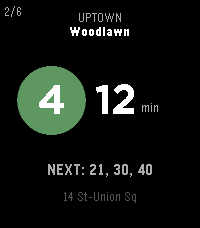
Tools & UtilitiesYou're three blocks from the platform. Do you run? Transit Arrivals answers the only question that matters to the city dweller on the go: how long until the next train. Pin your stations (Home, Work, the situationship) and the live countdown is one glance away. No app to dig out of your pocket, no subterranean scroll - just the next train on the face of your watch. Every line, rendered the way city knows it: the colored bullet, the route letter, the direction it's bound for. Tap up or down to flip between lines, hold to jump stations. The next three trains wait quietly beneath the headline number, so you always know if you've got a cushion. - Live arrivals straight from the real-time feeds (MTA (NYC), PATH (NJ/NY), CTA (Chicago), WMATA (DC), MARTA (ATL), MBTA (Boston), SEPTA (Philly), BART (SF), GCRTA (Cleveland), LACMTA (LA), Metrotrail (Miami), and SubwayLink (Baltimore)) - the same data the platform countdown clocks use. - Scheduled arrivals for systems without live data (Philadelphia/South Jersey - PATCO, San Juan - Tren Urbano) - Your stations, your order. Save favorites with custom labels and step through them with a button. - Nearest, automatically. Let GPS surface the closest station when you're somewhere new. - Service alerts for your lines, so a reroute never catches you flat-footed. - Built for the wrist - fast, legible, and frugal with your battery. Quick press up/down to cycle lines, quick press to cycle direction, long hold select for the menu, long hold up/down to cycle between nearest and saved stations, double press back for service disruption information. Designed for every modern Pebble: Pebble Time 2, Pebble Time, Pebble 2, and the round Pebble Time Round.
 16
16NFL Update
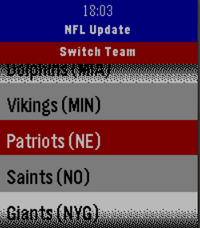
NotificationsNever miss a game. NFL Update brings your favorite team's full season schedule right to your wrist — live scores, final results, and upcoming games, all without touching your phone. No companion app needed, everything is ready to go once you select your team! Made for Time and Time 2, Round and Round 2 coming soon! Features: 📅 Full 2026 NFL season schedule for your chosen team 🔴 Live in-game scores with quarter and clock updates ✅ Final scores with W/L results, color-coded green for wins and red for losses 📊 Win/loss record always visible in the header 🏠 Home and away indicator for every game 📌 Next 3 upcoming games automatically pinned to your Pebble timeline ⏰ 1-hour pre-game reminder notification ⚙️ Pick your team once from the built-in team wheel — all 32 NFL teams supported 🔄 Press Select anytime to refresh with the latest data from ESPN
 85
85Music Boss Media Browser
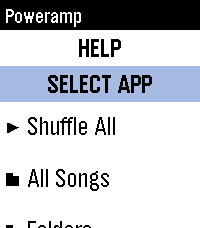
Remotes🎵🔍 Your full music library. On your wrist. PowerAmp, Podcast Addict, Spotify, Musicolet, GoneMAD, VLC and more. 🎁 Try it now - no strings attached! Activate a fully unlocked 3-day free trial of the Music Boss Deluxe companion app with all features included. No limitations. No surprises. Try it along side the Music Boss watch apps! Music Boss Media Browser is a brand new experience for Music Boss Deluxe users - bringing full library browsing directly to your Pebble for the first time. Browse playlists, explore your library, choose a track, and hit play - all without touching your phone. You can even select which media app to browse, right from your watch. ✨ What’s New • Deep integration with Music Boss Classic and Music Boss Time - launch the browser directly from the watch app and jump right back when you're done • Automatic app detection - Music Boss finds supported media apps for you • Broad compatibility - works with apps like PowerAmp, Podcast Addict, Musicolet, and Spotify (Spotify requires a quick setup) • Supports any Android app that implements media browsing 🆕 This is a brand new addition to Music Boss Deluxe If you're already a user - you're ready to go. ⌚ Watch Compatibility All Pebble models supported 📱 Companion App Compatibility • Classic Pebble App / Rebble • New Core Pebble App • microPebble 🤖 Mobile Device compatibility Android only
 398
398Flights
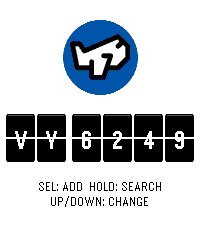
DailyNever miss a flight update from your wrist. Pebble Flights lets you track any flight in real time — just enter a flight code and get departure and arrival times, gates, terminals, aircraft details, delay predictions, destination weather, and more, right on your Pebble. The app is a premium app, and to continue the development of it we made it premium. It has 12h free trial and the cost afterwards will be $5.99. If you have any inquiry please contact at hello@ovvio.studio. Thanks for supporting ♥️. Features: - Real-time flight tracking with smart auto-refresh that speeds up near departure time. - Aircraft details: model, registration, seats, engine type, and more. - Airport delay predictions for departure and arrival. - Route distance and estimated flight time between airports. - GPS distance to your departure airport. - Destination weather: current temperature and conditions at your arrival city. - Live countdown to departure with context-aware tips. - Offline mode: view your last tracked flight without connectivity. - App settings: set your flight code, units (metric/imperial), and time format from your phone. - Timeline pins: add your flight to the Pebble timeline from the options menu. - Multi-flight: Up to 3 flights stored to check on their status How it works: 1. Enter a flight code on the watch or set it from the phone settings. 2. The app fetches live data through your phone and displays it across multiple pages (route, times, aircraft, delays, weather and countdown). 3. Data refreshes automatically
 0
0Pebbodex
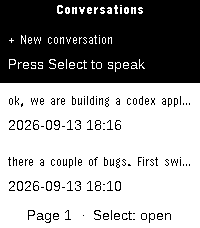
Tools & UtilitiesAsk questions and read Codex conversations on your Pebble Time 2. Browse conversation history, dictate a question using Pebble's speech service, and choose a model and reasoning level from the available Codex catalog. Messages are displayed in a compact chat view with separate user and assistant bubbles.