 20
20JuliaFractals - Fractals on your wrist
Tools & UtilitiesEver wanted to render fractals on your watch? Well, now you can! This app renders random julia sets right on your Pebble! Features: - Customizable iterations - Shake to Fav julia set - White-on-black or black-on-white setting Controls: Press UP/DOWN: change iterations Press SELECT: render new set Hold UP: show favorite sets Hold SELECT: show settings Hold DOWN: show info
 20
20ChipRef
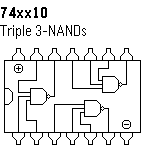
Tools & UtilitiesCommon integrated circuits reference app, showing internal schematics, pinouts, truth tables (to come)...
 20
20FuelGauge
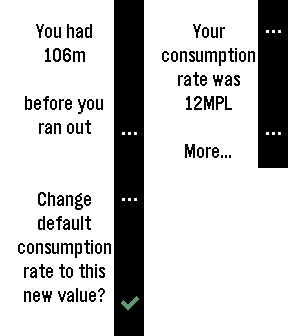
Tools & UtilitiesRide a motorbike with no fuel gauge? Use this app to work out your range and consumption rates. Caters for Imperial, US and Metric systems. Assumes when you fill up it's right to the top. Estimates only - use at your own risk!
 20
20MacroDroid - Device Automation for Andro
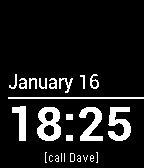
Tools & UtilitiesMacroDroid is a task automation and configuration app for Android that focuses heavily on usability with a simple, attractive UI and logical step by step process. MacroDroid now includes integrated pebble support with the companion watch app. This allows you to launch macros via a button press on your watch and send notifications, text and vibration events to your watch.
 20
20Pebbletracker
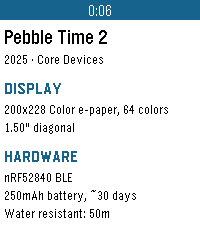
Tools & UtilitiesPebbletracker provides detailed information on every Pebble smartwatch ever made, including items such as processor speed, memory, display type, supported firmware versions, price, storage, and connectivity options.
 20
20Dice Roller
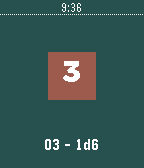
Tools & UtilitiesA simple dice rolling app. Use the top button to cycle through the number of sides on the dice - 2, 3, 4, 6, 8, 10, or 20. Use the bottom button to cycle through the number of dice. 1 - 6. The center button, or a flick or the wrist, will roll the dice. The total and current dice selection in 'xdy' terms are at the bottom. The colors are random, as everyone knows that good design comes from random colors. All dice will have the same number of sides, making this app not as useful as it could be. But it does what I need out of a dice roller, which isn't much. I'm not much of a programmer, but this was a fun project. I hope it helps.
 20
20GW2 Bosses Timeline
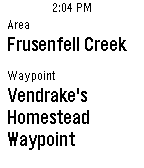
NotificationsView the next 30 minutes worth of Guild Wars 2 bosses on your timeline.
 20
20Fist of Fuury
GamesCan you punch faster than Bruuce Lee ? Challenge yourself with this game ! Developed by : Yiqian Hui, Peh Yee Woon and Suan Hui Pu University of Southampton Malaysia Campus
 20
20Flashcards
Tools & UtilitiesFlashcards lets you quiz yourself on the go! Have an upcoming test? Study on the way! Have a debate? Review your talking points. You can add all the questions and answers you want in the "Settings" menu within the Pebble app.
 20
20News
DailyView most popular news from the New York Times API. -API keys are needed from http://developer.nytimes.com/docs
![Utilities Bundle 2 [Pebble Rocker]](https://assets.repebble.com/screenshots/52e1d8be3bf01a324700010b-1.png) 20
20Utilities Bundle 2 [Pebble Rocker]
Tools & UtilitiesIncludes Android Settings, Phone Pager, Photos, and Tip Calculator apps. IMPORTANT: This watch app requires the Pebble Rocker companion app available via the Google Play store.
 20
20MIDI Tester
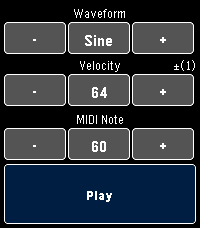
Tools & UtilitiesA simple tool for experimenting with the MIDI capabilities of supported devices. Change the wave form, velocity and notes to hear what they sound like without investing time into compiling and pushing builds to your device. This app was primarily made for developers, but I've noticed is also a cheeky way to annoy your dog or coworkers :P • Hold the + or - buttons for auto repeat • Press the Select button to toggle 1 or 10 step increments • Hold the Play button to sustain the note
 19
19W&L: Amino Acids App
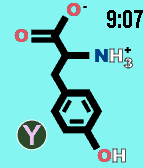
Tools & UtilitiesWatch & Learn Flashcards show the structures of the 20 common amino acids on the front. Pressing "select" turns the card to the back, showing the name and chemical characteristics. Amino acids change every 15 minutes or when down button is pressed. Up button = science time! *This watchapp is meant solely for studying and not for cheating*
 19
19Presentation Counter
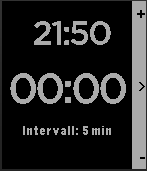
Tools & UtilitiesStart a presentation and the app will remind you in configurable intervalls via short vibrations how much time has elapsed 1 vibe: intervall has passed 1st time 2 vibes: intervall has passed 2nd time 3 vibes: intervall has passed 3rd time 1 vibe: intervall has passed 4th time and so on
 19
19Limone
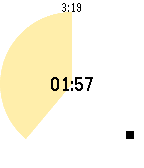
Tools & UtilitiesA simple pomodoro timer for Pebble, to notify 25 minutes work finished and after take 5 minutes break. Optionally supports to trigger IFTTT Maker channel and show today's tasks in Todoist.