 15
15TVFoodMaps - Restaurants on TV
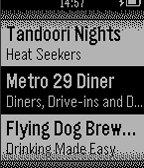
Tools & UtilitiesTVFoodMaps for Pebble is the very simple version of our website, tvfoodmaps.com, that allows you to find all the restaurants featured on over 40 different food and travel shows like Diners, Drive-Ins & Dives, Man v. Food and more. The app is very simple, it uses your current location to show you the 10 closest restaurants seen on TV. You can then click to see some additional information about each restaurant like how far away it is and what show it was on.
 15
15Run Tracker
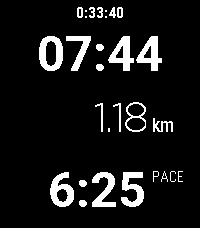
Health & FitnessThis is a run / walk tracker for Pebble with a focus on simplicity. It doesn't require a companion app but it does require a connection to a phone for GPS. The app shows the time, distance and pace of your run as well as the wall time. Press Select to start/pause/resume your run. While running, it shows your current pace. Wile paused, it shows your overall (average) pace. The app doesn't save any data about your previous runs. At the moment, the distance can be shown in kilometers but not in miles. The Pebble watch doesn't have GPS so it needs to use your phone to get the current position. It seems that Pebble can query the current position but can't trigger a precise GPS lock. The location will be inaccurate unless another app on the phone is requesting the location. Therefore, I recommend that you use a separate app on your phone, such as Strava or Google Fit, to record an activity to ensure that precise location data is available.
 15
15Clinch
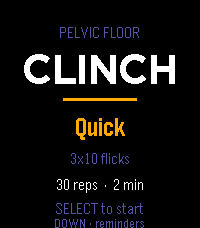
Health & FitnessGuided pelvic floor training, on your wrist. Clinch runs your pelvic floor sets so you don't have to count in your head. Each rep is a guided squeeze and release, cued by vibration, so you can train with your wrist down and your attention somewhere else. Pick a protocol and press start: Mixed — 10 quick reps to train the fast reflex, then 3×10 five-second holds for endurance. The one to run daily. Long holds — 3×10, five seconds on, five off. Straight endurance work. Quick — 3×10 short flicks in about a minute, for when you've only got a moment. While a set runs, a column fills as you squeeze and drains as you release, so a glance tells you where you are without reading a number. A short buzz starts each rep, a double buzz sends you into the release, and a longer pattern marks the end of a set. Pause, skip a rest, or bail out any time. Reminders that fit your day. Set up to three daily nudges and put them at any hour and minute you like — hold to open the editor and scroll each field. When a reminder fires, the watch buzzes and opens straight to a start prompt. It all runs on the watch's own scheduler, so it works whether or not your phone is nearby. Stays on your wrist. No account, no companion app, no data leaving the watch. Your protocol choice and reminder times are saved locally between sessions. Controls Menu: SELECT starts · UP changes protocol · DOWN opens reminders During a set: SELECT pauses · DOWN skips a rest · UP or BACK returns to the menu Reminders: UP/DOWN pick a slot · SELECT toggles it on/off · hold SELECT to set the time ***Medical Disclaimer*** Clinch is a training timer, not medical advice. Pelvic floor exercises are widely recommended, but roughly a third of people doing them from written instructions use the wrong muscles. If you're training for a specific symptom rather than general maintenance, it's worth seeing a pelvic floor physical therapist once to confirm your technique — it'll make every session here count for more.
 15
15Match Counter
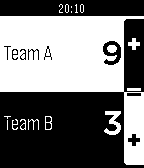
Health & FitnessEasy app to count points in a Match
 15
15SongBook
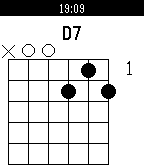
RemotesLinks with SongBook Android or iOS to show current and next song title, subtitle and chords. Use Select button to view chord definitions for current song. Move to previous/next song in the SongBook app with the Up/Down buttons.
 15
15Voice J ↔︎ E
Tools & Utilities英語と日本語相互に対応した翻訳アプリです。 アプリを日本語用と英語用に切り替えて使用します。 翻訳された文字は相手に見せるために180度画面を回転させることができます。 This is a translation app that supports both English and Japanese. You can switch between the Japanese and English modes within the app. You can rotate the screen 180 degrees to show the translated text to the other person.
 15
15AstroCast
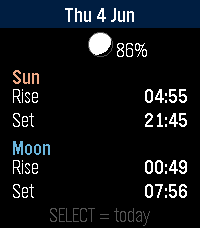
DailyAstroCast = Astronomical Forecast AstroCast turns your Pebble into a precise sun and moon almanac for your exact location. Open it for a clean overview of today, then step backward or forward through any day to plan ahead or look back. Features: * Overview page with sunrise, sunset, moonrise, and moonset at a glance, plus a small location-aware moon showing the current phase and illumination. * Detailed sun page: sunrise, sunset, solar noon, maximum altitude, day length, rise and set azimuth, and civil, nautical, and astronomical twilight. * Detailed moon page: moonrise, moonset, illumination, phase name, moon age, transit, maximum altitude, and rise and set azimuth. * A moon drawn and shaded exactly as it appears in your sky, rotated for your latitude rather than the flat calendar view. * Automatic positioning, or fixed coordinates you set yourself, with the nearest place name shown for confirmation. Navigation is simple: up and down move between days, select jumps back to today or switches between the sun and moon detail pages. Built for all Pebbles
 15
15Big Date
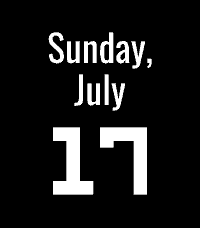
Tools & UtilitiesShows a simple date view. Great for assigning to a Quick Launch action when using faces that don't show the date!
 15
15Find My iPhone
Tools & UtilitiesTrigger the real Apple Find My Play Sound alert for your configured iPhone from a Pebble watch through your self-hosted backend
 15
15Series Timer A
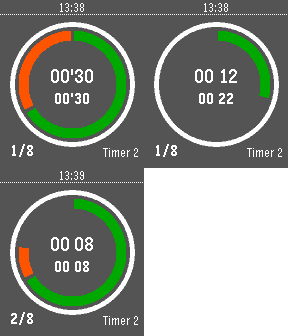
Tools & Utilities'Series Timer A' is a copy of 'Series Timer' watchapp. Using both watchapps you can launch an second timer when an first timer is running. You will have a new full set of timer settings. In 'A' version, timer name and serie count display are switched.
 15
15Pomodoro Clock
Tools & UtilitiesPomodoro Clock Stay focused, one session at a time — right on your wrist! A simple Pomodoro timer for your Pebble watch. Work in focused 25-minute sessions with short breaks in between. Features: 25 min work / 5 min break cycle Long 15 min break every 4 sessions Bold orange display with large countdown Progress bar shows time remaining Vibration alert when session ends Auto-cycles between work and break Controls: SELECT — Start / Pause / Resume UP — Restart current timer DOWN — Stop Stay productive without reaching for your phone.
 15
15Dice
GamesDice your watch. Shake the clock to roll a die!
 15
15Khelljyr Framework Example (Keyboard Sc
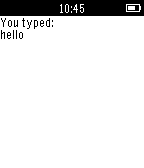
Tools & UtilitiesThis is an example made with Khelljyr Pebble Framework The topic of this example is the Keyboard scene feature. /!\This is a code example for pebble. Unless you are a developer, this application is useless for you, don't blame it ;p/!\ If you want to see the code of this project, go on the github project ! (https://github.com/nvareille/Khelljyr)
 15
15WDW Queues
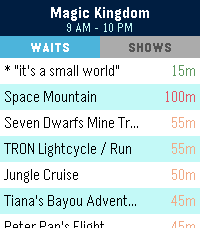
Tools & UtilitiesSkip the guesswork. WDW Queues brings live Walt Disney World data straight to your Pebble — no phone-fumbling, no app-switching, no squinting at a tiny map. What you get: - Live wait times for every attraction across Magic Kingdom, EPCOT, Hollywood Studios, and Animal Kingdom. - Show schedules for every performance, with the next start time highlighted. - Opening and closing hours for each park, shown right on the park picker so you know at a glance where's still open. - Favourites — pin your must-do rides and shows to the top of the list, kept in sync across park switches. - Sort by wait (ascending or descending) or alphabetically. Built for the watch: - Readable at a glance. Traffic-light colour coding (green / amber / red) means you don't need to read numbers to know if it's a walk-on or a two-hour queue. - Works on both Pebble Time 2 (rectangular) and Pebble Round 2 (circular) — with native layouts for each. - Auto-refreshes every five minutes while open; pull the latest on-demand by switching parks. Powered by ThemeParks.wiki — the community-maintained open API for theme-park wait times.
 15
15Moon Ascending Descending
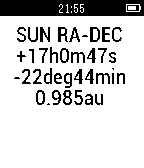
DailyMoon Ascending Descending Slope. All the calculation is done locally in pebble ( no link to internet is needed). The moon declination slope will shown as a real calculated graph in pebble by pressing the center button. The ticks on the time axis are in units of day. The ticks on the declination axis are in units of degree. The down button on the right side of the pebble watch will show the position of the moon in celestial coordinates (RA,DEC). If the current declination does increase (ascending moon) we call it in Swiss German (obsigänd) if it is in the descending it is called (nidsigänd), the descending moon. The numerical value on the right is the first derivative of the declination to the time (degree/day). The value d is the second derivative of the declination to the time (degree/(day*day)). To get suns position (RA,DEC) click the upper bottom on the right of the pebbel. The difference of the RA values are representative for the moon phase, as example 12 hour full moon, 0 hour new moon. A drawing of the moon phase, according the difference of the right ascension (RA) of the moon and the sun, will be included in the first picture together with the moon slope ascending descending curve. Remark: In a next release and if needed the accuracy of the object positions could be improved, now in the order of a few minutes, to less than one minute.