 15
15Moon Ascending Descending
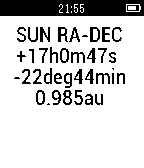
DailyMoon Ascending Descending Slope. All the calculation is done locally in pebble ( no link to internet is needed). The moon declination slope will shown as a real calculated graph in pebble by pressing the center button. The ticks on the time axis are in units of day. The ticks on the declination axis are in units of degree. The down button on the right side of the pebble watch will show the position of the moon in celestial coordinates (RA,DEC). If the current declination does increase (ascending moon) we call it in Swiss German (obsigänd) if it is in the descending it is called (nidsigänd), the descending moon. The numerical value on the right is the first derivative of the declination to the time (degree/day). The value d is the second derivative of the declination to the time (degree/(day*day)). To get suns position (RA,DEC) click the upper bottom on the right of the pebbel. The difference of the RA values are representative for the moon phase, as example 12 hour full moon, 0 hour new moon. A drawing of the moon phase, according the difference of the right ascension (RA) of the moon and the sun, will be included in the first picture together with the moon slope ascending descending curve. Remark: In a next release and if needed the accuracy of the object positions could be improved, now in the order of a few minutes, to less than one minute.
 15
15LIFX Client
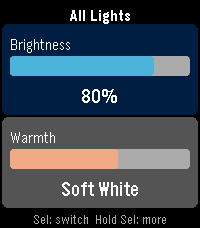
RemotesControl your LIFX smart lights from your Pebble. LIFX Client lets you adjust brightness and color temperature on the fly, or pick from a palette of colors. Features: - Adjust brightness in 5% steps - Tune warmth from daylight (6500K) to candlelight (2500K) - Choose a color from 8 presets - Target any individual light or group from your LIFX account - Works on every Pebble: round watches get a purpose-built arc UI, larger screens scale up automatically Controls: - UP / DOWN: adjust the active slider - SELECT: switch between Brightness and Warmth - HOLD SELECT: open the action menu In Color Mode, the Warmth slider shows your chosen color. Press UP or DOWN on Warmth to return to white light. Setup: 1. Go to cloud.lifx.com/settings and generate a Personal Access Token 2. Open the Pebble app on your phone and find LIFX Client 3. Open Settings, paste your token, and save 4. Launch the app -> HOLD SELECT -> Select Target to pick a light
 15
15Gabagool.
GamesGabagool. featuring: Gubby THE Plexer [JP] (explicit) as seen on CloudPebble (sorry guys) Crowned first pebble shitpost
 15
15HA Voice Tasks
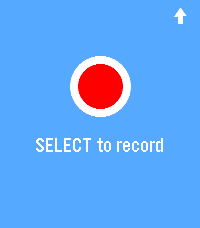
Tools & UtilitiesDictate voice notes on your Pebble and save them as tasks to Home Assistant todo lists.
 15
15MicroKnit
GamesRelax and knit away your stress on your Pebble! Select to knit a stitch Back to undo a stitch Up and Down to cycle yarn color in your basket Longpress for background, yarn basket, and reset All progress is saved for your next knitting session (usually)
 15
15HTML COLORS
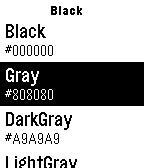
Tools & Utilities100 HTML Color Codes- With 10 Color Sections including Blue, White, Black, Red, Pink, Orange, Yellow, Purple, Green, Brown. Perfect for when you are programing a website and need color code options! Leave A Heart If You Like It!!! Email me if I might have made any mistakes or if you want me to add more color codes in the app or if you have any suggestions for any apps you want me to make or how to improve my app! Thank You!!!
 15
15Philly Transit
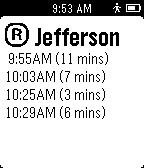
DailyCheck out our new app Get Me There! Supporting many cities worldwide now with buses and all transit realtime correction! For more information, check out GetMeThereTransitApp.com Realtime Philadelphia rapid rail transit information. Uses user's location to determine nearest 5 stations and displays realtime departure times from each. Lines include the Market Frankford Line, Broad Street Line, Broad-Ridge Spur, PATCO High Speed Line, Regional Rail (Between Jefferson and University City). With update 1.1 you may now select two regional rail stations and view trains traveling between them. You can also set a line as a favorite and have it displayed at the top of the list when in range. (These are premium features) An update in the near future will add support for the Norristown High Speed Line as well as Trolley Routes. Check: chrisschlitt.com/PhillyTransit for more information. Disclaimer: Trip Planning Data and Stop Information belongs to SEPTA and PATCO. Philly Transit is in no way associated with SEPTA, PATCO, or any transit authority.
 15
15BombleMan Demo
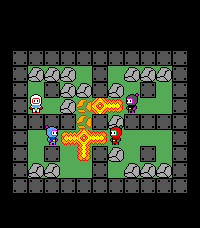
GamesBombleMan is a Bomberman clone for (most) Pebbles! Face off against 3 CPUs across 3 levels to become the ultimate "Bombler"! To play: * Select to move * Up/Down to turn * Back to place a bomb * Hold back to exit Powerups: * More bombs * Bigger explosion * Invulnerability * Kick CPUs: * Hunter (gray): goes after YOU * Friend (blue): goes after CPUs * Hoarder (red): goes for powerups ------ I'm releasing this as a demo to free BombleMan from the void (it's been there for a very long time). You can check out more details on the github page for how I made things like the CPUs work and what my future plans are: https://github.com/HarrisonAllen/bombleman
 15
15Yugioh Score Keeper
Tools & UtilitiesA simple app to take score in Yugioh games
 15
15TAFline
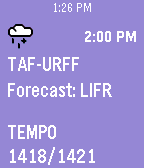
DailyGoing flying today? Put a TAF report on your wrist! TAFline pushes TAF report pins into your Pebble Timeline. Not only will you get the weather forecast, but we calculate the flight rules. Icons and background make it simple to know when your flight might become IFR. Made by a pilot for pilots. Open the settings to set a station or use the nearest one. Then launch the app. That's it! Old pins will automatically be replaced if a new report is issued or the station is changed when the app is opened again. Updated 2016-02-13: Now available on the Pebble Round Ties into avwx.rest, my METAR and TAF parsing API. Note: Flight rules are determined by the prior conditions if not all info is present in the associated report. 1: IFR - 9999 BKN009 2: IFR - TEMPO 7000 (BKN009) Pins will appear as soon as your timeline syncs.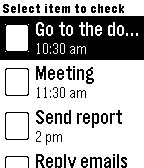 15
15ListaNow for Pebble
Tools & UtilitiesListaNow allows you to create a list using your phone and send it to your Pebble. That way you can access the list offline using your pebble without having to sync with your phone. --- Users Reports: "This is great for groceries, I can send the list to my pebble and leave my phone at home." - Me "Is this the reason you keep looking at your wrist all day?" - Mom "I just wanna know what time it is!" - Grandpa
 15
15Lovense Remote
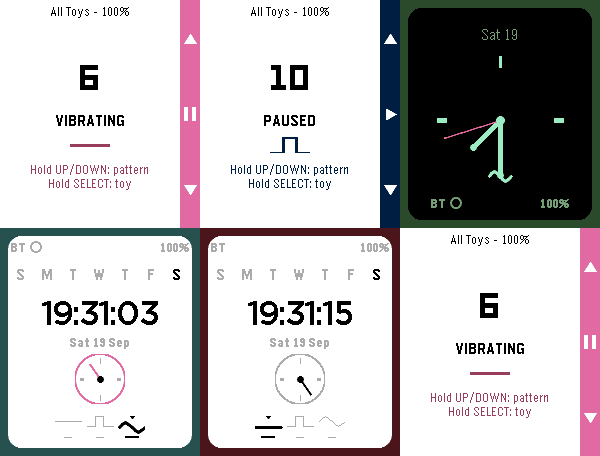
RemotesControl your Lovense toy discreetly from your wrist. Choose an open Basic remote-control face, or a Discrete face (Analog or Digital) that looks like an ordinary watch to everyone but you — vibration level and pattern are read entirely from hand position and color, never a number on screen. Fully customizable colors, with a Toy Settings screen for connection status and multi-toy groups. This app is created independently by its developer and is not affiliated with, endorsed by, or sponsored by Lovense or Pebble/Core Devices/Rebble. Built with the assistance of Claude (Claude Sonnet 5, Anthropic).
 15
15OpenSprinkler
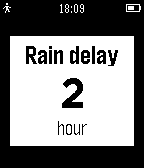
RemotesA Remote for your OpenSprinkler on your watch! - show the sprinkler status and Infos - set rain delay - reset rain delay - manual Mode - stop all stations - start test or programs - update with shake - show 7 day overview of waterlevel You need a OpenSprinkler from www.opensprinkler.com Tested on Firmware 2.1.4 API.
 15
15WootCrap
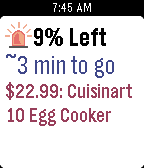
DailyAre you tired of missing out on Bags of Crap? With WootCrap, your house will soon be filled with cheap crap! During one of Woot’s famous Woot-Offs, just leave this app open on your Pebble and it will track the status of the current item, with vibrations to notify you when the item is almost sold out, is sold out, and when there’s a new item. To help you collect as much crap as possible, when a wild Bag of Crap appears, the Pebble will vibrate urgently so you don’t miss out. When you have WootCrap open and a Woot-Off is happening, the app constantly fetches updates from Woot.com to show you the current item up for sale as well as that item’s price, percent remaining, and estimated time remaining. It intelligently decides how often it should be checking the Woot site based on how much of the sale is remaining to help save their servers and save your battery life. Even when it’s not a Woot-Off day, you can use the app to see the current Woot. The watch’s up and down buttons can be used to cycle through the different Woot categories. You have the option of setting a daily notification time in the app’s settings, so that every day you can know what is the new item for sale on Woot. Additional Woot-Off Features: - Vibrates when there are 5% or less of the current item remaining, so if you’re trying to find a Bag of Crap, you have time to prepare for the next item by refreshing your login - Vibrates again when an item is sold out, and when a new item is up for sale Note: This app is not affiliated with Woot Inc.
 15
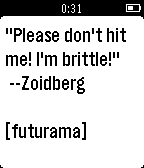
15Quotes
DailyNOTICE: Unfortunately the website that is used to get quotes from is currently down on 27-06-15. I'm hoping it will get corrected soon as there are a few other pebble apps that rely on it. A simple quotes app that displays quotes from iheartquotes.com Select from several categories or sources. Usage: - Press select to choose category/source or load a new quote from the current sources. - Long press select on the quotes or category screen to select a quotes source from current category.