 14
14FlipFast
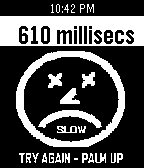
GamesHow fast can you react? FlipFast starts with your palm up and held steady. After a random number of seconds your Pebble vibrates and a timer starts. Flip your palm down as quickly as you can to stop the timer. Your result, including reaction time, is shown on the watchface. Can you do better next time? With 5 selectable reaction speed test levels, anyone can be challenged.
 14
14Say Something Smart
Tools & UtilitiesGenerate phrases that make you sound like a super hacker!
 14
14TTC Service Alerts
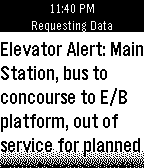
NotificationsThis will get info from the TTC Service Alerts to your watch. Double click UP/DOWN to see prev/next alert. Double click SELECT to refresh alerts.
 14
14Garadget Controller
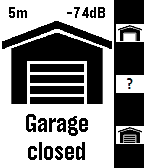
RemotesRemote control for the Garadget garage door controller. Shows door state, time since last change and wifi signal strength. Controls are as follows: Up: open door Down: close door Select: check door status and if you have more than one door: Long up: go to previous door Long down: go to next door
 14
14Ritual Builder
Tools & Utilitiesa tool to build ritual
 14
14EnigmaVu
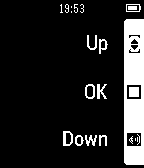
RemotesRemote Control for Dreambox(?) / Enigma based satellite receiver. Tested on Vu+ Solo2. You can control Power, Volume and Program by the buttons of your watch. I will left this app as it is because I integrated the control into my "raspio" app which allows to control the vu+ and an Internet Radio based on raspberry pi
 14
14Test Location
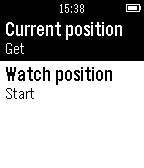
Tools & UtilitiesTest location functionality of your Pebble. You can test if your Pebble can get your current location or track your location while you are moving.
 14
14Perfect Egg
Tools & UtilitiesBoiling eggs can be difficult. When is it perfect? This app tells you when it's time to get the eggs out of the water.
 14
14Glance Cal
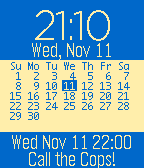
DailyGlance Calendar with slide in data panel. Double click the top and bottom buttons to move month. Requires Premium. Does NOT include other watchfaces. Cannot accept custom faces
 14
14Ask Pebble
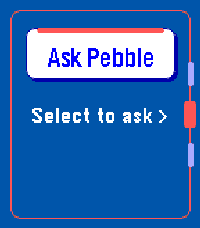
Tools & UtilitiesAsk Pebble turns Pebble Dictation into a compact AI Q&A flow. Press Select, speak a question, and the app sends the recognized text from PebbleKit JS on your paired Android phone to the API endpoint selected in settings. The response is shortened for the watch screen. This is a BYOK app: you must enter an API key for OpenRouter, OpenAI API, or a custom OpenAI-compatible Chat Completions endpoint. Usage costs, credits, rate limits, and model access are handled by your account with that provider. Optional context features are available in settings. Time context is enabled by default. Location and health context are opt-in. Health context can include today's steps, active minutes, sleep minutes, and restful sleep minutes when available from Pebble Health. This app is experimental and Android only. iOS is not supported or tested.
 14
14Wakka Wakka
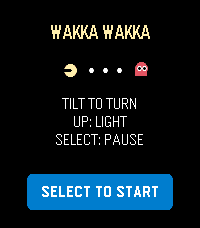
GamesWakka Wakka is a compact maze-chase game designed for Pebble Time 2 and Pebble Time or Time Steel. Guide a quick golden runner through a scrolling stage by tilting your wrist. Clear every energy dot while four colorful rivals use different pursuit strategies to close in. Large energy dots briefly reverse the chase: rivals turn blue and become vulnerable, giving you a chance to hunt them for bonus points. Three lives, a clear ready prompt, responsive buffered turns, a wraparound tunnel, and an optional gameplay backlight make each run easy to start and difficult to master. Controls: • Tilt: buffer turns at the next legal junction • UP: toggle backlight • DOWN: south-direction emulator fallback • SELECT: start/restart or pause/resume and recalibrate • BACK: exit Hold the watch level during calibration. Supports Emery and Basalt with platform-aware 200×228 and compact 144×168 layouts. English interface. Runs entirely on the watch with no account, configuration, network connection, or phone service during play.
 14
14Rozkład jazdy pociągów Polish Trains
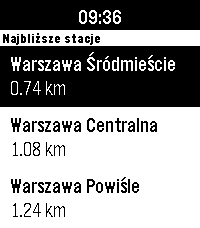
DailyNever miss your train again! The app shows the closest stations and departures with delays, platform and track numbers. It primarily uses the custom backend in `rozklad_backend/` directory, which serves the data from the official [PKP PLK PDP API](https://pdp-api.plk-sa.pl/swagger/index.html), and falls back to the unofficial [API Bilkom](https://kalkulatorkolejowy.pl/bilkom) when the custom backend is unreachable or does not know a station. The app bases on [PebbleRail](https://github.com/jccit/pebblerail). If you find any bugs or have any ideas for improvements, please open an issue on GitHub with the appropriate label. Pull requests are also very welcome 😉 Tags: PKP, SKM, WKD, Polish, Poland, train, timetable
 14
14Trizones
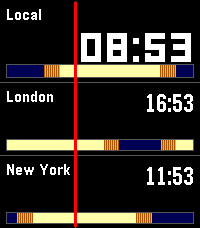
Tools & UtilitiesTrizones lets you track three time zones at a glance - perfect for remote teams, frequent travelers, and anyone with family scattered across the globe. Each row shows a city name, its local time, and a colour-coded sunrise/sunset band so you can instantly see whether it's day or night there. The band shifts as the sun moves, giving you a visual sense of where each city is in its day. Features - Three simultaneous time zones, fully configurable - Sunrise and sunset visualised for each city - Optional sunrise/sunset time display - 5+ themes: Midnight, Aurora, Dusk, Slate, Ice, and more - Time travel: step forward and backward in time with the Up/Down buttons to plan calls across zones - Press Select to instantly return to the current time - 40+ cities pre-loaded including London, Tokyo, New York, Sydney, Lagos, Dubai, San Francisco, Buenos Aires, Tel Aviv, and more Designed for Pebble Time 2, support for more models will come in the future.
 14
14Start Timer Sail Racing
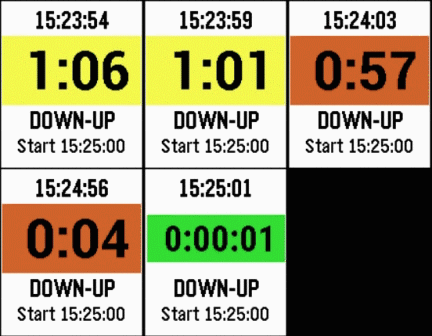
Tools & UtilitiesStarting Timer for Yacht Racing Counts down to Start with vibration alerts. Multiple operation modes. Developed by experienced sailboat racer. FEATURES: Large easy-to-read display with all relevant data and color highlighting. Standard 5 minute starting sequence by default, but initial number of minutes can be changed. Short vibrations at 4 minutes, and at seconds from 10 down to Start, long vibrations at 1 minute and at Start. Jump to prior minute, next minute, or sync to clock by button press. Remembers timer Mode and Start time when not running. Wakes up automatically if not running at 10 seconds before Start. COLOR: Yellow background for more than 1 minute to Start. Red background for less than 1 minute to Start. Green background for count up after Start. MODES: Rolling: from one Start into next Start. Down-Up: counts down to Start and then counts up. Down-Stop: counts down to Start and stops. BUTTONS Top: Jump timer to prior minute. Long press to stop and reset to initial value or change initial value. Middle: Start/pause timer toggle. Long press to sync Start time to nearest clock minute. Bottom: Jump timer to next minute. Long press to rotate timer Mode. CATEGORY: Sailing
 14
14Solfarer Atlas
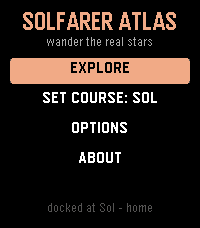
Tools & UtilitiesTravel where you like. Solfarer Atlas is the Local Bubble as a place you can walk around: 2,236 real star systems within 100 light-years of Sol - Proxima Centauri, Barnard's Star, Wolf 359, Tureis, Guniibuu, and the rest - from the Hipparcos catalog, in their true spectral colors. No hourly schedule, no daily seed, nothing waiting for you. Where the Solfarer watchface walks one path chosen for you, the Atlas hands you the whole neighborhood: the map centers on wherever you're docked, and the 24 nearest stars are yours to cycle through, one button at a time. Each one has a page - spectral class, absolute magnitude, distance from Sol, the constellation it belongs to - and, more to the point, what the trip would cost you. Set course and go. Every journey is honest special relativity: a 1g burn to the midpoint, flip, and brake. The flight plays out as a twin-paradox cutscene with both clocks running at their true relative rates - 7.8 light-years to Wolf 359 ages the universe 9.5 years and you 4.5. Your career keeps the tally: how many hops, how far you've roamed, the farthest you've ever been from home, and how much younger you are than everything you left behind. * 2,236 real star systems, names, classes, and constellations included * The 24 nearest neighbors from wherever you stand - the neighborhood re-sorts every time you arrive * A lifetime ledger: hops, light-years, and the gap between your clock and the universe's * Set course for Sol from the title menu, from anywhere in the Bubble * Options on the watch, no phone needed: full, quick, or no flight replay; confirm before travel; a buzz on arrival; and a reset back to Sol * Sibling of the Solfarer watchface and the Lighthaul courier game - same bones, real galaxy The physics is real: exact time dilation, honest 1g rocketry in rapidity. The stars are real too. Go and see them.