 10
10Horario 5to TIC
Tools & Utilitieshola
 10
10Toothbrush Timer
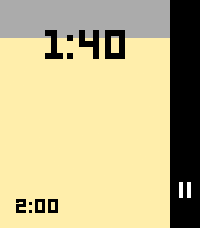
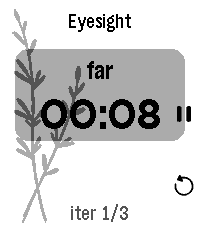
Tools & UtilitiesA simple timer for brushing your teeth, built for the Pebble watch. The app runs two back-to-back timers: a 2-minute timer for brushing your teeth, and a 30-minute timer before you eat. During the 2-minute timer, the watch vibrates every 30 seconds to prompt you to switch quadrants, then auto-advances to the 30-minute timer when finished.
 10
10Micro Moria
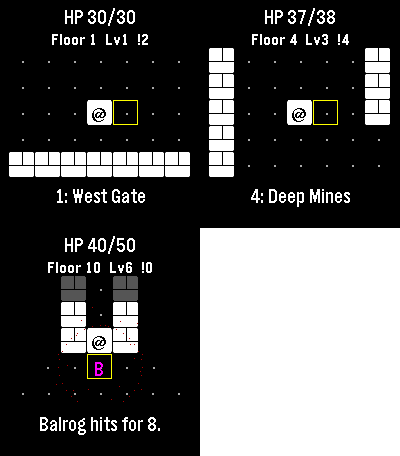
GamesI lost countless hours as a kid to a text Rogue derivative also themed after Moria, and I’m already zoned into playing it on the watch. Descend ten floors through Moria, collect treasure and equipment, and face the Balrog at the Bridge of Khazad-dum. Goblins pursue you, orc archers prepare ranged attacks, and cave trolls strike hard. Bump an enemy to fight. Play a few turns and come back later: the watch automatically saves your floor, position, enemies, health and gear. Gold and purchased equipment survive death or a return to camp. Spend gold between expeditions on blades, mail and lembas packs. Defeat the Balrog and take the final exit to unlock New Game+, up to five harder tiers. Up and Down turn; Select steps. Back opens healing, waiting and camp. Step onto stairs to choose whether to descend. Touch also moves you. No timer, account or connection required. For Pebble Time 2 and Round 2. Touch requires firmware 4.33.2; button controls remain available. By Luke Steuber.
 10
10STOXX Stock Tracker
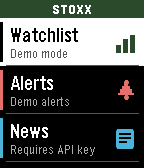
DailySTOXX Stock Tracker lets you track prices, set alerts, as well as track entries and P/L. You can even set a target price to monitor. Instructions in the app and watch. Requires a free API key from finnhub.io, paste your API key in the Settings page to use the app.
 10
10CharWatch
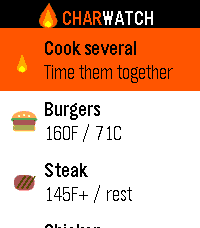
Tools & UtilitiesGrill timers and safe internal temps, right on your wrist. CharWatch turns your Pebble into a BBQ command center. Pick what you're grilling and it walks you through every stage — when to flip, when to add cheese, when to pull it — with a buzz on your wrist at each step, so you're never chained to the grill watching a phone. What it does 11 grill foods with USDA-safe internal temperatures built in Guided cook timers that prompt you to flip, toast buns, add bacon or cheese, rest, and confirm temp Steak, your way — five doneness levels that adjust the sear time Burger thickness — thin, regular, or thick, and the timer scales to match (no more raw-in-the-middle thick patties) Build your plate — toggle buns, bacon, and cheese per burger or dog Cook Several — put the whole spread on one timeline. CharWatch staggers each item so everything finishes together, and merges nearby prompts into a single buzz so you're not pinged six times a minute Confirm-temps reminder before you serve Runs entirely on the watch — no phone, no internet, no account Whether it's two burgers or a full cookout, CharWatch keeps the timing straight so you can focus on the fun part. Designed for the Pebble Time 2. Also builds for classic Pebble models.
 10
10Java String Methods
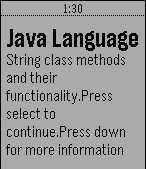
Tools & UtilitiesUseful app for programmers.
 10
10FastWasp
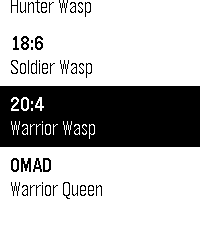
Health & FitnessFastWasp is a free, native intermittent-fasting tracker for the new Pebble devices from Core Devices. Everything runs on the watch - no companion app, no phone, no accounts, no internet. 6 fasting programs built in: - 12:12 - Worker Wasp - 14:10 - Scouting Wasp - 16:8 - Hunter Wasp - 18:6 - Soldier Wasp - 20:4 - Warrior Wasp - OMAD - Warrior Queen Glance-first UI. The main screen always shows a circular progress ring filling toward your target, a large HH:MM:SS countdown, and - once you pass the target - an OVERTIME badge with an upward counter. No hunting through menus to see where you are. Eating window tracking. After you stop a fast, FastWasp immediately starts counting down your eating window. A wrist alert fires when it closes. OMAD mode. Tracks elapsed time since your last meal with a thin progress bar toward the 23-hour target. Wrist alerts. A wakeup is scheduled at your target time so the watch vibrates and shows a banner even if you close the app. Long pulse for fast complete, double pulse for eating window closed. Stats. Total fasts completed, average fast length, longest fast, and total overtime accumulated - all on one scrollable screen. Press Up to open from any state. 100% offline. All data lives in watch persistent storage. Nothing leaves your wrist. Supports Core 2 Duo (diorite, 144x168 B&W) and Pebble Time 2 (emery, 200x228 colour).
 10
10Traffic Info Luxembourg
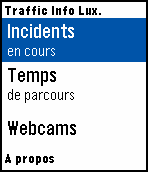
DailyTraffic information for Luxembourg motorways on your wrist! Data is fetched from http://cita.lu. This app is unofficial and NOT in any way supported or endorsed by the Administration des ponts et chaussées, Luxembourg. Features: - Incidents: Displays a list of current traffic incidents. Select an entry to view its details in a scrollable card. - Travel times: Displays a list of current travel times for a few destinations from several places. Select a starting place in the list to view the complete card. - Webcams: Choose from a variety of traffic monitoring webcams to show on the Pebble screen. Due to the limited resolution and color palette, image quality can suffer. Best results achieved during daylight hours. A few "hotspots" (busiest junctions) are promoted to the top of the menu to quickly access webcams around these areas in a sub-menu. Alternatively, the list is also sorted by motorway.
 10
10Notre Dame
DailyNotre Dame Golden Dome Watchface
 10
10mars:control
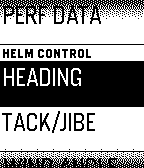
RemotesPebble WatchApp for the bo4 mars:pro marine device. - Display marine data (NMEA, Seatalk) - Display performance data - Use Pebble as MOB wearable device - Remote control auto helm Coming soon: - Remote control the mars:pro device - Control the mars:pro performance module - Get alarms to your wrist Please contact bofour to get the companion device for marine data aquisition and analysis.
 10
10OsakaSubway
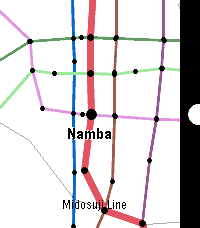
Tools & UtilitiesOsaka Subway Map. for English and Japanese. (1) SELECT: Choose the train. (2) UP, DOWN: Go to the next station, or return to the previous station. SELECT: Change to the other line. BACK: Back to select menu.
 10
10Garden Buddy
Tools & UtilitiesAn app that can tell you everything you need to know about as many plants as possible. This will tell you plant locations, do's and don't, watering and sunlight information in a nice compact way for a large arrangement of plants. It allows for editing and adding of your own as well as easy sorting methods to find the right plant.
 10
10Thymer
DailyThymer is a highly configurable timer app specifically tuned for Pebble Time 2: moderately big text for my old eyes, touch controls, and... that's it I guess. Timer definitions are written in TOML, processed on the phone, and sent to the watch where they are cached for daily use.
 10
102048
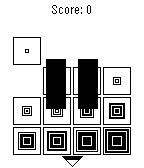
GamesA clone of 2048 for the Pebble smartwatch. Tilt the screen to combine adjacent matching tiles. You win when you reach the 2048 tile! Press the middle button to pause/unpause. Press the back button to undo your last move. Hold to exit.
 10
10Pebble Notes with Reminders
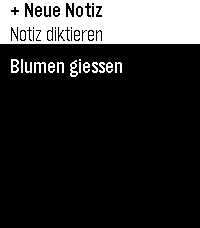
Tools & UtilitiesVoice-dictated notes stored entirely on your watch — no phone app needed. Usefull for doorpin notes or parking lot ids. Add, view, update, and delete notes by speaking. Set reminders just by saying phrases. German interface. Basically touch enabled user interface. Limited storage. Works on Pebble Time 2, Round 2, and 2 Duo. No settings, just as it is. It's done with the skill (see https://repebble.com/blog/spring-2026-pebble-app-contest) using Claude. Here's the full set of supported "remind me" phrasings — matched case-insensitively, checked in this order, first match wins: 1. Duration — English or German remind me in N minute(s) erinnere mich in N minute(n) 2. English clock time (ambiguous AM/PM) remind me at N o'clock — N is 1–12; resolves to whichever of N-AM or N-PM comes soonest (today or tomorrow). 3. German clock time — explicit 24h erinnere mich [um] HH:MM uhr — colon form, e.g. "erinnere mich um 14:25 uhr" erinnere mich [um] HH uhr[ MM] — natural spoken word order (Uhr between hour and minutes), e.g. "erinnere mich vierzehn Uhr fünfundzwanzig" um is always optional in both forms Minutes are optional in the second form — "erinnere mich um 14 uhr" alone defaults to :00 Rolls to tomorrow if that time today has already passed Numbers, in every phrase above: digits (5) or spoken words work interchangeably, English and German, including German compounds (fünfundzwanzig = 25, einundzwanzig = 21, etc., covering the full 21–59 range needed for hours/minutes). A few concrete working examples: "remind me in 5 minutes" / "remind me in five minutes" "erinnere mich in 3 minuten" / "erinnere mich in drei minuten" "remind me at 7 o'clock" "erinnere mich um 14:25 uhr" / "erinnere mich 14 uhr 25" "erinnere mich vierzehn uhr fünfundzwanzig" "erinnere mich um 9 uhr" (→ 09:00) Anything outside these four patterns is saved as a plain note with no reminder — no error shown, so it's worth sticking to one of these forms.