 10
10NewsSnacker
DailyRead popular twitter news feeds, remove duplicate stories and display on the watch. Simple eh? Because this is using Beta .js code, clicking 'select' to get the next story can be delayed by a few seconds. This has not been tested on iOS.
 10
10raspio
RemotesControl Vu+ Solo satelite receiver and Raspberry Pi Internetradio. See Github for more information (link to source code) Satellitenreceiver Vu+Solo und Internetradio steuern. Weitere Informationen auf Github (link zum Quellcode)
 10
10NewYorkTimes Whatchapp
DailyWith this awesome app you can scroll through the headlines and short descriptions of those headlines of The new york times.
 10
10Multiply
GamesA game similar to Cookie Clicker, but more simple. Race your friends to the highest score of cookies, buying multipliers on the way (Still In Beta).
 10
10Durr2
Tools & UtilitiesVibrates every set interval. A direct clone of Durr watch from Skrekkøgle.
 10
10Find My iPhone
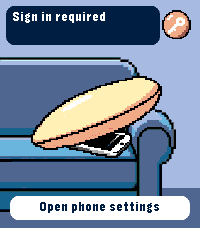
RemotesRing your iPhone directly from Pebble Time 2. Open the watch app, select an iPhone with the Up and Down buttons, then hold Select for 650 ms to send the sound command. The app runs through Pebble Core on your iPhone and talks directly to Apple over HTTPS. No separate companion app or intermediary server is required. Setup supports trusted-device two-factor authentication, multiple iPhones, automatic system language selection and clear states for offline devices, expired sessions and rate limits. Your password and two-factor code are used only during sign-in and are not stored. Apple session tokens remain in Pebble Core local storage on the paired iPhone. You can remove the saved session from the settings page at any time. Important: this is an independent, unofficial utility based on an undocumented Apple service. It is not affiliated with or endorsed by Apple. Apple may change the service without notice, which can temporarily or permanently stop sign-in or sound requests from working. Requires Pebble Time 2 (emery), Pebble Core on iPhone, an internet connection and an Apple Account with Find My enabled.
 10
10ChronoKit
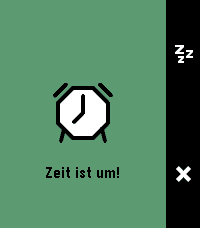
Tools & UtilitiesStopwatch and Timer in one app
 10
10EyeRef
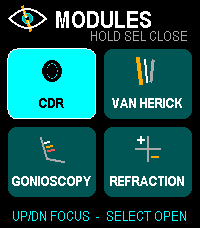
Health & FitnessOffline ophthalmology reference and refraction calculator for Pebble Time 2. Browse cup-to-disc ratio, Van Herick grading, gonioscopy landmarks and Shaffer grades, plus refraction tools for transposition, spherical equivalent, optical cross, retinoscopy working-distance correction, and vertex conversion. Designed for fast button and touch navigation and stores no patient data. Educational reference only; not a diagnostic or treatment system.
 10
10Wrist Glow
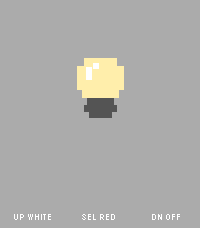
Tools & UtilitiesWrist Glow turns your Pebble Time 2 into a simple screen light when you need a tiny bit of glow in the dark. Choose from three modes for each of the physical buttons: - White for a bright neutral screen, keeps on backlight - Red for a less intrusive red screen, keeps on backlight - Off for a black screen with normal automatic backlight behavior The app is intentionally watch-only and has no phone companion, networking, animations, or background activity. A small bulb and button guide remain visible so the app never feels like an unexplained blank screen. The red mode uses red display pixels illuminated by the normal backlight. It does not change the physical backlight color. Pebble does not expose a documented brightness control to apps, so White and Red use the watch's normal backlight level.
 10
10MapNavi JP
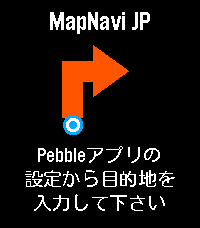
Tools & UtilitiesMapNavi JPは、スマホのMapNavi JP設定画面から住所を入力することで、Pebble Time 2のウォッチ画面に「300m先で右折」といった指示が矢印で表示される、日本向けナビゲーションアプリです。 徒歩・自転車・車の3つの移動手段に対応。 表示縮尺が変わることが目的で、経路は移動手段に最適化はされていないと思います。 カラー画面に周辺地図を表示し、曲がり角では自動的にバイブで通知します。 あくまで参考程度にすることをお勧めします。 ・カラー地図: 周辺の道路・建物・公園・川をリアルタイム表示 ・リアルタイムGPS追跡: スマホのGPSで現在地を自動追跡 ・経路から外れると自動リルート: 80m以上外れると自動で経路を再取得 ・曲がり角でバイブ通知: 指示が変わったことをすぐに知れます ・日本の住所に対応: 駅名・建物名での検索も可能 ・複数の移動手段: 徒歩・自転車・車から選択
 10
105/10/15
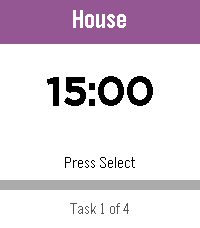
Daily5/10/15 is a highly configurable interval timer for Pebble. Starts with four ready-made lists — Work Loop, Long Loop, Quick Loop, and Morning Routine. Full add, delete, and edit support means build your own! The watch counts down and vibrates when it’s time to switch. Loop lists restart automatically; one-shot lists announce when you’re done. State persists across app exits, so you can check your watchface without losing your place. • Select — play/pause • Up/Down — skip tasks • Long Select — reset current task • Long Down — back to the List of Lists Named in tribute to the classic iPhone app 30/30.
 10
10Gym Zones
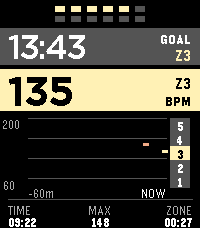
Health & FitnessGym Zones is a focused strength-training companion for Pebble Time 2. Start and finish workouts manually, see current BPM and a rolling one-hour graph, track a stable heart-rate zone, and run a configurable between-set rest timer. The app can reopen when rest ends and preserves an active workout for ten minutes after you exit. Outside a workout, take a one-minute resting PPG-RMSSD measurement and compare it with a personal seven-day baseline. HRV is an optical wellness estimate, not a medical measurement or readiness score. Gym Zones has no account, server, GPS, or network service and does not transmit workout or sensor data. Settings stay locally on the watch and in Clay on the phone; Pebble Health synchronization, if enabled, is managed by PebbleOS. Assign Gym Zones to Settings → Quick Launch → Tap Up for direct access.
 10
10Pebble Buy
DailyBESCHREIBUNG DEUTSCH ---------------------------------------------------------------- Pebble Buy – die Einkaufsliste am Handgelenk. Leg dir eine Liste je Laden an – Aldi, Edeka, Baumarkt, Drogerie – und ruf im Laden einfach die passende auf. Abhaken geht mit einem Druck oder Tipp; der nächste Artikel rutscht direkt unter die Markierung. Erledigtes wandert durchgestrichen nach unten. Neue Artikel auf der Uhr: • Diktieren: „Milch, Eier und zwei Kilo Äpfel“ wird zu drei Artikeln – mit Menge • Anfangsbuchstaben wählen, dann aus Vorschlägen tippen (rund 300 Begriffe + deine eigenen) • „Häufig“: deine üblichen Artikel, was bald wieder fällig ist, steht oben Kategorien werden automatisch erkannt und farbig markiert. Funktioniert auch ohne Netz im Laden – Änderungen werden nachgeschickt. Bequem am Computer pflegen: pebble.ni3d.de/buy (Web-App mit Hell/Dunkel-Modus) – drei Tage gratis testen, mit Pro unbegrenzt. Gratis: 2 Listen, Web-App 3 Tage zum Testen. Pebble Buy Pro (einmalig 2.99 USD zzgl. MwSt.): Web-App unbegrenzt, bis zu 20 Listen, Listen mit dem Haushalt teilen (live abgeglichen – wer eingeladen wird, braucht kein Pro) und Statistik mit Kaufrhythmus und „bald wieder fällig“. Freischalten direkt auf der Uhr. Datenschutz: Konto mit E-Mail, gespeichert auf ni3d.de in Deutschland. Keine Werbung, keine Weitergabe; eine anonyme Artikel-Statistik gibt es nur, wenn du sie einschaltest. BESCHREIBUNG ENGLISCH ---------------------------------------------------------------- Pebble Buy – your shopping list on your wrist. Create one list per store and open the right one when you get there. Tick items off with one press or tap; the next item slides right under the cursor. Done items move to the bottom. Add items on the watch: • Dictate: "milk, eggs and two kilos of apples" becomes three items – with quantities • Pick the first letters, then choose from suggestions (built-in + your own items) • "Frequent": your usual items, the ones due soon on top Categories are detected automatically and color-coded. Works offline in the store – changes sync when you're back online. Edit on your computer at pebble.ni3d.de/buy (web app with light/dark mode) – free for three days, unlimited with Pro. Note: the built-in word list and dictation splitting are German-first. Free: 2 lists, web app for 3 days. Pebble Buy Pro (one-time 2.99 USD + VAT): unlimited web app, up to 20 lists, share lists with your household (live sync – invited people don't need Pro) and statistics with buying rhythm and "due soon". Unlock right on the watch. Privacy: account with e-mail, stored at ni3d.de in Germany. No ads, no data sharing; anonymous item statistics only if you opt in.
 10
10Burh
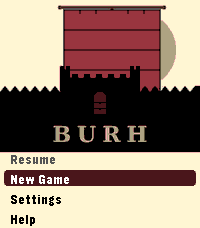
GamesLate ninth-century England. Norse fleets work your coasts every year. You have a small kingdom, a war band, and difficult choices to make before winter closes in. Most turns take thirty seconds. A campaign plays in short sessions across real days - the game waits when you are not watching. Your kingdom is a four-by-four grid of territories, roughly half settled when the campaign begins. Fortifications take years to build. The same people who farm your land fill your fyrd. Monasteries draw Norse attention. Ruins wait to be reclaimed. The Norse learn your settlements over time. A fleet that has raided your coast for two years knows things about your defences that a newly arrived one does not. A shattered war band cannot be quickly rebuilt. Battle outcomes are costly even when you win. Fyrd go home after a fight. Housecarl casualties stay lost until you recruit again. Procedurally generated maps. Four difficulty levels: Learn, Sheltered, Standard, Brutal. Campaign chronicle. For Pebble Time 2. *Burh* is Old English for a fortified town; pronounced "burr." *Note: Claude Code was used in the generation of this app.*
 10
10Phone Sound Mode
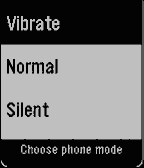
Tools & UtilitiesPhone Sound Mode puts your phone's ringer one press away. Heading into a meeting, a class, or a quiet room? Switch your phone to Vibrate, Normal, or Silent straight from your Pebble, without taking your phone out of your pocket. Open the app, choose a mode, and you're done. A short vibration confirms that your phone has changed, and the app returns to your watchface a moment later. If the change can't be made, the app stays open and tells you why, so you can try again. Clear icons for each mode make it easy to pick the right one at a glance, on round and rectangular screens, in colour or black and white. Android only. Phone Sound Mode requires its free Android companion app. Open the companion once and allow Do Not Disturb access, which Android needs to switch into and out of Silent reliably. Nothing is sent to a server; the watch talks only to your phone. Created by Ark-am. Discover our work and custom software development services at https://ark-am.com/