 9
9Daily Poem
DailyEnjoy a daily poem from poetrydb.org! Query random poems, save poems and favorite poets, dictation-search for a poet, and find a random poem by your favorite poet!
 9
9Words Auto
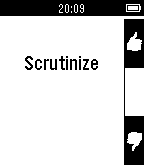
Tools & UtilitiesPebble Words Auto lets you practice words on the go so you can prepare for GRE or SAT without worrying about misplacing those pesky paper flash cards. You get 3 seconds before the next word automatically comes up, or you can press a button to see the meaning. Don't fancy the auto-play? Try Pebble Words instead to practice at your own pace.
 9
9Pocket Bowling
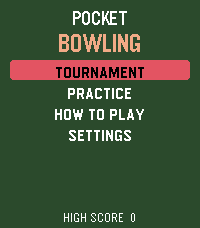
GamesPocket Bowling brings a complete ten-pin bowling experience to your wrist. Aim your shot, time the accuracy and power meters, and send the ball down the lane with realistic pin-to-pin action. Play a quick Practice game across five difficulty levels or enter a five-match Tournament against CPU opponents. Follow every frame with live score tables, including strikes, spares, bonuses, and running totals. Climb the tournament ranks and build your ball collection. Every tournament victory unlocks a new ball color. Can you defeat the final opponent to claim the prestigious Golden Ball? Features: • Complete ten-frame bowling scoring • Practice mode with five difficulty levels • Five-match Tournament mode • Live player and opponent scorecards • Random accuracy and power sweet spots • Gutter balls and interactive pin collisions • Unlockable and selectable ball colors • Win the tournament to claim the Golden Ball • Haptic feedback and built-in instructions • Support for every modern Pebble platform One complete Practice game is included free. Unlock the full game for $1.99 with a one-time KiezelPay purchase. No subscription is required. Gameplay works offline. An internet connection through your paired phone is only needed for purchasing, restoring, or periodically verifying the full-game license.
 9
9Provat
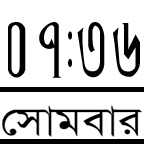
DailyBangla watch face with day
 9
9Chess Clock
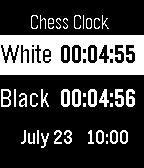
GamesHere is a chess clock on your wrist. App is already in settings when you open it. Using the up and down buttons adjust the time. The select button cycles through the hours, minutes, and seconds. Press and hold the select button to start the count down. White will countdown first. Pressing either the up or down switches timers. Select button brings the app to settings.
 9
9Faster Than Walking
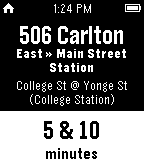
DailyThe best transit app for the Toronto Transit Commission
 9
9Caltrain.app
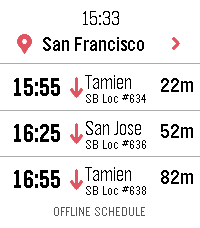
DailyCatch the right Caltrain from your wrist. Features: • Upcoming departures in a fast, glanceable list • Live estimates and delay information • Train details and a scrollable route timeline • Touch gestures and equivalent hardware-button controls • Tailored layouts for Pebble Round 2 and Time 2 ONLINE With a phone connection, Caltrain.app can use a one-time location lookup to select the nearest station. You can also choose and remember a preferred station. OFFLINE When your phone or internet is unavailable, the app retains useful live results and falls back to a compact schedule stored directly on the watch. Scheduled information is clearly distinguished from real-time data. PRIVACY No accounts, ads, analytics, or background location tracking. Unofficial community app. Not affiliated with or endorsed by Caltrain.
 9
9ripple
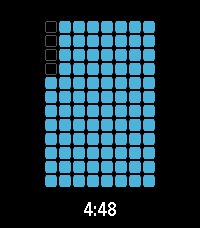
Tools & Utilitiesa timer application with a number of visualization options
 9
9PebbleDiver
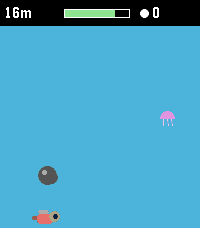
GamesA one-button deep-sea dive. Hold to swim up, let go to sink. Dodge rocks and jellyfish, grab pearls and air, upgrade your gear, and dive as deep as you dare. PebbleDiver is a one-button arcade dive for the Pebble Time 2. Hold SELECT to swim up, hold DOWN to dive faster, let go to sink — that's the whole control scheme. Dodge rocks and jellyfish on the way down, scoop up pearls and air bubbles, and see how deep you can go before your oxygen runs out. Pearls carry over between runs. Spend them in the shop on a bigger oxygen tank, faster fins, a lamp that pulls nearby pearls and bubbles toward you, or a sword. The deeper you go, the darker the water and the faster the current — and from 30 m down, sharks start hunting you instead of just drifting past. Dodge them, or equip a sword and tap UP (or the touchscreen) to fend one off for extra pearls. Legend says a magic Pebble waits deep below for divers who have fully equipped themselves. Whether that legend is true is for you to find out. FEATURES • Genuine one-button gameplay: hold to rise, release to sink, DOWN for a burst of extra descent speed. • Oxygen meter with a fair "pity" system — bubbles never stay scarce for long, so a dry spell never turns into an unfair death. • Pearls persist between runs — build up your stash and gear up over time. • Shop with four upgrades, five levels each: Oxygen tank, Fins, Lamp, Sword. • Sharks actively hunt you from 30 m down — dodge them, or fend one off with a sword (UP or a screen tap) for a pearl payout. • Water darkens and the current quickens the deeper you dive, for a real sense of descent. • Made for the Pebble Time 2 (Emery) color screen. • Plays entirely offline — no phone app, no internet connection needed. • Available in English, Nederlands, Français, Deutsch and Español, following your watch's system language automatically. • Your pearls and upgrades are saved on the watch itself.
 9
9GoatWatch
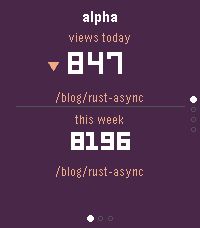
Tools & UtilitiesYour sites, at a glance. GoatWatch connects to GoatCounter and surfaces the numbers that matter right on your Pebble: unique visitors today with a trend versus yesterday, total pageviews for the past week, and the top page drawing traffic right now. Flip between up to eight sites with the up and down buttons. Dive deeper with a tap of Select: a seven-day pageview bar chart shows the shape of your week, followed by top pages for the week and for today - so you can see not just how many people came, but what they were reading. The watch polls automatically every five minutes and retries quietly if your connection is slow. Set it up once from the Pebble app on your phone - paste in your GoatCounter API token and a comma-separated list of your site names - and GoatWatch handles the rest. *Note: Claude Code was used in the generation of this app.*
 9
9Confuzzled 2026 Schedule
DailyUnofficial Pebble app for the Confuzzled 2026 schedule Shows currently happening events with locations Pin events to your timeline that you don't want to miss Should work offline so spotty Hilton Wi-Fi won't break the app
 9
9HA Trigger
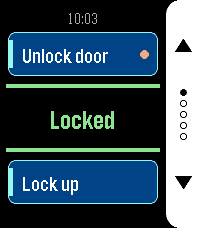
Tools & UtilitiesHA Trigger puts Home Assistant actions on your wrist and keeps the answer in front of you. Each screen carries two actions: the top button runs one, the bottom button the other. Between them sits the state of an entity of your choice, in large type and coloured by what it says: green when things are as they should be, amber while a lock is still turning, red when the entity is unavailable or Home Assistant did not answer. It refreshes by itself every 15 seconds while the app is open, so you can read it without pressing anything. Set up as many as five screens — front door, garage, lights — and flip through them with the middle button. Only screens with at least one action are shown, and dots on the button rail tell you where you are. The app reopens on the screen you left it on. Each action can ask before it fires. Turn the prompt on for anything you do not want to trigger from a pocket, and the watch shows a countdown ring: the middle button runs the action, any other button cancels, and doing nothing cancels it too. Actions with a prompt are marked with a dot on their card, so you can see which one is the careful one. Any service works — `lock.open`, `script.turn_on`, `switch.toggle`, `scene.turn_on`, `cover.open_cover`. Give it a target entity, or leave that empty for scripts that take no arguments. For the status line, a template sensor is worth setting up: whatever text it produces is what the watch shows. Your settings live on the watch as well as on the phone, and the two sync in both directions. Reinstall the phone app and the watch hands its configuration back; reinstall the watch app and the phone restores it. You should not have to type a long-lived token twice. Built for Pebble Time 2 and Pebble Round 2, with a layout drawn for each — a full-height button rail on the rectangular display, a rounded rail set inside the circle on the round one. Settings - HA URL — base URL of your Home Assistant, no path and no trailing slash. If you leave out `http://` or `https://` it is assumed to be `http://`. - Long-Lived Token — from Profile > Security in Home Assistant. Best created under a dedicated, non-administrative user. - Screens 1 to 5 — each with its own status entity and a top and bottom action. Leave both actions of a screen empty to hide it. - Status Entity — shown in the centre of the screen. Leave empty to use the top action's entity, or the bottom one's if the top is empty. A template sensor works well here. - Top / Bottom Action — a label, a service in `domain.service` form, an optional target entity, and whether to ask before running it. For a script, scene, automation or button you can name the entity alone and leave the action empty — the matching action is derived from it. Without a label the card shows the entity's name. - Color Scheme — Dark uses a white button rail on black, Light a black rail on white.
 9
9SG LightningMon
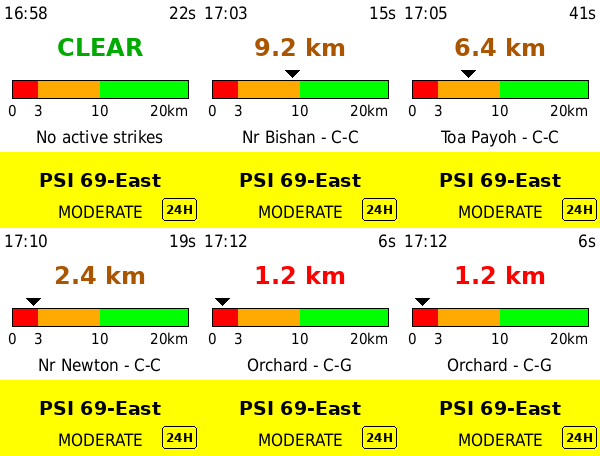
DailySG LightningMon 2.2 — Real-time lightning proximity and air quality on your wrist. Powered directly by NEA's live data (data.gov.sg) for your exact GPS location — no app server, no middleman. NEW IN 2.2 - 1-hour PM2.5 — press DOWN to switch the lower panel between the 24-hour PSI and NEA's hourly PM2.5 reading in µg/m³ - Why both? PSI is a six-pollutant composite averaged over a day, so it lags. The 1-hour PM2.5 is the first number to move when haze arrives. During an episode the two disagree, and that gap is the point - Band colours — Normal, Elevated, High, Very High, on the same colour logic as the PSI panel - Source badge — a 24H or 1H marker sits in the corner of the panel, so a glance never leaves you guessing which reading you are looking at - Your panel choice is remembered across restarts, alongside your theme FEATURES - GPS-based distance to the nearest active lightning strike - Distance ruler — the nearest strike plotted on a 0–20km scale, so you can see a storm closing in or moving off - Colour-coded zones — RED (<3km) / ORANGE (<10km) / GREEN (>10km), marked on the ruler itself - Air quality for your region, picked automatically from GPS — 24-hour PSI or 1-hour PM2.5, your choice - Strike type — cloud-to-ground (C-G) or cloud-to-cloud (C-C) - Neighbourhood lookup — names the nearest estate to each strike - Adaptive rolling window — tightens from 10 to 5 minutes during active storms - Light and dark themes — press SELECT to switch, your choice is remembered - Data age indicator — turns red if the phone link drops - Live clock, refreshing every minute - Auto-refresh every 2.5 minutes REQUIREMENTS - No account or API key — uses NEA's public API directly - Location Services enabled on your phone SUPPORTED WATCHES Pebble Time 2 (Emery) — optimised HOW TO USE 1. Open the app on your watch 2. Grant location permission when prompted on your phone 3. Press SELECT to switch between light and dark 4. Press DOWN to switch between 24-hour PSI and 1-hour PM2.5 5. RED means seek shelter — read the distance, don't just glance at the colour Approximate distances only. Not a certified life-safety device — always follow official NEA/SCDF advisories during severe weather. The 1-hour PM2.5 bands are NEA's descriptors for short-term concentration, not health categories — for decisions like school closures, NEA's own 24-hour PSI forecast is the number to follow. Tested with Pebble Time 2 only. Built with ❤️ in Singapore.
 9
9CountNOW
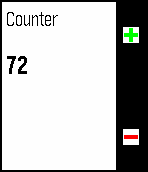
Tools & UtilitiesCountnow is a simple, timeline optimised watchapp, that with the press of a button, registers a click. You could use this to count attendance at an event, count laps in an oval and more.
 9
9Plant Tracker
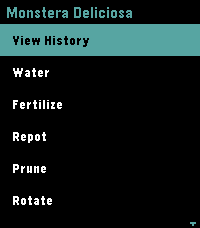
Tools & Utilities🌿 Pebble Plant Tracker is a premium, offline-first companion application designed to manage your indoor garden directly from your wrist. It displays your plants in a sleek, high-contrast dark theme showing the relative time since their last care event (e.g. `W: 3d ago | F: 12h ago`). You can instantly log eight maintenance actions (Watering, Fertilising, Repotting, Pruning, Rotation, Cleaning, Treating, and Relocating) and review up to 20 historical logs in a scrollable timeline on the watch. Configure your plant list, planting dates, and view a complete history timeline through the phone's Pebble settings dashboard. Your data remains secure and synced even when offline.