 4
4JS Compatibility
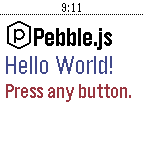
Tools & UtilitiesA Pebble watch app to test the compatibility of different JavaScript engines. This is being used to test RockWork's compatibility with the official Pebble App's JavaScript engine. RockWork is an unofficial Pebble app for Ubuntu Touch.
 4
4Cineworld Dublin
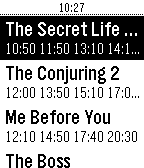
DailyCineworld Dublin film times, with daily schedule, including editorial reviews and viewer comments.
 4
4CityHook
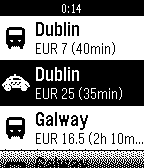
NotificationsUse the CityHook WatchApp to find the best way between airport and city. We've found out everything there is to know about all the options - Taxis, Trains, Bus and Sedan - to help you find the best way for you to connect your flight with your destination.
 4
44 Digit numeric keyboard demo
Tools & UtilitiesNumeric Keyboard demo, pebble.js source available at my GitHub: iAbadia
 4
4The Calorie Counter - Black Edition
Health & FitnessA simple calorie counter. - Press the up button to add calories. - Press the down button to correct your entry before you will save. - Press the middle button briefly to save your input. - Press the middle button long to clear your inputs. Ein einfacher Kalorienzähler. - Drücke den oberen Knopf um Kalorien hinzuzufügen. - Drücke den unteren Knopf um deine Eingabe zu korrigieren bevor du sie speicherst. - Drücke den mittleren Knopf kurz um deine Eingabe zu speichern. - Drücke den mittleren Knopf lang um deine Eingaben zu löschen.
 4
4welink
Tools & Utilitieswelink
 4
4Dungeon Doors
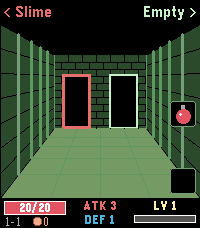
GamesLeft or right? A pocket roguelike for your wrist. Walk through three dungeons, one door at a time. Above each door you see what waits behind it: a chest, an empty room, the merchant – or a monster. Which monster? You only learn its name, not how strong it is. Remember who hurt you. FEATURES - 3 dungeons, each with its own look and 4 new enemy types, 12 pixel-art monsters in total - Automatic battles: every hit earns XP, every level gives +1 ATK and +1 DEF - Blue, green and red swords and shields - Chests with a choice of two items: potions, bombs, gold, gear – and rare finds - The merchant sells permanent upgrades and, sometimes, the Dragonslayer that destroys any boss in one blow - Bag with two slots on the middle and bottom buttons - Beat the boss to descend deeper with all your stats – beat the third one to win - Backlight stays on while you play - English and German CONTROLS Back / Up: left / right door or item Select / Down: use item in bag slot (Select also leaves the merchant) Hold Back: quit How deep can you go?
 4
4Classic Snake
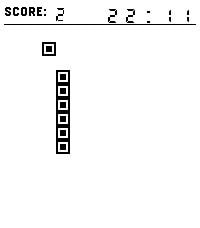
GamesEnjoy a nostalgic Snake experience with a visual style inspired by classic Tetris blocks. Guide the pixel-style snake, collect square food, grow longer, and beat your highest score. Features: Two control methods: buttons or swiping. Time display — so you can keep track of the time while playing (after all, it is a watch). Visuals inspired by Tetris Picking up an apple is accompanied by a sound (this can be disabled). Enjoy the game!
 4
4benzaiflow
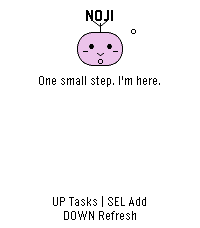
Dailybenzaiflow brings Noji, your quiet companion, to your wrist. See your tasks, catch a new thought, and put the phone away. • Browse active tasks, with pinned tasks first, and open a task for its details and estimated minutes. • Add a task by dictation on supported watches, write with the watch buttons, or choose a small essential. Review before saving. • Capture while your phone is out of reach: once paired, the app keeps up to three unsent tasks on the watch for retry when you reconnect. • Bring your Noji’s shape, color and expression with you. SETUP A benzaiflow account is required. After installing, open the app’s settings in the Pebble phone app, sign in, and choose “Connect my Pebble.” The Pebble phone app provides the internet connection for syncing. Learn more: https://benzaiflow.com LANGUAGES & LIMITS The watch interface is English; pairing is available in English and French. Task text supports UTF-8; button entry uses a Latin ASCII alphabet. Dictation requires a compatible watch and an available phone transcription service. This first release supports browsing and adding tasks; completion, deletion and reminders are not available on the watch. Support: support@benzaiflow.com Privacy: https://benzaiflow.com/privacy
 4
4DownTime: Voice Crosswords
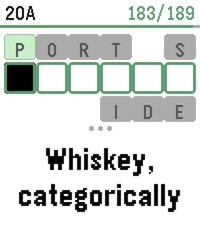
GamesDownTime is an offline collection of 200 new crossword puzzles (9,000+ clues), supporting dictation for speech-to-text, or bespoke on-watch typing. It uses a custom crossword engine which displays one clue at a time to maximize legibility, and a tuned voice interpreter to increase dictation accuracy. Includes two crossword sizes: Mini (7x7) Regular (15x15) And two difficulties: Peaceful Challenging For maximum accuracy, it's recommended to use the Cloud provider for Pebble speech recognition (available in the Pebble app settings). However, we also support spelling out individual letters via voice dictation, which is easier for local models to parse. Or, use the on-screen swiping to type text! Special thanks to Nicole Feng (nzfeng on Github) for providing the "MsFit Crossword Dataset"!
 4
4Cheetah's Wordle
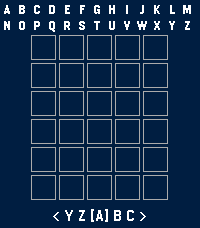
GamesFurchee's Wordle A fully working Wordle Game for the pebble smart watch! I made a better one because I like wordle. Tested the round screen versions using the emulator. Let me know if it doesn't display properly! If you want something added or something breaks, please contact me on git on any IM of your choice under @furchee. Features so far: -Compiled list of guessable words (2350) -Completely redone word lookup to fit the massive 15,000 allowed wordlist. -6 rows to guess from -Game logs progress (Total Games, Wins, Losses, Streak, Best Streak, Win Percentage as well as which row you solved in.) -One word a day (might change this to two a day --ie once every 12 hours) -Scrolling letters on button hold -Round displays are supported! Letters wrap around screen for proper board real estate. -Tap the screen to initiate a 15 second backlight timer for better clarity in bright/dim locations. -Hard mode added through brand new settings page (Thanks HumbleWolf1797 for the suggestion!)
 4
4Ultrasonic
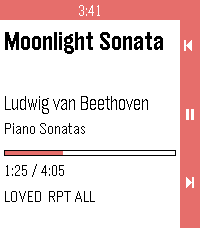
RemotesUltrasonic for Pebble is a wrist-side controller for Ultrasonic, the open-source Subsonic/Navidrome client for Android. It runs on Pebble 2 Duo and Pebble Time 2, and it needs a small companion app on your phone (available from the project's GitHub Releases). ON THE WATCH Now playing. Title, artist, album, a progress bar that ticks locally between updates, and flags for loved / shuffle / repeat. Transport. Up / down are previous / next. Long-press for volume. Select is play / pause. Long-press select opens the actions menu. Actions. Browse library, Love / Unlove the current track, Shuffle queue, Repeat (None / All / One). Browse. Ultrasonic's own library tree — Media Library, Artists, Albums, Playlists and their children. Select on a folder opens it; select on a track (or the "Play All" row) plays it; hold select on an album plays the whole album. ON THE PHONE The companion holds no credentials. Ultrasonic keeps authenticating, keeps the queue, and stars tracks the way its own notification does. The companion just drives Ultrasonic's media session and forwards the library tree. REQUIREMENTS - Ultrasonic 4.8.0+ paired to your Subsonic/Navidrome server - The Core Devices Pebble app paired to your watch - The Ultrasonic for Pebble companion APK (installed by hand from the project's GitHub Releases, one time) SOURCE AND SUPPORT Source and companion APK: https://github.com/P1R4N351/ultrasonic-for-pebble NOT AFFILIATED This project is not affiliated with Ultrasonic, with the Core Devices Pebble team, or with any Subsonic/Navidrome server implementation. Names are trademarks of their respective owners.
 4
4Talk to the Void
RemotesSimple app that sends your Voice Dictation and displays the response without saving anywhere. Quick Launching it starts the dictation automatically and exits 3 seconds after displaying the response. Used for a personal project to route around the built in Cloud APIs and send .wav files to a personal server.
 4
4Punti Arco
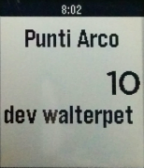
Health & FitnessArchery score Simple sum of score values UP or DOWN to choose point (1,2,3,...10) MIDDLE to add MIDDLE long press to delete last entry
 4
4AImigo
Tools & UtilitiesYour (small) AI voice assistant, right on your wrist. ⚠️ Requires a NaN.builders API key (https://nan.builders) and the Pebble phone app connected for dictation. Supported watches: ✅ Pebble Time 2 (emery) ✅ Pebble 2 Duo (flint) ✅ Pebble Round 2 (gabbro) Press a button, dictate your question and this voice assistant replies right on your Pebble. On watches with a speaker, the answer is read aloud too. - Voice dictation through the watch microphone - AI-powered answers — pick your model in settings (Gemma 4 or Qwen 3.6) - Spoken answers on speaker-equipped watches; hold UP to replay - Talk to it in 🇪🇸 Spanish, 🇬🇧 English, 🇫🇷 French, 🇮🇹 Italian or 🇵🇹 Portuguese — it replies in the same language - Simple interface: ask, read or listen, ask again Built for quick questions and short answers (about a sentence), tailored to what a watch can comfortably handle. On speakerless watches you get text answers with a vibration. 🗣️ Ready to ask it something?