 2
2Button Masher
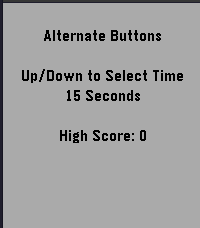
GamesButton Masher is a speed test to see how fast you can press your watch buttons. Can you beat your high score? Select 15s, 30s, 45s, or 60s and start pressing the up and down buttons to crank up your score!
 2
2ModernWatch
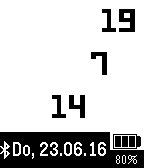
DailySimple modern watch showing hour, minute and second in three lines. The actual date (in german version) is shown on the bottom. The battery state with a symbol and a value is shown in the right bottom corner. The bluetooth connection state is displayed on left bottom corner.
 2
2Milk Tray Man Mission Timer
Tools & UtilitiesNeed a countdown for your next daring chocolate delivery mission? This little app, based on the Tea Timer Example, gives you 20 mission timers that start with the a 1 minute timer for the first mission and each successive mission is a minute longer, you simply select how long you need, by selecting the appropriate mission.
 2
2Run Tracker
Health & Fitnesstest app
 2
2Menta-List
RemotesThis app is part of Menta-List Pro. Please purchase Menta-List Pro from the Apple App Store before installing as it will not function without it.
 2
2Pebble Imposter
GamesThe impostor word game now on pebble
- 2
xDrip+ Snooze
NotificationsxDrip Snooze shortcut
 2
2Brush
Tools & UtilitiesToothbrush timer with some configurability
 2
2Football (US) Timer
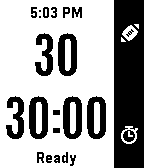
Tools & UtilitiesFootball timer designed for the NGFFL flag football league based on an original design by Sheldon Smith. Features include: -- 30 second play clock with vibrations at 15, 10, 5, and 0 seconds. (Pressing up button starts clock or stops it and resets it to 30 if it is already running.) -- 30 minute game clock with vibration at 2 and 0 minutes. -- Game clock status indicator - Changes color and message to show whether clock is stopped or running at a glance. -- Quick-Edit mode (long-press the down button) to quickly add or subtract time. -- Time of Day visible at top of screen. -- Persistent memory: App will be aware of the game and play clock state if the app is exited (although vibrations will not occur) and will pick up with the correct time remaining when the app is restarted. Features Planned but Not Yet Implemented: -- Menu to access the following features: -- -- Reset the game clock without having to wait for it to wind down or having to use the Quick-Edit mode. -- -- Set default starting values for the Play and Game Clocks other than 30 seconds/minutes respectively. -- -- Option to hide certain elements for a less cluttered screen. -- -- Option to disable the two-minute warning.
 2
2BEARING
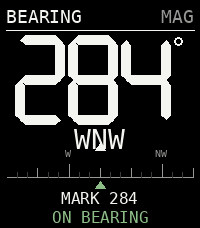
Tools & UtilitiesNot all those who wander are lost...
 2
2Pandora Remote
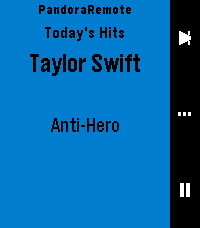
RemotesControl Pandora from your wrist. PandoraRemote lets you manage playback, rate songs, and adjust volume directly from your Pebble watch. FEATURES - Skip tracks, play/pause with a single button press - Thumbs up or thumbs down the current song - Adjust phone volume from your watch - See the current song, artist, and station on your watch - Auto-launches when Pandora starts playing - Works on all Pebble hardware except the OG (Time, Time Steel, Time Round, Pebble 2, Time 2, Core 2 Duo, Core Time) HOW IT WORKS PandoraRemote has three screens you cycle through with the select button: Playback: Skip to the next track or play/pause. Rating: Thumbs up or thumbs down the current song. Volume: Turn the volume up or down on your phone. WARNING: This is a personal passion project, and frankly, if I don't see a need for a feature, I probably won't add it on my own. So if you have a feature request, please submit an issue on the github repo, and I'll evaluate if I think it would be nice to have. The best way it to develop it yourself: if you're not a developer, it might be time to try out Claude Code (or similar) and submit a PR with your proposed changes. I will review and merge if it looks good. This project is open source and licensed under CC BY-NC-SA 4.0. See https://creativecommons.org/licenses/by-nc-sa/4.0/ for details. SETUP 1. Install the PandoraRemote companion app on your Android phone. Until the app is available on the Google Play Store, download the APK from: https://github.com/gravity-rose/PandoraRemote/releases 2. After sideloading, you must grant the app restricted permissions and notification access. The app will walk you through this on first launch. 3. Start Pandora — the watch app launches automatically. DISCLAIMER Pandora is a registered trademark of Pandora Media, LLC. PandoraRemote is an independent project and is not affiliated with, endorsed by, or sponsored by Pandora Media, LLC.
 2
2Debate Timer for Pebble
Tools & UtilitiesA dedicated timer for British Parliamentary debating. Track speeches, POI periods and speaker order directly from your wrist. Features: 7-minute BP speech timer POI period from 1:00 to 6:00 Vibration alerts for important time points Speaker progression through all 8 BP speeches Start, pause, reset and next-speaker controls Fully offline — no phone or internet connection required Designed for debaters, judges and tournament organizers.
 2
2SNAK3
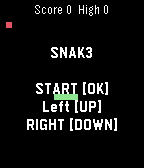
GamesNokia-inspired game :D Control: [OK] Start/Paus. Hold [OK] Restart. [UP] LEFT [DOWN] RIGHT
 2
2Big Blue Bus (unofficial beta)
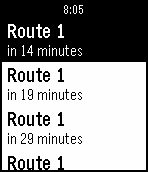
Tools & UtilitiesSimple app to find the nearest bus stops and upcoming arrivals for the Big Blue Bus (transit system in Santa Monica, California).
 2
2Telegram Voice
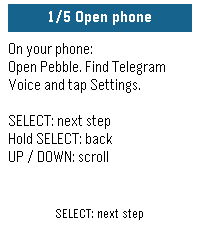
Tools & UtilitiesUse your Pebble watch to speak to your Telegram bot. Press SELECT, say what's on your mind, and read your bot's reply on your wrist. Connect your own compatible AI assistant or automation bot for quick questions, notes and requests without typing on your phone. MAKE IT ONE BUTTON Assign Telegram Voice to Hold SELECT in Pebble's Quick Launch settings. Hold the button from your watchface to open the app and start speaking. Press SELECT again for follow-up messages; UP and DOWN scroll the answer. SET UP WITH YOUR WATCH The watch walks you through numbered instructions while you complete setup on your phone. Each person configures their own watch bot token and destination bot. Try the offline demo before connecting anything. YOU WILL NEED A Pebble with a microphone, a connected phone with internet and working dictation, a dedicated Telegram watch bot, and a compatible destination bot. For private bot conversations, both bots must enable Bot-to-Bot Communication Mode, and the assistant must accept bot messages. Messages are delivered as text. Replies are checked while the app is open; the latest reply is saved on your phone. Very long replies are shortened. No voice playback. Your bot, your choice. No developer account or hosted bridge service is required. Independent community app; not affiliated with Telegram.