 81
81Small Places
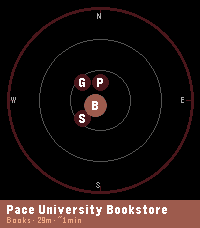
DailySmall Places Discover the independent businesses and hidden gems around you — no chains, no noise. Small Places uses OpenStreetMap to surface nearby cafes, bookstores, vintage shops, bakeries, parks, and more, filtered by walking distance and updated as you move. Built to help you slow down and appreciate the small things in life. ! Developer Notice (June 22nd 2026) - This app is currently powered by the free Overpass API. Overpass has been experiencing increased traffic as of late and is working on developing strategies to best manage the quantity of requests they receive. While this app does everything it can to be a good user of the Overpass API and minimize requests, the landscape for interacting with the Overpass API is currently very volatile. For the Small Places app, this means sometimes requests may sometimes be dropped and businesses will fail to populate. As the situation develops, alternative solutions to provide you information about local small businesses are being considered ! Features: - Live nearby list with walk-time estimates and closing-soon warnings - Compass radar view showing places by direction and distance - Smart time-of-day priority sorting (coffee shops in the morning, bars in the evening) - Mood presets to instantly switch your search focus — Morning Fuel, Lunch Break, Evening Out, Weekend Wander - Save spots you want to visit later to "My Places" for quick reference - Chain filtering keeps results locally-owned and independent - Background wake-ups so results are ready when you raise your wrist - Configurable radius, poll interval, hours filter, and measurement units - Manual latitude/longitude input mode lets you explore local businesses anywhere in the world from the comfort of your current location (or simply get a better idea of the app's abilities without downloading to a physical watch) Supported Business Categories: Art & craft, bakeries, bars & pubs, bike shops, bookstores, cafes, clothing, florists, game stores, gift shops, grocery, hardware, libraries, music stores, parks, pet stores, restaurants, specialty food, toy stores, vintage & second-hand shops. Platform notes: - Full experience (color, radar view) on Pebble Time 2, and Pebble Time Round 2 - Pebble 2 Duo: all features supported, radar view not available to save you some space for a more lightweight small places experience - Original Pebble: supported with a reduced nearby list (5 places) and bookmark limit (10); radar view not available. Just the core functionality without modern space expectations weighing you down. Powered by OpenStreetMap contributors — this app wouldn't exist without their effort. --- If you would like to give back and make sure your favorite local businesses in the area are on the map and well documented for everyone to enjoy, please check out OpenStreetMap: https://www.openstreetmap.org. This app is not directly affiliated with OpenStreetMap but does draw its data from there. The OpenStreetMap editor interface is fairly easy to use for making quick updates in your local community. Please ensure proper contributor standards are maintained and contribute responsibly!
 81
81Ripples 3D
GamesAn interactive 3D math function demo. *** BUTTONS *** UP : colorization (Monochromatic,Distance). SELECT: pattern (Dots,Lines,Stripes,Grid). DOWN : oscillator (Anchored,Floating,Bouncing). long UP: illumination (Diffuse,Spotlight) long SELECT: transparency (Opaque,Xray,Translucent) long DOWN : detail (Coarse,Fine) Coarse detail (faster): shadow and color change frontiers snap to the nearest control point in the active pattern grid. No anti-aliasing is applied. Fine detail (slower): shadow and color change frontiers are approximated to no more than 3 pixel error. Anti-aliasing is applied.
 81
81C25K - Couch to 5K
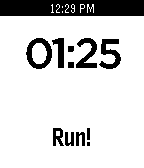
Health & FitnessA simple Watchapp that provides users with timers for each interval of the popular Couch to 5K running program. It features each workout for each of the 9 weeks, so you can simply select which workout you are at, and the timer begins. You will be alerted with a vibration when the current interval is done.
 81
81FaceBrowser
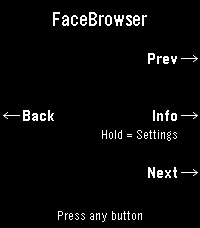
DailyBrowse watchfaces right from your wrist. FaceBrowser lets you scroll through the Rebble and Pebble app store catalog directly on your watch, showing you a live preview of each watchface so you can see exactly how it will look on your screen. Use the up and down buttons to flip through faces one by one, or turn on random mode to discover something new. Filter by collection to browse all available faces or just the most loved ones. When you find a face you like, press select to see the app name, developer, and a QR code you can scan to quickly open it on your phone and install it. Features: - Live watchface previews rendered on your watch - Browse sequentially or shuffle randomly - Filter by collection (all or most loved) - View app details including name and developer - QR code for quick install from your phone - Support for Rebble and Pebble app stores - Works on all Pebble hardware platforms
 80
80Pebblegram
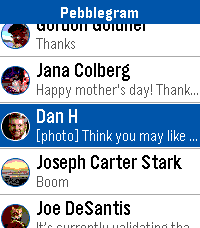
DailyA Telegram client for Pebble. New release does not require a companion app or a service running anywhere. Everything is kept securely in your phone. Works for Android and probably iOS, but I haven't tested iOS yet as I don't have an iPhone. Documentation is on the Github page.
 80
80Checklist
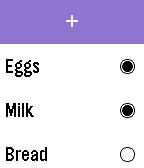
Tools & UtilitiesSimple checklist for your Pebble. Enter up to 25 items using: - Tertiary Text - Dictation - Phone Input via Config Page Support for Chalk is in the works. I am aware that some users are experiencing an issue where the configuration page does not open. I am looking into this issue currently, and will release an update once it's fixed.
 79
79Pebble Foscam
Tools & UtilitiesPebble Foscam lets you control and view your Foscam webcam snapshots on your wrist. The version 1.2 supports instant snapshots from multiple cameras, zooming in/out for larger than Pebble screen size images, switching IR (Infrared) on/off, etc.
 79
79Voice 🎤 Relay
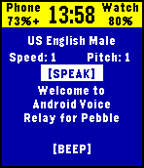
Tools & UtilitiesAllows you to remotely make your phone talk or make BEEP noises. Good for a phone finder or phone locator to find your phone find phone or scare your dog. No companion app required! Only works on Android phones, though, sorry Apple users. Neither the classic Pebble nor the Pebble Steel have a microphone, so choose from a small selection of pre-made sentences. Future updates may expand upon these sentence selections. It has a few other nifty features like showing you your phone's model number, battery percentage and charge status.
 79
79Rogue's Ring
Tools & UtilitiesThe Rogue's Ring Companion App features cryptic hieroglyphs that provide crib notes for 24+ different Scam School effects. No matter what room you're in, no matter what kind of crowd you're faced with, you'll have your cheat-sheet to perform some of the best tricks you've learned over the last 5 years of Scam School episodes. For more info on each trick visit https://www.youtube.com/watch?v=qQ5V3gGvmC4
 79
79Health monitor +
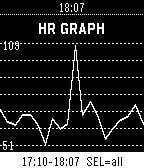
Health & FitnessHealth monitor + tracks your heart rate, steps, and sleep continuously in the background using your Pebble's built-in sensors. Heart rate samples are recorded at regular intervals (1–6 minutes) alongside your daily step counts and sleep durations, with all data stored right on your watch for up to 7 days. View your current BPM, daily steps, last night's sleep, and resting heart rate directly on your wrist, or sync to your phone to explore detailed charts and your complete health history in the app config page.
 79
79Quick Peek
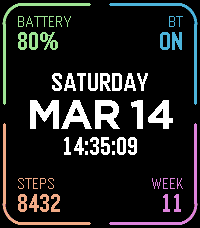
Tools & UtilitiesTake a quick look at useful info by adding Quick Peek to your quick launch. Many otherwise nice watchfaces don't show all the info you need throughout the day. Quick Peek solves this issue by displaying additional info, easily accessible when configured as a quick launch app. And auto exit handles returning to you watchface automatically (with ability to cancel auto exit). Lot's of configuration options to make it show what info you need. 7 complication slots, where you can choose what info to show + color. Ability to define a second page for even more info (navigate using up/down buttons or swipe on touchscreen). Available complications: * Date (with configurable format) * Day of week * Time (with or without seconds) * Battery percent * Bluetooth connection status * Step count * Week number * Heart rate * Distance * Calories * Active minutes * Sleep * Weather (icon + current temp) * Today's high and low temp * Tomorrow's weather (icon + high and low temp) * UV index * Sunrise * Sunset * Phone battery * Next alarm time (within 24h) * Second time zone (configurable city, which also acts as the label) * Agenda — today's appointments, from one or more calendar feeds on the phone. In the big center slot it takes the whole column and lists the day; anywhere else it shows only next appointment. * Webhook** (drawn as a button to tap on touchscreen) Configurable buttons, choose what action each of the up/middle/down buttons does, both normal press and long press. Available button actions: * Swith page * Disable auto-exit * Reset auto-exit * Webhooks** In addition to the physical buttons, flicking the watch resets auto-exit timer and tapping on touchscreen disables auto-exit. Additional configuration options: * Date format * Light mode, which puts the whole display on white and darkens the corner colors to suit * Temperature unit (Celsius or Fahrenheit) * Auto exit delay (when launched from quick launch) Webhooks: Define up 6 webhooks by specifying a URL that will we called when the webhook is triggered. You can point this to any publicly available URL or something on your local network, for example Home Assistant so that you can toggle lights on/off, open your carage door or whatever Home Assistant can automate. Ability to choose HTTP method (GET/POST/PUT), define a JSON payload, and a Bearer token for authentication.
 79
79Connect Alert
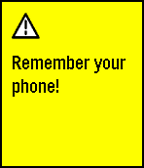
NotificationsRuns a background app that checks if your pebble is connected to your phone. If your pebble gets disconnected, it alerts you by saying: "Remember your phone!". The service can be turned on and off in the app on your pebble. Useful if you tend to leave your phone at random places.
 79
79RemindMe
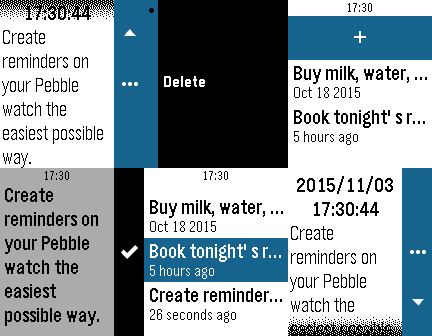
DailyCreate reminders on your Pebble watch the easiest possible way. ## Idea Dumb, repetitive and mechanical tasks (doing the dishes, taking a shower, driving to work, jogging, what-have-you) are always a good opportunity for my mind to wander, and often the times when ideas sprout and *to-do*'s come back to mind. When those ideas come up, my usual way to treat them is to postpone them to after the task at hands, as I'm probably not in a position to take notes (hands are wet, or on the wheel, etc.). Unfortunately, most of the times I fail to remember the idea when I get in better disposition to write it down, or to process it. **RemindMe** is my solution to this problem. My own digital way, always on my wrist, to tie a knot to my handkerchief, to tie a string around my index finger, or to throw a slipper, a book, or any other unusual item in the middle of the room's floor. ## How it works At the moment **RemindMe**'s main screen is a list of all your notes, which you can enter to display in full or delete, and a way to add dictated notes. I suggest you link a Quick Launch button to **RemindMe**, so that you can open the "new note" dictation screen in only one long click from your watchface. ## Features Version 1.0 only includes a quick note system that allows you to create time-stamped text notes.
 79
79Mario Core
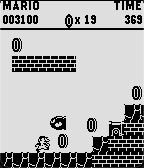
GamesA spiritual successor to the mario runner tech demo from 2015! fully expanded into a playful adaption of Super Mario Bros for the NES. jam packed full of features sure to keep you entertained, with more planned in the future! currently includes flagpoles, underground levels, bonus rooms, power ups, enemies, procedural generation, etc
 79
79Backtrack
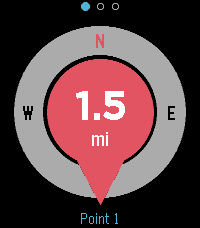
Tools & UtilitiesFind your way back to a saved point. Drop a pin at your location and Backtrack shows a compass-oriented arrow and the distance back to it, and buzzes when you arrive. Great for finding your car, your tent, or a meeting point. Uses your phone's GPS. Localised in 6 languages.