 82
Yelpful
DailyHungry? Thirsty? Need a haircut? Use this app to find local places close to you. This app is better than the official yelp app since you can see a map, view images, deals, and the category. If you see green stars, then the place has a yelp deal! Customize by choosing the sort method, miles or kilometers, view only deals, and GPS accuracy.
 82
Pebble Foscam
Tools & UtilitiesPebble Foscam lets you control and view your Foscam webcam snapshots on your wrist. The version 1.2 supports instant snapshots from multiple cameras, zooming in/out for larger than Pebble screen size images, switching IR (Infrared) on/off, etc.
 81
PBLPom
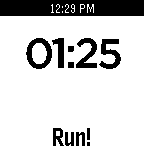
Tools & UtilitiesPBLPom is a highly customizable, multilingual, easy-to-use, attractive work timer. You can use it with the Pomodoro Technique® or other time management systems. The "Pomodoro Technique®" and "Pomodoro®" are registered trademarks of Francesco Cirillo. We have no relationship with, nor do we endorse, these marks, their owner, or the company FC Garage.
 81
C25K - Couch to 5K
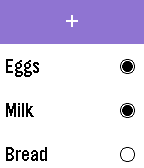
Health & FitnessA simple Watchapp that provides users with timers for each interval of the popular Couch to 5K running program. It features each workout for each of the 9 weeks, so you can simply select which workout you are at, and the timer begins. You will be alerted with a vibration when the current interval is done.
 81
Checklist
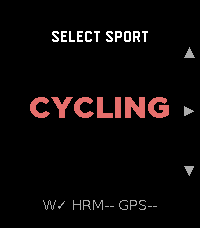
Tools & UtilitiesSimple checklist for your Pebble. Enter up to 25 items using: - Tertiary Text - Dictation - Phone Input via Config Page Support for Chalk is in the works. I am aware that some users are experiencing an issue where the configuration page does not open. I am looking into this issue currently, and will release an update once it's fixed.
 81
Strava GPX
Health & FitnessStrava GPX turns your Pebble Time 2 into a standalone GPX workout recorder for cycling, running, and walking. It captures GPS distance, speed/pace, and heart rate, and saves a GPX file directly to your phone's Downloads folder when you stop. No account, no subscription, no cloud dependency — the file is yours immediately. Import the .gpx into Strava, Komoot, Garmin Connect, or any platform that accepts the format. For users who want automatic delivery, an optional Cloudflare Worker can email the file to you the moment the workout ends. What it records: elapsed time (pause/resume), GPS distance, speed/pace (km/h or mph / min/km or min/mi), heart rate embedded at every track point. Sports: Cycling (speed), Running, Walking (pace), each with independent HR sampling interval. Settings: HR interval 1–30 s per sport · GPS accuracy filter · metric or imperial · optional download subfolder · optional Worker for email delivery.
 80
Pebbles & Dragons
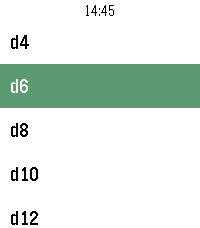
Tools & UtilitiesA simple watch app to roll dice for Dungeons & Dragons and other tabletop RPGs Roll standard dice from d4 up to d100 Adjust the number of dice rolled using + and - Show the total result and preview single rolls New updates and features coming soon...
 80
RemindMe
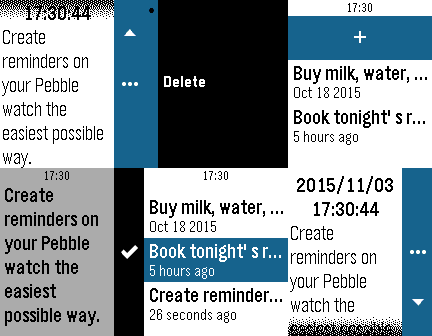
DailyCreate reminders on your Pebble watch the easiest possible way. ## Idea Dumb, repetitive and mechanical tasks (doing the dishes, taking a shower, driving to work, jogging, what-have-you) are always a good opportunity for my mind to wander, and often the times when ideas sprout and *to-do*'s come back to mind. When those ideas come up, my usual way to treat them is to postpone them to after the task at hands, as I'm probably not in a position to take notes (hands are wet, or on the wheel, etc.). Unfortunately, most of the times I fail to remember the idea when I get in better disposition to write it down, or to process it. **RemindMe** is my solution to this problem. My own digital way, always on my wrist, to tie a knot to my handkerchief, to tie a string around my index finger, or to throw a slipper, a book, or any other unusual item in the middle of the room's floor. ## How it works At the moment **RemindMe**'s main screen is a list of all your notes, which you can enter to display in full or delete, and a way to add dictated notes. I suggest you link a Quick Launch button to **RemindMe**, so that you can open the "new note" dictation screen in only one long click from your watchface. ## Features Version 1.0 only includes a quick note system that allows you to create time-stamped text notes.
 80
Voice 🎤 Relay
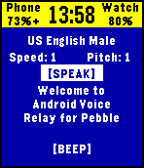
Tools & UtilitiesAllows you to remotely make your phone talk or make BEEP noises. Good for a phone finder or phone locator to find your phone find phone or scare your dog. No companion app required! Only works on Android phones, though, sorry Apple users. Neither the classic Pebble nor the Pebble Steel have a microphone, so choose from a small selection of pre-made sentences. Future updates may expand upon these sentence selections. It has a few other nifty features like showing you your phone's model number, battery percentage and charge status.
 80
Workout HR
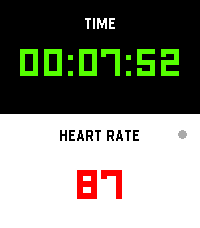
Health & FitnessI’m finally launching my dream workout app, built exclusively to make that glorious Pebble Time 2 screen pop! Get all your vital stats—elapsed time and real-time heart rate—that’s actually easy to read while you're breaking a sweat. It’s time to manage your gains more effectively while keeping that classic Pebble quirkiness alive on your wrist!
 79
Just Weather
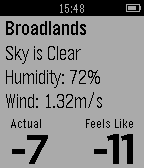
DailyGets current weather stats for current location. Update: Added choice of wind speed units in app config. Displays: Closest location weather data was retrieved from Description of weather Humidity Wind speed Temperature (nice and big) Apparent Temperature (what it really feels like) Default is Celsius, but can you change this in this apps config after installing it. If you have any suggestions, requests, recommendations feel free to email me! I welcome ideas. (Feel free to contact me to add more weather providers and I'll see what I can do) I made this app because I wanted a weather app to access from the app list, which was not a watch face, and was ONLY for weather. This way my main pebble watch face can be only for time.
 79
Rogue's Ring
Tools & UtilitiesThe Rogue's Ring Companion App features cryptic hieroglyphs that provide crib notes for 24+ different Scam School effects. No matter what room you're in, no matter what kind of crowd you're faced with, you'll have your cheat-sheet to perform some of the best tricks you've learned over the last 5 years of Scam School episodes. For more info on each trick visit https://www.youtube.com/watch?v=qQ5V3gGvmC4
 79
Find My Phone
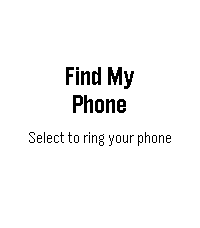
Tools & UtilitiesLost your phone? Pick Find My Phone in your watch's launcher and hit select to start ringing your phone
 79
Connect Alert
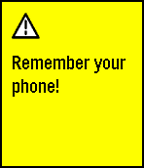
NotificationsRuns a background app that checks if your pebble is connected to your phone. If your pebble gets disconnected, it alerts you by saying: "Remember your phone!". The service can be turned on and off in the app on your pebble. Useful if you tend to leave your phone at random places.
 79
WikiRadius
Tools & UtilitiesWhether you are a tourist exploring a new city or a local wanting to uncover the hidden history of your hometown: WikiRadius turns every simple walk into an interactive journey of discovery. The app uses your smartphone’s high-precision GPS to scan your current coordinates and automatically delivers fascinating facts about landmarks, historical sites, and geographical features right to your wrist. No manual searching required, just start walking, and the world around you begins to "speak". How the Smart 3-Stage Radar Works WikiRadius isn't a normal browser; it's a pure "location-to-information" bridge. To always show you the most relevant destination, an intelligent search logic works in the background in three stages: Local Area (200m): The app primarily searches for major, relevant Wikipedia articles in your immediate vicinity. Monument Scanner (200m): If there is no Wikipedia entry, WikiRadius taps into OpenStreetMap, explicitly searching for hidden historical monuments or structures (historic). Wide-Angle Radar (1km): If your direct surroundings are completely empty, the app automatically expands its search radius to 1,000 meters to find the next major destination for you. Display Symbols Explained So you know exactly what the radar has locked onto at a glance, WikiRadius uses special visual indicators in the headline: No Prefix (e.g., Space Needle): A classic Wikipedia article in your immediate vicinity (under 200m). The [H] Symbol (e.g., [H] Old Water Tower): A historical monument, building, or relic found via the OpenStreetMap scanner. The Double Arrow >> (e.g., >> Golden Gate Bridge): A destination from the wide-angle radar. It is further away (up to 1km) but serves as an excellent long-distance goal for your walk. Once you cross the 200m mark, the arrow disappears. Key Features Live Navigation Cockpit: A smooth real-time compass and dynamic distance display guide you to your discovery, meter by meter. Smart Feedback: Your watch vibrates subtly only when a new destination appears on the radar. No annoying continuous vibrations while navigating. Universal Compatibility: Flawlessly supports all Pebble models (Emery, Basalt, Chalk, Diorite, Aplite, Gabbro...), adapting its UI perfectly to round, rectangular, color, and monochrome screens. Independent Integration: WikiRadius retrieves public data from the Wikipedia API and Overpass API to deliver high-quality knowledge. However, the app is not affiliated with, endorsed by, or connected to the Wikimedia Foundation or OpenStreetMap. It acts purely as an independent, location-based client. Discover what you would have otherwise just walked right past. Best https://atomlabor.de