 62
62Another Timer
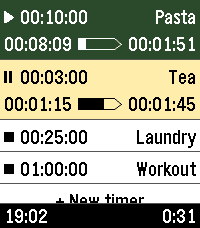
Tools & UtilitiesYet another timer app, built for fast, versatile, & straightforward usage. Features: - Only one touch to create & start new timers - Multiple timers - Reusable saved timers - Run-once timers - Labeled timers - Track remaining time, elapsed time, & overtime - Configure timers either from the phone or from the watch - Optionally start counting from app launch - High configurability The user interface follows the design of the Another Alarm app. Use them both to feel familiar. The app was originally forked from Sykerö Software's Countdown Timer, later mixed with many extra ideas and useful features from other open source apps. The touch dial is adopted from howeaj's Instant Timer, and the label input keyboard from metuuu's Mölkky scorekeeper. Check out also those brilliant apps! Attribution links, Pebble app store: - https://apps.repebble.com/countdown-timer_c1e3e132dae74bbcaf1a8320 - https://apps.repebble.com/timer-instant-timer_1a42bf7ed056404abbdd7bf9 - https://apps.repebble.com/m-lkky-scorekeeper_bb6ffbee520f4c4cafc2b424 Attribution links, GitHub: - https://github.com/Sykero-Software/PebbleCountdownTimer - https://github.com/howeaj/pebble-instant-timer - https://github.com/metuuu/pebble-molkky-scorekeeper
![Social Bundle 3 [Pebble Rocker]](https://assets.repebble.com/screenshots/52f076c6bb34233437001b62-0.png) 62
62Social Bundle 3 [Pebble Rocker]
DailyInclude the Events, Facebook, and Twitter watch apps. IMPORTANT: This watch app requires the Pebble Rocker companion app available via the Google Play store.
 62
627day ICS Calendar
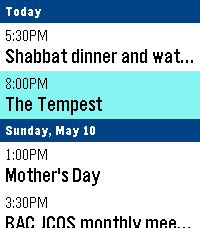
DailyLeave your phone in your pocket. 7-Day ICS Calendar brings your Google Calendar(any ICS should work) directly to your wrist, beautifully organized and always available—even when you're offline. Built from the ground up for speed, reliability, and a native Pebble feel, this app securely bridges your private Google Calendar directly to your watch, ensuring you never miss a meeting. Key Features: AppGlance Support: See your next upcoming meeting directly on your Pebble’s system launcher menu without even opening the app! (Pebble OS 4.0+) Extreme Customization: Long-press the Select button on the main menu to open the Settings. Instantly toggle between Dark/Light Mode, switch to Large Fonts for better readability, or choose to show/hide past events. True Offline Support: Going for a run without your phone? Your events are permanently saved to the watch's internal memory. Close the app, open it later, and your schedule is instantly there. Battery-Conscious Sync: The app uses a smart background caching system to prevent battery drain, waking your phone’s Bluetooth only when you need fresh data. Need an instant update? Just hit "Force Sync" in the settings menu. Scrollable Detail View: Click any event to open a dedicated detail view. Read massive event descriptions and long titles using the physical buttons to scroll, complete with a native top status bar so you never lose track of time. Universal Compatibility: Designed to support all Pebble hardware, including dynamic layout adjustments for the Pebble Time Round and high-contrast mapping for monochrome screens like the Pebble 2. Global Formatting: Fully respects your preference for 12-hour (AM/PM) or 24-hour time formats. How to Setup: 1. Go to your Google Calendar settings on a computer. 2. Find your calendar and scroll down to "Secret address in iCal format." 3. Copy that link and paste it into the App Settings page on the Pebble phone app. 4. Hit Save, and your watch will securely sync your next 7 days! If you enjoy what I am making don't forget to heart the app. If you want to support continued development, consider a donation: https://ko-fi.com/ericmccormick
 62
62Streaks
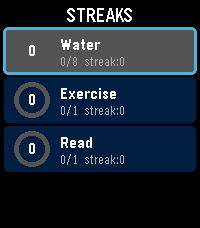
Health & FitnessTrack your daily habits and build streaks right from your wrist. Streaks is a simple, colorful habit tracker for Pebble that helps you stay consistent with up to 6 customizable daily goals. Set up habits like drinking water, exercising, reading, meditating -- anything you want to do every day. Each habit gets a vibrant progress ring that fills as you tap toward your daily goal. Complete your goal and feel the satisfying buzz. Keep going day after day to build your streak. Features: Track up to 6 daily habits Customizable names, goals (1-20), and colors for each habit Visual progress rings with completion animations Streak counter tracks consecutive days Best streak memory to beat your personal record Quick-tap to increment from the list, or open detail view for full stats Works on rectangular (Emery) and round (Chalk) Pebble watches Settings configurable from your phone via Clay Build better habits, one day at a time.
 61
61Metronome
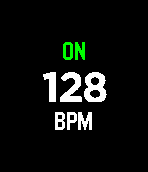
Tools & UtilitiesA minimalistic haptic metronome for the Pebble Time. Adjust the tempo with the up and down buttons and toggle vibration with the select button.
 61
61Metronome
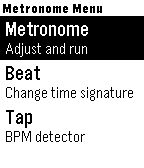
Tools & UtilitiesThis is a haptic metronome app for Pebble devices. It gives you visual and vibration feedback to display the tempo. It is also possible to configure the time signature and tap in a tempo. The app respects Quiet Time and does not vibrate when Quiet Time is active.
 61
61Tideline
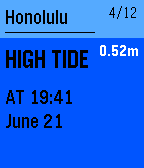
DailyGet accurate tide predictions delivered to your Pebble watch. Tideline adds pins to your timeline for high and low tide events. Tide information can also be viewed directly in the app. Currently supports thousands of tide stations in the USA, Caribbean, Pacific, New Zealand, Australia and Antarctica! More features are planned for future releases including: - Additional tide locations - More animations and eye candy Please contact tideline.watchapp@gmail.com if you have any bug reports, feature requests or just want to say that you like my app ;)
![Social Bundle 1 [Pebble Rocker]](https://assets.repebble.com/screenshots/52e485b11e4cae1a79000e2b-0.png) 61
61Social Bundle 1 [Pebble Rocker]
DailyIncludes the Facebook, Foursquare, and Twitter watch apps. IMPORTANT: This watch app requires the Pebble Rocker companion app available via the Google Play store.
 61
61Feel The Time
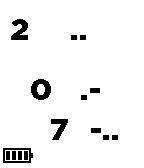
Tools & UtilitiesDon't look. Feel it. Feel the time with your Pebble. When you can't glance the watch like while meeting or presentation or hair cutting or dentist, feel the time vibration with this app. A step for master the feeling is following. <setup> 1. download this app. 2. register this app as QUICK LAUNCH of up(or down) button long press. (this is option) 3. use SETTINGS option for configuration (this is option) <how to use> 3. long press up (or down) button to launch this app. it feels startup vibes. 4. push up button and feel vibe to know the current hour. 5. push middle button and feel vibe to know 10 digit of the current minute. 6. push down button and feel vibe to know 1 digit of the current minute. 7. push back button to quit this app. <configuration> - vibe length : normal/short/long - vibe clock : off/every hour/every 30min - pre clock vibe :off/5min/10min <vibe pattern> vibe pattern consist of long vibe and short vibe. long vibe means 5, short vibe means 1. only 0 is special pattern. all patterns are following. 0 .- 1 . 2 .. 3 ... 4 .... 5 - 6 -. 7 -.. 8 -... 9 -.... 10 -- 11 --.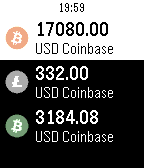 61
61Crypto Watch
DailyCrypto Tracker for Pebble With this app you can watch the price of Bitcoin, Litecoin, Bitcoin Cash, and Ethereum on the Coinbase Market. You will be able to choose your currency type as well. As an added bonus, you can enter a Bitcoin, Litecoin, Bitcoin Cash, Ethereum paper wallet address to track as well. The value of coin and the currency value with be displayed. If you click to select the wallet, a QR Code will appear of the wallet address. This is great for a quick receive barcode of your Bitcoin, Litecoin, Bitcoin Cash, and Ethereum Wallet. If you like this app, you can donate some BTC, LTC, BCH, ETH do the addresses below: BTC: 1D9HuDKKYY5RiMmwicV4xfuRNhVNwtmNJP LTC: LVVFkds7vYEN3yVDpXVPeMUtMYKZ8pNYbu BCH: 15FzrbwukP8VBXoLmKBYfmb8ELK5NxTtns ETH: 0xf02a22f7b4fd26264f6086c79785c80e04ed2256
 61
61Wikipedia Nearby
DailyFind interesting places around you by looking for Wikipedia articles near your current location. Note: Wikipedia Wordmark is a trademark of the Wikimedia Foundation and is used with the permission of the Wikimedia Foundation. We are not endorsed by or affiliated with the Wikimedia Foundation.
 61
61CPR Timer (Adult)
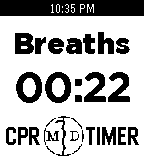
Tools & UtilitiesAn app designed assist in the correct provision of adult CPR on patients without an advanced airway (30:2). The watch vibrates at 100/min to time compressions. After 30 compressions, the app times breaths at 15/min. When breaths are complete, press the "UP" button to restart compressions. *Beta Version for training purposes only* By: Michael R. DiBenedetto mdpebbleapps@gmail.com
 61
61Legend of Pebble
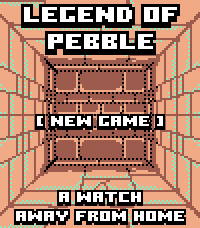
GamesLEGEND OF PEBBLE A first-person dungeon crawler RPG for your wrist. THE STORY You check the time. The watch flares. The world twists. You wake in a rift ruled by the Signal Keepers. Ten floors. Merchants. Bosses. Break the Signal. Get home. FEATURES • First-person exploration (Grimrock-style) • Stairs up/down — revisit merchants, beds, chests • Turn-based combat with enemy HP on screen • Signal Magic — Heal, Purge, Decode (SELECT cycles) • Weapons, armor, chest upgrades • Merchants — potions, gear, spells, carryable MAP/REST • Puzzles — keys, plates, blocks, teleporters, secrets, pits • Mid-boss The Keeper · final boss The Architect • Fair gold: first kill full, second 25%, then capped • Save/Continue · amber/teal pixel art (Time 2 + Round 2) CONTROLS UP: Forward / Attack DOWN: Turn left (hold: inventory) / Cast in combat SELECT: Turn right / Cycle spell·potion / Confirm BACK: Run (not vs Architect) HOLD SELECT: Minimap (UP = legend) TOUCH Top/Bottom/Left/Right: move · Center: menu Combat: tap DOWN icon to cycle; tap below to cast CREDITS Fork of Dungeon Escape by Brian Ouellette (GPL-3.0). https://apps.repebble.com/dungeon-escape_4d6fde68a2b047ef83381221 @brianenders.bsky.social · art lineage: Clint Bellanger Thank you Brian — this would not exist without your game.
 60
60Codex Pigeon
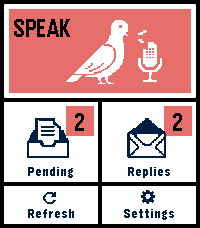
Tools & UtilitiesCodex Pigeon turns a Pebble Time 2 into a small voice mailbox for GitHub and Obsidian. Dictate a note on the watch, review it, and send it to a private GitHub repository as a Markdown file. Later, refresh the app to read replies or dictate a follow-up in the same conversation. Touch controls and the physical buttons both work throughout the app. Codex Pigeon is a transport tool, not a hosted AI service. It moves messages between the watch and a repository you control. What happens on the home computer is entirely your choice. You can use Codex, Claude, another model, a local model, a simple script, or no model at all. The Codex workflow is the only model-based setup tested end to end for this release. HOW IT WORKS The watch sends each request as a separate file in the repository's inbox folder. A process on your computer can read the request and create a matching file in the replies folder. GitHub carries the files between devices, while Obsidian presents them as ordinary local notes. The file-per-message design keeps the mailbox append-only and reduces merge conflicts. Dismissing a reply hides it on the phone and watch only. It does not delete the GitHub or Obsidian copy. SETUP 1. Create a dedicated private GitHub repository. For example, create a private repository named pebble-mailbox under the fictional account example-user. Inside it, create folders named inbox and replies, plus a file named Conversation.md. Commit and push the initial structure. 2. Create a restricted GitHub token. In GitHub, open Settings, Developer settings, Personal access tokens, Fine-grained tokens, then Generate new token. Limit repository access to the single mailbox repository. Grant only Contents: Read and write. No administration, workflow, issue, pull-request, organization, or account permissions are required. Use an expiration date and store the token safely. github_pat_EXAMPLE_NOT_A_REAL_TOKEN is a fake example and must not be used. Never put a real token in source code, documentation, screenshots, Obsidian notes, or chat. 3. Connect the repository to Obsidian. Clone the mailbox repository onto the home computer. You can open that folder as a dedicated Obsidian vault, or clone it as a folder inside an existing vault. Git performs the synchronization; Obsidian does not need a Git plugin unless you independently want one. 4. Configure Codex Pigeon. In the Pebble phone app, open Codex Pigeon settings and enter the repository owner, repository name, branch, and fine-grained token. Example values are example-user, pebble-mailbox, and main. Test the connection, then save. 5. Choose what processes incoming notes. A local worker can periodically pull the repository, find inbox files without matching replies, perform the requested work, write the response to replies using the same message ID, optionally update Conversation.md, then commit and push. Codex Pigeon deliberately does not install that worker or decide what it may access. Configure your local tool with the permissions and project boundaries you consider appropriate. Watch messages should be treated as untrusted input, not as automatic permission to access unrelated files or services. NO-AI USE AI is optional. Codex Pigeon can be used as a voice-to-Markdown inbox, an append-only remote notebook, an input for a rules-based script, or a way to capture notes for manual review in Obsidian. Without a local worker, requests still reach the repository; replies simply remain manual. PRIVACY AND LIMITATIONS Use a private repository dedicated to this mailbox. Do not dictate passwords, API keys, payment information, clinical identifiers, or other highly sensitive material. The GitHub token is stored in the Pebble phone app's app-specific local storage. This is not equivalent to the iOS Keychain. Revoke the token if the phone is lost, and use Erase credentials before transferring the device. The paired phone must be connected over Bluetooth and the Pebble phone app must be available. If iOS has force-quit the companion app, reopen it before refreshing. Version 0.4 supports Pebble Time 2, Round 2 platform. Tested on Time 2, stable battery and function. This is a beta of a small project, things can go wrong, or, just not be as good as you want them to be. Feel free to write me about any problem, or any idea.
 60
60Accelerometer
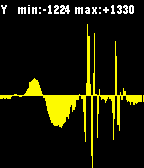
Tools & UtilitiesA real-time, auto-scrolling auto-scalling accelerometer readings plotter Buttons: - SELECT: toggle the axis (X/Y/Z) being plotted. - (2x) UP/DOWN: (jump) scroll left/right - 2x SELECT: vibrate - LONG SELECT: change (10hz/25hz/50hz) sampling rate (UP/DOWN) For more information read: http://developer.getpebble.com/2/guides/accelerometer.html