 48
48Rescue Me
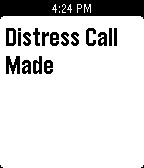
Tools & UtilitiesRescue Me will send out a text or an email to your emergency contacts with flick of the wrist if you are in an emergency or distress situation it will give them your current location. Set contacts in app settings. When you need to be safe(e.g. returning from a late movie alone) just start the app and keep it open. In an emergency just shake your wrist and confirm by pressing any button.
 48
48Analog Forecast Weather App
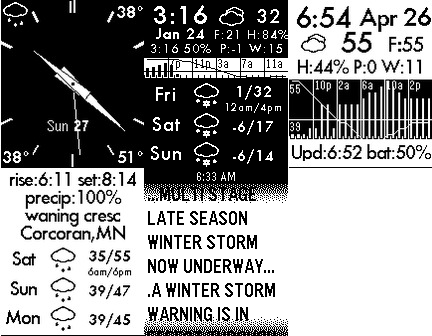
DailyData forecast.io API (or openweathermap.org) Analog Screen and Detail Screens Forecast for 3 days Weather Alerts Precipitation by hour for 24 hours (bar graph) Temperature trends for 24 hours (line chart) Current Weather (Temp, Pressure change,Wind speed,Feels Like Temp, Humidity)
 48
48Starfield Graphics Demo
GamesThis is a simple graphics demo showing randomly generated stars flying across the display at 30 FPS
 48
48Phone Battery Monitor
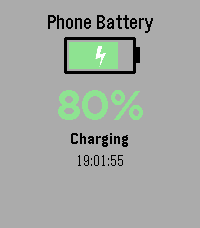
Tools & UtilitiesNever wonder about your phone's charge level again! Monitor your phone's battery directly from your Pebble watch - perfect for when your phone is charging in another room. Key Features: • Real-time battery level display with large, easy-to-read percentage • Visual battery indicator with color-coded status (green/yellow/red) • Animated charging indicator - see at a glance when your phone is plugged in • Instant updates when battery level or charging status changes • Manual refresh with SELECT button • Vibration alert when your phone reaches 100% charge • Current time display • Works on all Pebble models How It Works: Simply install the app and it will automatically connect to your phone. The watch face shows your phone's battery percentage, charging status, and a visual battery icon that fills up as your phone charges. The lightning bolt animation lets you know when charging is active. Perfect For: • Monitoring charging progress from another room • Keeping track of your phone's battery without checking it constantly • Getting notified when your phone is fully charged • Peace of mind when you can't see your phone Requirements: • Pebble watch (all models supported) • Smartphone with Battery Status API support (most modern iOS and Android devices) Stay connected and never miss a charge cycle again!
 48
48Train Navigation
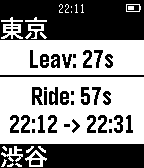
Tools & UtilitiesRequired - Only Japan can be use. - Set Google API Public Key on settings Functions - Set destination station - How many minutes will you need go out for next train from your location. - Transit details. - Last train from your location. How to setup? On smart phone configuration 1. Open setting on your smart phone 2. Input Google API key and add stations 3. Submit configuration on bottom of the page. How to use? click up button: previous train down button: next train select button: display route details long click up button: Back to first train. down button: Change mode to select destination station select button: Change mode to last train (back button will be back to normal mode) Known issues - Application will crashed when displaying too many Japanese words. ##CAUTION## This application is under beta version. Please note that publisher shall not be responsible for any loss and troubles.
 48
48Hue Off v1.1
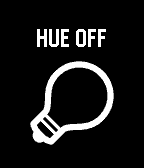
RemotesControl your Philips Hue light bulbs. Initial Setup - Press select to discover bridge and begin pairing process. Controlling Light Bulbs - Press select to switch on/off - Long press select to adjust brightness levels
 48
48Timestamp
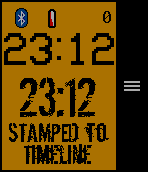
Tools & UtilitiesSave a Timestamp of the current time to the timeline just by entering the app! Set a button shortcut for one button logging. Use the microphone to label your Timestamp! (option to turn OFF) "STAMPED TO TIMELINE" will show up after the timeline pin request is sent (it might take a bit). It may take a few seconds to 15 min for the pin to actually show on the timeline, but you do not need to remain in the app. You can stay in the app for the Timestamp list and a fully functional watchface with a bluetooth disconnect warning (short long short vibration and icon) and low battery warning (icon @ 20% or below). In a BIG monospaced font you will see the current time above the Timestamp (rubber stamp font, get it?). The minutes since you stamped will show at the top. Use your pebble for other tasks, go to the past timeline or the list in the app to see your Timestamp. Why would you use this? Keep track of fuzzy timing: At bedtime you tell your child you will stay 5 more minutes. You look at your watch. Several minutes later you look at your watch but can't remember what time it was the first time. Leave a breadcrumb trail of time. Like when you take your ibuprofen, track potty training... The last 50 Timestamps are saved in a list. Use the options to manage your list. Create your own use case with this simple tool at your finger tips (literally)! Note: Past Timeline remembers 24-48 hours. App remembers last 50 timestamps. Font Dirty Ego-MisprintedType stamPete-http://www.joebob.nl VCR OSD Mono-Riciery Leal Give it a heart of you like it!
 48
48AlarmNote
Tools & UtilitiesDaily alarms with custom notes, automatically rescheduled to the next day. Great for taking various different pills on a daily basis. (Do not rely totally on these reminders. Bugs may be present, even though I have tried to verify correct working in many situations.). Time changes are not handled and would be hard to handle. Just select "reset alarms" when changing time zones.
 48
48Flipple - Flip a Coin
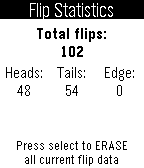
Tools & UtilitiesFlip a coin to avoid making decisions! Flip with a wrist flick, pressing the select button, or quick launching the app. If you want to do instant flips, press the down button. Change the settings or view the flip statistics window by pressing the up button. Please contact me if you have any questions, comments, or most importantly, discover a bug!
 48
48Own Health - Final Frontier Edition
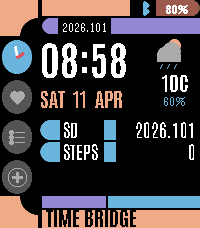
DailyA health companion for the final frontier. Four LCARS-styled pages designed for Pebble Time 2. Own Health Features: Time Bridge: Current time, date, stardate, live weather with temperature, and daily step count. Health Bridge: Steps with progress bar, weight, strength logged status, and sleep duration pulled from Pebble Health. Mission Plan: Visual progress bars for your three core weekly goals: 7 hours of sleep, strength training, and 10,000 daily steps. Entry Console: Manual logging for strength (toggle logged/pending) and weight (adjustable spinner). Navigate pages with UP/DOWN. Live weather via OpenWeatherMap. Bluetooth status indicator. Real health data from Pebble Health service. Own Your Health.
 48
48Sidecar by flwkt
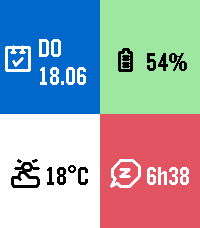
DailySidecar by flwkt Your watchface looks great — but it probably does not show everything you care about. Sidecar is a quick-launch companion watchapp that fills the gaps: a configurable grid of complications you can open in one press and dismiss just as fast. Love a minimal face with no clutter? Keep it. When you need steps, sleep, weather, or battery at a glance, Sidecar is there. Complications Assign any of these to up to six grid slots: - Current weather — Live temperature with a weather icon for current conditions - Weather forecast — High and low temperatures for today with a forecast icon - Steps — Today's step count - Distance — Distance walked or run today - Heart rate — Current heart rate in BPM - Battery — Watch battery level as a percentage - Date — Day of week and calendar date - Sleep total — Total sleep duration for today - Deep sleep — Restful (deep) sleep duration for today - None — Leave a slot empty; only active slots are shown The grid layout adapts automatically based on how many slots you use, from a single full-screen cell up to a 2x3 grid. Features Built for Quick Launch — Assign Sidecar to a Quick Launch button on your Pebble Time 2 for instant access. Press Back, Up, or Down to exit and return to your watchface. Weather from your phone — Current conditions and today's forecast use your phone's location via Open-Meteo. Pick Celsius or Fahrenheit in settings. Health data — Steps, distance, heart rate, and sleep metrics read from Pebble health services when those complications are enabled. Make it yours — Set global background and foreground colors, or turn on per-cell colors for a bolder look. Pick a system font (Gothic, Roboto Condensed, Droid Serif, Bitham, and more) or leave it on Auto to scale with your grid size.
 48
48jetAudio for Pebble
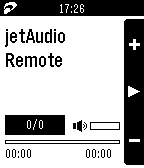
RemotesjetAudio for Pebble is a music app for Pebble smartwatch to control jetAudio for Android music player. (!) This application requires jetAudio Basic (Free) or Plus (Paid) for Android and activated through in-app purchase to work properly. If you have not installed jetAudio before, please try jetAudio first before downloading this app.
 48
48Intervals
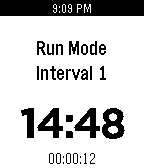
Health & FitnessSet multiple timers each with a different countdown time. The app will cycle through the timers and vibrate when a timer elapses. Starts over when all set timers have expired. [Double Click Select] Next Screen [Long Press Select] Prev Screen [Single Select] Change Unit/Start & Stop [Up] Increase interval/time, skip to next interval [Down] Decrease interval/time, skip to prev interval
 48
48Color Calendar Redux
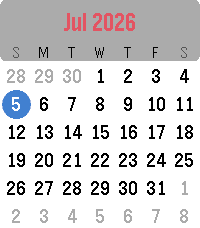
DailyColor Calendar Redux This is an update of the original Color Calendar app created by Kelby. A simple, easy-to-read calendar for your Pebble. Tap or Swipe Up and Down to scroll between months, Tap/Select returns to today, and long select press toggles between Sunday-first and Monday-first week layouts. New in this version: - Full support for Pebble Time 2 and Pebble Round 2, with a layout that scales to fill their larger displays (and it still runs great on Pebble Time and Pebble Time Round). - Touchscreen controls on Pebble Time 2 and Pebble Round 2: swipe up or down to change months, tap to jump back to today. - Simple calendar icon in the app menu - The current date now appears in the launcher under the app name (e.g. "Thu, Jan 1st") Based on the original Color Calendar by Kelby. Full credit to them, I just added some features and native scaling for the new watches. About the Developer - Comet Designs creates fun content for the Pebble platform - Buy me a coffee https://ko-fi.com/cometdesigns
 48
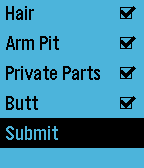
48Nothing butt clean
DailyRemembering what you already cleaned in the shower can be hard. Good thing the pebble is waterproof.