 35
35Attitude Indicator
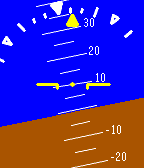
Tools & UtilitiesThis app uses the Pebble's accelerometer to simulate an attitude indicator. The main indicator shows an artificial horizon and degrees of pitch up or down. The bank indicator at the top displays left or right tilt, with markers at 10, 20, 30, 45, and 60 degrees. By default the backlight is kept on, although it can be turned off by pressing the top right button and waiting a few seconds. Because an accelerometer is used and not a gyroscope, this app is only accurate while stopped or at a constant velocity, not while turning. I would not recommend using this for navigation anyway. ;)
 35
35Clock
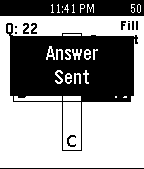
Tools & UtilitiesThis application is just a clock...that has cheating capabilities built in.
 35
35tabblo - A tado Control
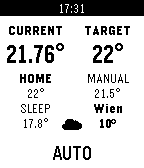
Remotestabblo brings tado°® on your wrist. It allows to control and monitor the temperature of your tado°® home. The Up/Down buttons change the current mode temperature. The Select button switches between Manual and Automatic mode. A long press on the Select button forces a refresh.
 35
35Pace Calculator
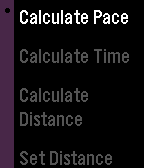
Health & FitnessCalculate your target pace before a run or jog either in kilometers or miles. You can also calculate your: - Distance based on the running time and pace - Running time based on the distance and pace - Expected start or end time for your run
 35
35Skink GPS
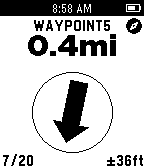
Tools & UtilitiesSkink GPS turns your Pebble into a simple but useful GPSr. Featuring a GPS satellite display, tracking screen, waypoint navigation and a trip computer. A full-featured companion app allows you to export recorded tracks as KML or GPX files, import waypoints and geocaches in GPX or LOC formats and export waypoints in GPX format. It also works with geocaching apps which support the “radar” intent.
 35
35GoSy Run
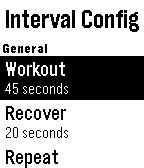
Health & FitnessHelps you exercise running. - Interval timer with extended rest, warm up and cool down - Ladder timer - Stretch timer with 8 exercises
 35
35TaskerVoice
Tools & UtilitiesUnleashing the full power of Tasker via the Pebble's microphone
 34
34Bar Finder
Tools & UtilitiesThirsty? Now with Bar Finder the closest drinking establishments are delivered to your wrist at the press of a button. Bar Finder will tell you how far it is, the street name and even point you in the right direction. Note: This has been fully tested on iOS but should also work on Android - please give feedback on your experiences!
 34
34Australian Radar
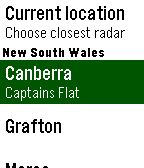
DailyCheck for rain from your wrist! This Watchapp displays the latest radar image from one of the more than fifty sites operated by the Australian Bureau of Meteorology. Only useful in Australia. Requires an Internet connection. This app downloads several kilobytes with each refresh, so consider your data limits if you leave this app open for long periods. Copyright of the radar maps and images is owned by the Australian Bureau of Meteorology.
 34
34IParkedWhere
Tools & UtilitiesA simple but useful utility for tracking where you parked and if you locked your car. You can set the stall (letter/number) with the up down keys, get your GPS translated to an address, address by IP address and now supporting notifications so your time and parking is stored in your latest pebble notifications.
 34
34ResMed CPAP Stats
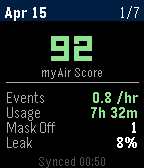
Health & FitnessCPAP sleep stats from ResMed myAir
![Twitter [Pebble Rocker]](https://assets.repebble.com/screenshots/52e1b36e318d6ebb15000111-1.png) 34
34Twitter [Pebble Rocker]
Daily- Browse your home timeline on your Pebble watch. - See user name, time, text, and picture for each tweet. - View tweet picture (any picture that Twitter can display inline on their web page). IMPORTANT: This watch app requires the Pebble Rocker companion app available via the Google Play store.
 34
34mcbroken
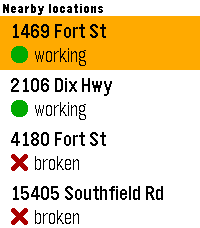
DailyA mcbroken client for Pebble smartwatches. Now you can check if the ice cream machine is down on your wrist! Nearby shows up to 5 McDonald's locations within a 5-mile (8.04 km) radius from your current location, sorted from closest to farthest, and Saved shows all of your saved locations (duh) that you've added in the app settings. You can save up to 5 locations.
 34
34EasyWake
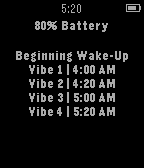
DailyEasyWake makes waking up in the morning much less stressful. Instead of almost having a heart attack every morning from your alarm, you can use EasyWake to wake up peacefully. EasyWake tries to slowly wake you up by sending short vibrations in a repeated pattern. It sends vibrations at 4:00, 4:20, 5:00, 5:20, 5:40, and 6:00 AM. All you have to do is leave EasyWake open on your Pebble Watch while you sleep. The app is set to fully wake you up at 6:00 AM, so you do not need to set an alarm on your watch. Wake up easy with EasyWake. *If popular request, I will add a way to set what time you want to wake up :)
 34
34child time
DailyIntroducing the new pinnacle in practical Pebble parenting functionality! Tired of your little ones disagreeing on how late is 'late' at bed time? Or arguing whether the displayed time of day has anything to do with getting out of bed? Solve all disagreement and SHOW them what 'time' it is! This handy app enables Pebble parents to display common daily events - on demand - instead of the time of day: whether that be 'bed time', 'play time', 'bath time', 'lunch time' or many more. Now with enhanced readability for encouraging little readers! v1.6: minor technical update. Check out the link to 'more from this developer' below for the original 'bed time' watchface. And a special thanks to Pebble Forum user LaFauve for helping me fix some of the code!