 35
35Respire
Health & FitnessRespire will guide you through a series of deep breaths, and will remind you to take some time to breathe during the day. [Respire is currently in BETA. Please report any bug or feature request.] 😌 Start a session 😌 1) Open the app. 2) Press up or down to select the duration of the session. 3) When you're ready to start, press the select button. 4) Follow the on screen instructions. Inhale when the circle grows, and exhale when it shrinks. The watch will also vibrate to guide the session without looking at it. 5) Keep breathing until the session ends. 6) You can repeat the session or exit the app. 😌 Reminders 😌 Respire will remind you to take some time to breathe during the day. By default you'll receive reminders every 4 hours. The reminder frequency can be changed in the configuration page of the app. NOTE: The purpose of this app is to guide you through breathing sessions. If you feel anxious or unwell you should contact a specialist for advice.
 35
35Horizon Scout
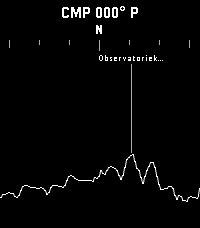
Tools & UtilitiesExplore the world around you with Horizon Scout, an app that identifies mountains and peaks in your view based on your location and direction. Perfect for hikers, outdoor enthusiasts, and anyone curious about their surroundings. Features: - Real-time peak identification as you look around you - Compass-based navigation for detailed exploration of the horizon, or use Up/Down buttons on watches without a compass - Single-click (Select button) to refresh and update the peak information - Long-click (Select button) to switch back to compass mode - Configurable settings to customize what information you see Attribution: This app uses peak data from the PeakFinder service. Horizon Scout is an independent Pebble implementation inspired by the excellent PeakFinder mobile app. If you enjoy this app, I recommend supporting the original PeakFinder app and service. Links: [PeakFinder Web: https://www.peakfinder.com/] [PeakFinder Mobile App: https://www.peakfinder.com/mobile/]
 35
35Pebble Runner
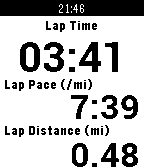
Health & FitnessPebble Runner brings the features of a running GPS watch to your Pebble. It utilizes your Android phone's GPS to provide multiple customizable screens of running data as well as the ability to start, stop, create laps, and reset the run from your wrist. In addition to displaying run data, the companion Android app stores your recent runs, allows you to view them on a map, and also export them.
 35
35Voice Relay
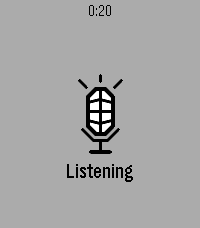
RemotesLaunch Voice Relay and it starts listening straight away. Press Select when you've finished speaking, and what you said is sent to an HTTP endpoint you choose — your own server, your own model, your own key. The reply comes back as text on the watch. Setup Open the app's settings in the Pebble phone app and fill in two fields: the endpoint URL, and any headers you need (one per line, Name: value — an API key goes here). A Test button posts the word "test" so you can confirm the endpoint works before speaking to it. The contract Voice Relay posts {"text": "what you said"} and expects {"response": "what to show"} back. Anything that speaks JSON will do — a language model, a webhook, a note-taking service, a home automation script. On the watch Select speaks again. Up and Down scroll a long reply. Back exits. Errors are shown in plain words, not codes — a failed request tells you the status and whatever the server said about it. You need your own endpoint. There is no built-in service and no account to create; nothing is sent anywhere except the address you enter. Speech recognition uses the same phone-based dictation as the rest of the watch, so a phone connection is required.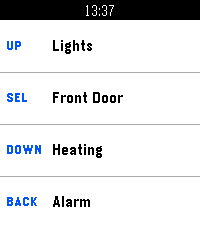 35
35Pebble Hooks
RemotesPebble Hooks lets you send HTTPS requests from your watch using the four Pebble buttons. Each button can be configured separately from the Pebble mobile app. For each action, you can set a label, HTTP method, URL, authentication, optional headers, and an optional request body. Supported auth types include Bearer, Basic, and custom header-based auth. The watch shows simple status feedback when a request is sent or completed. To exit the app, hold the Back button or Swipe Up on supported devices.
 35
35PeReader
Tools & UtilitiesWelcome to PeReader! A super simple .TXT reader for all your reading on the go! Is the ol' 9-5 sucking your life away? Throw your favorite novel in here and disappear for awhile! Have several E-Readers back home and want to sync your reading? - Use the percentage skip option! Sneakily reading some smut in the dark? - Enable the backlight for your goblin needs! That's pretty much it... Just upload your TXT file into the app settings page and upload. You may need to adjust the page character count in the settings if on a larger device like the Time 2. Up button - previous page Down button - next page Select button - options menu - Lightbulb toggles between backlight on and auto - Skip button opens skip menu to jump forward or back Hope you enjoy! Side note: If a txt fails to upload, you may need to split it into chunks or it could be an issue with funky characters or formatting in the document. Still gotta iron that out.
 35
35AquaCave - Drink Water!
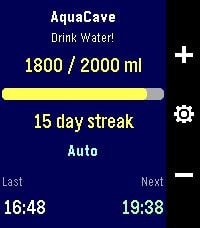
Health & FitnessAquaCave — Drink Water! A smart, focused water tracker for your Pebble. AquaCave helps you stay hydrated by tracking your daily water intake right from your wrist and reminding you to drink throughout the day. No phone required to use it — everything runs on the watch. Log a drink with a single button press, watch your progress bar fill toward your daily goal, and keep your hydration streak alive day after day. Features - Quick logging — add or remove water with the up/down buttons, in amounts you choose - Custom daily goal (500–4000 ml), or let AquaCave calculate it automatically based on your body weight, activity level, heart rate, and local outdoor temperature - Two reminder modes: a fixed interval, or an automatic mode that paces reminders evenly across your day - Active hours — only get reminded between your chosen start and end time, never overnight - Sleep-aware reminders — when enabled, reminders automatically pause while you're asleep and resume when you wake up, using Pebble Health sleep detection - Early-drink pacing — if you log a drink before your active window starts, reminders adjust so they spread out naturally from your start time instead of clustering - Streak counter plus statistics: 7-day average, best streak, and goals reached this month - Drink history with timestamps and an overview of your upcoming reminders - Optional vibration, left- or right-hand button layout - Settings menu with 5 organized sections — configure everything directly on the watch - Phone companion app with two-way sync: all settings are backed up to your phone and automatically restored when you pair a new watch or reinstall the app - Available in 8 languages: English, German, French, Spanish, Italian, Portuguese, and Simplified & Traditional Chinese — automatically detected from your watch language Compatible watches: Pebble Time, Pebble Time Steel, Pebble 2, and Pebble Time 2 (color and black-and-white displays supported). Support development AquaCave is free. If you find it useful and would like to support its development, you can buy me a coffee here: https://ko-fi.com/gessm — thank you!
 35
35wifi status
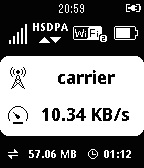
Tools & Utilitiesdisplay mobile rooter status for huawei e585 (myfi) and hw-01c, gl10p it can display: ・signal level ・network type ・connecting device number ・battery level ・carrier name ・current transfer speed ・total transfer volume ・connecting time ・microSD status
 35
35PebbleFlix
RemotesPebbleFlix allows you to control Netflix on your Mac. Just install and run the server app on your Mac, open PebbleFlix on your watch, then you can pause, play, and adjust the volume. To download the Mac application, click "WEBSITE LINK" below and send the link to yourself, or visit the following URL on your Mac: http://octalmage.github.io/PebbleFlix (Capitalization is important) Also works with Hulu, YouTube, Vimeo, VHX and many other services. Mac OS X only, Windows version coming soon. Star the GitHub project to get updates.
 35
35MultiCount
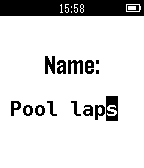
Tools & UtilitiesNow supports: Français, Deutsch, Espanõl Do you, sometimes, want or need to count things, but just can't keep track of everything in your head? MultiCount is what you need! It allows you to manage a list of counters, each with a custom name, to count anything you want, from the number of coffee you drink a week to the number of times you say "Hello" a day. Please send me any feedback on Twitter: @GilDev Français Avez-vous, parfois, l'envie ou le besoin de compter des choses, mais vous n'arrivez jamais à vous rappeler où vous en êtes ? MultiCount est ce qu'il vous faut ! Il vous permet de gérer une liste de compteurs, chacun avec un nom personnalisé, permettant de compter ce que vous voulez, du nombre de cafés que vous buvez par semaine au nombre de fois que vous dites "Bonjour" par jour. Envoyez-moi vos retours sur Twitter : @GilDev
 35
35CatchOneBus
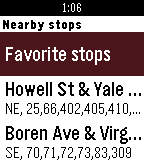
DailyCheck bus or transit time everyday? You'll love this app! CatchOneBus will show nearby transit stops and live arrival times. You can save any stop as favorite and CatchOneBus will show your favorite stop's live arrival time immediately when you are near that stop and open the app. You can shake your Pebble to update the information in real time. Currently works in the following list of cities and areas and supported by the public transit API provided by various organizations and agencies. • Seattle, Tacoma, Bellevue, Everett, WA (OneBusAway) • Portland, Beaverton, Gresham, Hillsboro, OR (TriMet) • Boston, Cambridge, Medford, MA (MBTA) • New York metropolitan area, NY (MTA) • Tampa Area, FL (HART) • Vancouver, BC (Translink) Using Tips: • Make sure to turn on location services on your Pebble Time app on the phone. • Save a bus stop as favorite for easy access, especially for your daily used stops for commute. • Set quick launch on your pebble watch for CatchOneBus to achieve checking commuter bus real time with one click. App developed by Yaoyu Yang and Dian Zhang. Give us a like or feedback!
 35
35SpeakNiWoTa Daily Words
Daily****NOW SUPPORTING HANZI CHARACTERS**** Speak Ni-Wo-Ta brings you the Daily Word Pebble app. Every time you open the app you will be presented with a new Chinese word. We are pulling from 2000 of the most common Chinese words. So start your Mandarin Chinese today. **Future updates will include Tones in Pinyin
 35
35Intrinsic Gravelty
GamesBedrock Bros. --- Intrinsic Gravelty a demo for a Pebble smartwatch and two Game Boys 1st place at Evoke 2017 in Alternative Platforms http://www.pouet.net/prod.php?which=71545 Credits: @hbehrens -> code, tools lastfuture -> music, gfx Comments: Demake of Still's "Intrinsic Gravity" for the Original Pebble Smartwatch (24KB RAM, 2 color e-paper) and two original Game Boys using nanoloop cartridges. Original: Still - Intrinsic Gravity for Under Construction 2014 http://www.pouet.net/prod.php?which=64756 pixtur -> gfx, code, tools hoffman -> music
 35
35Metronome
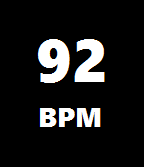
Tools & UtilitiesFind the correct tempo with this great metronome app for Pebble! Metronome displays the current beats per minute (BPM) and flashes the screen accordingly. Pushing the up or down buttons increases or decreases the tempo. Pushing the select button turns the vibrate-click on or off.
 35
35Deck of Cards
Tools & UtilitiesA full deck of cards on your wrist.