Plugins are a dev preview. Enable them first in the Pebble mobile app: Settings → Plugins → Plugins/permissions preview. Learn more
 4
OSM Map Background
OtherThis plugin generates map image with either your current location in the middle or selected custom gps coordinates that you can then use as background in watchfaces or watchfapps. You can select style, zoom level, layers and other options. Made by Claude.
 4
Stocks + Crypto
FinanceStock and crypto prices on any watchface that reads stocks, from Yahoo with no key, or your own Finnhub, Twelve Data, or Alpha Vantage key. Stocks + Crypto serves prices the same way the Pebble app's own Stocks plugin does, so a watchface written for it reads these with nothing to change. Build one watchlist of up to 8 stocks and 8 crypto pairs, and put the ones you most want on your wrist at the top, since a watchface may only show the first few. - Works with Yahoo the moment it is installed, with no account or key. - Takes your own free Finnhub, Twelve Data, or Alpha Vantage key, with a Paid Plan switch for a key on a paid plan. - Keeps a free key inside its plan's limits for the minute and the day. - Prices crypto from Yahoo, whatever source you pick for stocks. - Keeps the last good price for a ticker the provider could not price for a moment. - Keeps your API keys in the phone's encrypted secure storage. - Refreshes every 5 minutes to an hour, your choice. Prices can be delayed. They are for information only, not financial advice. To use it, turn on plugins in the Pebble app under Settings, Plugins, Plugins / permissions preview. Then pick Stocks + Crypto as your Stocks source, and as your Crypto source too if your watchface reads crypto. ----- I mostly build things in my spare time, and your support helps keep that going. It usually finds its way into more green coffee beans, a few roasting experiments, and plenty of late-night coding sessions working on Pebble projects like this one. If you've found something useful here, or simply enjoy following along with what I'm building, you can support my projects here: https://ko-fi.com/nullsyntax
 4
Astronomy
OtherAstronomy brings the sun and the moon to every watchface and app on your Pebble. It is a phone-side plugin: install it once, and any face that supports plugins can show sunrise, sunset or the moon phase – no internet connection, no account, no API key. WHAT IT PROVIDES The sun (category "astronomy", item "sun"): • sunrise, sunset and solar noon for today • civil dawn and dusk (twilight) • the next sunrise and the next sunset • day length and whether the sun is up right now • the sun's altitude, azimuth (with compass direction) and hour angle • sunrise and sunset for the coming seven days The moon (item "moon"): • moonrise and moonset, the next moonrise and moonset • the moon phase as a number, a short and a long name, and as a picture (drawn for your hemisphere) • illumination in percent and the moon's age in days • the next new moon and the next full moon • the moon's altitude, azimuth and hour angle FOR YOUR PLACES You get one set of values for each of your weather locations in the Pebble app, or for your current position. If the phone has no position fix for a while, the last known one is used – the sun and moon hardly move with a few kilometres. ACCURATE AND TIME-ZONE-PROOF Everything is computed on your phone with established astronomical formulas (sun and moon after Meeus, the moon with parallax for your position). Checked against the reference library PyEphem for eight places and seasons from the Arctic to Sydney: rise and set times agree within a minute, positions within a tenth of a degree. All moments are delivered as exact timestamps, so faces show them correctly in any time zone, also after daylight saving changes. "Today" is the solar day around now, so polar day and polar night are handled too. LANGUAGES Phase names in English, German, French, Spanish, Italian and Portuguese, following your Pebble app's language. FOR DEVELOPERS Sources astronomy/sun and astronomy/moon, one instance per weather location (same instance ids as weather/location). Shapes: timestamp, numericValue, shortText, longText, boolean, icon/image and daily series. Permission: Location. Used by the watchface Perpetual III. Made with Claude.
 4
Emberio
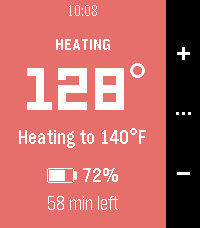
Tools & UtilitiesYour Ember mug on your Pebble. See your drink's temperature and how many minutes of heat your mug's battery has left, change the temperature from your wrist, and get a buzz when your drink is ready or the battery runs low. • The drink's temperature, big, on a background that shows what the mug is doing: orange heating, green perfect, blue cooling • Target temperature, battery percentage, and minutes of heat left (or time to full on the coaster) • Up/Down change the target. Select opens Latte, Coffee and Tea presets, heater on/off, alerts and units • Alerts on your watch: drink ready, and low battery at the level you choose • Watchface plugin: plugin-aware watchfaces and Complications can show your drink's temperature, battery and time left • Every Pebble, with round layouts for Time Round and Round 2 You need: • An Android phone with the free Emberio companion app, which talks to your mug over Bluetooth: https://github.com/aleminopuy/emberio/releases/latest • An Ember Mug 2 (the Mug, Cup, Tumbler and Travel Mug should work too) iPhone isn't supported. Unofficial. Not made by, or affiliated with, Ember Technologies. Open source (MIT): https://github.com/aleminopuy/emberio Made with AI.
 3
London Tube Lines
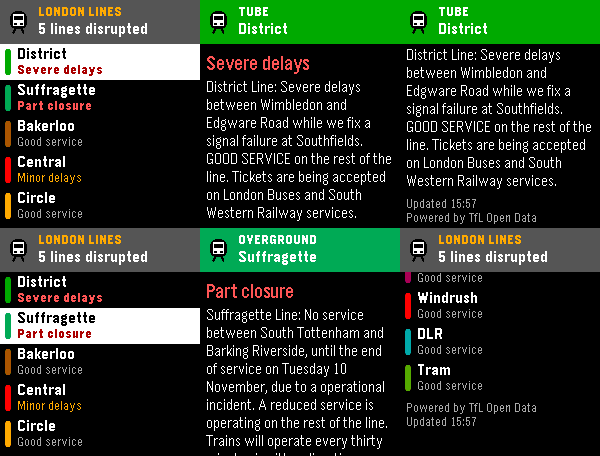
Tools & UtilitiesLive status of the Tube, Elizabeth line, Overground, DLR and trams on your watch, and for any watchface. Powered by TfL Open Data.