TimeBlocks
Devfootclan
Watchface
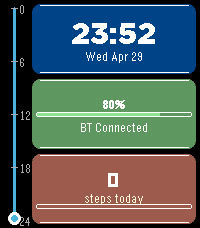
Description
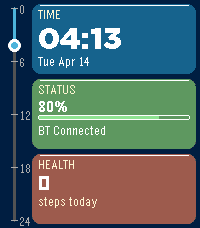
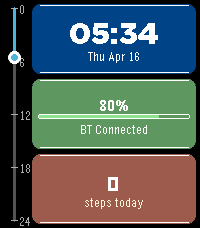
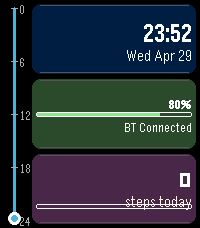
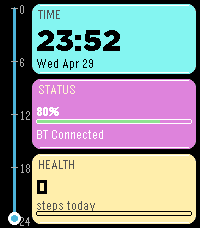
TimeBlocks turns your Pebble into a daily command center. A visual timeline shows where you are in your day, while three modular blocks keep the info you care about front and center — rearrange, restyle, and wrist-tap for quick peeks.

$1 unlocks customizations. 1-hour trial, then a 20s code screen. Top Block stays editable, middle and bottom go default. Until you pay, settings show Pay now at the top with kzl.io/code and your watch code. Once a week those two pills show kzl.io/code, a 10 min till close countdown, and your code. Paying restores your custom layout you set during the 1 hour trial.

DAY TIMELINE
• Progress through the day — vertical bar (rectangular) or full circular arc (round)
• 24-hour or 12-hour timeline range
• Optional analog hands on round (kept in the bezel so they don’t cover your blocks)

EIGHT MODULES (any module in any of the three blocks)
• TIME — clock (system/12h/24h), date formats, optional seconds, week or day-of-year
• STATUS — watch battery % (and phone battery % when the companion supports it), color bar, Bluetooth (+ disconnect vibration)
• HEALTH — steps, sleep (today), distance, or calories; step goal bar; optional HR row; 7-day step chart
• WEATHER — temp & condition via Open-Meteo (no API key); high/low today & tomorrow; sunrise/sunset
• COUNTDOWN — days/hours/minutes to a target date & time (through 2099)
• WORLD CLOCK — second city (DST-aware offset updated from phone)
• DATE — dedicated date block with sun times when available
• AGENDA — next 1–3 calendar events from one or two public ICS feeds (daily/weekly/monthly/yearly; TZID + EXDATE supported for common zones)

CUSTOM ROWS
• Override each block’s top / middle / bottom line with any content (time, batteries, weather, agenda titles/times, HR, sun, countdown, and more)
• Agenda Title(s) and Time(s) list up to 3 events on one line, comma-separated — or use the Agenda module for stacked title+time pairs

TAP GLANCES
• First tap (or raise) wakes the face; a second deliberate glass tap cycles Glance 1 → 2 → 3 → hide
• Each glance is one row of content on a chosen block
• Select button also advances

NIGHTSTAND MODE
• Plug in (charging or plugged) and the face becomes a large bedside clock
• Shows next cached agenda event, weather (temp + condition), and charge percent

HOURLY CHIME
• Optional short vibration on the hour
• Respects Quiet Hours so overnight stays silent

CLAY CUSTOMIZATION
• Per-block colors, borders, corner radius, text alignment, titles on/off, row font sizes
• Theme presets: Dark, Light, Ocean, Sunset, Monochrome
• Quiet hours for BT disconnect vibration and hourly chime
• Temperature unit, date format, step goal colors

PRACTICAL
• Safe with Quick View / notification overlays
• Phone battery needs a compatible Android/Rebble companion with Battery API (iOS often shows P n/a)
• Quiet Hours marker on Status; optional flash alerts for BT loss / low battery
• Platforms: Pebble Time 2 (Emery) and Pebble Time Round (Chalk)
- DeveloperDevfootclan
- CategoryFaces
- PlatformsTime Round, Time 2, Round 2 (scaled)
- Updated2026-10-16
- Version9.0.5