//GRID
gerbert
Watchface
Description
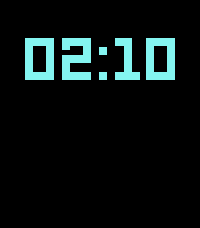
//GRID is a minimalist watchface for Pebble Time 2 and Pebble 2 Duo, inspired by the visual language of the TRON universe - a black background, neon geometry, scanline details, and LCD-style digits.

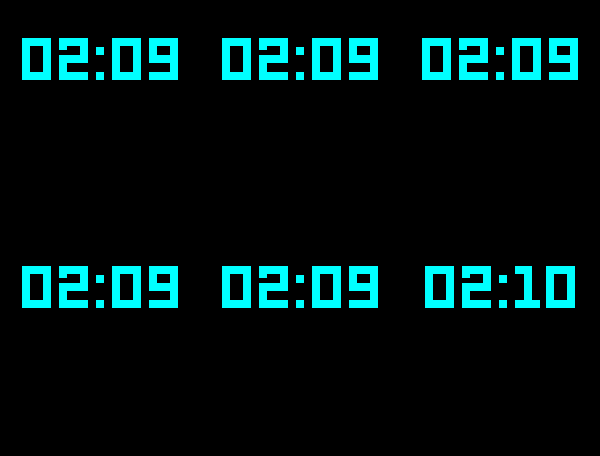
In its idle state, the watchface shows the current time and, when at least one alarm is enabled, the next active alarm. A wrist flick turns on the backlight and triggers a full-screen Doppler animation made of expanding concentric rings. The complete watchface then remains visible for the configured glance duration - seven seconds by default, adjustable from 3 to 30 seconds - before returning to the idle view.

An optional Do Not Disturb interval can suppress glance activation during selected hours. The interval may cross midnight. Do Not Disturb affects the glance screen only and does not suppress alarms.

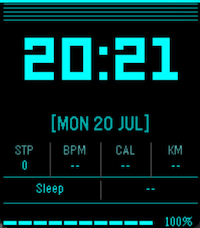
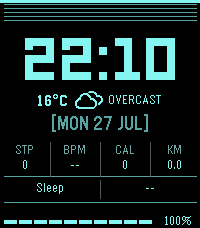
The full display includes an optional hourly weather forecast, the date, health statistics, sleep duration, and a segmented battery indicator.

When enabled, the weather forecast appears between the time and date. The watchface stores up to 12 hourly forecast entries and automatically displays the entry for the current hour. Open-Meteo is currently supported as the weather provider.

Weather can be displayed as text, an icon, an icon with condition text, or temperature only. The preferred display mode can be selected in the watchface settings. A status indicator shows whether the displayed weather data is still fresh or has become stale according to the configured update interval.

Weather data is normalised by PebbleKit JS before it is sent to the watch, keeping the watchface independent of provider-specific weather codes.

Weather settings allow you to enable or disable the forecast, choose a provider, select the display mode, set the refresh interval, and choose how soon a failed update should be retried. If an update fails, previously received valid forecast data remains available while the watchface continues trying to refresh it.

Up to five alarms can be configured from the watchface settings. Alarms can be one-time or recurring, with schedules for every day, weekdays, weekends, or selected days of the week.

The nearest active alarm is shown below the time on the idle screen. When an alarm fires, the watch repeatedly vibrates until the alarm is dismissed with a wrist flick. One-time alarms are automatically disabled after they fire. If several alarms are scheduled for the same time, they are handled one after another. Snooze is not implemented.

Do Not Disturb never suppresses a ringing alarm. While an alarm is ringing, the normal wrist-flick gesture is used to dismiss it instead of activating the glance screen.

On Pebble Time 2, the health section shows steps, heart rate, active calories, and walking distance. Pebble 2 Duo shows steps, active calories, and distance, omitting heart rate because the device does not have an optical heart-rate sensor.

On Pebble Time 2, the battery indicator changes colour as the remaining charge drops:

Cyan above 30%
Green from 21% to 30%
Yellow from 16% to 20%
Orange from 11% to 15%
Red at 10% or below

Pebble 2 Duo uses a monochrome white battery indicator.

Above 10%, each of the ten battery cells represents 10% of the total charge, with the current incomplete segment shown using a dim pattern. At 10% and below, the indicator switches to a more precise scale where each cell represents 1% - ten cells at 10%, five at 5%, and one at 1%. The same low-charge scale is used on both devices.

Both 12-hour and 24-hour time formats are supported. In 12-hour mode, the AM/PM indicator appears alongside the time, and alarm times use the corresponding 12-hour representation.

The watchface is designed with battery life in mind. Most of the time, only the clock and, when configured, the next alarm are visible. Weather, health information, sleep data, and battery details appear only when the full display is activated. Weather updates and alarm checks use the watchface's existing minute-based processing rather than continuous background polling.

NOTE: while I'm trying to keep settings intact between updates, it may happen the storage might change during the development process. Please update the settings by pressing "save settings" if you notice any issue.

Weather icons are provided by Weather Icons 2.0.12. The original v1.0 icon designs were created by Lukas Bischoff; icon artwork from v1.1 onward and maintenance of Weather Icons are credited to Erik Flowers. The Weather Icons font is licensed under the SIL Open Font License 1.1.

Source: https://github.com/erikflowers/weather-icons
- Developergerbert
- CategoryFaces
- Platforms2 Duo, Time 2
- Updated2026-09-08
- Version2.7.3