TinyMaker Monitor
Brooman Inks

Watchapp
Description
Watch a print on your TinyMaker resin printer from your wrist. Layer count, time left, resin level — live, on any Pebble.

Requires the TinyMakerWifi community firmware (github.com/slibbinas/TinyMakerWifi).

WHAT IT DOES

Status page
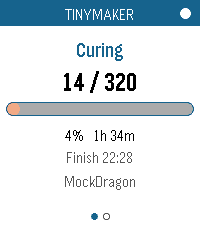
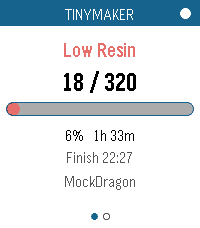
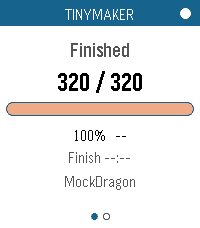
- Current print phase — Curing, Lifting, Peeling, Paused, Idle, Finished
- Layer counter, e.g. 142 / 860
- Progress bar and percentage
- Time remaining, plus the clock time it'll finish
- Freshness dot: white when data is current, red once it's more than 50 seconds stale

Resin page
- Resin left as a percentage of the VAT, and in millilitres
- LOW RESIN banner when the printer raises its low-resin flag
- Print name and elapsed time

Alerts — distinct vibration patterns for print finished, low-resin pause, print cancelled, and power-loss recovery. A finished print shows a summary card with total time and resin used; a low-resin pause jumps straight to the resin page. (These only fire while the app is open — see Limitations below.)

Controls — every touch gesture has a button equivalent, so it behaves the same on watches without a touchscreen:
- Switch page: Up/Down buttons, or swipe left or right
- Refresh now: Select button, or tap the progress bar
- Show "last updated": tap the header dot
- Exit: Back button

Two ways to get data — polls the printer's web API, or subscribes to MQTT if you have a broker. Picks automatically and falls back on its own.

Runs on all seven Pebbles — aplite, basalt, chalk, diorite, emery, flint, gabbro. The layout rescales from 144x168 to 260x260 round, and the palette collapses to black-on-white on the monochrome watches.

Gentle on the printer — polls every 20 seconds while printing, backs off to every 3 minutes when idle.

SETUP

Open the app's settings in the Pebble phone app and set Printer host to tinymaker.local (or its IP). That's it — the app finds the status endpoint itself. Your phone needs to be on the same WiFi as the printer.

For MQTT instead: enable it on the printer, give your broker a WebSocket listener (Mosquitto: listener 9001 + protocol websockets — PebbleKit JS can't reach port 1883), and enter ws://<broker>:9001. The app reads the printer's Home Assistant auto-discovery configs to work out the topics itself.

LIMITATIONS

The app has to be open. PebbleKit JS only runs while the watchapp is in the foreground, so nothing is polled — and no vibration fires — once you exit.

For alerts when you're not watching, use the printer's own notifications: tinymaker.local, then Settings, then Notifications sends you a Telegram, WhatsApp or Discord message when a print finishes, pauses for low resin, or is cancelled. Those arrive on your phone and forward to your Pebble automatically. Use this app for checking on the print; use those for being told about it.

Verified end-to-end against a live print on emery, gabbro, chalk, basalt and aplite. MQTT is implemented but untested — the firmware ships with it disabled, so there was no broker to try it against.
- DeveloperBrooman Inks
- CategoryTools & Utilities
- PlatformsOG Pebble, Steel, Time/Time Steel, Time Round, 2, 2 Duo, Time 2, Round 2
- Updated2026-09-05
- Version1.0.0