 6
6NFL Live Scores
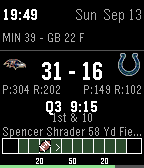
FacesNFL Live Scores for Pebble Stuck in a meeting? Can't watch the game? Don't worry - keep the score on your wrist. NFL Live Scores updates every minute straight from ESPN's public scoreboard API, so a glance at your watch is all you need. Features Never miss the big game either - when your team isn't playing, the watchface automatically switches to that night's Thursday/Sunday/Monday Night Football game (a small yellow SNF/MNF/TNF tag folds into the status line so it's never mistaken for your own team's game), then switches back on its own once that game ends or your team's does start. Toggle: Auto-Show Primetime Games. Team logos - real team logos in place of 3-letter abbreviations, right in the score row. Toggle: Team Logos (color watches only - the B&W models fall back to colored text). Live game - score, quarter & clock, down & distance, and the last play - shortened to just the name that matters and the yardage (the receiver on a completion, the ball carrier on a run), so it reads like "Boutte 12 yds" instead of a full play-by-play sentence. A quarterback scrambling for yards still shows up correctly since his name is whoever's in the rusher spot. The last play is always on screen during a live game - it doesn't cycle away. The moment the 2nd quarter ends it just says "Halftime" until the 3rd quarter kicks off. Team stats - each team's passing and rushing yards ("P:220 R:95") sit right under the score, in the space that would otherwise be empty during a live game. Turnovers ("INT:2 FUMB:1") get their own line right below that. Field position bar - a compact field graphic instead of a static diamond: End zones shaded in each team's real color Full-width yard lines (including the goal lines) run the whole height of the bar, never past it A football-shaped marker shows exactly where the ball is, with a small arrow (> or <) pointing toward whichever end zone the offense is driving The outline turns red the instant either team enters the red zone and back to white the instant they leave it - no animation, just an at-a-glance state change, and it's always drawn so the football, yard lines, and end zone labels stay visible on top of it Small "20"/"50"/"20" yard-number labels sit just below the field TV network - which channel's carrying the game, shown pre-game and during play. Pre-game - kickoff time, TV network, team records. Final - final score, next scheduled game (including bye-week look ahead). Bye week - "Bye Week" and your next opponent shown on their own lines, with both teams' real logos already up (in the score row and on the field bar) so next week's matchup is right there waiting. Ticker - sits left-aligned right under the time and date, same spot as the MLB watchface, cycling through every other game happening this week. Toggle the pace with Ticker Speed (5 / 10 / 30 / 60 seconds). Notifications - feel it before you see it: 1 short buzz for a field goal or safety, 3 short buzzes for a touchdown; no buzz for extra points or two-point tries, and it only ever buzzes for your own tracked team - never for a primetime game you're just watching. Toggle: Vibrate on Score. Always visible - time, date, and an optional battery bar so it's still just a watch. Toggle: Battery Bar. Settings Settings - Options Team - All 32 NFL teams Auto-Show Primetime Games - On / Off Team Logos - On / Off Ticker Speed - 5s / 10s / 30s / 60s Vibrate on Score - On / Off Battery Bar - On / Off Data ESPN's public scoreboard/summary API - free, no API key. Refreshes every minute, so you're always caught up. Questions: broomaninks@gmail.com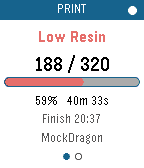 1
1TinyMaker Monitor
Tools & UtilitiesWatch a print on your TinyMaker resin printer from your wrist. Layer count, time left, resin level — live, on any Pebble. Requires the TinyMakerWifi community firmware (github.com/slibbinas/TinyMakerWifi). WHAT IT DOES Status page - Current print phase — Curing, Lifting, Peeling, Paused, Idle, Finished - Layer counter, e.g. 142 / 860 - Progress bar and percentage - Time remaining, plus the clock time it'll finish - Freshness dot: white when data is current, red once it's more than 50 seconds stale Resin page - Resin left as a percentage of the VAT, and in millilitres - LOW RESIN banner when the printer raises its low-resin flag - Print name and elapsed time Alerts — distinct vibration patterns for print finished, low-resin pause, print cancelled, and power-loss recovery. A finished print shows a summary card with total time and resin used; a low-resin pause jumps straight to the resin page. (These only fire while the app is open — see Limitations below.) Controls — every touch gesture has a button equivalent, so it behaves the same on watches without a touchscreen: - Switch page: Up/Down buttons, or swipe left or right - Refresh now: Select button, or tap the progress bar - Show "last updated": tap the header dot - Exit: Back button Two ways to get data — polls the printer's web API, or subscribes to MQTT if you have a broker. Picks automatically and falls back on its own. Runs on all seven Pebbles — aplite, basalt, chalk, diorite, emery, flint, gabbro. The layout rescales from 144x168 to 260x260 round, and the palette collapses to black-on-white on the monochrome watches. Gentle on the printer — polls every 20 seconds while printing, backs off to every 3 minutes when idle. SETUP Open the app's settings in the Pebble phone app and set Printer host to tinymaker.local (or its IP). That's it — the app finds the status endpoint itself. Your phone needs to be on the same WiFi as the printer. For MQTT instead: enable it on the printer, give your broker a WebSocket listener (Mosquitto: listener 9001 + protocol websockets — PebbleKit JS can't reach port 1883), and enter ws://<broker>:9001. The app reads the printer's Home Assistant auto-discovery configs to work out the topics itself. LIMITATIONS The app has to be open. PebbleKit JS only runs while the watchapp is in the foreground, so nothing is polled — and no vibration fires — once you exit. For alerts when you're not watching, use the printer's own notifications: tinymaker.local, then Settings, then Notifications sends you a Telegram, WhatsApp or Discord message when a print finishes, pauses for low resin, or is cancelled. Those arrive on your phone and forward to your Pebble automatically. Use this app for checking on the print; use those for being told about it. Verified end-to-end against a live print on emery, gabbro, chalk, basalt and aplite. MQTT is implemented but untested — the firmware ships with it disabled, so there was no broker to try it against.
 50
50RGB Backlight Test
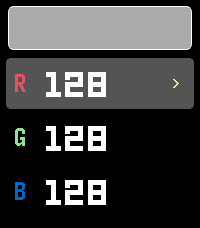
Tools & UtilitiesRGB Backlight Test A Pebble app for the Pebble Time 2 (Emery) to interactively test the RGB backlight using the new light_set_color_rgb888() API introduced in SDK 4.9.169. Features Live R, G, B channel adjustment with instant backlight feedback Color swatch preview (approximate 64-color display) Touch and button controls
 17
17Lunar Phase
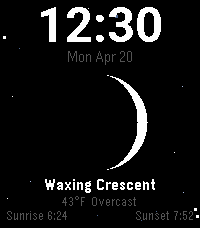
FacesLunar Phase 🌙 A Pebble watchface that tracks the moon. Features Live moon phase — accurately drawn crescent, gibbous, quarter, full, and new moon updated daily Phase name — displays the current phase (e.g. Waxing Crescent, Full Moon) Current weather — temperature and conditions pulled from your location Sunrise & sunset — rise and set times shown at the bottom Starfield background — scattered stars that never overlap the moon Shooting star — flick your wrist to send a shooting star across the screen Platforms Pebble Time 2 (emery) Pebble Time Round 2 (gabbro)
 12
12NHL Live Scores
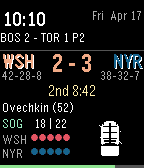
FacesNHL Live Scores 🏒 Can't watch your favorite team's game? Now you don't have to — strap it to your wrist. NHL Live Scores is a Pebble watchface that keeps you up to date on live NHL action without ever pulling out your phone. What It Does Live scores with team abbreviations in team colors Period & time remaining for the current period Shots on goal for both teams Power play indicator — know when your team is on the man advantage Last goal scorer displayed in real time Team records (W-L-OTL) for both teams Goal celebration — animated goal light flashes when someone scores 8-bit icons — stick & puck during play, Zamboni during intermission Playoff series status — shows series record instead of season record during playoffs Next game — when no game is live, shows the next scheduled match-up Battery bar at the bottom of the screen Scrolling ticker of other games around the league
 64
64Mini Golf Touch
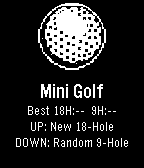
Games⛳ Pebble Mini Golf... Now with Touch Controls A fully playable mini golf game for Pebble smartwatches — now with full touch screen support on Pebble Time 2 and other touch-enabled models. Take on 18 hand-crafted holes or a randomly generated 9-hole course. Drag to aim, drag to set power, tap SHOOT — or use the buttons if you prefer. Sink it in as few strokes as possible — hit too hard and the ball lips out, just like real golf. Features 18-hole course — hand-crafted holes ranging from simple straights to tricky doglegs, bumpers, and moving obstacles Random 9-hole course — procedurally generated every round so no two games are the same Realistic physics — fixed-point ball movement, wall bounces, friction, and lip-out on hard putts Scorecard — tracks every hole with a clean two-column layout and your total vs par Best score tracking — your best round is saved and shown on the home screen Save & resume — quit mid-round and pick up right where you left off Haptic feedback — feel every bounce and hole-in on your wrist Touch Controls Aim - Drag anywhere on the green Set power - Drag the power bar on the right Shoot - Tap the SHOOT! button Button Controls Aim Phase: UP - Rotate aim clockwise DOWN - Rotate aim counter-clockwise SELECT - Lock direction BACK - Return to menu Power Phase: UP - Increase power DOWN - Decrease power SELECT - Shoot BACK - Back to aim Platforms Supports all Pebble models: Aplite, Basalt, Diorite, Emery, and Flint. By Brooman Inks Check out my other apps and watchfaces! Any suggestions let me know - broomaninks@gmail.com venmo.com/u/brooman-inks
 14
14Vanity
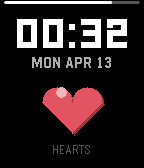
FacesVanity Most watchfaces show you the time. Vanity shows you how many people like it. It connects to the Pebble App Store, fetches its own heart count, and displays the number inside a big red heart on your wrist. Every 30 minutes it checks again. It can't stop. Tap your wrist and the heart pulses. It wasn't designed to do that. It just started doing it on its own. Tap also forces an immediate refresh, because 30 minutes is apparently too long to wait. The EKG line at the bottom speeds up the more hearts it has. Zero hearts? Flatline. A thousand? Cardiac event. The narcissism is not just functional — it's physiological. When someone new hearts it, confetti explodes and a little "+1" floats up like a video game score. It also knows its rank among all watchfaces. It checks. It always checks. Hit a milestone and a crown appears. It earned that. Lose Bluetooth? The heart turns gray and cracks. It's fine. It's totally fine. Is it useful? Debatable. Is it honest? Absolutely. Live heart count from the Pebble App Store Store rank displayed on screen EKG heartbeat that speeds up with popularity Floating "+N" popup on new hearts Confetti celebration on gains Milestone crown at 1, 5, 10, 25, 50, 100, 250, 500, 1K Animated pulse on tap + instant refresh Cracked gray heart on Bluetooth disconnect 6 heart colors to match your personality disorder Battery bar, Quick View support Remembers its last count between sessions (obviously) Every platform from aplite to gabbro It also tells the time, if you care about that sort of thing.
 53
53Trivia for Pebble
Games❓Pebble Trivia A trivia game for Pebble smartwatches. Questions pulled live from the Open Trivia Database - completely free, no account or API key needed. 🕹️How to Play 1. Pick a category When you open the app you get a category menu. Choose what you want to be quizzed on: 🌍 All Topics - random questions from everything 🧠 General - general knowledge 🗺️ Geography - countries, capitals, landmarks 📜 History - historical events and figures 🔬 Science - physics, chemistry, biology, and more 🎬 Entertainment - movies, TV, music, books 🏆 Sports - athletes, teams, records 🐾 Animals - wildlife and nature ✅ True / False - quick true-or-false questions ⭐ Easy (Kids) - family-friendly easy questions 2. Pick a difficulty After choosing a category, pick how hard you want it: 🎲 Any Difficulty - mix of everything 🟢 Easy - beginner friendly 🟡 Medium - a solid challenge 🔴 Hard - for trivia nerds only 3. Select your answer The question appears on screen with four shuffled answer choices (A, B, C, D) - or just True / False for that category. Use UP / DOWN to highlight an answer, then press SELECT to lock it in. The app automatically checks your answer — no self-reporting needed. On Pebble Time 2 and Pebble Round 2, you can also swipe up/down to move the highlight and tap to confirm. 4. See your result The screen immediately shows whether you were right or wrong: Correct - green flash, short buzz, score goes up Wrong - red flash, double buzz, correct answer highlighted in green The result auto-advances after 2 seconds. Press any button (or tap) to skip ahead. 🎮 Controls Category and difficulty menus: UP / DOWN - move the highlight SELECT - confirm selection Swipe up / down - move the highlight (Time 2 and Round 2 only) Tap - confirm selection (Time 2 and Round 2 only) Question screen: UP / DOWN - move the answer highlight SELECT - lock in your answer Swipe up / down - move the answer highlight (Time 2 and Round 2 only) Tap - lock in your answer (Time 2 and Round 2 only) BACK - return to the difficulty menu Features Live questions - fetched fresh from the internet every session, so you never run out Automatic scoring - the app checks your answer, no self-reporting Score display - shown in the label bar as Geography 5/8 x3 (correct/total + streak) Category colors - each category gets its own color on color-screen Pebbles Difficulty filter - fine-tune how hard the questions are per category True / False mode - a quick-fire category with simple yes-or-no questions Marquee scrolling - long answer choices scroll horizontally after a 1-second pause, then repeat Question auto-scroll - questions too long to fit scroll up automatically, pause, and repeat Touch support - swipe and tap to navigate on Pebble Time 2 and Pebble Round 2 Round screen support - layout is adjusted for round Pebble displays All platforms - runs on every Pebble ever made No account needed - completely free, no API key, no login
 56
56Solstice
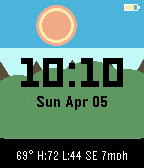
Faces🌅 Solstice - A Living Landscape Watchface Solstice transforms your Pebble into a window onto a living world. The sky shifts through dawn, day, dusk, and night using your actual local sunrise and sunset times. A sun or moon arcs across the sky on an accurate astronomical path. Live weather drives the atmosphere - clouds drift, rain falls, snow settles. The landscape changes with the real season. Shake your wrist to trigger a shooting star or a lightning bolt! ✨ Features 🌤️ Dynamic Sky System - 4 phases: Night (deep blue), Dawn (peach/gold), Day (cerulean), Dusk (orange/sunset) - Real sunrise/sunset times fetched from Open-Meteo - sky phases and celestial arc are astronomically accurate, not hardcoded - ⭐ Stars visible at night and dusk ☀️ Celestial Tracking - Sun and Moon arc across the sky based on your actual local sunrise/sunset times - 🌙 Real lunar phases: Moon renders the correct phase (new, crescent, quarter, gibbous, full) calculated from the actual synodic cycle using a 2-circle rendering technique - Sun has a warm glow halo - Position updates every minute 🌦️ Live Weather - Fetches from Open-Meteo API (free, no key needed) via PebbleKit JS - Weather animates the scene: ☀️ Clear sky, ☁️ Drifting clouds, 🌧️ Rain streaks, ❄️ Snowflakes, ⛈️ Thunderstorm - Refreshes every 30 minutes 🍂 Seasonal Landscape - Mountains and terrain change color with the actual season: - 🌸 Spring: Green ranges - ☀️ Summer: Deep vibrant greens - 🍁 Fall: Orange and tan tones - ❄️ Winter: Gray mountains with snow caps on the peaks ⛰️ Parallax Mountains - Two mountain ranges at different depths for a layered silhouette effect - Colors shift with time of day and season 🌠 Shooting Star & ⚡ Lightning Flash - Shake your wrist to trigger a shooting star across the sky - During a **thunderstorm**, the same wrist shake triggers a lightning bolt flash instead - Brief animation preserves battery 🌡️ Weather Bar - Single line at the bottom: current temp with daily high/low and wind direction/speed - Example: 72° H:80 L:61 NW 12mph ❤️ Heart Rate Monitor *(Pebble Core Time 2 and Pebble Time 2 only)* - Displays live heart rate in beats per minute in the complication bar - Only appears on Pebble Core Time 2 (flint) and Pebble Time 2 (emery), which have built-in heart rate sensors - Rate shown with a pulsing ring animation around the sun/moon - Updates every minute alongside other health metrics 🌸 Flower Garden *(Steps Counter)* - A small garden of flowers grows along the bottom of the landscape - Each flower represents your daily step progress - Flowers sprout and grow taller as you accumulate steps throughout the day - Stems are green, petals shift from yellow to pink to red - Resets at midnight with the step counter 🔋 Battery and Bluetooth Indicators - 🔋 Battery icon top-right: turns red below 20%, green while charging - 📵 Disconnect indicator top-left: small X when phone connection is lost Please feel free to email me at broomaninks@gmail.com to let me know of any bugs or suggestions. Thank you for trying out Solstice and enjoy! 📱 Platform Support emery - Pebble Time 2 gabbro - Pebble Round 2 basalt - Pebble Time chalk - Pebble Time Round ⚡ Battery Efficiency - Redraws once per minute - Particles computed deterministically, no continuous animation timer - Weather refreshes every 30 minutes 🙏 Credits - 🌤️ Weather: Open-Meteo API (free, open-source) - https://open-meteo.com - 💙 Built for the Pebble community Please feel free to email me at broomaninks@gmail.com to let me know of any bugs or suggestions. This is one of my first watchfaces. Thank you for trying Solstice and enjoy!
 86
86MLB Live Scores
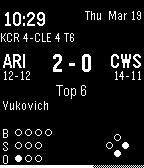
FacesMLB Live Scores for Pebble Live MLB scores on your wrist, updated every minute from the official MLB Stats API. Features Live game — score, inning, top/bot, balls/strikes/outs, current batter, pitch speed & type, base runner diamond, last play result Pre-game (shown 2 hrs before first pitch) — start time, weather, probable starters with W-L records, TV network Final — W/L/SV pitcher decisions, next scheduled game Ticker — scrolling strip of every other game today; flick your wrist to browse Notifications — vibration pulse when your team scores; Charge fanfare through the speaker when your team homers (Pebble Time 2 / Round 2) Always visible — time, date, optional battery bar, team colors (Pebble Time 2)
 26
26Colors - Watch Face
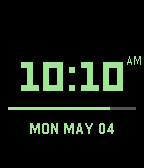
Faces🎨 Colors Watch Face A simple, clean Pebble watch face that puts your favorite color front and center. Pick a color, and the time displays in it. Or let it change automatically every hour. Or go full rainbow — a new color every minute. Features 8 vivid accent colors — Green, Cyan, Yellow, Orange, Red, Blue, White, Pink Hourly color change — automatically cycles to the next color at the top of each hour Rainbow mode — cycles through all colors every minute Battery bar — horizontal line between the time and date, fills left to right; gray track shows empty portion Step counter — daily step count above the time; hidden at 0, shows -- when unavailable AM/PM indicator — small label in the top-right corner in 12-hour mode Date & day of week — uppercase display below the battery line (e.g. MON MAY 04) 24-hour format — optional toggle Settings Accent Color - Choose from 8 colors Change Color Every Hour - Auto-advances the color at each new hour Rainbow Mode - Cycles through all colors every minute Battery Bar - Show/hide the battery strip Date - Show/hide the date Day of Week - Show/hide the day Step Counter - Show/hide daily steps 24-Hour Format - Toggle 12h/24h time Platforms Aplite · Basalt · Chalk · Diorite · Emery · Flint · Gabbro By Brooman Inks