 5
5Calorie Log
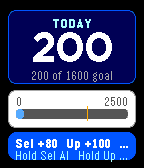
A fast, offline-first manual calorie tracker for Pebble Time. Select adds 80 calories, Up adds 100, and Down undoes the last addition. The total persists on the watch and resets at the start of each new day. No account, API key, or internet connection required. Designed for Pebble Time (Basalt).
 1
1EndWatch
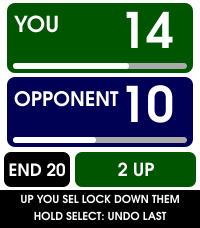
EndWatch turns Pebble Time 2 into a quick, glanceable crown green bowls scorecard.

Use the Up and Down buttons to select the points scored by you or your opponent, then press Select to lock in the end. Scores cycle from zero through the configured maximum, so dead ends, singles, doubles and team matches are all simple to record. Hold Select to undo the most recent end.

EndWatch keeps the running score and current end visible, with a colour-coded summary of the previous end. Charming bowls-and-jack animations warn when either player is one or two points from the result, combine both players' situations when appropriate, and mark a deciding end with a handshake.

Features include:

• Configurable winning score and maximum points per end.
• Custom player names, colours and vibration alerts.
• Automatic saving across app exits and watch restarts.
• Hold-to-undo, including after the winning end.
• Full end-by-end scorecard synchronisation to the phone.
• Spreadsheet-ready scorecard copying with match statistics.
• Five completed matches saved locally on the phone.
• Result, opponent, statistics and weather in Timeline Past.
• Optional match-start weather with Celsius/Fahrenheit and mph/km/h choices.

Weather is optional. When enabled, EndWatch requests the phone's location once near the start of a match and retrieves current conditions from Open-Meteo. Coordinates are discarded after the request; only the weather snapshot is retained with the match.
 8
8Golf Score
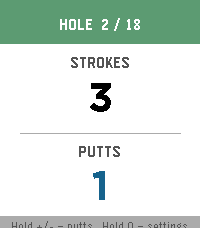
An app to track golf score (strokes and putts)

Open source here: https://git.mikeeberlein.com/meberlein/PebbleGolfScore/src/branch/master
 24
24UV Guard
UV Guard helps you know when the sun is worth taking seriously.

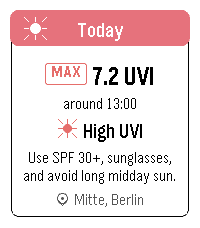
Get a quick, glanceable UV forecast on your Pebble with the information that actually matters: how strong UV will get, when it peaks, and whether sunscreen, sunglasses, shade, or covering up is a good idea.

The app shows Today and Tomorrow with maximum UVI, peak time, a simple four-part day timeline, and plain-language sun protection advice. It can use your current device location or a manually selected place.

UV Guard can remind you before you head out with a morning UV digest, and warn you when the UVI reaches your chosen protection threshold.

Forecasts are cached, so the watch can still show the latest available guidance when the phone or network is not ready.
 285
285Flinch — Random Nudges
Your wrist doesn't nag on a schedule. Flinch uses random-interval nudges — the same psychology behind slot machines — to build habits that actually stick. No streaks. No gamification. Just a sharp little reminder when you least expect it.

Variable-ratio reinforcement is the most effective conditioning schedule in behavioral psychology. Flinch puts it on your wrist.

Features:
• Define custom habits with personalized nudge text
• Random-interval wakeups throughout the day — never predictable
• Per-habit active hours, frequency range, and vibration pattern
• 5 vibration patterns: Gentle, Normal, Strong, Double Tap, Triple Tap
• Quick mute: long-press SELECT to silence all nudges for 30 minutes
• Mute status visible per-habit with countdown
• Optional acknowledgment tracking (tap SELECT = "I did the thing")
• Daily acknowledgment count per habit
• Dark-themed config page with clean card-based UI
• Zero backend, zero cloud, zero accounts — everything on watch + phone
• Survives watch reboots (uses Pebble wakeup API)

Build a habit. Break a habit. Flinch doesn't care which — it just nudges.
 1
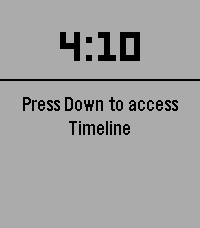
1Interval treadmill
Interval on treadmill
 15
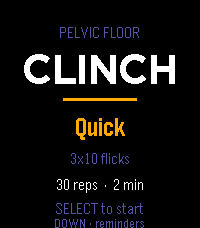
15Clinch
Guided pelvic floor training, on your wrist.

Clinch runs your pelvic floor sets so you don't have to count in your head. Each rep is a guided squeeze and release, cued by vibration, so you can train with your wrist down and your attention somewhere else.

Pick a protocol and press start:

Mixed — 10 quick reps to train the fast reflex, then 3×10 five-second holds for endurance. The one to run daily.

Long holds — 3×10, five seconds on, five off. Straight endurance work.

Quick — 3×10 short flicks in about a minute, for when you've only got a moment.

While a set runs, a column fills as you squeeze and drains as you release, so a glance tells you where you are without reading a number. A short buzz starts each rep, a double buzz sends you into the release, and a longer pattern marks the end of a set. Pause, skip a rest, or bail out any time.

Reminders that fit your day. Set up to three daily nudges and put them at any hour and minute you like — hold to open the editor and scroll each field. When a reminder fires, the watch buzzes and opens straight to a start prompt. It all runs on the watch's own scheduler, so it works whether or not your phone is nearby.

Stays on your wrist. No account, no companion app, no data leaving the watch. Your protocol choice and reminder times are saved locally between sessions.


Controls

Menu: SELECT starts · UP changes protocol · DOWN opens reminders

During a set: SELECT pauses · DOWN skips a rest · UP or BACK returns to the menu

Reminders: UP/DOWN pick a slot · SELECT toggles it on/off · hold SELECT to set the time


***Medical Disclaimer***
Clinch is a training timer, not medical advice. Pelvic floor exercises are widely recommended, but roughly a third of people doing them from written instructions use the wrong muscles. If you're training for a specific symptom rather than general maintenance, it's worth seeing a pelvic floor physical therapist once to confirm your technique — it'll make every session here count for more.
 1
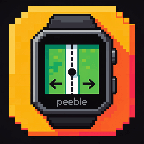
1Straight Line
for walking/hiking in a straight line. buzzes twice when deviating to the left and once when deviating to the right.

## Settings

Open the app's settings (gear icon) in the Pebble phone app:

- **Line coordinates**: paste from the KML (see above).
- **Buzz when off the line by**: default 5 m. Phone GPS wanders by 2 to 5 m,
  so 5 m gives a few false buzzes per 10 minutes; 8 m is calmer.
- **Repeat buzz every**: default 10 s. Repeats stop while you are already
  walking back towards the line.
- **Ignore GPS worse than**: default 20 m. Weaker fixes show "WEAK GPS" and
  never buzz.
- **Walk in reverse**: tick this if you walk from the path's last point to its
  first. Otherwise left and right are swapped.

You can also paste the coordinates into `BUILTIN_COORDS` at the top of
`src/pkjs/index.js` before building and skip the settings page.

## On the watch

- Top: ON LINE / LEFT / RIGHT, then the offset in metres.
- Middle: the vertical bar is the line, the dot is you, the ticks mark the
  alert threshold. Hollow dot = weak GPS.
- Bottom: metres to the end of the line and current GPS accuracy.
- Screen turns red (black on black-and-white watches) while you are off the line.
- SELECT: mute / unmute. UP: demo the "left" buzz. DOWN: demo the "right" buzz.
- "NO PHONE" means no update for 20 s. "ARRIVED" within 10 m of the end.

## Things to know

- The phone does the GPS work. Keep the app open on the watch, and give the
  Pebble phone app "Allow all the time" location permission on Android so it
  keeps working with the phone screen off. Exempt it from battery
  optimisation if updates stop.
- The offset is averaged over the last 3 GPS fixes, so it lags a few seconds.
 29
29Pebble Gym
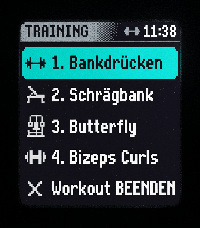
Hevy Workout Routine Companion & History Tracker for Pebble Smartwatches NOTE This is a Vibe-Coding project! 🎸✨ Built interactively using advanced agentic AI pair-programming to prototype, test, and implement features on-the-fly. PebbleGym brings your fitness routines directly to your wrist. Compatible with all Pebble platforms (optimized for Pebble Time 2/emery), it allows you to easily import your training plans from the provider Hevy using public links – or simply create your own custom routines directly in the app settings. During the workout, the watch displays the current set with target values, compares them with your history ("Last Time"), and logs your achieved weights and repetitions. Need to adjust your weights or reps on the fly? Simply long-press the up/down buttons to edit them directly on your watch. A built-in rest timer with haptic feedback ensures your breaks are perfectly timed. Thanks to a clever protection mechanism (long-press), accidental clicks are prevented, and a quick exercise menu lets you flexibly jump between exercises at any time if a machine in the gym is occupied. Plus, with the new workout persistence feature, your progress is always safe – even if you accidentally close the app, you can pick up right where you left off. Export your entire history as a CSV file anytime!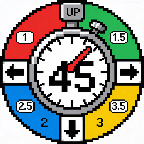 1
1Lagree Timer
Timer for running a Lagree class.
Class duration is 45 minutes.
Short click of UP triggers a 1 minute move timer.
Short click of SELECT triggers a 1.5 minute move timer.
Short click of DOWN triggers a 2 minute move timer.
Long click of UP triggers a 2.5 minute move timer.
Long click of SELECT triggers a 3 minute move timer.
Long click of DOWN triggers a 3.5 minute move timer.
 360
360Pebble Fit
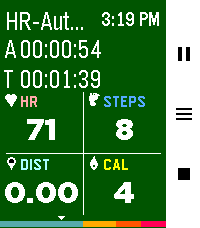
The fitness tracker you've been looking for! Track 19 different workouts, plus a Pace Trainer, an Interval Trainer, and an Automatic Mode based off heart rate. After a workout, review calories burned, steps taken, distance traveled, records beat, a GPS map of your route, and your heart rate over time. Enable auto-pause in settings to automatically stop tracking during periods of inactivity. Feel free to use your watch as you work out and background your exercise. Export exercises to FIT, GPX and TCX formats. Want heart rate zone awareness? Enable "HR Zone Vibe" in settings to get vibration alerts when you enter a new heart rate zone during your workout. View your workout history, daily/weekly/monthly stats, personal records, and track progress toward daily goals. Full features: - See Monthly/Weekly/Daily workout stats - View 20 past workouts and their specific stats (and see a snazzy GPS map) - Run 19 different workouts, including a pace trainer, an interval trainer and a heart rate adaptive trainer (scales the intensity of calories burnt based off heart rate) - Track active time, total time, heart rate, steps, distance, calories burnt, heart rate zone all from one screen - Additional workout screens for: - Tracking heart rate zone and time spent in each zone (This is the page that vibrates as you leave or enter a new HR zone, see above :) - Track pace (time per mile or km) - Track custom laps - View elevation of your workout and an expected route (if route is uploaded) - View your route as you exercise or see your expected route as you hike - If you get lost, use the path finder to point you back to your uploaded trail - See a fully featured map as you exercise that you can pan and zoom in and out of to see land features - Utilize a cool down timer for when you lift weights - Get notified when you finish a record breaking workout - Get notified if you enter or leave a new heart rate zone while you work out - Track daily goals - See individual workout type records - Auto pause for inactivity during workouts - Background your workout and go about your business then stop it when you're ready - Enable automatic workout detection and the watch will prompt you when you start to work out - Its free! Seriously. I made a tool I wanted to have and decided to share it. At the end of it all - I hope it helps you stay healthy 💪 If you would like to have more of a conversation about features, reach out via the developer link. I try to be responsive! Or let's talk on the Reddit post I made: https://www.reddit.com/r/pebble/comments/1sjvs0i/pebble_fit_a_fully_featured_fitness_app/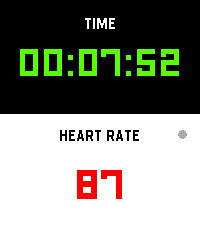 75
75Workout HR
I’m finally launching my dream workout app, built exclusively to make that glorious Pebble Time 2 screen pop!

Get all your vital stats—elapsed time and real-time heart rate—that’s actually easy to read while you're breaking a sweat. It’s time to manage your gains more effectively while keeping that classic Pebble quirkiness alive on your wrist!
 34
34ResMed CPAP Stats
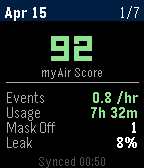
CPAP sleep stats from ResMed myAir
 6
6Hourly Steps
Hourly Steps mimics Fitbit's "Reminder to Move" functionality but with way more user control.

Through App settings you can adjust:

- What hour to start getting reminders
- How many minutes before the end of the hour to get reminded to move
- How many hours you want to be reminded to move
- The minimum steps you want to be reminded to do each hour
- What your daily step goal is
- What days of the week you want to receive reminders
- All the colors used in the app's visual appearance

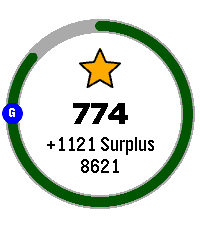
Hourly Steps will even help you reach your daily step goals by splitting that goal by your active hours and showing it as a stretch goal after hitting the minimum.  For example: if you want to do 10,000 steps a day and be active for 10 hours a day, it'll show a stretch goal of 1,000 steps each hour after finishing the minimum steps.  That stretch goal will automatically adjust if you get closer to that goal or fall behind, creating a "deficit" or "surplus" value that shows how on track you are.  You'll even get a Fireworks show upon completion of daily steps.

Please allow an hour after installing for the app to establish steps at the start of the next hour.  It may show an incorrect hourly steps value until then.

Note: Due to Pebble limitations around tracking steps within a specific time frame, this app uses a background worker to get steps at the start of each hour and determine when to open the app for reminders.  You can optionally turn this off if you need the background worker for something else.  This will cause Hourly Steps to use wakeup timers instead, however that has some limitations.  Since there can only be one Foreground app at a time, it'll close down any other app you have open even if it doesn't need to remind you of steps.  This will happen once at the start of an hour and once during active hours at the reminder minute you set (but not outside of active hours).  It may also fail to use the timers entirely if another app has scheduled a wakeup for the same minute  This should not happen with background worker active.  Because of this I highly recommend keeping the background worker active.

Fireworks code adapted from:

https://apps.repebble.com/fireworks-particle-effects-glancing_5592dc3e53d39fc50500006b
 6
6Pushup Reminder
A 100% Vibe Coding Project - built entirely with AI! 🤖

Get stronger every day right from your wrist! Pebble Pushups is your ultimate personal trainer for the Pebble Smartwatch. Whether you are stuck at a desk or working from home, this app ensures you stay active by gently reminding you to knock out a set of pushups at custom intervals.

Features:

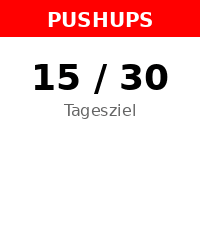
📈 Adaptive Daily Goals: The app intelligently learns from your performance! Crush your goals to trigger an 'Overload' day with a higher target, or get a 'Deload/Recovery' day if you need a break. You can always override the target manually!
⏰ Smart Reminders: Set your active time window and reminder intervals. The app uses the reliable Pebble Wakeup API so it doesn't drain your battery while waiting in the background.
⚡ Quick Log: Easily and reliably log your completed pushups with a few clicks. Your daily count is tracked seamlessly.
📊 Smartphone Dashboard: Dive into your workout history! Check out a beautiful 14-day performance chart right inside the Pebble app settings on your phone, and export your data as CSV.
🌐 Fully Offline & Bilingual: No cloud dependencies! The settings menu renders completely offline. Available in English and German.
Transform your daily routine and build healthy habits—one pushup at a time!