 45
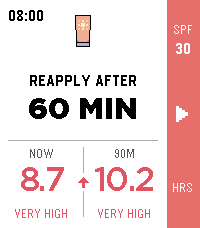
45SPF Timer
Enjoy the sunshine without losing track of your sunscreen.

SPF Timer shows the current UV index from MET Norway, gives you a quick hourly
forecast, and suggests when to reapply based on your sunscreen's SPF. Start the
timer with one button and your Pebble will vibrate when it is time for another
layer.

The launcher glance keeps the important part close by: your current UV index
when no timer is running, or the minutes remaining until you should reapply.

Stay sunny. Stay covered.

SPF Timer is a reminder tool, not medical advice. Always follow the directions
on your sunscreen.
 14
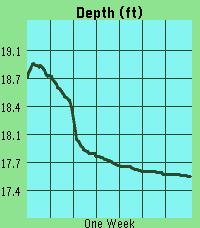
14River Depth
This app pulls gage height from river monitoring locations tracked by USGS. It then plots the last week of data, scaling automatically to your screen. The ID will default to a location near downtown Iowa City, IA. However, you can update the ID in the settings page at any time and the graph will update once you press save. Units can also be selected between feet and meters.

DISCLAIMER : This app contains code generated by Gemini. The vast majority of which is in the index.js file.
 3
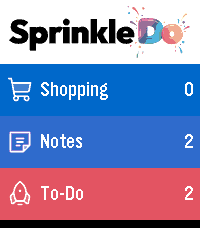
3Sprinkle Do Local
A free, no-account trial of Sprinkle Do that runs entirely on your watch. Three ready-made lists - Shopping, Notes, To-Do - add items by voice, tap to check them off. Nothing syncs anywhere, everything stays on your watch. Want more sections, due dates, notes, photos and sync across devices? Get the full version and signup on www.sprinkledo.com
 38
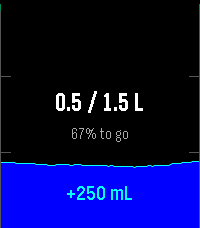
38Brilliant Hydration
Brilliant Hydration is a simple, thoughtfully designed water tracker for your Pebble.

Controls:

• Up: Log a drink
• Down: Correct the amount
• Select: Open 7-day and 30-day statistics
• Hold Select: Open settings
• Hold Down: Undo the latest grouped entry
• Swipe right on a reminder: Dismiss

Set the drink and correction amounts separately in the Pebble app settings. Prefer the original three-amount layout? Classic controls are still available.

Browse individual days in your statistics and stay on track with smart reminders. Reminders, haptics, units, colors, and language are all adjustable.

For the quickest access, assign Brilliant Hydration to a Pebble shortcut.

Optional Android companion:

The free companion adds a private 31-day backup and restore, history on your phone, CSV import, and optional Health Connect sync.

Installation guide:
https://landostock.github.io/brilliant-hydration/install-android.html

Install updates over the existing apps. Do not uninstall first, as this deletes locally stored data.

Brilliant Hydration is free and open source. If it has earned a place in your daily routine, you can support future updates with a small tip:
https://ko-fi.com/qwertzuiopue

Brilliant Hydration is a personal tracking tool and does not provide medical advice.
 19
19Nasu
Deutsch

Nasu ist eine Medikamenten-Erinnerungs-App für die Pebble Time 2 – mit einer kleinen Krankenschwester, die dich auf ihrer Vespa begleitet und daran erinnert, deine Medikamente zu nehmen. Weil ich ein vergesslicher bin und nichts cooles gefunden habe, hab ich mir das einfach selbst programmiert. Der Name spielt auf das japanische ナース (nāsu) für „Nurse / Krankenschwester“ an.

Deine Tabletten werden mit Form, Farbe, Größe und Beschriftung möglichst realistisch nachgebildet und als kleine physikalische Objekte auf der Uhr dargestellt, die auf die Bewegung deines Handgelenks reagieren. Darunter findest du eine detaillierte Liste mit Name, Dosierung, Menge und Beschreibung deiner Medikamente.

Nasu unterstützt außerdem Injektionspens sowie tägliche, wöchentliche und monatliche Einnahmepläne. Erinnerungen können per Ton und Vibration erfolgen und wiederholt werden, bis die Einnahme bewusst per Gedrückthalten bestätigt wurde.

Mit Hell-/Dunkel-Theme, deutscher und englischer Oberfläche und vollständig konfigurierbaren Medikamenten.

Nasu ist ein Komfortwerkzeug und kein Medizinprodukt.

English

Nasu is a medication reminder app for the Pebble Time 2, featuring a little nurse who accompanies you on her Vespa and reminds you to take your medication. Because I’m forgetful and couldn’t find anything cool, I just programmed it myself.
The name is a play on the Japanese word ナース (nāsu), meaning “nurse”.

Your pills can be recreated with their shape, color, size and imprint and appear on the watch as small physical objects that react to the movement of your wrist. Below the simulation, a detailed list shows the medication name, dosage, quantity and description.

Nasu also supports injection pens as well as daily, weekly and monthly schedules. Reminders can use sound and vibration and repeat until the medication is deliberately confirmed with a press-and-hold interaction.

Includes light and dark themes, German and English interfaces, and fully configurable medications.

Nasu is a convenience tool and is not a medical device.
 60
60Codex Pigeon
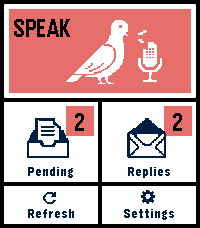
Codex Pigeon turns a Pebble Time 2 into a small voice mailbox for GitHub and Obsidian.

Dictate a note on the watch, review it, and send it to a private GitHub repository as a Markdown file. Later, refresh the app to read replies or dictate a follow-up in the same conversation. Touch controls and the physical buttons both work throughout the app.

Codex Pigeon is a transport tool, not a hosted AI service. It moves messages between the watch and a repository you control. What happens on the home computer is entirely your choice. You can use Codex, Claude, another model, a local model, a simple script, or no model at all. The Codex workflow is the only model-based setup tested end to end for this release.

HOW IT WORKS

The watch sends each request as a separate file in the repository's inbox folder. A process on your computer can read the request and create a matching file in the replies folder. GitHub carries the files between devices, while Obsidian presents them as ordinary local notes.

The file-per-message design keeps the mailbox append-only and reduces merge conflicts. Dismissing a reply hides it on the phone and watch only. It does not delete the GitHub or Obsidian copy.

SETUP

1. Create a dedicated private GitHub repository.

For example, create a private repository named pebble-mailbox under the fictional account example-user. Inside it, create folders named inbox and replies, plus a file named Conversation.md. Commit and push the initial structure.

2. Create a restricted GitHub token.

In GitHub, open Settings, Developer settings, Personal access tokens, Fine-grained tokens, then Generate new token. Limit repository access to the single mailbox repository. Grant only Contents: Read and write. No administration, workflow, issue, pull-request, organization, or account permissions are required.

Use an expiration date and store the token safely. github_pat_EXAMPLE_NOT_A_REAL_TOKEN is a fake example and must not be used. Never put a real token in source code, documentation, screenshots, Obsidian notes, or chat.

3. Connect the repository to Obsidian.

Clone the mailbox repository onto the home computer. You can open that folder as a dedicated Obsidian vault, or clone it as a folder inside an existing vault. Git performs the synchronization; Obsidian does not need a Git plugin unless you independently want one.

4. Configure Codex Pigeon.

In the Pebble phone app, open Codex Pigeon settings and enter the repository owner, repository name, branch, and fine-grained token. Example values are example-user, pebble-mailbox, and main. Test the connection, then save.

5. Choose what processes incoming notes.

A local worker can periodically pull the repository, find inbox files without matching replies, perform the requested work, write the response to replies using the same message ID, optionally update Conversation.md, then commit and push.

Codex Pigeon deliberately does not install that worker or decide what it may access. Configure your local tool with the permissions and project boundaries you consider appropriate. Watch messages should be treated as untrusted input, not as automatic permission to access unrelated files or services.

NO-AI USE

AI is optional. Codex Pigeon can be used as a voice-to-Markdown inbox, an append-only remote notebook, an input for a rules-based script, or a way to capture notes for manual review in Obsidian. Without a local worker, requests still reach the repository; replies simply remain manual.

PRIVACY AND LIMITATIONS

Use a private repository dedicated to this mailbox. Do not dictate passwords, API keys, payment information, clinical identifiers, or other highly sensitive material.

The GitHub token is stored in the Pebble phone app's app-specific local storage. This is not equivalent to the iOS Keychain. Revoke the token if the phone is lost, and use Erase credentials before transferring the device.

The paired phone must be connected over Bluetooth and the Pebble phone app must be available. If iOS has force-quit the companion app, reopen it before refreshing.

Version 0.4 supports Pebble Time 2, Round 2 platform. Tested on Time 2, stable battery and function. This is a beta of a small project, things can go wrong, or, just not be as good as you want them to be. Feel free to write me about any problem, or any idea.
 1
1Baseball ScoreKeeper
Keep track of your baseball game score while you play with the press of a button!
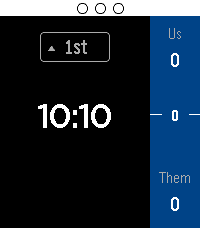
Track outs and runs in each half of an inning

Font size and text color are configurable
Log historical game scores

Instructions:

Up button press: Increase score
Down button press: Decrease score
Select button press: Record an Out

Up button hold: Scoreboard
Down button hold: Undo
Select button hold: Menu

Outs are recorded by the dots at the top of the screen.
Be sure to set the home/away team in the menu before starting the game
 128
128Route! - Transit routing on your wrist
Route! — Door-to-door transit routing on your wrist.

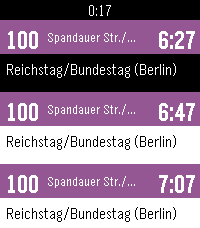
Save up to 5 favorite destinations (home, work, gym...) and get real-time trip suggestions with just one tap. Route! finds your current location, calculates the best connections, and shows you exactly which lines to take, where to board, and when to transfer.

Features:
- Save favorite destinations via address search
- Real-time routing from your current location
- Line chain overview (e.g. S1 > U6)
- Detailed trip view: departure times, platforms, transfers, walking legs
- Color-coded bars by transport mode (subway, S-Bahn, tram, bus, ferry, regional)

Coverage: Germany, Austria, Switzerland, UK, Ireland, Spain, Netherlands, Belgium, Denmark, Sweden, Norway, Poland, and more.

Companion app to Abfahrt! (real-time departures).

Powered by api.abfahrt.now
 135
13580% battery charged
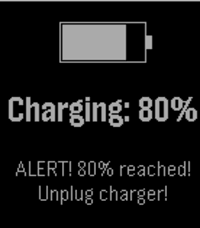
Get notified when you charge your pebble and the battery level reaches 80%. This way, you can manually interrupt the charge. Preventing batteries to charge completely has been proven to improve their capacity degradation.

When 80% charge is reached, the pebble will display a message and vibrate repeatedly. Additionally, you can configure your pushbullet access token or a custom webhook in the settings so that you get a remote notification as well.
 1
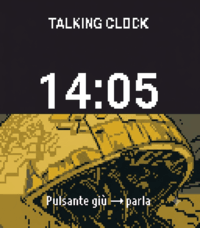
1Talking Clock IT
## Talking Clock – Italian Version

A small, standalone watch application that announces the exact current time in Italian when the user presses a button or performs a double tap on the screen.

The user can choose which action will trigger the time announcement. For example, the time can be announced by pressing one of the watch buttons or by double-tapping the screen.

### Features

* The application runs entirely on the watch.
* It does **not require a connection to a mobile phone**.
* The current time is announced using the watch's built-in speaker.
* The time is pronounced **in Italian**.
* The user can choose between the **12-hour and 24-hour formats**.
* The **upper-right button** is used to switch between the 12-hour and 24-hour formats.
* The other available buttons can be configured to announce the current time.
* A **double tap on the screen** can also be configured as a trigger for announcing the time.
* The application announces the **exact current time** according to the watch's internal clock.

### Italian Voice

This is the Italian version of the application. All time announcements are spoken in Italian.

For example:

* **24-hour format:** “Sono le quattordici e trentacinque.”
* **12-hour format:** “Sono le due e trentacinque del pomeriggio.”

The application should work completely offline and independently from any smartphone.
 22
22Star Watch
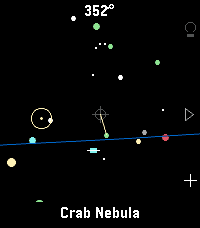
A tool for finding and identifying objects in the night sky. Just hold your wrist up to the sky and discover what's up there!

Features include:
- Manual targeting (point the crosshair at sky objects for names)
- Object targeting (pick from several lists of objects to be pointed to where they are currently in the sky)
- Backlight on/off (all) as well as a red backlight mode (currently Emery only) for easy nighttime viewing.
- Zodiac view mode
- All stick figures (constellations) mode
- Heading, horizon, ecliptic options
- Touch screen mode available

Tilting up and down is smooth thanks to a dedicated tilt sensor in the watch; unfortunately, the watch's compass azimuth updates (left & right movements) can be poor at times. I've added software filters to help smooth it out for now. Once gyro access is added to the Time 2 and Round 2 firmware, I'll update this app for a smoother, more responsive sky-scanning experience.

Built for Pebble Time 2. Your mileage may vary on Pebble Round 2 and Pebble 2 Duo.
If you find a bug or have a suggestion, let me know!
 7
7POTA Pebble
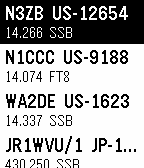
Shows you the latest POTA spots. You can filter by band and mode.
 1
1E-Auto Timer
Die App berechnet die Ladezeit und startet einen Timer für einen Opel Corsa E (46 kwh) bis die empfohlenen 80% Batterie Aufladung erreicht ist.
 346
346Navi App
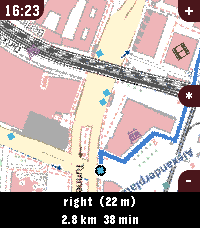
Welcome to Pebble Navi
- Turn-by-turn navigation and a map on your wrist
- No companion app needed
- Support walking, driving and cycling modes
- Destination selection from saved locations
- You can dicate a destination to your watch if it has a micro
- Save current location
- Support for Imperial and Metric units
- Added Rotation mode, the map rotates with the user and the route.
- Supports every nearly pebble
- Dynamic rerouting
- Preview routes on your phone
- NEW: Vibrate on left and right turns (only in walking and cylicng mode)

You can manage locations in the apps phone menu.

To people with older pebbles:

There are two new options, one is to Enable experimental mode were we maximise sending speed of the map, but that can lead to instability, together with the telemetry option I hope i can make sure the update works fine on ever watch. When im sure it works fine with every watch model, i want to remove the telemtry again. I only could test this on my time 2 but the emulator behavior and hw behavior is different.

If you have any suggestions or issues send me a message using the contact developer option or open a issue on github.

Rebble Store Listing:
https://apps.rebble.io/en_US/application/6a2ec9ab000bc200090963fc
 38
38Pebble Timer
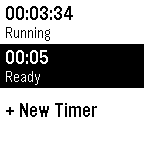
The most basic of all timers. Allows you to set hours and minutes for one or more timers.

Seriously, it's a no-fluff timer for people who just want simple tools for simple jobs!