 2
2Speed Test Game
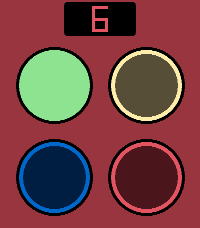
GamesA reaction speed game for Pebbles with touchsreen. Four different colored buttons that light up randomly. Tap the buttons in correct order, while the tempo gets faster and faster. Are you fast enough to beat the high score? Includes sound effects (off by default). Based on the classic Finnish game "Nopeustesti" from the 90's.
 18
18Faceoff Remix
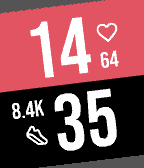
FacesA Pebble watchface that is a "Remix" of a watchface called "Faceoff" (inspired by "versus" screens) made by ollien. Credits to ollien for the original idea, and for releasing it as open source. Original source code: https://github.com/ollien/pebble-faceoff Changes I have made: * Less slant and offset hour/minute numbers from each other. * Switch "complications" to the other side. * Add more complication options, including weather, step count and heart rate. * Add support for black & white models. * Add "intro animation" that slides in the values at startup, and an optional slide on every time change.
 30
30Sierra
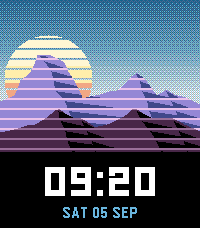
FacesA watchface inspired by the old retro games with text based commands, many of which had the word "Quest" in their title, and the publisher company of said games. Features a mountain range and a rising and setting sun + moon. Uses real sunrise & sunset times and moon phase for your location. Optional complications on "Status bar" (at the top) and at "Message line" (on the bottom). Includes some fun easter eggs, can you find them all?
 54
54Concentribble
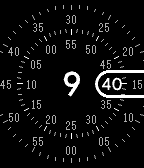
FacesA watchface for Pebble inspired by the Wear OS watchface called "Concentric". Two concentric dials that turn as time passes, minutes on the inner one and seconds on the outer. Lots of customization options. Features: - Moving seconds dial: Always, Never, 5 or 10 seconds after wake - Multiple dial styles: Dashes or Dots, all or every 5th, or None - 8 color options for all these: current hour, current minute, pill outline, seconds, complications - Up to 6 optional complications: Date, Weekday, Battery, Phone battery, Step count, Active calories, Heart rate, Weather & Status line - Step and calorie goals you set, which the arcs fill towards - Status line complication shows icon when Quiet time enabled or when Bluetooth connection lost + next alarm time (when it's within 24h) ** - 12h/24h support (detected from watch settings) - Runs on every Pebble - rectangular and round, color and black & white ** Next alarm time only works on the new watch models
 12
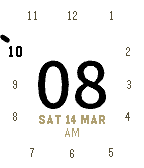
12Orbitabble
FacesThe minutes own the middle of the screen, easy to glance. Hours on the edge like an analog clock, with current hour higlighted. Indicator orbiting around, so you get the same feel like on an analog watch, e.g. "almost at the next hour". 3 different color themes: - Paper - Dusk - Signal 3 distinct indicator styles: - Pip - Dot - Arc Gives 9 different looks to choose from. (Only Light/Dark themes on black-and-white devices) **Features** - Date below the minutes - Optional complication above: battery percentage or step count - Intro animation — one full orbit on launch, lighting each hour as it passes (can be turned off) - 12h support: AM/PM below date - 24h support: hour numbers swap to 13-23 after noon - Hour stays readable when the timeline quick view slides up: the active hour moves in above the minutes when it would be behind the notification - Runs on every Pebble — rectangular and round, colour and black & white **Credits** Step icon from the Pebble iconography set, created by Pebble Technology Corp. and used under the Apache License 2.0.
 41
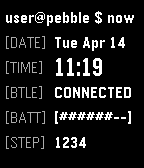
41CLI clock
FacesIt's like a CLI terminal, but on your wrist. Inspired by the many others terminal watchfaces, but still trying to be usable as a daily driver. Shows current time with a little bit bigger font, and shows seconds for a short duration after shake/tap. Also displays date, bluetooth connection status, battery percent (as a progress bar) and step count. More options and configurable additional infos coming soon...
 82
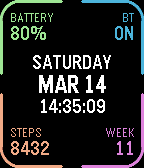
82Quick Peek
Tools & UtilitiesTake a quick look at useful info by adding Quick Peek to your quick launch. Many otherwise nice watchfaces don't show all the info you need throughout the day. Quick Peek solves this issue by displaying additional info, easily accessible when configured as a quick launch app. And auto exit handles returning to you watchface automatically (with ability to cancel auto exit). Lot's of configuration options to make it show what info you need. 7 complication slots, where you can choose what info to show + color. Ability to define a second page for even more info (navigate using up/down buttons or swipe on touchscreen). Available complications: * Date (with configurable format) * Day of week * Time (with or without seconds) * Battery percent * Bluetooth connection status * Step count * Week number * Heart rate * Distance * Calories * Active minutes * Sleep * Weather (icon + current temp) * Today's high and low temp * Tomorrow's weather (icon + high and low temp) * UV index * Sunrise * Sunset * Phone battery * Next alarm time (within 24h) * Second time zone (configurable city, which also acts as the label) * Agenda — today's appointments, from one or more calendar feeds on the phone. In the big center slot it takes the whole column and lists the day; anywhere else it shows only next appointment. * Webhook** (drawn as a button to tap on touchscreen) Configurable buttons, choose what action each of the up/middle/down buttons does, both normal press and long press. Available button actions: * Swith page * Disable auto-exit * Reset auto-exit * Webhooks** In addition to the physical buttons, flicking the watch resets auto-exit timer and tapping on touchscreen disables auto-exit. Additional configuration options: * Date format * Light mode, which puts the whole display on white and darkens the corner colors to suit * Temperature unit (Celsius or Fahrenheit) * Auto exit delay (when launched from quick launch) Webhooks: Define up 6 webhooks by specifying a URL that will we called when the webhook is triggered. You can point this to any publicly available URL or something on your local network, for example Home Assistant so that you can toggle lights on/off, open your carage door or whatever Home Assistant can automate. Ability to choose HTTP method (GET/POST/PUT), define a JSON payload, and a Bearer token for authentication.