 20
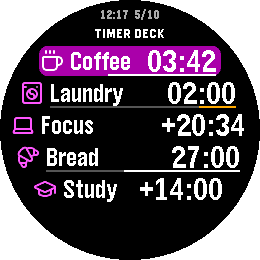
Timer Deck
Tools & UtilitiesKeep your day moving, one timer—or one sequence—at a time. Timer Deck brings independent countdowns, stopwatches and Timer Chains to your Pebble Time 2 or Pebble Round 2. Keep up to ten timers in one Deck, or save a sequence that moves through each step automatically. Every chain starts when you choose. Build chains on your watch or in the Pebble phone app. Start from scratch, use a Pomodoro, Plank or Tea template, or copy existing countdowns without changing the originals. Arrange steps in your own order and repeat the sequence for multiple rounds. Ten ways to make it yours: 1. Focused work: alternate concentration and breaks. 2. Interval training: repeat work and recovery periods. 3. Stretching: give each movement its own timed step. 4. Cooking: keep several dishes on separate countdowns. 5. Tea brewing: save a sequence of steeping times. 6. Morning routines: move through each task without checking your phone. 7. Study sessions: divide time between reading, practice and review. 8. Presentations: rehearse each section at its intended pace. 9. Housework: turn a long chore list into short, timed rounds. 10. Elapsed-time tracking: use a stopwatch whenever the finish is open-ended. Progress rings, Deck progress bars and a live launcher subtitle keep time visible at a glance. Choose your colors, switch between light and dark, and adjust vibration alerts. Pause, resume, restart or skip a chain step with your watch buttons. Your timers and chains stay saved on the watch. Once configured, timing and watch controls work without a phone connection. For chain steps under one minute, keep Timer Deck open. Watchface alerts depend on Pebble OS scheduling.
 54
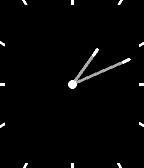
Thin+
FacesThin, plus: a clean analog watchface with splashes of color and the information you choose. Keep it minimal: hide the date and leave any or all complication slots empty. - Three complication slots—top, left and bottom—show steps, heart rate, battery percentage, digital time, distance, active calories, ISO week number, a second time zone, weather or nothing. - Three date styles: Full (weekday, day and month), Day only, or Weekday and day. The date can also be hidden completely. - Weather in Celsius or Fahrenheit, using your phone's location only when a Weather slot is selected. It refreshes about every 30 minutes and hides readings older than three hours. Weather by Open-Meteo: https://open-meteo.com/ - A second time zone with named zones and daylight-saving adjustments where supported. Other phone runtimes offer a fixed UTC offset, adjusted manually for daylight saving. - An optional step-goal ring follows the edge of the face. Automatic uses Pebble Health’s typical daily step count, with a 7,500-step fallback when unavailable or zero. Custom lets you choose a whole-number target from 1,000 to 100,000 and keeps it when you switch modes. Off by default, with a customizable color. - Smooth, anti-aliased hands with precisely aligned tips. Turn on thicker hour and minute hands for extra weight. - A second hand appears for 15 seconds after launch or a wrist flick. On Pebble Time 2, you can also enable a screen tap to show it. Tap detection is off by default and may use more battery. - Seven themes: Classic, Neon, Ocean, Sunset, Lime, Mono and Paper, plus individual color controls. - Hour markers double as a battery indicator. An optional charging highlight changes the filled markers' color while charging. - Optional low-battery-only display: show selected battery percentages below 20%, and hide them at 20% or higher. Off by default; independent of the hour-marker battery indicator. - Optional disconnected indicator, with a choice of the original small indicator or a larger colored center ring. Disconnect vibration can be switched off. - Timeline Quick View hides the bottom complication during an event peek and restores it afterward on supported rectangular watches. - Hands open at the current time by default. Enable “Animate hands when the face opens” if you prefer the opening sweep. Available for all seven Pebble platforms. Settings adapt to your watch's capabilities; health features require Pebble Health, and heart-rate slots stay blank when a sensor is unavailable. Distance follows your km/mi preference. Both time complications follow your 12- or 24-hour preference. Existing settings are preserved when updating. New complications are optional, the step ring starts off, and Full keeps the original date layout. Based on Thin by Chris Lewis. Original Thin: https://apps.repebble.com/thin_550ccb556caaed4e0100006d
 21
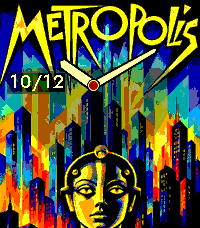
CINÉ
FacesCINÉ: Cinema on Your Wrist Some films keep their own time. Two hours in a dark room can stay with us for decades. We watch the same scene years later, and it hasn't changed. We have. I can forget why I walked into the kitchen, yet remember the light in a film I saw twenty years ago. CINÉ leaves a little room for that kind of memory on your Pebble Time 2. Eleven full-screen movie posters, from Metropolis and Vertigo to Blade Runner and Ran, take turns on your wrist. Choose your favourites, let them change at your own pace, or keep one film close. More posters are coming soon. Keep the analog hands, choose digital time in Deco, Couture or Maison, or show both. Make the colours your own. Optional larger dates and battery readings make everyday glances easier; you can show the battery all the time or only when it's low. The artwork stays on your watch and works offline. Flick your wrist to move to the next poster, or set the flick to reveal a few details about the film. You can switch the gesture off, too. You glance down while waiting for the kettle. There's the time, and a small reminder of another time you still carry with you.
 9
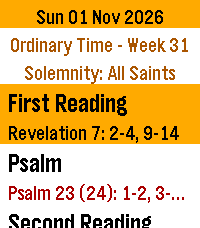
Roman Missal
DailyA worn cover. A ribbon left between the pages. The familiar red words that once helped us find our place. A missal can carry the memory of years spent in prayer, and of the people who sat beside us. Daily Roman Missal brings a little of that familiarity to your Pebble Time 2. The readings for ordinary mornings and great feast days are gathered together on your wrist, ready when the church grows quiet. Open it to today's Mass readings, with the season and the names of feasts, memorials and solemnities. The whole reading library is stored on the watch. No account or internet connection is needed to read. Bold Large and Extra Large text, red Scripture references and seasonal colors make the pages easy to follow. A little crimson ribbon keeps your place as you read. Move from one reading to the next with Down, or return with Up. Settings opens with a Select tap in the reader, with a dark Church mode for quiet surroundings. Hold Select for 0.7 seconds to exit to the launcher, then press Back to return to your watchface. Find reading and date shortcuts in Controls, after Settings on the main menu. Swipe to scroll, tap for a few lines, or hold to turn pages. Look ahead to Sunday or the next feast. An evening shortcut opens tomorrow's readings and, where available, a choice of Mass. The launcher can show today's celebration before you open the app. Choose Mass offers Christmas Day, Vigil, Night and Dawn readings; the Easter Vigil with the year's Gospel and a psalm choice for celebrations with or without baptism; simple and extended Pentecost Vigil readings; and the vigils of the Nativity of St John the Baptist, Saints Peter and Paul, and the Assumption. The daily readings remain the default until you choose another Mass. Opening the app or changing dates restores the daily default. “The important thing is that we should love the Mass and make it the centre of our day.” — St. Josemaría Escrivá, Christ Is Passing By, no. 154 This edition contains selected English Mass readings for the General Roman Calendar, 2020–2037. It is a daily reading companion, rather than the complete liturgical Roman Missal: the Order of Mass and all its prayers are not included. One default reading set is provided for each date with a daytime Mass, with the special Mass choices listed above. National and local calendars and optional memorial choices are not included. Epiphany is January 6; Ascension and Corpus Christi are Thursdays. Holy Saturday has no daytime Mass; its Easter Vigil is for after nightfall. The Easter Vigil includes all seven Old Testament readings, the Epistle and Gospel. Long reading forms and first psalm options are used, with the Easter psalm choice noted above. The intervening prayers and complete vigil rites are not included. Readings: Pocket Missal Project, Pocket Missal [v.04.X.2026], based on the New American Bible; John 8:12–20 supplied from USCCB (CCD). Calendar: romcal (MIT). No analytics or personal data collection.
 21
Popeye G&W Clock
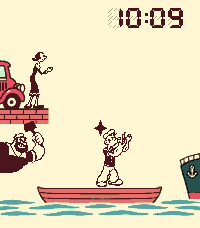
FacesOld-school charm. Right on time. Popeye G&W Clock is a nostalgic LCD watchface with an active harbour scene. Olive Oyl throws, Popeye moves and catches, and Brutus joins the action in crisp, fixed-pose animation inspired by 1980s handhelds. Make it yours from My Apps settings: choose two information rows for the date, battery, daily steps, optional weather, world time or an event countdown. Pick an LCD colour theme, adjust the inactive segment ghosts, or switch to larger digits, high contrast and reduced motion. Four layout presets help you get started; animation activity is selected separately. Japanese date labels are available. Choose a crowded Arcade, a calmer Relaxed or a Still scene that changes only each minute. Set the pace, active characters, quiet hours and battery cutoff. Motion pauses while the face is covered or Pebble Quiet Time is active. No sound or disconnect vibration. Weather uses Open-Meteo and is off until enabled. Phone location or a manual city is available; weather updates require the phone and Internet. Steps require Pebble Health access. World time uses bundled daylight-saving rules. Cached data is marked when stale. An unofficial, fan-made watchface inspired by Popeye Game & Watch, with no official affiliation. The playable Popeye G&W game is a separate app.
 19
Popeye G&W
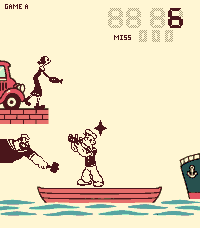
GamesA whole childhood on one small screen. There was a time when a whole afternoon could fit in your hands. A little boat, a few black shapes, and the solemn promise that this would be your last game before dinner. Then one more catch. One more try. Popeye G&W returns to the harbour of Nintendo's 1981 Wide Screen handheld. Olive Oyl stands beside her car, tossing food across the water. Popeye reaches from his rowboat. Brutus waits for you to lean a little too far. The figures move in those familiar little jumps, and you remember how much could happen with so few pictures. Play Game A or B, race a 60-second Sprint, or try the Daily round that everyone gets the same day. Turn the watch sideways, and leave your best score for tomorrow. Between games, the harbour keeps time, with a daily alarm to bring you back to the present. Somewhere, it is still the afternoon you didn't want to end. An unofficial fan adaptation for Pebble Time 2, with vivid scenery, saved scores and stats, LCD-style beeps and gentle vibration cues. Runs entirely on the watch. Gameplay is adapted for Pebble; this is not an exact emulation. Controls and Help: https://github.com/ewijaya/popeye-gw#help
 0
KasugaBus
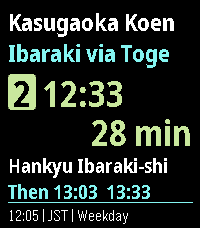
DailyLocal buses for Minami-kasugaoka, Ibaraki, Osaka, Japan. KasugaBus shows the next scheduled Kintetsu and Hankyu buses at eight stops around Minami-kasugaoka: Kasugaoka Koen, Toge, Midorigaoka, Handai Higashiguchi, Handai Igakubu Byoin-mae, Handai Igakubu-mae, Nihon Teien-mae and Handai Honbu-mae. The home screen shows your stop, direction, route, departure time, countdown and the next buses. - Works offline; timetables update through your phone without reinstalling. - Favourites, Nearby (approximate distance from your phone's location), departure board and full trip details. - Leave-now reminders and a daily commute alarm. - Train connection: the JR or Hankyu train to catch after your bus and when it reaches Osaka or Kyoto. - Configurable Up/Down buttons, three text sizes and four themes. - Times follow the weekday, Saturday and Sunday/holiday timetables in Japan time. Times are scheduled, not live arrivals. Coverage is local, not all of Osaka.
 7
Orationes
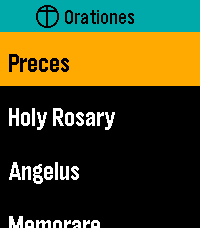
DailyMake time for prayer. On your wrist. Available offline. Orationes is a Catholic prayer book for Pebble Time 2. Large text and clear contrast help you focus on the words. Your prayers stay on your watch, ready without a phone or internet connection. PRAY THROUGHOUT YOUR DAY Start with Latin Preces, Holy Rosary, Regina Caeli, Angelus, and Memorare. Explore Come, Holy Spirit, the Litany of Humility, Adoro Te Devote, blessing and grace at meals, 92 Aspirations, 14 Prayer Cards, the Litany of Loreto, psalms, prayers before work, preparation for Confession, and more. The Rosary mystery reference previews today's set and weekday before opening it. All Mysteries separates each set's name from its weekday details. KEEP YOUR PRAYERS CLOSE Choose and arrange up to seven shortcuts to individual prayers or collections. Personalize them on the watch or through Settings in the Pebble mobile app. Browse All Prayers and press Select to open a prayer directly; hold Select and release for Open/Pin options. A readable first-use hint explains where the gesture works. Settings → Help offers eight selectable topics covering navigation, reading, resuming, pinning, layout, phone settings, Rosary, and reminders. Scroll through each topic with Up/Down; Select or Back returns to topics. PICK UP WHERE YOU LEFT OFF With Remember Place On, opening a prayer from any menu resumes its saved position, or starts at the beginning if none exists. With it Off, prayers always start at the beginning and saved places are cleared. Continue displays your last saved prayer name prominently and opens it directly. Recent Prayers keeps separate places for up to eight prayers. Enable Continue First at the top of watch Settings or in phone Settings to put Continue above your shortcuts; the setting stays synchronized between both. Both Settings pages show their bundled app version at the bottom. READ YOUR WAY New installations start with Dark appearance, Ocean title accent, and Lime navigation highlight. Choose Large or Extra Large text, Light or Dark appearance, and independent title and navigation colors. Existing preferences are preserved on upgrade. Prayer text retains strong black-and-white contrast, with clearer response blocks and stanza spacing. The Litany of Humility attribution stays in small print. Compact headers, submenu chevrons, and a narrow list-position indicator make menus easier to browse. Compact Menus fits short rows into 36 pixels instead of the spacious 54-pixel default, keeping full-size text and expanding longer names. Short Settings labels and values share a line when they fit. Compact Menus is available on the watch and in Clay and syncs in both directions. Opening phone Settings requests current watch values; if the watch does not reply, cached values are clearly labelled. Open Orationes on the watch and reopen phone Settings to refresh. The Preces blessing cross is supported in both text sizes. RESTORE YOUR DEFAULTS One Restore Defaults action resets shortcuts and shared preferences: Dark/Ocean/Lime colors, Large text, Remember Place On, Continue First Off, Compact Menus Off, and the noon reminder Off with a 10-second duration. Saved prayer positions are kept. On the phone, tap Save Settings to apply the reset. MOVE AT YOUR PACE Swipe to scroll, tap Up or Down, or hold either button to move faster. Press Select while reading for Start again or Jump to section where available. Aspirations offers ten jump groups covering all 92 entries. Double-press Select while reading to return to your watchface. PAUSE AT NOON Enable an optional vibration reminder for Angelus or Regina Caeli, selected automatically for the season. EXPLORE THE PRAYER DIRECTORY https://github.com/ewijaya/pebble-orationes/blob/main/docs/prayer-list.md