 5
GAuth
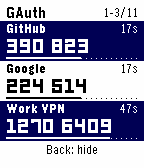
Tools & UtilitiesGet two-step sign-in codes on your Pebble, even when your phone is out of reach. Press Select to reveal up to three codes at once. Each account has its own countdown and timer bar so you can see how long its code will last. Press Back to hide the codes. Press Up or Down to scroll one row at a time. On Pebble Time 2 and Round 2, you can also drag the list and release to snap it into place. To switch between light and dark, hold Up, press Select, then press Back. Your watch remembers your choice. Set up GAuth in the standard Pebble phone app. 1. Open GAuth on your connected watch. In the Pebble phone app, open GAuth’s settings gear. Hold Select on the watch, then enter the 16 groups of four button presses shown on the phone. Keep the sequence private. Check that the eight characters on both screens match, press Select on the watch to save, and confirm on the phone. 2. In Google Authenticator, choose Transfer codes → Export codes. In GAuth settings, tap Choose QR image and select a photo or screenshot for each export QR. If you have two images, add both in either order to see one account list. On Android the camera option requests the rear camera. If your phone opens a photo picker, take a photo with the Camera app and select it. You can also paste export links or individual TOTP setup links and tap Review accounts. 3. Choose the accounts and labels you want and confirm replacement. Each import replaces every account on the watch, so include all the ones you want to keep. Tap Transfer to watch and press Select on the watch to approve. After import, codes refresh automatically from the watch clock, even with Bluetooth off. GAuth supports six- and eight-digit time-based codes (TOTP) with SHA-1, SHA-256 or SHA-512 and up to 32 accounts, depending on label and key sizes. Counter-based codes (HOTP) are unsupported. To pick up later account changes, import a fresh export. GAuth reads QR images on your phone and encrypts the selected accounts for your paired watch before transfer. Export photos, screenshots and links contain reusable keys. Keep them private and keep your original authenticator for recovery.
 20
WristShelf
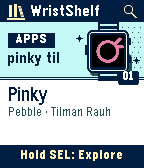
Tools & UtilitiesDiscover new watchfaces and apps without leaving your watch. WristShelf brings the Pebble and Rebble catalogs together in Recent, opening straight into illustrated cards with real catalog artwork. Use Up and Down to browse, Select to open a listing, and hold Select for Explore: switch between apps and faces, search by voice on a microphone-equipped watch, or type a name. Open a listing to see the maker, read the description, and flip through full-screen screenshots. A short control hint appears each time you open the app. On Pebble Time 2 and Pebble Round 2 with touch enabled, swipe to browse, tap a card to open it, and tap the on-screen keys to search. Buttons remain fully supported. Choose either store or both in WristShelf settings in the Pebble phone app. Browse with your paired phone online. To add a listing to My Apps or My Faces from the watch, connect its store account in those settings. Sign in with the browser on the same phone, then return to finish linking. The Pebble companion syncs your library with your watch. You can also choose Install via phone to finish from the store listing.
 20
Brickline
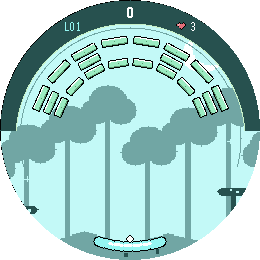
GamesBrickline is a brick-breaker game built specifically for the Pebble Time 2, combining classic arcade gameplay with touch controls, Pebble-style pixel art, sound, haptics, and extensive customization. Play through 24 hand-crafted levels, each with its own layout and visual character, and use seven different power-ups to change the flow of the game: Wide Paddle, Glue, Extra Life, Turbo, Shield, Fireball, and Multi-ball. Brickline is designed around the hardware of the Pebble Time 2. You can play using touch or buttons, adjust touch sensitivity and button directions, enable or disable vibration, control sound effects and speaker volume, keep the backlight on during gameplay, choose between light and dark themes, change difficulty, or enable a reduced-effects mode to conserve battery. A major part of Brickline is now available on the phone side of the app as well: you can create your own custom levels, send them to the watch, and share levels with other players. This makes Brickline more than a fixed set of stages and opens the door to an expanding collection of community-created levels. The game currently includes: - 24 built-in levels - 7 unique power-ups - Touch and button controls - Adjustable touch sensitivity - Custom button directions - Sound effects using the PT2 speaker - Adjustable sound volume - Optional vibration feedback - Adjustable difficulty - Light and dark modes - Keep-backlight-on option - Reduced-effects battery-saving mode - Custom level creation on the phone - Level transfer to the watch - Level sharing between players Feedback, bug reports, balance suggestions, and custom level creations are very welcome. Break the bricks. Build your own. Share the challenge.
 44
Pinky
Tools & UtilitiesPinky turns a microphone-equipped Pebble into a one-button voice notebook. Assign it to Quick Launch, long-press, speak, and save the transcript in a searchable phone library. Meet Pinky's mouse in 1.5! This round-eared, rosy-cheeked companion waves hello, hugs a tiny microphone while listening, and celebrates with a heart when your note is saved. It appears in black and pink on color watches and in monochrome on Pebble 2 and 2 Duo. Pebble 2 Duo, Time 2, and Round 2 on firmware 4.44.3+ support raw recordings up to five minutes. Choose Whisper or another speech-to-text model with your OpenRouter key, or use your Gemini key. The mouse stays with you throughout raw recording. System Dictation opens Pebble's own dialog on every supported model. Pinky sends temporary raw audio to your chosen provider and saves the returned text. Cloud voice needs microphone and network permission with Local-only off. System Dictation uses Pebble's separate service. Local-only is on by default for new installs and blocks Pinky-controlled cloud requests. Browse, search, copy, delete, and export notes as JSON or CSV. Save to drive uses your phone's file or share interface. Optional features include hotword AI research, note and research emails, daily or weekly digests on launch, your own EmailJS or private relay, custom REST endpoints, and Pinky Hub. All models need a paired phone. Cloud features need Internet. Export regularly to back up your library. Pinky is an independent community project.
 15
Atomic Wedge
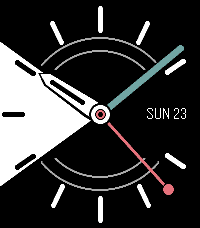
FacesAtomic Wedge is a dynamic analog watchface that turns its signature dial sector into useful, glanceable information. Track steps, activity, sleep, battery, daylight, rain, alarms, focus sessions, events and more, with customizable motion, refresh intervals, colors, and seconds-hand behavior.
 47
Ventura
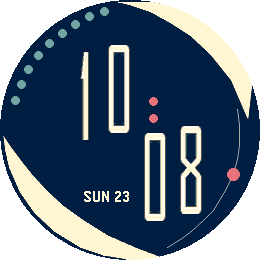
FacesVentura is a crisp digital watchface for Pebble Time 2 and Pebble Round 2. Sweeping asymmetric forms frame oversized split numerals, while the day, date, mint battery dots, and a moving coral seconds indicator keep the essentials visible at a glance. Each layout is tuned independently for its rectangular or round 64-color display. Ventura follows the watch’s 12/24-hour setting automatically and runs entirely on the watch, with no phone connection or configuration required.
 16
Pebble WorldTimer (Time 2) <deprecated>
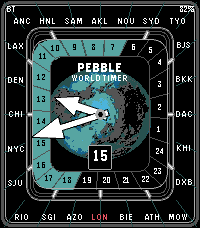
FacesA refined world-time watchface for Pebble Time 2, featuring a live 24-hour day/night ring, 24 customizable city zones, four color themes, and local time controls. This watchface has been deprecated in favor of the unified version for Pebble Time 2 and Round 2 with new options and high contrast face options: https://apps.repebble.com/pebble-worldtimer_9a72e09a7aac4be382e359a6
 28
Pebble WorldTimer
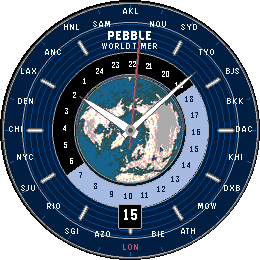
FacesA refined world-time watchface for Pebble Round 2 and Time 2, featuring a live 24-hour day/night ring, 24 customizable city zones, four color themes, and local time controls.
 11
EyeRef
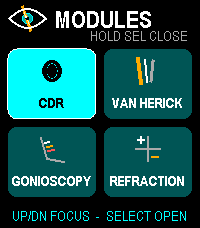
Health & FitnessOffline ophthalmology reference and refraction calculator for Pebble Time 2. Browse cup-to-disc ratio, Van Herick grading, gonioscopy landmarks and Shaffer grades, plus refraction tools for transposition, spherical equivalent, optical cross, retinoscopy working-distance correction, and vertex conversion. Designed for fast button and touch navigation and stores no patient data. Educational reference only; not a diagnostic or treatment system.