 13
13Shot & Recoil Counter
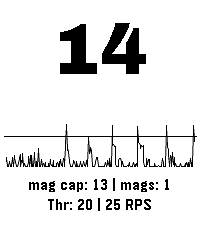
Tools & UtilitiesThis app uses the accelerometer to measure recoil (as spikes in acceleration) in order to count the number of shots taken in sports shooting. Settings: - Color Theme (default: Dark Mono) - Recoil threshold, set this to adjust for different calibers or other physical activities - Maximum rate of fire, set this to suppresses events happening after an initial detection to avoid false positives. (default: 3 Rounds Per Second) - Show Mags, toggle to display how many magazines have been spent (default: on) - Debug Energy Overlay, enable this to show the spikes relative to the current threshold setting, for easy adjusting. Usage instructions: - Short press up or down to change the threshold setting - Long press up or down to change magazine capacity - Short press select to reset count - Long press select to cycle through the color themes NOT A SAFETY DEVICE THE SOFTWARE IS PROVIDED FOR ENTERTAINMENT, TRAINING, AND/OR DATA RECORDING PURPOSES ONLY. IT DOES NOT DETECT OR CONFIRM ANY FIREARM SAFETY CONDITION AND DOES NOT PROVIDE ANY SAFETY GUARANTEE. THE SOFTWARE’S OUTPUT IS NOT A RELIABLE INDICATOR OF WHETHER A FIREARM IS LOADED, UNLOADED, OR SAFE TO HANDLE. THE SOFTWARE MAY BE INACCURATE OR MAY FAIL TO COUNT PROPERLY DUE TO SENSOR LIMITATIONS, CALIBRATION, USER HANDLING, WEAR OR ORIENTATION OF THE DEVICE, ENVIRONMENTAL CONDITIONS, OR OTHER FACTORS. USERS MUST NOT RELY ON THE SOFTWARE’S OUTPUT TO MAKE DECISIONS REGARDING LOADING, UNLOADING, FIRING, OR SAFE HANDLING PRACTICES. IN NO EVENT SHALL THE COPYRIGHT HOLDER OR CONTRIBUTORS BE LIABLE FOR ANY PERSONAL INJURY, BODILY INJURY, DEATH, OR PROPERTY DAMAGE ARISING OUT OF OR RELATING TO THE USE OF OR RELIANCE ON THE SOFTWARE OR ITS OUTPUT, EVEN IF ADVISED OF THE POSSIBILITY OF SUCH DAMAGES, AND EVEN IN CASES ALLEGING NEGLIGENCE, STRICT LIABILITY, OR OTHER TORT OR LEGAL THEORIES TO THE MAXIMUM EXTENT PERMITTED BY LAW.
 1
1FT Capture
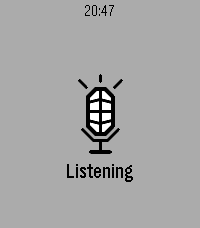
Tools & UtilitiesQuick capture using the microphone for FacileThings
 21
21Swiss Chronograph
Tools & UtilitiesEnglish One swipe. That’s it. Are you tired of timer apps where your finger covers exactly what you are trying to set? Or of tapping through menus again and again just to start a simple countdown? Swiss Chronograph is different. Swipe once along the vertical ruler, choose your time, and you are done. The interface was designed to be as minimal as possible: as little visual clutter as possible and as few clicks as possible. The timer can be minimised and continues running in the background. When the countdown finishes, the display alternates between light and dark once per second while the digits invert with it. The alarm plays a proper 8-bit sound: 10 seconds of sound followed by a 2-second pause, repeated until the alarm is dismissed or stops automatically. Choose a permanent Light or Dark theme, or use Shake mode to switch between them with a movement of your wrist. Touch is the fastest way to use Swiss Chronograph, but every essential action is also available through the hardware buttons. That means the timer remains fully usable when the screen is wet, your hands are dirty, or you are wearing gloves. And yes, it is genuinely Swiss: it was designed and developed in Switzerland by a Swiss developer. The project is open source. Have fun with it! Greetings, Maru Deutsch Ein Swipe. Das war’s. Bist du es auch leid, dass du bei Timer-Apps mit dem Finger genau das verdeckst, was du einstellen möchtest? Oder dass du dich durch Menüs klicken musst, nur um einen einfachen Countdown zu starten? Swiss Chronograph ist anders. Ein Swipe über das vertikale Lineal, Zeit auswählen, fertig. Die Oberfläche wurde so minimalistisch wie möglich gestaltet: so wenig visuelle Ablenkung und so wenige Klicks wie möglich. Der Timer kann minimiert werden und läuft im Hintergrund weiter. Wenn der Countdown endet, wechselt der gesamte Bildschirm einmal pro Sekunde zwischen hell und dunkel, während sich die Ziffern passend dazu umkehren. Dazu spielt ein richtiger 8-Bit-Alarmton: 10 Sekunden Ton, danach 2 Sekunden Pause, bis der Alarm beendet wird oder automatisch stoppt. Du kannst dauerhaft ein helles oder dunkles Theme verwenden. Im Shake-Modus wechselst du mit einer Bewegung des Handgelenks zwischen beiden. Am schnellsten funktioniert Swiss Chronograph über Touch. Trotzdem ist jede wichtige Funktion auch vollständig über die Hardwaretasten bedienbar. Damit kannst du den Timer auch verwenden, wenn das Display nass ist, deine Hände schmutzig sind oder du Handschuhe trägst. Und ja, er ist tatsächlich schweizerisch: Er wurde in der Schweiz von einem Schweizer entwickelt. Das Projekt ist Open Source. Viel Spass damit! Gruss, Maru
 0
0ZURICH-Railway-Datum
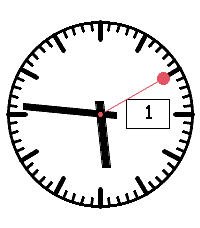
DailyAnaloges Swiss-Railway-Watchface mit größerer Datumsanzeige
 6
6Tuya Lights
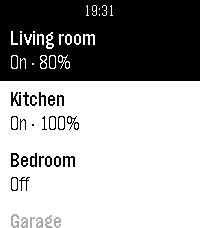
RemotesTuya Lights — control your smart lights from your wrist. See all your Tuya / Smart Life lights in one list and switch them on or off with a tap. Open a light to adjust its brightness and colour temperature. The list keeps your most-used lights on top and greys out any that are offline, and optional quick-toggle and auto-return settings keep control fast. Set up your Tuya cloud account once from your phone.
 33
33Countdown timer
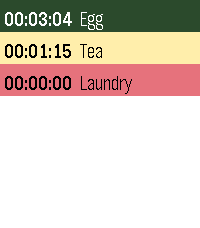
Tools & UtilitiesCountdown timer — a simple multi-timer for your Pebble. Configure any number of named countdown timers (up to 16) from your phone, each with its own duration. On the watch you see the list and can start, pause, or reset each timer. Several can run at once, and a timer vibrates when it reaches zero even if the app is closed in the background. Sort the list by most recently used, shortest remaining, or longest remaining.
 9
9Find My iPhone
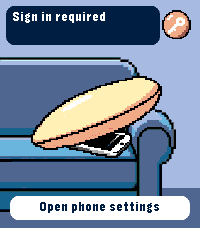
RemotesRing your iPhone directly from Pebble Time 2. Open the watch app, select an iPhone with the Up and Down buttons, then hold Select for 650 ms to send the sound command. The app runs through Pebble Core on your iPhone and talks directly to Apple over HTTPS. No separate companion app or intermediary server is required. Setup supports trusted-device two-factor authentication, multiple iPhones, automatic system language selection and clear states for offline devices, expired sessions and rate limits. Your password and two-factor code are used only during sign-in and are not stored. Apple session tokens remain in Pebble Core local storage on the paired iPhone. You can remove the saved session from the settings page at any time. Important: this is an independent, unofficial utility based on an undocumented Apple service. It is not affiliated with or endorsed by Apple. Apple may change the service without notice, which can temporarily or permanently stop sign-in or sound requests from working. Requires Pebble Time 2 (emery), Pebble Core on iPhone, an internet connection and an Apple Account with Find My enabled.
 6
6Plant friend
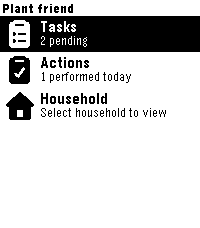
Tools & UtilitiesPebble watchapp for Plant friend. Keep track of your plant care schedule directly from your watch.
 10
10Talk Timer
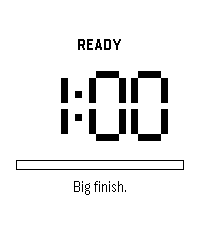
Tools & UtilitiesA stage timer you never have to look at. Set your talk length, tap your wrist, and speak. Talk Timer buzzes at the marks you choose so you can keep your eyes on the room instead of your watch. A short line of encouragement appears before you start and at each quarter of your talk. Small thing. The ten seconds before you open your mouth are the ones that matter. Want to see an update or request a feature? Email me: mike@eternitymarketing.com
 1
1Tútt - Cepillado
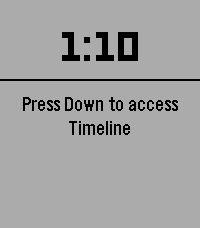
Tools & UtilitiesTútt es un temporizador de 3 minutos para guiar tu cepillado dental, dividido en 6 tramos de 30 segundos. Cuenta regresiva de 3s antes de iniciar, vibración doble al cambiar de tramo, barra de progreso visual y colores personalizables (fondo y letras). Pausa en cualquier momento con un toque.
 6
6SoundboardPOC
GamesSoundboard proof of concept to play audio on the Pebble watch. Just some random audio clips that I like
 44
44Escape Call
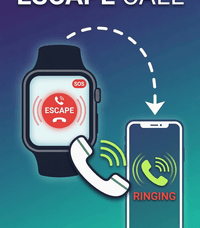
Tools & UtilitiesLong Press a Button and your phone rings! Stuck in a long conversation and need to go? No prob! Loser at the bar bothering you? Escape! Want to pretend to have friends and be cool? Welcome to the club! Works on my pebble time 2. Thats all I know for sure. SETUP: (Kind of a pain) This app needs a webhook URL to ring your phone. Two options: OPTION A - Twilio (Recommended, ~$1.15/month): Sign up at twilio.com (free trial included) Buy a local phone number Go to Functions and Assets > Services > Create Service Add a Function with path /call, set it to Public Paste this code (replace the phone numbers with yours): exports.handler = function(context, event, callback) { const client = context.getTwilioClient(); client.calls.create({ to: '+1YOURNUMBER', from: '+1TWILIONUMBER', twiml: '<Response><Say voice="alice">Hey, do you have a second?</Say><Pause length="60"/></Response>' }).then(function(call) { callback(null, 'OK'); }).catch(function(err) { callback(err); }); }; Deploy All, then Copy URL In the Pebble app, open Escape Call settings, paste the URL as Webhook URL, set Method to GET, Save OPTION B - CallMeBot (Free, needs Telegram): Install Telegram, search for @CallMeBot_txtbot, send /start Follow auth steps, then add @CallMeBot_API to contacts and message it Your webhook URL: http://api.callmebot.com/start.php?user=+1YOURNUMBER&text=Incoming+Call&lang=en-GB-Standard-B&rpt=2 Paste into Escape Call settings, set Method to GET, Save Note: Telegram must be running in background QUICK LAUNCH: On your watch, go to Settings > Quick Launch > assign Escape Call to Back button. Hold Back 2 seconds from any watchface to activate.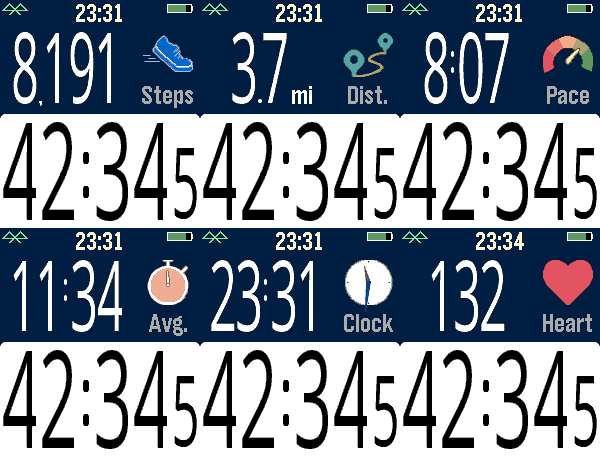 6
6Fit Tracker
Health & FitnessExercise app that records elapsed time, heartrate, and distance. Exports FIT files for Strava and other online applications. The bottom button is used for starting and stopping. The top button switches the top line mode between steps, distance, current speed, average page, current time, and (if available) heartrate. Device-dependent features are heartrate, speaking, and touchscreen. There are custom settings for the watch to speak the interval distances or times (Pebble Time 2, Pebble Duo). The touch screen can be used to switch between the modes, similar to the up button. A touch over 0.2 seconds is recognized, and the left and right side of the screen change the mode forward or backward. Use the middle button to activate the menu for custom feature. These include showing tenths, bluetooth, battery, metric/imperial. Interval notifications by time or distance are supported, and the notifications can be by vibration or (if available) the speaker announcing the interval. You can see your mapped workouts at https://fit.setpebble.com. In order for your activity to be linked to your account, you will need to enter your Pebble serial number both for your account and when you adjust the app settings using the Pebble companion app. After a workout, do a long press on the up button to either Save or Delete your workout. If saved and you have a SetPebble account, you can see your workout at https://fit.setpebble.com. There is a Strava limit of 10 users (including me!), and I am not allowed to request an increase until we reach 10 users.
 1
1Strava sync app
Health & FitnessStill in the beta stage but I'm building an app that allows you to track runs and walks, and, taking advantage of your phones GPS, gets a GPX file to upload to whatever workout app you use that supports them, the target case being Strava. DISCLAIMER - NOT AFFILIATED WITH STRAVA
 3
3OG Groceries
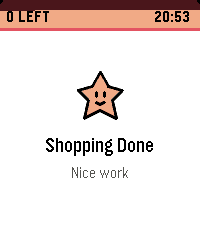
Tools & UtilitiesPersonal app to check items off a grocery list as I shop.