 1
1Futbol
Tools & UtilitiesKeep track of futbol scores in European top leagues, MLS, liga MX.
 14
14Find My iPhone
Tools & UtilitiesTrigger the real Apple Find My Play Sound alert for your configured iPhone from a Pebble watch through your self-hosted backend
 2
2APRS Beacon
Tools & UtilitiesOne-press APRS position beacon for licensed amateur radio operators. Pick a map symbol and a privacy radius on the watch, press UP (or quick-launch) and your phone's GPS position is reported to the APRS-IS network - blurred by a random offset inside the radius you chose (500 m to 5 km, or exact). **Requires a valid amateur radio licence, your own callsign and an APRS-IS passcode (entered once in the phone settings page).
 9
9Wrist Glow
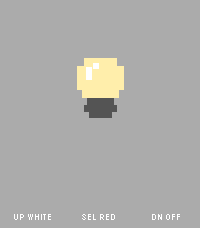
Tools & UtilitiesWrist Glow turns your Pebble Time 2 into a simple screen light when you need a tiny bit of glow in the dark. Choose from three modes for each of the physical buttons: - White for a bright neutral screen, keeps on backlight - Red for a less intrusive red screen, keeps on backlight - Off for a black screen with normal automatic backlight behavior The app is intentionally watch-only and has no phone companion, networking, animations, or background activity. A small bulb and button guide remain visible so the app never feels like an unexplained blank screen. The red mode uses red display pixels illuminated by the normal backlight. It does not change the physical backlight color. Pebble does not expose a documented brightness control to apps, so White and Red use the watch's normal backlight level.
 9
9Quick Voice Notes
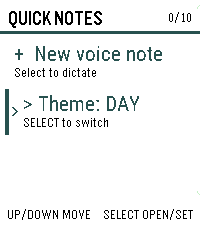
Tools & UtilitiesCapture a thought before it gets away. Inspired by the Index 01 ring. Quick Voice Notes turns a short spoken note into text directly from your Pebble Time 2, then lets you review it before saving. Notes are stored on the watch with their timestamps and appear newest first. Open any note to read the full text, delete individual notes, or remove all notes after confirmation. A day/night theme switch keeps the list comfortable to read in different lighting. Dictation is provided by the paired phone, so the phone must be connected and its voice-dictation service must be available. Quick Voice Notes does not record or store audio. The watch stores up to 10 notes, with a maximum of 240 characters per note.
 21
21Dashboard 2
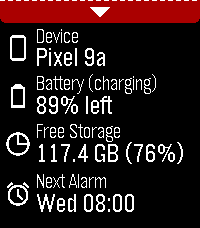
Tools & Utilities**IMPORTANT**: Requires Android companion app which is available from GitHub (https://github.com/C-D-Lewis/pebble-dev/tree/master/watchapps/dashboard2) or compiled from source with Android Studio. Modern successor to Dashboard, which is largely defunct now due to background app Android policy and permissions clampdowns since 2016. Starting with minimal features, and adding more as they are deemed possible with opt-in special device access as required. The focus is on modularity, maintainability, and re-usability. Data available: - Device name - Device battery level and charging status - Device free storage space - Next Android alarm Toggles / features available: - Find Phone with loud sound - Cycle through ringer modes (requires opt-in permission, see below) Uses PebbleKit Android 2 to retrieve information about the phone and control some toggles / features via the official Pebble Android app.
 1
1Interval treadmill
Health & FitnessInterval on treadmill
 9
9Klotski
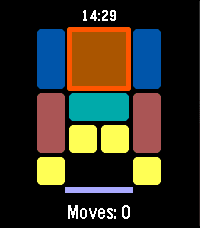
GamesKLOTSKI A classic sliding block puzzle for your wrist. Slide the blocks, clear the path, and escape the largest piece through the exit — in as few moves as possible. This app uses the most famous of the traditional Huarong Dao (Klotski) layouts, known as "Heng Dao Li Ma" (横刀立马) — the classic "Escape Cao Cao" puzzle. Its shortest known solution takes 81 moves. FEATURES Classic 4x5 Huarong Dao / Klotski board layout Button-only controls, no touch required Move counter tracks your progress Score based on move efficiency (closer to the optimal 81 moves = higher score) High score saved on your watch Quit confirmation so you don't lose progress by accident CONTROLS UP / DOWN: Cycle through pieces SELECT (short press): Select a piece, then cycle through move directions (Up, Right, Down, Left) SELECT (long press): Execute the move in the selected direction BACK: Cancel selection / confirm quit to title GOAL Move the large 2x2 block down to the exit at the bottom of the board. The fewer moves you use, the higher your score. Version 1.1.5
 29
29MirrorMov
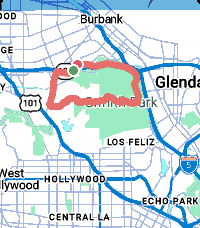
Health & FitnessYour Pebble is a sports watch. MirrorMov records your ride, run or hike with a live map, heart rate and cadence, then hands you a real FIT file you can take anywhere. MirrorMov requires a subscription from mirrormap.app. COMPATIBLE WITH STRAVA - Upload finished activities straight to your own Strava account, automatically on finish or manually from your history - Pull your own Strava routes onto the watch and navigate them with live progress and a breadcrumb - Your chosen sport carries into the upload, so activities land correctly categorised - Connect or disconnect whenever you like RECORDING - GPS at ~1Hz for a real activity track - Heart rate from the watch HRM, cadence from step rate - A live map while you record: your position on real map tiles, not just numbers - True pause/resume -- paused time and distance are genuinely excluded - Crash-safe: a background worker keeps logging if the app closes mid-activity, and the gap is stitched when you return MAPS AND ROUTES - Real map tiles with day and night themes - Two styles: Urban for streets, Outdoor for trails - Import your own GPX routes and navigate them YOUR DATA, YOURS - Every activity saved on your phone with full track and sensors - Browse your history: sport, date, distance, duration - Export any activity as a FIT file -- Garmin Connect, Komoot, TrainingPeaks, anywhere - Delete anything, any time - No Strava account required: recording, maps, history, GPX import and FIT export all work standalone REQUIREMENTS - A subscription from mirrormap.app - An Android phone. iOS is not supported -- iOS PebbleKit JS lacks the browser APIs the map depends on. Pebble Time 2 gets all 23 sport types and larger route capacity. Pebble Time and Time Steel get the core six. mirrormap.app/mirrormov
 2
2Meal Tracker
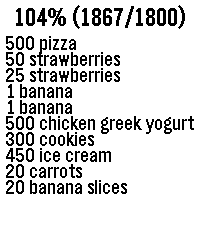
Health & FitnessTrack your mealies If started via quick launch, the dictation service automatically starts. You can say things like "banana", "small banana", "big banana", "500 grams of chicken, cucumber, and yogurt." After confirmed a food item, the app automatically closes after 3 seconds. It has a hardcoded number of target grams at 1800 per day.
 56
56Pebblsky
DailyBrowse your pinned feeds and stay up to date with what people are talking about with the latest trending topics from Bluesky. Support my work https://ko-fi.com/lamasters Thanks to denden1088 in the rebble discord for the banner!
 8
8BOM Weather
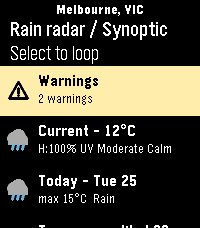
Tools & UtilitiesAn app for the Australian Bureau of Meteorology (BOM) weather service. Features: - Set or auto-detect your town for weather specific to you - Looping Rain Radar with various distance views (use up/down buttons) - Looping Synoptic chart - Current weather information - Weather forecast for each of the coming 7 days - Weather warning notices - Coastal info + costal specific warnings - Touch screen enabled Built for Pebble Time 2. Support for other Pebbles added as best I can. If you find a bug or have a suggestion, let me know!
 2
2Debate Timer for Pebble
Tools & UtilitiesA dedicated timer for British Parliamentary debating. Track speeches, POI periods and speaker order directly from your wrist. Features: 7-minute BP speech timer POI period from 1:00 to 6:00 Vibration alerts for important time points Speaker progression through all 8 BP speeches Start, pause, reset and next-speaker controls Fully offline — no phone or internet connection required Designed for debaters, judges and tournament organizers.
 12
12Trigalarm
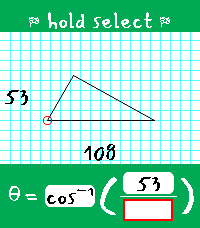
DailyTrigalarm is a habit-correcting alarm for heavy sleepers that forces you to solve for theta in right triangles. It's the perfect amount of thought to activate your brain in the morning! ## The Pitch ### Simple The alarm setter is only one page. You can only set one alarm. There is no snooze, there is no weekly schedule, and there is no way to disable the alarm (you'll always have one set - every day - like it or not). ### Persistent The alarm goes off at least twice. The first time, you must solve a triangle to silence the alarm. The second time, you must do it again, but within a strict time limit (and no constant vibration). Fail to solve it within the time limit? The alarm is scheduled for a third time. This process continues until you solve within the time limit - this is to prove you managed to stay awake between alarms before allowing it to be fully disarmed. Even if you force-quit Trigalarm, it will shortly re-open to continue nagging you. ### Adaptable Trigalarm is meant to be adapted to your needs, and you should adjust its settings as you progress on your sleep journey. For example, as your trig skills improve, you may want to lower the time limit for the disarming alarm. You can also adjust the gap between alarms to account for how quickly you find yourself getting out of bed. Perhaps the most unique, Trigalarm features optional Pavlok API integration to punish you via minor electrocution if you fall back asleep, force-quit the app, or attempt to overwrite your active alarm cycle. ## Learn the Lingo - Main alarm - The first alarm that goes off; comes with continuous vibration and does not disarm Trigalarm when solved. If Pavlok integration is enabled, this alarm can zap the user after a configurable amount of time if they do not respond. Solving this alarm will schedule an awareness alarm. - Awareness alarm - Any subsequent alarm after the main alarm has been solved; comes with only one brief vibration to indicate to the user it has opened. It has a configurable time limit it must be solved within to disarm Trigalarm. If the time limit expires, it will begin vibrations (and optionally Pavlok zaps), and once solved, it will schedule another awareness alarm. ## Tips & Tricks - When you successfully disarm the alarm, you are prompted with the options to either exit and keep the same alarm time for tomorrow, or to select a new time. If choosing the latter, whatever time you select will assume you mean tomorrow. This avoids situations where you wake up at 6 on a Friday, set an alarm intended for 9 on Saturday, and end up with your wrist buzzing in three hours! - If you are stuck waiting for an awareness alarm or there is a bug that schedules an alarm incorrectly, there is a "Reset Alarm" button in the phone-side settings that will set your alarm to 00:00.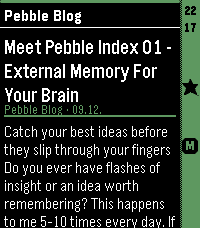 13
13HeadeRSS
DailyPull feed headings and summaries from any Google Reader-compatible API, such as FreshRSS, and enjoy a lightweight reading experience on your Pebble. - Show all articles either at folder level or per feed. - Mark articles as read or unread as you open them. - Mark articles as favorites. - Minimalistic settings. Designed as a companion reader for quickly browsing your feeds on Pebble, this app lets you discover and triage articles on the go, then read the full content later in your upstream RSS reader. Because it connects to a full-featured RSS backend, there is no built-in limit on the number of feeds you can use—the feed management stays where it belongs: in your RSS service.