 33
33PathFinder
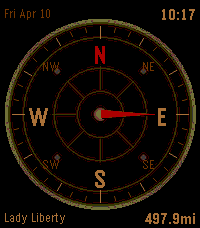
Tools & UtilitiesCompass/directions app with date, time and 3 different faces. Add up to 6 locations to track in the settings. Use Up & Down to cycle between locations and see distance and heading. Watches step tracker approximates distance updates in between Phone GPS polling (customizable interval in settings). Press Select to manually refresh location/distance data.
 1
1Abfahrzeiten Linz
DailyEchtzeit-Abfahrten für die nächste Haltestelle in Linz – automatisch per GPS.
 293
293Pebble Pillage
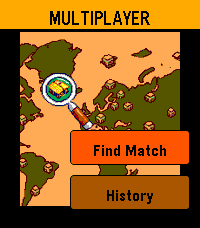
GamesIntroducing Pebble Pillage, a charming castle defence game for Pebble! Navigation: explore with touchscreen, zoom with up & down buttons, 'select' to select. 704 x 704 isometric grid - fully customisable, lay out your base how you see fit Online multiplayer raids - real opponents matched in real time, cycle through your troops with the 'up & down' buttons, and deploy them on enemy bases Push-notifications - get pinged the moment someone raids you! notification includes the players name, and how well they did against your base Raid history - in the multiplayer menu, you can track your progress in your most recent raids The world comes to life with a full day → evening → night cycle, giving your base golden hour & fireflies during the dusk and early morning, as well as a vignette gloom and animated woodland at night. Tap to collect elixer from troops' gravestones, and flick your wrist to snap the camera back to the town hall. explore the shop to buy buildings and defences. Pebble Pillage — a whole strategy game on your wrist!
 58
58Glyph
Tools & UtilitiesShare anything, instantly. Glyph lets you store up to five QR codes on your Pebble - social media profiles, contact links, Wi-Fi credentials, payment links, or any URL you share often. When you need to share, just raise your wrist and let someone scan right off the screen. No fumbling with your phone. QR codes are generated on the watch itself, so they're always ready. Flip through your saved codes with the up and down buttons, and a label tells you exactly which one is showing. Set it up once from the Pebble app on your phone, and it just works. *Note: Claude Code was used in the generation of this app.*
 10
10Pebble PWS
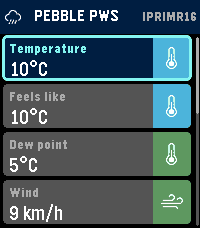
Tools & UtilitiesPebble PWS shows live Personal Weather Station data from WeatherUnderground on your Pebble Time 2. Choose your Weather Underground API key, station ID, and preferred units in the phone app settings, then view current temperature, feels-like temperature, dew point, wind, gusts, wind direction, rainfall, rain rate, pressure, and humidity on your watch. Select a metric to see 24-hour history charts, including wind and rainfall visualizations. Designed for quick, glanceable local weather from the station you care about most. Developed using AI assisted coding techniques.
 16
16Weather Text US
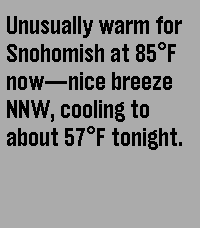
DailyWeather Text is a Pebble watch app that uses AI-generated natural language to describe current weather conditions from the NOAA* directly on your wrist, delivering simple, readable forecasts without icons or clutter. *United States only
 5
5Wrist Card
Tools & UtilitiesKeep score on the course without breaking your rhythm. Wrist Card is a minimalist golf scorecard for your wrist - track strokes, putts, and penalties hole by hole with a single button. Pick a 9- or 18-hole round, log each hole with quick up/down presses, and review on a clean scorecard grid. Your round saves automatically. - 9 or 18 hole rounds - Per-hole strokes, putts, and penalties - Running totals and a hole-by-hole scorecard - Color stat coding on Pebble Time 2; crisp black & white on Pebble 2 Duo - No setup, no account, no distractions Built for Pebble Time 2 and Pebble 2 Duo.
 27
27Steep Me
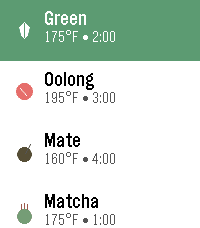
DailyThis app allows you to quickly find the temp of common tea types and set a steep timer for each type of tea, with customization allowed on your phone.
 19
19Qibla - Prayer Times & Compass (NEW)
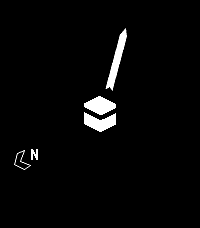
NotificationsPrayer times & notifications on your Timeline, plus a Qibla compass for your Pebble. Automatically calculates prayer times based on your location - so make sure "location services" is enabled on your phone. Use the settings screen to customize the calculation method and Asr setting. NOTE: You have to open the app every 3 day to fetch the notification and phone must be connected. The basic calculation happens using the geo location for whole world but if you want specific you can use the below calculation using settings app. The following calculation methods are supported: - Diyanet (Turkey) - Egypt - ISNA - Jafari - Karachi - London Unified Timetable - MWL - Makkah - Malaysia - Singapore (Muis) - Tehran Note: This is relaunch of the old app "Qibla - Prayer Times & Compass" as the old app doesn't function anymore, I am updating it and re-running the server to make it work again. Thanks to Collin Fair (former dev) made it open source. Let us know about the bugs, create issue on https://github.com/jibraniqbal666/pebble-qibla, thanks
 10
10PID departures
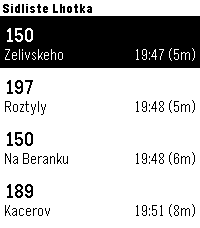
Tools & UtilitiesQuickly check upcoming departures from Prague public transport directly on your Garmin watch. The app allows you to save up to 5 favorite stops and easily switch between them using a long press of the Up button. If you prefer automatic detection, you can enable GPS mode, and the app will automatically display the 5 closest stops near your current location, so you don’t need to configure anything manually.The app uses the Golemio API, the official open data platform for Prague Integrated Transport. To use the app, you need to create your own API key: 1)Sign up to the Golemio api dashboard. 2)Generate your personal API key. 3)Enter the key in the app settings. Create your key here: https://api.golemio.cz/api-keys/auth/sign-in If you find the app useful and would like to support further development, you can buy me a coffee: https://buymeacoffee.com/alex_pavlov
 68
68Strava GPX
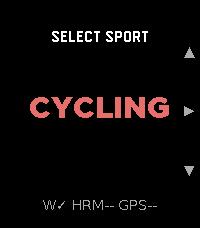
Health & FitnessStrava GPX turns your Pebble Time 2 into a standalone GPX workout recorder for cycling, running, and walking. It captures GPS distance, speed/pace, and heart rate, and saves a GPX file directly to your phone's Downloads folder when you stop. No account, no subscription, no cloud dependency — the file is yours immediately. Import the .gpx into Strava, Komoot, Garmin Connect, or any platform that accepts the format. For users who want automatic delivery, an optional Cloudflare Worker can email the file to you the moment the workout ends. What it records: elapsed time (pause/resume), GPS distance, speed/pace (km/h or mph / min/km or min/mi), heart rate embedded at every track point. Sports: Cycling (speed), Running, Walking (pace), each with independent HR sampling interval. Settings: HR interval 1–30 s per sport · GPS accuracy filter · metric or imperial · optional download subfolder · optional Worker for email delivery.
 1
1GolfTracker
Health & FitnessPublished for testing
 17
17HASS To Do List
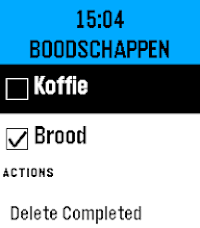
Tools & UtilitiesHASS To Do List is a simple watchapp that lists to do items of a single Home Assistant Local To Do List (https://www.home-assistant.io/integrations/local_todo/). You can complete items on the to do list by pressing the center button to check the checkboxes and you can also remove the checkbox again. Completed items can be removed, only all at once. It only supports one Home Assistant Local To Do List. It does not support adding items to the to do list. For that you can use (Voice) Assist supported by the much richer Home Assistant app: Home Assistant WS (https://apps.repebble.com/home-assistant-ws_68dea5734be9cb0009429595). The connection with Home Assistant is configured via the Pebble phone app. You need: - Your Home Assistant url - A long-lived access token, created in Home Assistant - entityID of your todo list, e.g. todo.groceries The font size is rather big, that's because my old man eyes can't read the tiny text anymore on the new higher res screen of the Pebble Time 2. This app is fully created using Claude Code, so no guarantees it works flawlessly.
 217
217nextbuses
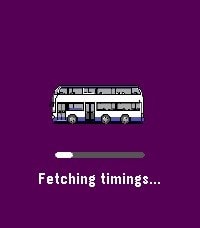
Daily[UPDATED 2026] nextbuses lets you view real-time arrival information for all bus services at any bus stop in Singapore. Features: • Save your frequently used bus stops as favourites for quick access • Use your phone's GPS to find the nearest bus stop • Browse nearby bus stops in a map view (except Aplite devices) • Manual input of bus stop code Tips: • Hold the Select button in a bus stop to add it to your favourites • Hold the Select button on the main menu to remove a favourite • Alternatively, manage your favourites through the companion configuration page Map data provided by OneMap (onemap.gov.sg). A web version is also available via the website link below.
 4
4Hirake Goma
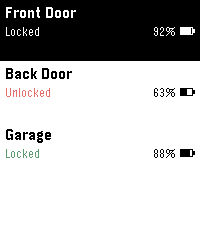
Tools & UtilitiesLock, unlock, and check your SESAME (Candy House) smart lock straight from your Pebble. Pick a lock from the menu, then use the action bar buttons — Up to unlock, Down to lock, and the middle button to refresh status and battery. The list shows each lock's state and battery at a glance. Supports multiple locks. Your SESAME API key and device secret keys are stored encrypted on your phone, never in plaintext and never sent to the watch. An optional PIN (entered on the watch) can lock the app so a lost watch can't open your door. Requires a SESAME Web API key (free from the Candy House dashboard).