 217
217nextbuses
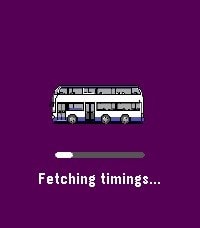
Daily[UPDATED 2026] nextbuses lets you view real-time arrival information for all bus services at any bus stop in Singapore. Features: • Save your frequently used bus stops as favourites for quick access • Use your phone's GPS to find the nearest bus stop • Browse nearby bus stops in a map view (except Aplite devices) • Manual input of bus stop code Tips: • Hold the Select button in a bus stop to add it to your favourites • Hold the Select button on the main menu to remove a favourite • Alternatively, manage your favourites through the companion configuration page Map data provided by OneMap (onemap.gov.sg). A web version is also available via the website link below.
 4
4Hirake Goma
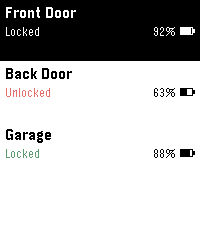
Tools & UtilitiesLock, unlock, and check your SESAME (Candy House) smart lock straight from your Pebble. Pick a lock from the menu, then use the action bar buttons — Up to unlock, Down to lock, and the middle button to refresh status and battery. The list shows each lock's state and battery at a glance. Supports multiple locks. Your SESAME API key and device secret keys are stored encrypted on your phone, never in plaintext and never sent to the watch. An optional PIN (entered on the watch) can lock the app so a lost watch can't open your door. Requires a SESAME Web API key (free from the Candy House dashboard).
 3
3Stocky
DailyStocky — track your investment portfolios right from your wrist. Built for the Pebble Time and its compact display: the same app laid out across more, simpler screens, so every number stays clear and easy to read on the smaller screen. On a Pebble Time 2? Look for "Stocky HD" instead — reworked for the larger, higher-resolution display, with bigger numbers and more information on every screen. Features: • Multiple portfolios and watchlists • Today's and all-time profit/loss, per stock and per portfolio • Multi-currency summaries • Price alerts you can set right from the watch • Historical price chart and news • Daily briefing Set up your holdings from the phone settings page. Powered by Yahoo Finance.
 10
10Stocky HD
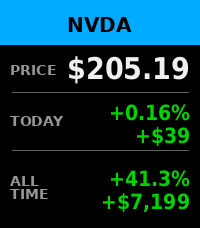
Tools & UtilitiesStocky HD — track your investment portfolios right from your wrist. This is the HD edition, built for the Pebble Time 2 and its larger, higher-resolution display: bigger numbers and more information on every screen, made to be read at a glance. On a Pebble Time 1? Look for "Stocky" instead — the same app reworked for the smaller screen, with the information spread across more screens so it stays easy to read. Features: • Multiple portfolios and watchlists • Today's and all-time profit/loss, per stock and per portfolio • Multi-currency summaries • Price alerts you can set right from the watch • Historical price chart and news • Daily briefing Set up your holdings from the phone settings page.
 24
24HOIHO
Tools & Utilities## Minimalist Hand-Drawn Memo App A lightweight and responsive sketchpad for your wrist. Jot down quick notes and ideas instantly using the intuitive touch sensor. ## Key Features: - Auto-Save: Your canvas is safely saved to the flash memory **automatically**. - Undo: Press the **Down** button to cleanly erase your last stroke. - Clear: **Long-press** the **Down** button to wipe the canvas and start fresh. - Dark / Light Mode: Easily toggle the background color with a single click of the **Select** button. - Line Thickness: **Long-press** the **Select** button to open the configuration screen, allowing you to finely adjust the pen size from 1 to 32 pixels. - Lock / Unlock: Press the **Up** button to toggle drawing capability. Locking the screen completely deactivates the touch sensor to prevent accidental input and maximize battery life.
 2
2Insulin Tracker
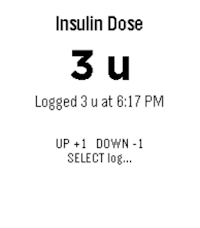
Health & FitnessThis is a very simple app for people with diabetes to keep track of their short-acting insulin use. Use the up/down buttons to adjust the dose in 1-unit steps, then press select to log it with the current time. Long-press select to review your last 3 recorded doses. Designed for quick, low-friction dose tracking without needing your phone.
 16
16CalDAV Calendar
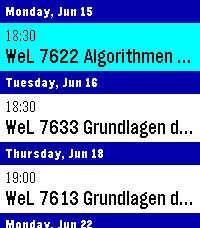
DailyThis is a fork of Eric McCormick's 7day ICS Calendar (https://apps.repebble.com/7day-ics-calendar_82451ba23ca641ab82821fa6). Your Calendar, at a Glance. Leave your phone in your pocket. CalDAV Calendar brings your Nextcloud (or any CalDAV) Calendar directly to your wrist, beautifully organized and always available—even when you're offline. Key Features: Smart Grouping: Events are elegantly categorized into "Today," "Tomorrow," and upcoming days with a clean, cyan-highlighted interface. True Offline Support: Going for a run without your phone? Your events are permanently saved to the watch's internal memory. Close the app, open it later, and your schedule is instantly there. Battery-Conscious Sync: The app uses a configurable 1-hour caching system to prevent battery drain. It only wakes up your phone’s Bluetooth when you actually need fresh data. On-Demand Refresh: Did your schedule just change? Simply Long-Press the Select button on any event to force an immediate, real-time sync with CalDAV. Full Details: Click any event to open a dedicated detail view, displaying the full event title and exact start/end times without truncating text. Global Formatting: Fully respects your preference for 12-hour (AM/PM) or 24-hour time formats. Multiple Feeds: Can merge up to 4 CalDAV feeds into one feed for display, if you have multiple calendars. How to Setup: Depends heavily on your calDAV Provider. You will find options to share the calendar publicly, often the generated link will end in .ics or ?export. Currently supports only public (unauthenticated) calendars - in case of Nextcloud this is not much of a problem, although it means security-by-obscurity. Copy said link and paste it into the App Settings page on the Pebble phone app. Hit Save, and your watch will securely sync your next days!
 16
16REcounter
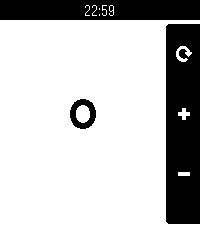
Tools & UtilitiesWhy? Because, in an era where a simple counter app would likely be left up to the AI overlords, I'd rather just fork something some guy made in 2014 and add touch support. This fork of the original adds support for all current and past Pebbles and enables touch support for incrementing the counter. This ended up being a pretty cool micro-project, as I learned about how the Pebble SDK has changed over the years. Immediately upon porting to the new SDK, there were various things that didn't quite look like they used to. This includes the lack of a status bar, the lack of margin&rounded corners on the action bar, the inability to render the previously valid menu icon, and the weird way bitmaps used to work regarding color and translucency. I addressed all of these to preserve the legacy Pebble SDK look with this app! In addition to Emery+touch support, this version of the app also supports all other Pebbles. Original app by Matthew Bauer.
 46
46Touch Tone
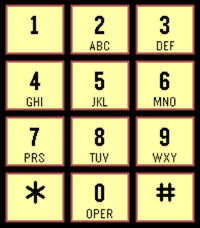
Tools & UtilitiesPlays the touch tone classic sounds on an old 12-button telephone. Experience those dulcet tones from the before times.
 3
3Hashcat Reactor
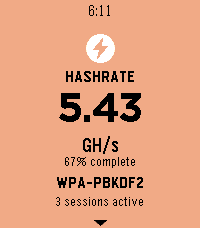
NotificationsIt is a client app for hashcat reactor which show real time stats like hashrate, recovered hashes, power usage and temperature, if you are the very few using hashcat and a pebble watch try hashcat reactor which is a GUI for hashcat and use this pebble client app to have the dashboard on your wrist. Find out more at: https://github.com/jjsvs/Hashcat-Reactor Project is open source so you can modify and fit it to your needs.
 380
380Circula
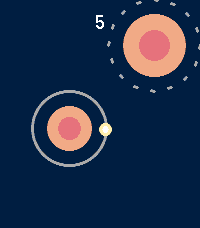
GamesMaster the Gravity. Conquer the Void. Step into the pulsing, high-contrast world of Circula, the ultimate test of timing and reflexes for your Pebble smartwatch. In this hypnotic orbital arcade experience, you are a lone energy pulse navigating an infinite field of celestial nodes. Leap from orbit to orbit, harness centrifugal force, and climb higher than ever before. The Premise You don't just move-you orbit. Every node has its own gravitational pull and direction. Your mission is to time your jump perfectly to break orbit and catch the next node. Miss the mark, and you'll drift into the void. Stay too long, and the advancing camera will consume you. Why You’ll Love Circula: Hyper-Responsive Controls: Designed for the "one-button" philosophy. A single press of the Select button is all you need to master the jump. Dynamic Visuals: Experience a "Hot" color palette featuring deep Oxford Blues and vibrant Sunset Oranges, optimized for crystal-clear visibility on both color and monochrome e-paper displays. Pure Performance: Native C implementation ensures silky-smooth 30FPS gameplay across all platforms, from the classic Pebble to the latest Pebble Time 2. Tailored Difficulty: Whether you want a relaxing rhythmic climb or a high-speed survival challenge, choose between Easy, Medium, and Hard modes to suit your playstyle. Glance-First Design: Minimalist HUD keeps your focus on the action, with subtle score pulsing and haptic alerts to keep you in the flow. Features: Procedural, infinite level generation - never the same climb twice. Full support for Round (Chalk), Rectangular (Basalt/Aplite), and high-res (Emery) displays. Persistent High Score tracking. Battery-efficient core engine. Can you maintain the orbit? Or will you break under the pressure?
 3
3Jadwal Sholat Indonesia
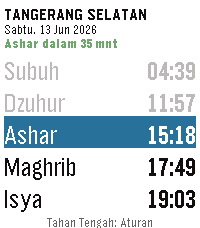
DailyPantau waktu sholat langsung dari pergelangan tangan Anda. NEW - On-watch settings. Long-press the center button to configure reminders, hide sunnah prayers, and set early reminder timing. No phone required. - Live countdown. The header now shows time until the next prayer (e.g. "Ashar dalam 23 mnt"), color-coded green → orange → red as it nears. - Past prayers are dimmed so the current and upcoming prayers stand out. - Day offset indicator. Browsing ahead shows "[Besok]" or "[+2 hari]" in the date line so you always know which day you're viewing. IMPROVED - Much larger text by default. Sunnah prayers (Imsak, Terbit, Dhuha) are now hidden by default, giving 5 rows instead of 8. The app automatically uses a larger font with the extra space. - Font size scales dynamically: larger watches and fewer visible rows means bigger, easier-to-read text. - City names are cleaned up (strips "Kota" / "Kabupaten" prefixes) so they fit the header without truncation. FIXED - Prayer reminders now trigger correctly when the app is launched by a wakeup alarm (previously silent on cold launch). - Network errors are shown on screen instead of leaving the app stuck on the loading message indefinitely. - Refreshing no longer causes a brief flash of stale data. Jadwal Sholat Indonesia menampilkan waktu sholat lima waktu — Subuh, Dzuhur, Ashar, Maghrib, dan Isya — langsung di smartwatch Pebble Anda. Data jadwal mengacu pada sumber resmi KEMENAG, mencakup seluruh kota di Indonesia dari Sabang sampai Merauke. Tidak perlu buka ponsel — cukup lihat jam tangan Anda.
 0
0TransitRadar Tallinn
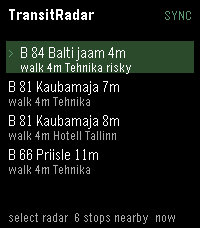
Tools & UtilitiesA small application to check the departure times of buses and trams from the nearest stops
 2
2HVV Departures - Hamburg
Tools & UtilitiesDeparture times of trains and buses around you, provided you are in Hamburg, Germany. Open the app and after a quick GPS check you get the list of all the departures around you. Somewhat unpolished since it's my first app, working on making it less basic. Screenshots are not from the app, the GPS check does not work in the emulator so Cloudpebble just grabbed the next best thing.
 8
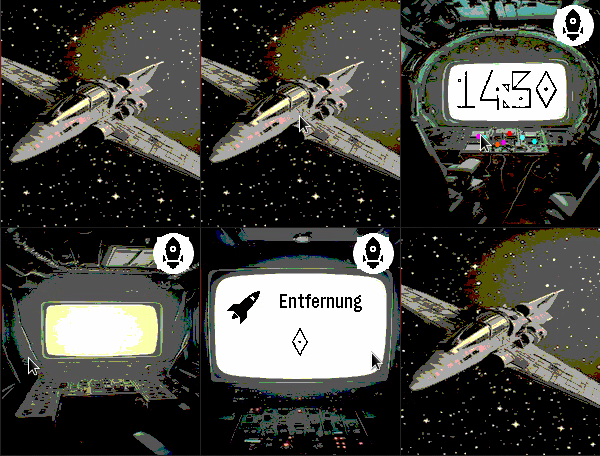
8Spaceship
DailySpaceship is a watchapp for Pebble Time 2 (Emery) that turns your wrist into the cockpit of a spaceship. Built as an app rather than a watchface because only apps can access the Emery's touch screen — but it behaves just like one. SCREENS & NAVIGATION --------------------- Tap the space screen to open the cockpit. Swipe left or right to move between screens: • Space — your ship drifting through the stars (tap to enter) • Cockpit — large digit clock with animated indicator lights • Engine Room — battery level displayed as a ten-bar fuel gauge; ALERT blinks below 20% • Distance — today's step count with a distance icon • Weather — current temperature, condition icon and description (GPS or IP location) • Heart Rate — current BPM, blinking at your actual pulse with electric sparks Navigation is circular: swipe right from Heart Rate to return directly to the Cockpit. A back button on every secondary screen takes you straight back to Space. SPACE SCREEN ------------ Choose from twelve different spaceship designs — or enable shuffle mode to automatically cycle through them at a configurable interval. An optional animated comet streaks across the background for extra atmosphere. WEATHER ------- Weather data is fetched automatically using GPS location (with IP fallback) via Open-Meteo. The weather screen shows the data source (GPS / IP), a programmatic weather icon, and a reload button for manual refresh. Temperature in °C or °F, description in English or German. AUTO-RETURN ----------- After a configurable delay (3–30 seconds of inactivity), the app automatically returns to the Space screen. SETTINGS (configurable via the Pebble app) ------------------------------------------ • Spaceship design: 12 models or shuffle mode • Shuffle interval: how often the ship changes automatically • Animated comet: on / off • Language: German or English • Temperature unit: °C or °F • Time format: 12h or 24h • Auto-return delay: 3–30 seconds • Backlight timeout: 3–9 seconds NOTE ---- Spaceship must run as an "App" rather than a "Watchface" because Pebble only exposes the touch screen to apps. Once launched, it stays active and responds to touch and swipe gestures exactly like a watchface would. Vibecoded with Claude · Pebble Time 2 (Emery) only