 7
7Disney Parks Fuel Rod Locator
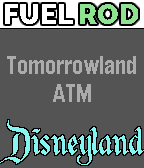
Tools & UtilitiesThis app lets you find Fuel Rod rechargeable battery swap kiosks at any Disney park in North America. Pressing select will toggle between Walt Disney World locations and Disneyland locations. Shaking the watch will refresh the nearest location. This won't direct you to the exact location, you may still have to ask a cast member where it is, but it'll tell you the building/store where the kiosk is located.
 173
173Pal Locator
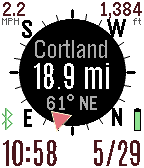
Tools & UtilitiesThe Pal Locator app helps you find or return to specific locations. It works with the Pal Strap or your smart phone GPS. You can drop markers at your current location or enter a specific location using the custom Settings. The direction and distance for each marker is displayed in the app. Use the top button to switch between markers. You choose your refresh rate, or use the bottom button to manually refresh your GPS. Hold down the bottom button with a long press to activate the map. Use the middle button to display the menu to control your Pal Strap, set or clear markers, or change the custom settings. You can set labels for your custom marker through the settings page on your Pebble smart phone app. Up to seven custom markers are supported. If you have the compass activated but it is not working, move your Pebble watch in a figure-eight gesture a few times. You can also have your orientation based on your direction of travel according to your GPS. If you have trouble getting this app to work with the Pal Strap, first get the Pal Strap working using the manufacturer's Pebble and smart phone apps.
 40
40Pal Boost
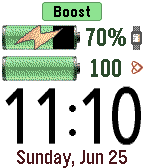
Tools & UtilitiesPal Boost enables the power boosting features for Pal Strap devices. The top button activates boost, and the bottom button disables boost. The middle button activates the custom settings menu, where boost and other custom choices can be set. Note that disabling the boost is not reflected in the Pebble until the Pal Boost app is closed, which is why the "charging" icon is sometimes displayed for the Pebble battery even though boost is disabled. This behavior is either a flaw or feature in the Pal Boost firmware (not sure which!). The Pal Strap is designed for Pebble Time, not Pebble 2. If you jury-rig the Pal Strap to use the Pebble 2, please let me know how!
 12
12NGFFL Referee Timer (30/60 play clock)
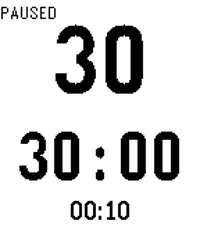
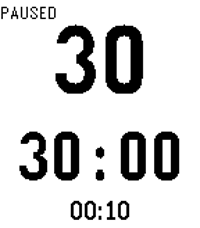
Tools & UtilitiesA game clock and 30-second play clock that can be controlled independently. New: Game clock defaults to 30 minutes but can be adjusted to any value and will be saved in memory. Instructions ************** UP BUTTON: Start 30s play clock/Reset play clock LONG PRESS UP: Start 60s play clock DOWN BUTTON: Start/Stop game clock SELECT BUTTON (Long Press): Enters setting mode. If game clock is in the middle of a countdown, up and down buttons adjust the game clock. Single click the select button again to exit the settings mode. Long click to reset the game clock to the original value. If game clock is already reset, long pressing the select button will enter a special mode to adjust the game clock's value. For example, if you change the game clock from 30 minutes to 25 minutes, the clock will automatically reset to 25 minutes in the future. The current mode of the clock is displayed in the top left corner of the screen.
 17
17Referee Timer (25/40 play clock)
Tools & UtilitiesA game clock and 25-second play clock that can be controlled independently. New: Game clock defaults to 12 minutes but can be adjusted to any value and will be saved in memory. Instructions ************** UP BUTTON: Start 25s play clock/Reset play clock LONG PRESS UP: Start 40s play clock DOWN BUTTON: Start/Stop game clock SELECT BUTTON (Long Press): Enters setting mode. If game clock is in the middle of a countdown, up and down buttons adjust the game clock. Single click the select button again to exit the settings mode. Long click to reset the game clock to the original value. If game clock is already reset, long pressing the select button will enter a special mode to adjust the game clock's value. For example, if you change the game clock from 12 minutes to 10 minutes, the clock will automatically reset to 10 minutes in the future. The current mode of the clock is displayed in the top left corner of the screen.
 22
22ZTM Warsaw Timetable
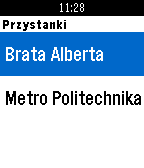
DailyTimetable for Warsaw public transport provided by ZTM. Currently supports buses, trams and trains (SKM and KM). You need to configure first. Add bus/tram stops by their name and number. Optionally you can add a default line that will be displayed on select. If not provided, pushing select button will display the list of lines. Long press of select button always displays the list of lines. ---- Rozkład jazdy ZTM Warszawa. Aktualnie wspiera autobusy tramwaje oraz SKM i KM. Najpierw należy skonfigurować przystanki. Wymagana jest pełna nazwa przystanku oraz jego numer. Podanie nr linii jest opcjonalne. Wciśnięcie guzika select przenosi do listy linii. Jeśli w konfiguracji podana została linia, zostanie wyświetlony od razu rozkład dla tej linii. Długie przytrzymanie guzika select zawsze spowoduje wyświetlenie listy linii (nawet jeśli ustawiona jest linia domyślna).
 67
67Tesla Time
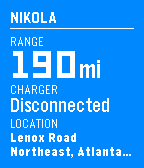
RemotesMonitor and control your Tesla Model S from your wrist. **IMPORTANT** Make sure you visit the settings from your Pebble or Pebble Time app first. The app won't work without it! - Check your range and charge status - Remember where you parked - Forgot your key? Unlock and remote start. - Too cold? Too hot? Turn on the AC or heat to prep your car. Log in to your Tesla account via the Settings.
 3
3Mensaplan Contine
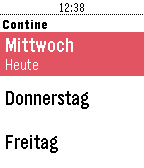
DailyMensaplan für die Contine in Hannover. Zeigt das ganze Menü der Woche an. Keine Companion-App von Nöten. Dies ist ein Privatprojekt und wurde aus Spaß an der Freude programmiert. Weder das Studentenwerk, die Mensa oder die Uni Hannover sind an diesem Projekt beteiligt. Bei Fragen, Kritik oder Ideen gerne einfach per Email melden.
 62
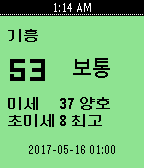
62Korea Fine Dust
DailySimple Checking Fine Dust App for South Korea data resource 한국환경공단(에어코리아), Daum open API(좌표변환)
 99
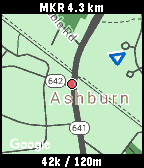
99SimpleMap
Tools & UtilitiesThis is simple map application. Show current location, speed(km/h), altitude, clock, and user marker(distance, direction) only. (The map is not always displayed, because it uses google static map) User markers can be set from the setting page or button. If the map is not updated, run the GPS continuation application (I did not create it) on your smartphone. * HOW TO USE * [CENTER] Change "enable / disable" position updating. [UP/DOWN] Change zoom level. [LongPressed CENTER] "Set / Clear" user marker. (one position only)
 77
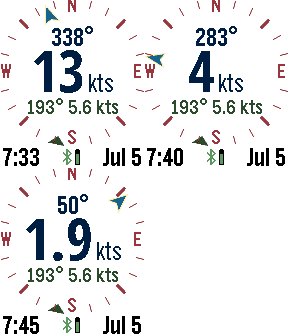
77Foresail
DailyThe ultimate Pebble sailing app! Displays your realtime speed and heading, along with wind speed and direction on a compass dial. Other screens include the current weather conditions, weather forecast, tide information, a zoomable map, and a sailing timer. You can switch screens using a long press to the up or down buttons. The select button on the Pebble activates the screens and settings menu. Speed and bearing is calculated using the smart phone GPS. Use the up and down buttons to zoom the map. The menu has a button for refreshing weather (or the map if it is visible). Select from several different weather services, including OpenWeatherMap.org, Yahoo Weather, NOAA, and the commercial service Forecast.io for premium subscribers. If tide is activated, the nearest NOAA or Canadian station is used to display tide information. GPS is used to find the closest weather station unless a manual location is entered. Customizable settings include the speed units (knots, mps, mph, kph), temperature scale, air pressure, date format, battery, connection, vibration alert, backlight, and more. SetPebble subscribers have access to Forecast.io weather information and more-frequent updates. Mapping tiles Copyright and courtesy of OpenStreetMap, OpenStreetMap contributors, Google Maps, ESRI ArcGIS, Stamen, and NOAA. Stamen data by Stamen Design (http://stamen.com); OpenStreetMap (http://openstreetmap.org) mapping tiles under Creative Commons licenses.
 194
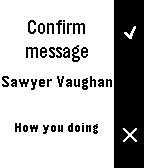
194TextSender for Pebble
Tools & UtilitiesThis app will allow users to send texts right from your watch! It is only for jailbroken iOS users and requires the tweak "TextSender for Pebble" in order to work. TO BE CLEAR: THIS WILL NOT WORK WITHOUT 'TEXTSENDER FOR PEBBLE' FROM CYDIA. For more information about jailbreaking, please view reddit.com/r/jailbreak.
 29
29COUNTER3
Tools & UtilitiesThis is counter. [UP,SELECT,DOWN] Count up [LongPressed UP,SELECT,DOWN] Clear
 51
51News v1.2
DailyRead the latest worldwide news headlines.
 18
18Timer v1.2
Tools & UtilitiesSimple and easy to use countdown timer.