 235
235xStocks
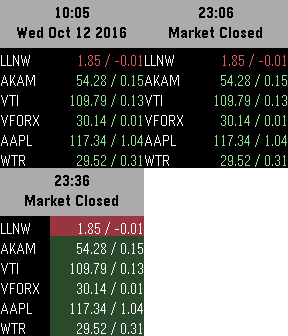
DailyStock Market Please Donate: http://bit.ly/tgdonate Features: o Show 6 symbols o Extended View Buttons: o Select - Update o Up/Down - Scroll through extended views
 234
234PebbleNavi
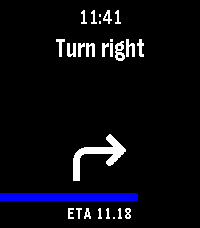
Tools & UtilitiesAndroid 16 Google Maps live notification navigation directions to Pebble. Companion app is in Google play closed testing and will soon be opened to all. (Can be downloaded from https://lumie.red/pebblenavi_v14.apk but will not work anymore after september) Companion app update v1.3: Autolaunch of watchapp when navigation starts. Companion app update v1.4: Autolaunch timer reset. First attempt to filter non-navigation notifications from Google maps. Samsung OneUI support is still incomplete.
 231
231I Am Rich
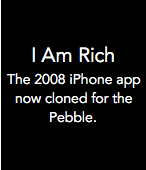
GamesA mockup of the 2008 iPhone app "I Am Rich" which survived 24 hours on the Apple App Store before being pulled. ** Goal: 50 hearts for Aplite and Chalk support. ** COMPLETED AND UPDATED. ** New Stretch Goal: 85 hearts and I will add timeline support with daily quotes about wealth and money. ** REACHED - CURRENTLY IN DEVELOPMENT. DEV STARTED ON JAN 11 2016 AND TO BE FINISHED AT END OF JAN 2016. ** Another stretch goal: 140 hearts and I will create a "Be my Valentine" app for Valentine's Day. ** The original iPhone app had no purpose except for showing people how rich you were to be able to spend US $999 on absolutely nothing. You can now experience the original app in all its glory without paying a single cent. Simply press the select button to bring up the original message that appeared in the app and press the same button again to dismiss the message. Furthermore, the app is now on your Pebble making it even easier to show off your supposed wealth to others.
 230
230Step Goal
Health & FitnessStep Goal lets you set a daily step goal, and tracks your progress throughout the day towards your goal. It will buzz your wrist when you reach the goal you've set. It also features an optional periodic reminder if you haven't been very active to move around some. Features: • Set a daily step goal of 2k, 4k, 6k, 8k, 10k, 15k, or 20k Steps • Choose to enable a bonus goal you can reach, you over achiever. • Counts your current streak, if you want. • Motivates you if you've been inactive for a while to get up and move around some. (This feature is beta.) • 8 Color Themes • Displays the time (It's almost like a watch!) • Circles • Sloths
 230
230Wrist AI
Tools & UtilitiesWrist AI — Your Pebble, Now Smarter Your Pebble will be better with Wrist AI !! Wrist AI turns your Pebble into a flexible, deeply integrated AI assistant. Speak naturally, talk to your preferred Large Language Model, hear replies through supported watch speakers, understand your health trends, remember important personal context, and turn everyday language into Timeline events, reminders and ToDos. Use OpenRouter to access GPT, Claude, Gemini, Gemma, Llama, Qwen and many more models, or connect Wrist AI to your own compatible API endpoint. Your phone handles API requests over Bluetooth; Wrist AI requires no proprietary relay server. WHAT’S NEW IN 1.6 • Full Touchscreen Workflow — On Pebble Time 2, double-tap Wi to talk, swipe left for Menu, swipe right for ToDo & Notes, use edge swipes to go back, drag lists directly and tap a row to open it. Physical buttons remain fully supported. • Refined Wrist AI Interface — Home, Menu and ToDo & Notes now use a unified floating-card design with cleaner transitions, compact gesture hints and dedicated touch controls instead of stock Pebble menus. • Reply History by Gesture — Pull down from the top of a reply to view the previous answer. From the bottom of an older answer, push up to return to the next one. Each answer opens from the beginning. • Better Reply Controls — Double-tap a reply to continue speaking, use the lower-right TTS control to start or stop playback, and keep navigation outside the reading area. • Clearer Touch Feedback — Scrolling no longer flashes list selections. A tapped row highlights briefly before opening so every action is visible and intentional. • Faster, More Reliable Assistant Actions — Improved multi-event Timeline requests, mixed ToDo/Timeline commands, speech-to-text tolerance, all-day events and TTS startup. CORE FEATURES • Voice conversations with up to 20 chats and 20 messages per chat • Up to five configurable models with on-watch switching • OpenRouter and custom OpenAI-compatible API support • Long-term Memory.md stored locally on the phone • Multi-day Pebble Health and exact sleep context • Timeline events, relative reminders, all-day events and strong local reminders • ToDo & Notes with conversation links and Archive • Optional Todoist two-way synchronization • Full touchscreen support on Pebble Time 2; experimental Pebble 2 Duo compatibility • Optional location context and web search • Conversation export, font controls and fixed or random themes • Basalt, Chalk, Diorite, Emery and Flint support GETTING STARTED 1. Install Wrist AI and open Settings in the Pebble companion app. 2. Add an OpenRouter API key, or select Custom API and enter your endpoint. 3. Add up to five model IDs and choose the active model. 4. Enable only the optional integrations you want: Health, Timeline, Todoist, location, web search or TTS. 5. Open Wrist AI and press SELECT to talk. WATCH CONTROLS • SELECT: talk, send reviewed Dictation, close a reply, or stop TTS • Hold SELECT: start a new conversation • UP: open conversations/settings or scroll upward • DOWN: open ToDo & Notes, re-record Dictation, or scroll downward • Hold DOWN on a reply: read it aloud on a supported speaker watch • BACK: return to the previous screen The complete control guide appears in the watch UP menu and can be hidden from Config after onboarding. PRIVACY AND COMPATIBILITY Conversations, Memory.md, ToDo & Notes and integration mappings are stored locally by the Pebble companion environment. Requests are sent only to the APIs you configure. Health and location context are optional and are not written into normal conversation history. Timeline features require a compatible Core Devices companion app with local Timeline support. Notifications depend on watch vibration, notification and Do Not Disturb settings. Pebble 2 Duo TTS remains experimental because it has not been validated on physical Duo hardware. Source and support: github.com/deusaw/Pebble-Wrist-AI Support development: paypal.me/Asterwyn
 228
228Pocket Glider
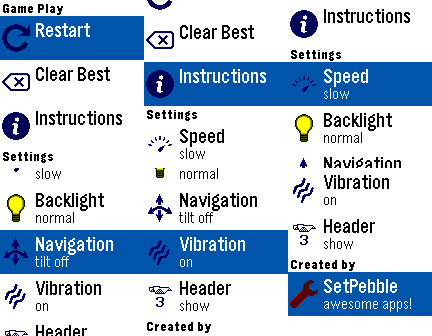
GamesFly a paper glider through a house, using heating sources to keep you aloft. Try to collect all objects without bumping into shelves, tables, or landing on the floor. Navigate by either the top and bottom buttons, or tilting your Pebble from side to side. The middle button activates the settings menu, where you can restart the game, reset the best score, or change custom settings.
 226
226GPS Bookmark
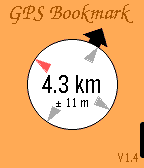
Tools & UtilitiesGo to a place. Make a bookmark. Return without getting lost. This is not a full-blown navigation software. It simply tells you the distance (as the crow flies) and direction to your destination. I made it for finding my tent while drunk at night at a heavy metal festival. Might also work for pop festivals or huge parking lots. Instructions: - Enable high accuracy GPS mode on your phone. - Long-press any of the three buttons on the right to save your current location. - Short-press a button to select a previously saved destination. - When the compass arrow is only shown as outline or not shown at all, you need to calibrate the compass. Rotate your Pebble in all directions until the arrow becomes visible and filled. (This may take some patience.) - When the big arrow turns into a second circle, you are pretty close to your destination. At this time, you should stop looking at your watch and instead look for any physical objects in your vicinity that might provide clues as to where you are, and maybe even why you thought it might be a good idea to come here. Trust yourself. You probably had a reason. Maybe even a good one. - To exit the app, double-click the back button. Feedback welcome! Planned features: - Better GPS error handling
 226
226Backlight
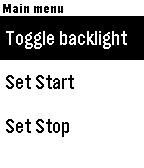
Tools & UtilitiesSimple program to automatically control your backlight. It sits in the background, allowing you to use whatever watch face you like. When you raise your arm to look at your watch, it will automatically turn on the backlight for 5 seconds. If you need to turn it back on again, just turn your wrist away and back again! The program has the ability to schedule a start and a stop time, however there is currently a bug in PebbleOS which prevents background wakeups from happening in some cases. Once this bug is fixed, I'll verify the functionality and upload a new version. Note, that PebbleOS only allows one background ("worker") task at a time. If you are using a program which counts steps, etc., and is thus running in the background, then you can't use this program at the same time. Most menu items are pretty clear, but the "Responsiveness" item isn't, so here's a description trying to describe what it does: The background worker task already reads only 10 accelerometer events per second, which is the slowest allowed. This new menu items allows the wearer to program the number of samples which are collected before the callback is called. Thus, it allows programming of the responsiveness of the backlight in 1/10th second increments. Presumably, calling the callback less often should save power at the expense of response time. You be the judge of what you want! Menu allows configuration such that light may be set to be always on while charging.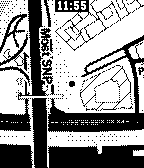 225
225Mini Map
Tools & UtilitiesMini Map is a tiny app, which uses GPS to continuously display where you are. It's completely free, which means no limitations and no hidden subscription fees! No companion app required. ANDROID ONLY* Works great on bike and on foot and is very efficient, so both your phone's and your Pebble's battery gets drained as little as possible. Map tiles are generously provided for free by CartoDB (cartodb.com) and Stamen Design (stamen.com). The tiles are downloaded as needed, which means you need an internet connection to use this app. Controls: UP - zoom in SELECT - refresh DOWN - zoom out *unfortunately, iOS host doesn't provide HTML5 Canvas, which is used for rendering the map without a companion app Why no colors? I don't have a color Pebble. If you can get me a Pebble Time (round), I'll develop a color version for free ;)
 224
224OW Camera Remote
RemotesOW Camera Remote lets you preview your phone's camera and remotely take pictures with a timer. Rebuilt and enhanced from the original app version from 10 years ago. Set a timer, strike a pose, and have your pic taken. Controls: Up: Toggle timer duration (max 15 seconds) Middle: Start the timer capture Down: Open the settings window Settings: Switch Camera: Toggle between front and rear phone cameras Preview: Toggle whether to show a live preview from your camera Timer: Toggle timer duration (max 15 seconds) Timer Vibration: Toggle whether to vibrate on each countdown second Dither: Choose the dither mode for the preview image (defaults to Floyd-Steinberg) Color Mode: Choose between color and black-and-white preview (color devices only). Black-and-white previews have a faster frame rate. Does not support iOS. Requires the Android companion app, OW Camera 2 for Pebble.
 223
223Light Switch
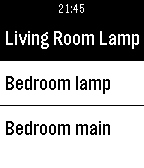
RemotesUse your Pebble to switch Hue lights on and off.
 221
221RideOn
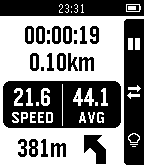
Health & FitnessNavigation & bike computer on your phone and your Pebble: • Turn-by-turn navigation • Real-world maps with streets, current position and path • Always-on bike computer with real-time information • Shows time, distance, speed, average speed and turn instructions • Vibe turn notifications: double for left, long for right • Light switch to keep the backlight on
 220
220Gemini Voice & Text
Tools & UtilitiesThis app turns your Pebble Time 2 into a fully functional conversational assistant using Google's Gemini with model and voice selection. If you enjoy what I am making don't forget to heart the app. If you want to support continued development, consider a donation: https://ko-fi.com/ericmccormick Version 1.3 and newer should support all Pebble watches with a microphone. I only have a Time 2, so please let me know if you run into issues. If your device does not have a speaker, you should only be asked for the Gemini API key. If your device has both a microphone and a speaker than you will be asked for two API keys. For help on how to get the API keys, read the the setup guide at https://tinyurl.com/PebbleGemini.
 220
220Color Calendar
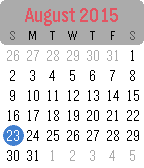
DailyA simple, easy to read calendar designed specifically for the Pebble Time. Up and down buttons scroll between months, select button returns to today. Long select button press toggles between Monday first and Sunday first formats.
 217
217nextbuses
Daily[UPDATED 2026] nextbuses lets you view real-time arrival information for all bus services at any bus stop in Singapore. Features: • Save your frequently used bus stops as favourites for quick access • Use your phone's GPS to find the nearest bus stop • Browse nearby bus stops in a map view (except Aplite devices) • Manual input of bus stop code Tips: • Hold the Select button in a bus stop to add it to your favourites • Hold the Select button on the main menu to remove a favourite • Alternatively, manage your favourites through the companion configuration page Map data provided by OneMap (onemap.gov.sg). A web version is also available via the website link below.