 258
258Spy
RemotesFinally now you can use your watch to help you become a Spy! Secretly control your android device with the screen off or on! *Take Pictures and Videos(soon be able to view them!) *Motion Detector! *Start and stop recording audio for conversations *Use speech-to-text to read live conversations *Silence and unsilence your phone *Control your phone's flashlight
 258
258Swim Counter
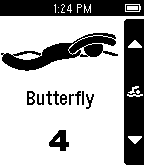
Health & FitnessA basic app that counts lengths of the four main swimming strokes. Utilize the Pebble’s ability to be taken underwater.
 250
250MLB ScoreWatch
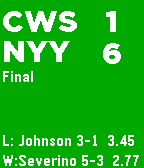
DailyKeep up with your favorite MLB teams right on your wrist. Follow live baseball games. Bug reports or ideas to make it better? Let me know in the forum: http://forums.getpebble.com/discussion/13038
 248
248Imgurmon
GamesEmbark on a wild adventure and discover all the Imgurmon in the land! This game was inspired by Imgur, and created by Mitch Davis and Sarah Clements during a 14-hour game jam. Controls: Tilt pebble to move
 248
248Dribble
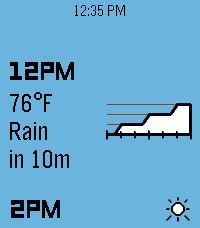
DailyA precipitation & hyperlocal weather app for Pebble. Location access is required for the app to work. When data is loaded, press the up or down buttons to scroll backwards or forwards through the forecast timeline. Hold either one to scroll quickly. There are three main information pages, which can be cycled by pressing the select button: Conditions: Displays the current weather conditions and temperature, along with a graph of next-hour precipitation intensity if applicable. Airflow: Displays wind speed & gust speed, wind direction, and atmospheric pressure. Experiential: Displays the perceived temperature, UV index, and visibility, along with an emoji accessorized with contextual indicators (sunglasses for high UV, umbrella for precipitation, hat & scarf for freezing weather, etc.)
 247
247Calendar App
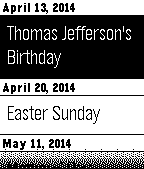
DailyAn interactive month view calendar that checks the calendars on your Android device and displays days which have an event in bold. Press center button to see an agenda view with event date, title, start time and end time.
 247
247My Bus
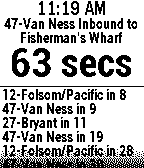
NotificationsReal-time arrival predictions for up to 8 bus and metro stops provided by NextBus! Works for over 60 US and Canadian public transit districts. Shows arrival times for all routes at a given stop. Or, repeatedly press select button to choose your preferred route at that stop. Check out my other transit apps for the following regions and agencies: SF Bay Area (10 Agencies), BART, New York MTA Bus, WMATA Bus & Rail, and Vancouver BC Bus.
 245
245GPS Tracker
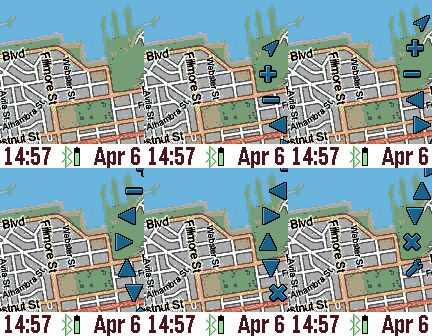
Tools & UtilitiesThe GPS Tracker app is a powerful wrist map, and can also be used to track your pals. The top button activates the backlight, and the bottom button pans the map depending on the tilt of the watch. The middle (select) button activates the menu wheel. The menu wheel has options for updating your location, zooming in (+) and out (-), panning, markers (X), and custom settings. To drop a marker, pan the map and choose "Add New Marker" from the markers menu. You can customize the marker label in the Settings page. The last choice in the markers menu is GeoLocation for displaying the street address. If you give yourself a NAME and specify a GROUP in the Settings screen through the Pebble Time phone app, then your location will be shared with others in the same GROUP. Use the group name "public" to see others that want to be seen. The “Wakeup” feature can be used to periodically send your GPS to your pals, even if the GPS Tracker is not active. The settings menu contains many options, including map service, process image, date format, and more. For the process image settings, you can choose to dither and/or boost the contrast of the mapping tiles for better readability. Location refresh is how often the GPS on the smart phone is queried. Mapping tiles Copyright and courtesy of OpenStreetMap, OpenStreetMap contributors, DigitalGlobe, Google Maps, ESRI ArcGIS, Bing maps, Stamen, and NOAA. Stamen data by Stamen Design (http://stamen.com); OpenStreetMap (http://openstreetmap.org) mapping tiles under Creative Commons licenses.
 245
245Find My Android Phone
Tools & UtilitiesFind your phone from your watch. No need to get someone to phone you. If you misplace or lose your phone, open this app to make your phone ring. If your phone isn't connected, the Bluetooth is set to high power mode: walk around and your watch will search out your phone. Your Android phone vibrates, plays your alarm sound on full volume, and turns the screen on white.
 243
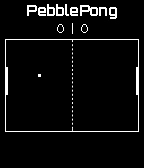
243PebblePong
GamesPong for Pebble Now with accelerometer support. Simply control your paddle by turning your wrist. To reset the calibration of the accelerometer during the game, press the select (middle) button on your Pebble. ATTENTION: This app is still under development. I would appreciate any feedback.
 241
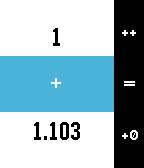
241Calculabble
Tools & UtilitiesCalculabble puts an easy to use calculator on your wrist. It's designed for three-button operation: - Click up to increase the current figure; hold down to negate the operand; - Click down once to add a zero to the right; double click down to remove it; hold down to insert point; - Click select to choose the operation and start inputting the second operand; hold to select the last operation; - Click select when you have both numbers to perform the calculation! FEATURES: - Up to 8 figures; - Floating point up to 3 decimals; - Addition, subtraction, multiplication, division, squares, roots; NOTE: roots are implemented using Babylon method. Results are approximations. TODOs: - Implement memory storage; - Implement more operations; - Add customization.
 239
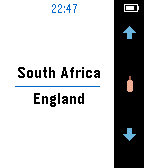
239Live Cricket
Notifications***NEW VERSION!*** Live Cricket V2 is a major re-write of the entire user interface of Live Cricket to work on all current Pebble Platforms. Live Cricket is no longer free, a one time purchase using KiezelPay at a low $0.99 is required to continue using Live Cricket after the 3 day free trial has elapsed. This has become necessary to support development and server costs. New Features include: Brand New UI Support for Pebble Time, Pebble Time Steel and Pebble Time Round Bluetooth disconnection notification, click vibrations, improved readability and so so much more! -------------------------- Live Cricket is a live Cricket Match / Score tracking application. Use this Pebble WatchApp to find the cricket match you are interested in and then monitor the scores in near-realtime. Features include: Match Overview and Details (overs, bowler, batsman) etc. New Multi Screen Layout to improve readibility Matches including all international 1-day, 5-days and T20 and many local matches 10 score history "Haptic" vibrations on button clicks Short vibration to alert you to each time the score changes
 239
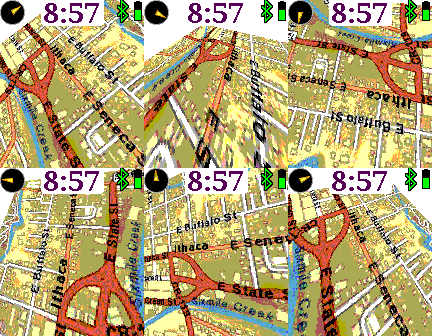
239Earth
Tools & UtilitiesA map that rotates, tilts, and zooms. Up and down buttons zoom in and out. Pressing up or down continuously pans the map forwards or backwards. The middle button shows the custom settings, and a long middle press resets the map to your current location. Customizable features include mapping service, displaying the time, compass, battery, bluetooth, screen inversion, vibration, map labels, and more.
 239
239Gas Finder
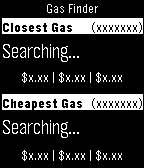
DailyThis watch app will easily allow you to find the closest & cheapest gas station to your current location. Launch the app and it will start searching for the closest gas station - when found it will display the station name, distance & direction from your current location and regular, premium and diesel prices (if applicable). It will then start to search for the cheapest gas station in a 10 mile radius - when found it will display the station name, distance & direction from your current location and regular, premium and diesel prices (if applicable). All data retrieved from http://www.mygasfeed.com/
 237
237PebbleNoti
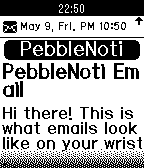
NotificationsMusic Remocon is added (New) Showing notifications such as 'incoming call', 'SMS', 'EMail', and '3rd party applications alerts' with all languages supported by your phone. Muti-byte characters such as Korean, Chinese, Japanese etcs can be shown on your phone. You can choose a font if you push your preferred true type fonts to /sdcard/fonts in your phone. Android Companion App is required.