 11
11Digivice - Alpha build
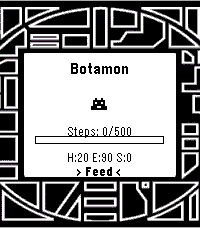
GamesA very early, alpha build of a reworked digivice. I wished this existed for the pebble, so I made one for myself. It is NOT anywhere near completion and it's all MY original code. Took some inspiration from the vital bracelet, as well. I liked the idea of fitness goals to help with evolution, but I'm not going to make you do sit-ups to get a greymon. Just some walking. Or heck, skip it and treat it like a normal digivice and let it eat, sleep, poop, and train and you'll get there. Or try out the battle simulator, which is all 50/50 coin flip rng based with a fun animation. Whatever floats your boat. Final note: Agumon line only, diverging evolutions will come into play at some point. Perhaps the next version, but for sure in the 1.0 release. Give me a few weeks.
 11
11Quick Voice Notes
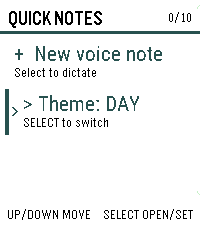
Tools & UtilitiesCapture a thought before it gets away. Inspired by the Index 01 ring. Quick Voice Notes turns a short spoken note into text directly from your Pebble Time 2, then lets you review it before saving. Notes are stored on the watch with their timestamps and appear newest first. Open any note to read the full text, delete individual notes, or remove all notes after confirmation. A day/night theme switch keeps the list comfortable to read in different lighting. Dictation is provided by the paired phone, so the phone must be connected and its voice-dictation service must be available. Quick Voice Notes does not record or store audio. The watch stores up to 10 notes, with a maximum of 240 characters per note.
 11
11Pocket Pool
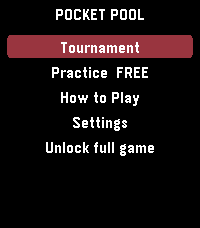
GamesPlay a complete game of 8-ball pool on your Pebble. Aim with the watch buttons, set your shot using a clear five-level power bar, and compete against computer opponents that become more accurate as the difficulty increases. Practice against Rookie, Skilled, or Pro CPU players, or enter a five-round tournament against Rookie, Hustler, Skilled, Pro, and Champion opponents. Win matches to earn in-game prize money and advance through the tournament. Your progress and winnings are saved on the watch. Pocket Pool includes one free Rookie practice game. A $1.99 one-time purchase through KiezelPay unlocks unlimited practice, every CPU difficulty, rematches, and the complete tournament. No subscription. Features: - Full 8-ball rules with solids, stripes, scratches, and the 8-ball finish - Computer opponent with increasing difficulty - Five-round tournament with persistent winnings - Five-level shot power bar - Adjustable aiming speed - Optional haptic feedback - Built-in How to Play guide - Square, round, color, and monochrome Pebble support Gameplay works offline. An internet connection is required only to purchase or restore the full-game license.
 11
11igi-Assistant
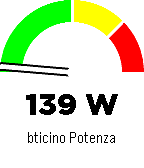
RemotesA comprehensive control interface for Home Assistant on your Pebble smartwatch. Monitor sensors, control lights, manage music, and chat with your home, all from your wrist with a high-contrast, readable interface. Key Features Sensor Monitoring: Display a specific sensor (e.g., car battery, power usage) directly on the main screen with a visual gauge and large, readable fonts. Light Control: Quick menu to toggle selected lights on and off. Home Assistant Chat: Send and receive text messages to Home Assistant (requires input_text). Supports voice dictation (on microphone-enabled models) and customizable canned messages. Music Control: Control active media players (Play/Pause, Volume, Next/Prev Track). Accessible Design: High-contrast black-on-white interface with color support for modern Pebble models (Time, Time Round, P2). Home Assistant Requirements To use all features, add the following to your configuration.yaml or create the helpers via UI: Chat: Create an input_text entity named pebble_chat. input_text: pebble_chat: name: Pebble Chat initial: "" max: 255 CORS (Important for Configuration): To allow the Pebble app configuration page to fetch your lights list, you must enable CORS: http: cors_allowed_origins: - "*" App Configuration Open the app settings within the Pebble mobile app. Enter your Home Assistant URL (e.g., https://your-home.duckdns.org or local IP if on WiFi). Enter a Long-Lived Access Token (create one in your HA User Profile -> Long-Lived Access Tokens). Enter your Nickname for the chat. Select the Lights you want to control and the Sensor to display on the home screen. Note: If the configuration page fails to load your entities, ensure CORS is correctly configured in Home Assistant (see requirements above). Controls Main Screen: UP: Open Music Control. SELECT: Open Lights Menu. DOWN: Open Chat. Lights Menu: UP/DOWN: Scroll through lights. SELECT: Toggle On/Off. SHAKE (Wrist): Toggle the currently selected light. Chat: UP/DOWN: Scroll through message history. SELECT: Open dictation or canned messages menu. Music: UP/DOWN (Click): Previous / Next Track. UP/DOWN (Long Press): Volume Up / Down. SELECT: Play / Pause.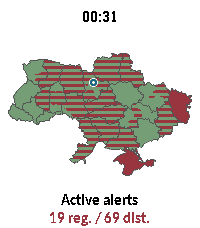 11
11Ukraine Alerts
DailyUkraine Alerts brings real-time air raid alert monitoring and situational awareness directly to your Pebble smartwatch. Featuring an interactive vector map of Ukraine, the app tracks sirens across all regions and districts with live updates every 15 seconds. Key Features: 🗺️ On-Device Vector Map: Renders full vector boundaries for all regions and districts with instant color-coded status. 📍 "My Safety" & GPS Pin: Uses your phone's location to place a marker on the map and prioritizes alert status for your immediate area. ⏱️ Active Sirens & Durations: Browse a dedicated list of currently alarmed regions with elapsed time counters (minutes, hours, days). 🔍 Smooth Navigation & Zoom: Zoom in (1.0x to 4.0x) to inspect specific raions or tap any region for instant details. Full touchscreen drag & tap support on compatible hardware (emery, gabbro). 🌐 Multilingual & Cyrillic Support: Bundles clean Cyrillic typography (Carlito font) and in-app language switching (Ukrainian, English, etc.). 🔄 Resilient Data: Automatically polls every 15 seconds with built-in API failover to ensure dependable uptime. Controls: UP / DOWN: Zoom in & out (1.0x – 4.0x) SELECT: Open Active Alerts & Safety menu BACK: Clear selection / Reset view / Exit Touch / Tap: Drag to pan across the map, tap to inspect any oblast or district Privacy & Data: Geolocation is only used to compute your relative position within Ukraine and is never stored or transmitted externally. Data sources: vadimklimenko.com & ubilling.net.ua.
 11
11Random for Pebble
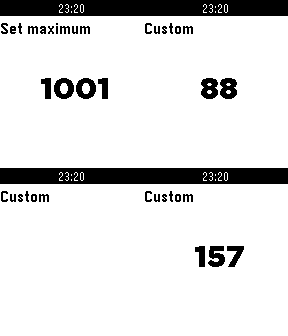
Tools & UtilitiesThis app lets you flick your wrist to: -roll a dice! -flip a coin! -generate a number up to your custom limit! Navigate through the different modes using the up/down buttons. Press select when in the custom mode to set the maximum, press select again to save it. If you enjoy the app, please rate it. If you discover a bug, have suggestions or just want to say hello, contact me!
 11
11Ping
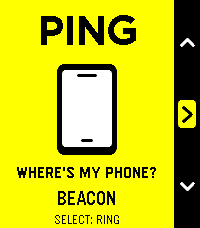
Tools & UtilitiesPING — Lost phone. Found your cool. Your phone is playing hide-and-seek. Your Pebble just became very good at seeking. Under a cushion? In yesterday’s jacket? Somewhere you put it “so you wouldn’t lose it”? Open Ping, press Select, and follow the sound. An essential little utility with unmistakably native Pebble styling: bold outlines, crisp white graphics, cheerful yellow while you search, and orange when your phone starts chiming. - One button to ring. One button to stop. - Three distinctive chimes: Chirp, Doorbell and Beacon. - No extra companion app required: works through the Pebble app already on your Android phone. - Two-minute automatic cutoff. - Perfect for Quick Launch: less searching, more smugly saying, “Found it.” Simple. Essential. Unmistakably Pebble. Requires Android, the Pebble mobile app, and an active Bluetooth connection. Phone media volume must not be silenced—Ping cannot override muted media. Sound follows your phone’s current audio output, including connected headphones or speakers.
 11
11Gist Reader
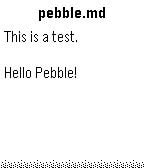
Tools & UtilitiesAccess GitHub Gists on your wrist! - Simple configuration with just a Gist ID - Support for multiple files in one Gist - Markdown files are rendered with basic formatting (headings, lists, etc.)
 11
11Long Rest
Health & FitnessSuper simple Pebble app for rest intervals (like in the gym or pomodoro) Originally built by [Remy](https://github.com/remy) for use in the gym, for rest intervals, and updated by updated by [clach04](https://github.com/clach04/pebble-rest-timer). This fork just changes timers from uint8 to uint16 for longer timers.
 11
11Pebble mPower
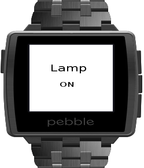
Tools & UtilitiesmPower Pro is a smart power strip from Ubiquiti Networks. Pebble mPower lets you control your mPower device from your wrist. Since the App controls mPower over the cloud, it requires the user to configure his/her (wireless) router IP passthrough correctly so that the mPower device's TCP port 22 can be accessed from Internet.
 11
11AQI Monitor
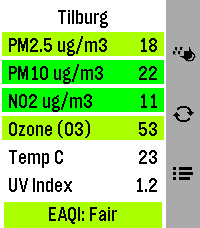
DailyAir Quality and Pollen monitor for Pebble Time 2 (Emery) Features: 🔶 Main screen shows current PM2.5, PM10, NO2, Ozone (O3) polutant values as wel as Temperature in Celsius and UV Index for your current location (shown on top) and at the bottom the general European Air Quality Index. 🔶 Background of polutant cells changes colours according to EU severity threshold values. 🔶 Forecast screen (Down button) with 24hr hourly forecast for each polutant, scrollable with both touch! and buttons. With a sticky header 😊 🔶 Pollen screen (Up button) with general pollen warning atop and 24hr forecast Graph for Weeds, Grasses and Trees. ⚠️ Pollen is Europe only and only during season ⚠️ Data comes from https://open-meteo.com and should provide worldwide coverage. The threshold values for the colouring of the boxes (severity) are according to EU norms, and so is the general EAQI index at the bottom (which is constructed from the other polutants so should again work worldwide, just EU norms). Location resolving to name by BigDataCloud reverse geoloc call. Pollen data is ONLY available in the EU, AND only during pollen season. It will show -No data available at this time- and a blank graph if nothing comes in for your location. This Pebble app needs colours 🏳️🌈 (and mucho pixels space), so that's why I only targeted Emery with this app 😊 Like what me and Claude made? Then give it some love in the store 😘🩷 And do check out my other stuff here:
 11
11Ishiki JP
DailyFlashcards on your wrist. Flip, grade, repeat. Supports the Japanese language. Review your Anki decks straight from your Core Time 2. Pick a deck, read the front, press to flip, and grade with a single button — ✓ Good · ~ Hard · ✗ Again — with a color flash and a buzz. Long cards scroll, due counts update as you study, and a quick vibrate tells you if the phone link drops. Private and offline: it reads your cards from AnkiDroid on your phone (which syncs to AnkiWeb itself) — no account, no server, nothing leaves your device. **Requires (Android):** the free Ishiki companion app + AnkiDroid on the same phone. Get the companion: github.com/f4nu/ishiki **Controls:** Up/Down scroll · Select reveals · then Up = Good · Select = Hard · Down = Again · hold Up/Down to scroll a long answer.
 11
11Ripple Alarm
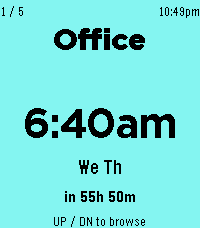
Tools & UtilitiesA large-text alarm clock designed to be easy to read at a glance. Set up to 5 alarms from your phone each with its own label, color, and weekly schedule. * Pressing the middle button takes you to the alarm that fires next. * Long pressing the middle button disables / enables the alarm.
 11
11Brew Buddy (Coffee Timer & Recipes)
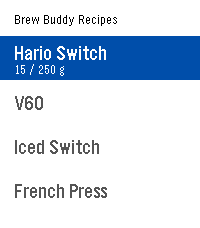
Tools & UtilitiesA custom coffee brewing timer that buzzes so you never miss the next step! Pick (or build) a recipe, select start, and get brewing! Recipes are fully editable and customizable from the settings page on your phone. When the drawdown from a brew finishes, press the select button to get a summary of the timing. Very helpful for dialing in new beans! Ships with presets for the Hario Switch, V60, French press, and AeroPress. Edit, duplicate, or build your own from scratch. Inspired by the work of: Tea's Ready, BrewKinetics, Coffee Timer, and Brew. If you like the app, consider funding my coffee addiction (thank you!) BTC bc1q7esequqkl8sg96je7zu045zyat2sg2x3ey8plu XMR 844dKmmRGpR2KPJd9pSin3NqYu7vH7AtdLFBRRPip8mkcS4NH61JvnKRi3zTHV91TvRerJHMHy8ihPSaso8wpgrhJKqsHN5
 11
11ProductHunter
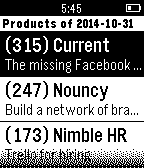
DailyProduct Hunt application for Pebble watches