 1
1Mond
DailyMain Infos of our Moon
 1
1Tiny Drunkard
RemotesClient for drunkards.duckdns.org
 1
1Sweetcadence
Health & FitnessTrack the tempo of your runs with Sweetcadence on your wrist. You now have the ability to measure how fast your legs are turning from under you to tune your run performance. Sweet.
 1
1Megalink Latest Software
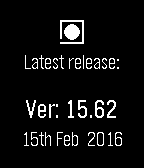
NotificationsGet the latest Megalink Software Bundle version and date.
 1
1Mensa UPB
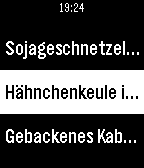
DailyMensa UPB is a small utility app for displaying the current dishes of the restaurants of the University of Paderborn.
 1
1CRYPTOTRACKER
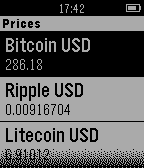
DailyShows a list of cryptocurrencys and their associated prices in USD.
 1
1Charm
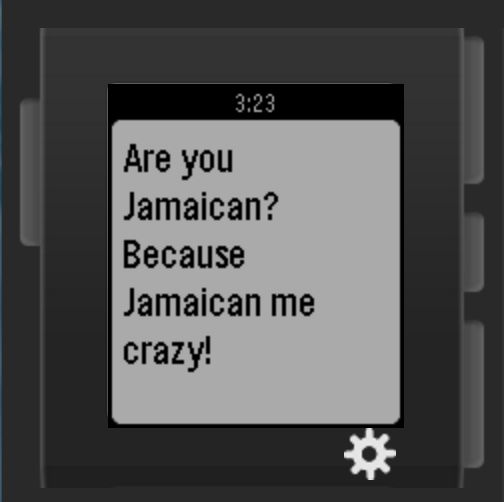
Tools & UtilitiesCharm helps you get out of those sticky situations through generating pick-up lines for you to use! With Charm, you'll never be lost for words ever again! Developed at HackTheNorth held in the University of Waterloo, Ontario, Canada by Patrick Sheldon Wee (patrickwee.co) and Joshua Paul Chan(thebattery.co).
 1
1Clay_Counter
Tools & UtilitiesCount Clays broken during shooting.
 1
1TransLoc
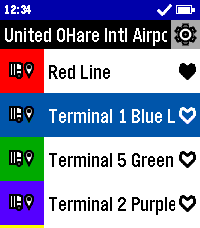
DailyCatch the bus in style with TransLoc for Pebble! With support for over one hundred transit agencies, this app can get you where you need to go. Don't second guess when your bus will arrive, find out now from the comfort of your wrist! This app is designed to be used in conjunction with either the official TransLoc mobile app, or a live tracker website based on TransLoc services. This app is meant to provide at-a-glance information, but is not meant for viewing a route on a map. Features Include: - At-a-Glance, Up-to-Date Route Information - Support for over 100+ Transit Agencies - Live Bus Distance Tracking* - Live Bus Capacity Tracking* - Location-Based Nearest Stop Information - Favorite Routes Potential Planned Features: - Add Original and Round Watch Support - Filter Running Routes from All Routes - Add Alerts Feature from Transit Agencies *For Buses with Tracking Support This project is open source! Check out the code yourself on GitHub! DISCLAIMER: THIS PROJECT IS NOT AFFILIATED WITH TRANSDEV, TRANSLOC, NOR ANY AGENCIES AVAILABLE WITHIN THE APP.
 1
1Trasher
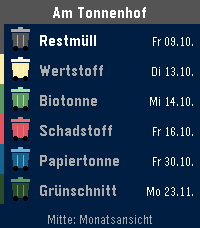
DailyBESCHREIBUNG DEUTSCH ---------------------------------------------------------------- Trasher zeigt dir, welche Tonne als Nächstes rausmuss – direkt auf der Uhr. • Liste: jede Tonnenart einmal, mit dem nächsten Termin (Heute, Morgen, Wochentag) und deiner Straße oben • Monatsansicht: kleine Tonnen in der passenden Farbe an jedem Abholtag, drei Monate zum Blättern • Timeline: Abholtermine der nächsten zwei Wochen als Pins in Tonnenfarbe, mit Erinnerung am Vorabend und am Morgen (Uhrzeiten einstellbar) • Einrichten am Handy: Ort, Straße und ggf. Hausnummer aus Listen wählen – kein Tippen. Danach die eigenen Tonnen anhaken. Unterstützt werden die Abfallkalender der großen Plattformen RegioIT (AbfallNavi), AWIDO und Jumomind/MyMüll – rund 3.000 Orte in Deutschland, z. B. Kreis Unna, Aachen, Nürnberg, Solingen, Kreis Viersen, Kreis Pinneberg, Darmstadt-Dieburg, Landkreis Fulda, Landkreis Rosenheim und viele weitere. Fehlt dein Ort in der Auswahl, nutzt deine Gemeinde einen anderen Anbieter. Bedienung: Mitte = Monatsansicht, Mitte lang = neu laden, Hoch/Runter = blättern. Datenschutz: Deine gewählte Adresse wird mit einer zufälligen Gerätekennung auf ni3d.de (Deutschland) gespeichert, damit die Uhr sie abholen kann. Kein Konto, keine Werbung, keine Weitergabe. Termine ohne Gewähr – maßgeblich ist der Kalender deines Entsorgers. BESCHREIBUNG ENGLISCH ---------------------------------------------------------------- Trasher tells you which bin goes out next – right on your watch. Made for Germany. • List: each bin type once, with its next date (today, tomorrow, weekday) and your street on top • Month view: small bins in matching colors on every collection day, three months to browse • Timeline: collections of the next two weeks as pins in bin colors, with reminders the evening before and in the morning (times adjustable) • Set up on your phone: pick town, street and house number from lists – no typing. Then tick your bins. Supports the waste calendars of the major German platforms RegioIT (AbfallNavi), AWIDO and Jumomind/MyMüll – about 3,000 towns, e.g. Kreis Unna, Aachen, Nuremberg, Solingen, Darmstadt-Dieburg and many more. If your town is missing, your municipality uses another provider. Controls: Select = month view, hold Select = reload, Up/Down = scroll. Privacy: Your selected address is stored with a random device ID on ni3d.de (Germany) so the watch can fetch it. No account, no ads, no sharing. Dates without guarantee – your waste company's calendar is authoritative.
 1
1Squire Plus
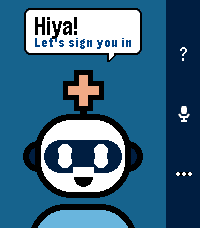
Tools & UtilitiesSquire Plus puts your own AI agent on your Pebble. Press SELECT, ask a question out loud, and your agent's answer appears on your watch. It connects to an agent you already run, such as Hermes or OpenClaw, through that agent's Telegram bot. Your phone talks to Telegram directly. There is no Squire Plus server in between. - Ask by voice, read the reply on your wrist. - Pick up your last conversation where you left off. - Recent and sample prompts one press away. - Optional location, so your agent can answer "what's nearby?". Off until you allow it. - Build targets: basalt, chalk, diorite, emery and gabbro. Android use is user-tested; iOS is unverified. **What you need** - Your own Telegram account. You sign in on the watch or in the app's settings. - An AI agent bot you've set up yourself in Hermes or OpenClaw. Squire Plus doesn't include an agent; it connects you to yours. - A Pebble phone app with full PebbleKit JS support. Cobble isn't supported. You don't need Telegram developer credentials to use this app. **Privacy** Your prompts, your agent's replies and (only if you allow it) your location travel through Telegram to the agent bot you choose, and are kept in that Telegram chat and by your agent's backend. Your Telegram sign-in stays on your phone. Squire Plus has no maintainer-operated relay or analytics server. Your selected bot and phone dictation service process data according to their own policies. **About** Squire Plus is an independently maintained fork of Squire by Justin Sunseri, which is based on Bobby by Katharine Berry. It is maintained by Andreas Varotsis and is not supported by the original authors. Unofficial; not affiliated with or endorsed by Telegram. Open source under Apache 2.0: https://github.com/AndreasThinks/pebble-squire Known limitation: Telegram and Squire Plus may both notify for replies. iOS has not been verified.
 1
1METAR
Tools & UtilitiesMETAR on your wrist
 1
1PTZ Remote
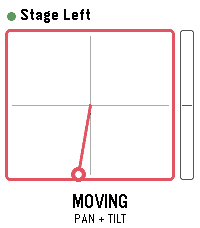
Tools & UtilitiesDrive Panasonic PTZ cameras from your wrist - with the buttons or by tilting the watch. PTZ Remote controls Panasonic AW-series cameras through their HTTP interface. Your phone does the talking, so the camera only has to be reachable on the same network. No extra software, no computer in between. Two ways to drive: - Buttons: up and down work the selected axis, a short press on select switches between TILT, PAN, ZOOM and FOCUS. - Motion: hold select as a dead-man switch and tilt your wrist. Zero is the posture you start from, so any comfortable arm position works - even with your elbow bent, in the dark next to the desk. Let go and the camera stops. Also included: presets with a confirmation before overwriting, up to 8 cameras to switch between, adjustable speed and tilt sensitivity, and an optional still image from the camera. That preview is not a live feed - the link to the watch carries about 1.6 KB per second, so one frame takes one to three seconds. Enough to check the framing, not to judge it. Nothing keeps moving unattended: the dead-man switch, a short arming delay so a tap does nothing, a watchdog on the phone that stops the camera if the watch goes quiet mid-move, and a stop when the app closes. Beta: camera control is tested against real hardware. The preview is not verified on a camera yet and is switched off by default; it needs JPEG transmission enabled in the camera's web menu. Runs on Pebble Time 2, Pebble Time and Pebble 2. Cameras are set up in the app settings on your phone. Vibe coded from start to store. That is the only reason it exists alongside a full time job. The app is free and has no ads. If you enjoy it, a coffee is much appreciated: https://buymeacoffee.com/SIDEffects
 1
1Entur Departures
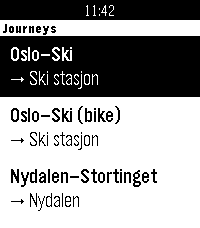
DailyGlance at your wrist, see your next train, and see which way it's going. Entur Departures shows live public transport departures for up to four journeys you set up on your phone, such as Oslo S – Ski. You don't choose a direction: the app checks which end of the journey you're nearer and shows departures from there. Near Oslo S you get trains to Ski, and near Ski you get trains back. Each departure shows: • The realtime departure time and a countdown in minutes • The line (R21, RE20, bus 31, ...) • The boarding track and the arrival track ("Spor 12 > 1"), so you can choose between two trains leaving at nearly the same time Per-journey options: • Big text: the countdown is huge and the track is bold, so you can read it at a glance while walking or cycling • Bike-friendly trains: a bike symbol on departures with step-free doors and room for a bike. You choose which lines or train numbers count, and it defaults to the Type 75 lines on Oslo – Ski. Works for trains, metro, trams, buses and ferries anywhere in Norway. In settings, type a stop name like "Nydalen" or "Bergen stasjon", or paste an NSR:StopPlace id. Boards are fetched in the background as soon as the app opens, so they're usually ready before you pick a journey. Privacy: your location is only used on your phone to decide the direction. It's never sent anywhere. Entur only receives the stops you set up. Unofficial app, not made or endorsed by Entur. Departure data comes from Entur's open APIs (NLOD licence). Built for Pebble Time 2.