 137
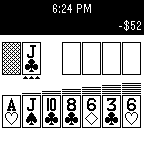
Solitaire
GamesKlondike Solitaire for Pebble. Includes Vegas scoring, one and three card draw modes, and selectable flip limit. Controls allow you to automatically skip over ineligible piles and move cards to the foundations, for more fun and less button presses! Please visit the webpage to report bugs and download the source code. Enjoy!
 136
License Revoked
GamesGTA meets Goat Simulator meets SNES FX-chip graphics — an open-world crime sandbox. Two islands, a causeway. Steal cars, run people down, rob the gun store, and lose the police in a parking garage. No missions — cause mayhem and get away with it. * Controls with one hand: thumbstick on the touchscreen, buttons to turn and fire * Money comes off bodies. Spend it at the gun store, or the strip club * Drive a taxi and pick up fares if you'd rather earn it honestly * Police escalate: arrests first, then guns, then a helicopter and SWAT if you keep it up * Steal the police helicopter
 135
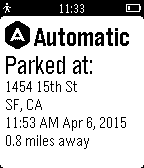
Automatic
Tools & UtilitiesNever forget where you parked. This app shows you where you last parked and when. It also shows how far you are from your car.
 135
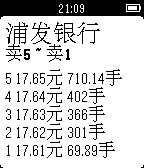
ChinaStock
DailyChinaStock is a watch app for tracking stock information in Chinese stock markets. It only supports Chinese language right now. Please set the system language to Simplified Chinese first to use the watch app. ChinaStock是专门针对中国用户的股票查询Pebble应用。 使用前请先将Pebble手表的语言设置为中文,因为股票的名称都是以中文显示的,否则会出现乱码。 使用说明: 第一次打开,请按手表屏幕提示在手机上的Pebble应用里对手表app进行配置。以后也可以随时进行配置,更改关注的股票或者指数的代码。 配置方法:点击对应的Settings按钮会打开一个配置网页,里面可以设置您要关注的股票或者指数的代码。请按页面里要求的格式输入。 手表app的使用方法: 在第一个列表页,上下键选择项目,确定键进入项目详情,长按确定键刷新列表。 在详情页,上下键翻页,确定键刷新数据,返回键返回到列表页。 欢迎大家多提意见和建议,我会把它做得越来越好的。谢谢支持和鼓励!
 135
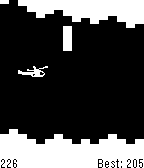
Helibble
GamesClassic helicopter. By Stuart Harrell.
 134
Spoon
DailySpoon is a simple Foursquare/Swarm check-in app for Pebble. The watchapp lists nearby venues using your phone's GPS location. Pick a venue and check-in. All from your wrist. Español Spoon es un app simple para Foursquare y Swarm. Usando el GPS del su celular para listar los lugares cercano. Elige uno y haz "check-in" desde tu pulsera.
 133
Pokedex
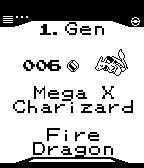
Tools & UtilitiesA Pokédex-App including all 721 Pokémon from all generations plus Mega Evolutions. Features: - English and German name (configurable), types, number and generation of every Pokémon. - Sort the Pokémon by number or by English or German alphabet. - Images of all Pokémon. - Little symboles for legendary Pokémon and Pokémon with Mega Evolution. Controls: - Up (hold): step 1 (25) Pokémon backward - Down (hold): step 1 (25) Pokémon forward - Press Select: toggle language/Mega Evolution - Hold Select: random Pokémon - Press Select on "Pokémon 000" to change order This app is based on the Pokédex by shutdown27 and the Pokédex by DKote with friendly permissions. Feel free to comment this app: https://jascosius.de/projects/pebble-pokedex/
 133
Hue On-Off
RemotesSimple remote control for your Hue appliance. Long press SELECT for brightness control. Long press UP or DOWN to switch all the lights On or Off. Hue ON-OFF is not affiliated with Philips company. Hue and all other Philips product names are trademarks or registered trademarks of Philips. JsHue: https://github.com/blargoner/jshue
 133
Android Settings [Pebble Rocker]
Tools & Utilities- Battery Level: view Android battery level and receive low battery notification (optional). - Ringtone: view/change state (silent/vibrate/normal) and volume. - Media Volume: view/change media volume. - Wifi: enable/disable wifi. - Bluetooth: enable/disable bluetooth. IMPORTANT: This watch app requires the Pebble Rocker companion app available via the Google Play store.
 133
Step Mail
DailyThis app construct mail body line by line, and send it. You can edit all mail contents by registering to SmartWatch SandBox site( http://www.sw-sandbox.info/ ). The demo movie is as follows. https://www.youtube.com/watch?v=EiFgAOH7WpE
 132
Calendar App
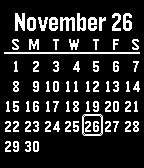
Tools & UtilitiesThis essential app gives you a one month calendar in 5 languages with optional week numbers. Pressing up/down changes the month. The Calendar is a WatchApp but can also be downloaded as a Watchface which complements other ways to tell time. The configuration menu lets you pick from 5 languages, background, start day and week numbers.
 132
Living The Dream
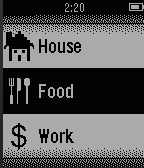
Games****NEW UPDATES*** (5/21/2015) Living The Dream is your second (better) life. Start off by getting a job to pull in some bacon. After earning mucho bacon, you can go to school, blow it on a new house, or simply cherish it because it's more money than what's in your real life bank account. Jokes aside, this is a very early release so don't expect too much yet. I currently have a whole list of updates and features I'll be adding to the game over the next couple weeks. Here's an incomplete list of confirmed upcoming new features: -View House: Will allow you to view the outside of your house. -Real Estate: Rent/Buy better apartments/houses. -Store: Will allow you to buy various things to interact with inside your house. Here is a list of unconfirmed (unconfirmed because I'm lazy and these would take a lot of coding) updates: -Stock Market/Investments: Make money while your player sleeps. -Walking work: Earn money and/or increase max energy for walking and exercising in your real life. -Avatar: A unique customizable avatar for every player. If you have any suggestions or ideas feel free to email me. Thanks! Changelog: 5/15/2015 (version 0.35) -Fixed bug with gym -Added vibrate option 5/16/2015 (Version 0.4) -Added auto save -Various bug fixes -Added Real Estate -Added cool icons 5/17/2015 (version 0.55) -Added food -Bug fixes. 5/21/2015 (version 1.1) -Added splash screen -Bug fixes -Lowered High School credits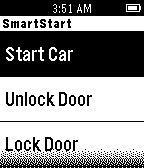 132
SmartStart
RemotesUsing the SmartStart app, you can now remote start or lock and unlock your car just by pushing a button on your Pebble. You must own a Viper SmartStart system for this app to work correctly. http://www.viper.com/SmartStart
 132
QuickTimer
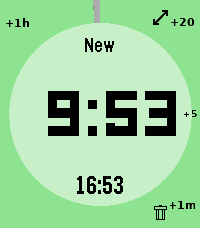
Tools & Utilities# pebble-timer-quick QuickTimer is a timer app for the Pebble Smartwatch, intended to be the fastest way to start a timer or stopwatch. Made for people that think needing 5 seconds to set a countdown timer or stopwatch is far too long. With QuickTimer, rest assured that you are not fiddling away precious moments of your life. QuickTimer starts counting as soon as you open the app. First press the button, then think how long the timer needs to be. If you want a timer for 1 minute and it takes you 6 seconds to start the timer, then your timer will be off by 10%, and that can be life or death. If you like your soft boiled eggs cooked for exactly 6 minutes and 20 seconds, QuickTimer will help you get the gooey texture you desire. QuickTimer works by pressing buttons to increment the countdown timer by set amounts (1, 5, 20, 60). Once you get used to this, you can set a timer without even looking at your watch. Here's how it works: - Open the app - You enter new timer mode where each button press adds a given amount of minutes to the total countdown time - After 3 seconds of inactivity your timer is set - If you don't press anything, QuickTimer goes into stopwatch mode instead - Once you are in counting mode, you can edit your timer, restart your timer, or you can enable repeat timers - Timers that are in alarm can be repeated, snoozed for 5 minutes, or silenced to become post timer stopwatches. ## Features ### Run several timers at once Need to track more than one thing? Turn on **Multiple Timers** in the settings and QuickTimer can keep up to five timers and stopwatches running at the same time. When you open the app it shows a list of everything that's running — scroll to one and select it to jump straight in, or pick **New Timer** to start another. Hold Down on a timer in the list to delete it. ### Every timer has a name — and you can speak a new one So you never lose track of which timer is which, QuickTimer automatically gives each one a short, memorable name the moment it's created. On Pebbles with a microphone, you can rename the active timer with your voice: while you're setting a timer, hold **Up** first and then press **Back**, then just say the new name. (Requires the **Voice naming** setting to be enabled and a connected phone.) ### Millisecond stopwatch Timing something precise? Pause a stopwatch while it's under an hour and QuickTimer shows the milliseconds too (e.g. `1:23.456`), so you can read off an exact split. The milliseconds disappear once it passes an hour to keep the display readable, and they only ever show on stopwatches — never on countdown timers. Based on [YclepticStudios/pebble-timer-plus](https://github.com/YclepticStudios/pebble-timer-plus).   ## Buttons ### New timer mode - Back: Add 1 hour - Up: Add 20 mins - Select: Add 5 mins - Down: Add 1 min - Hold Up: Toggle reverse direction (increments become decrements) - Hold Select: Switch to EditSec mode (seconds granularity) - Hold Up then press Back: Voice rename the timer (microphone models, when Voice naming is enabled) - Hold Down: Quit app and delete timer After 3 seconds of inactivity, the timer is set and transitions to counting mode. ### EditSec mode (seconds granularity) - Back: Add 60 seconds - Up: Add 20 seconds - Select: Add 5 seconds - Down: Add 1 second - Hold Up: Toggle reverse direction - Hold Select: Switch back to New mode (minutes granularity) - Hold Up then press Back: Voice rename the timer (microphone models, when Voice naming is enabled) - Hold Down: Quit app and delete timer ### EditRepeat mode Entered by holding Up while in counting mode (countdown timers only). - Back: Reset repeat count to 0 - Up: Add 20 repeats - Select: Add 5 repeats - Down: Add 1 repeat - Hold Down: Quit app and delete timer ### Counting mode - Up: Enter edit mode - Select: Toggle play/pause - Down: Extend high-refresh display rate - Back: Quit app - Hold Up: Toggle repeat mode on/off (countdown only) - Hold Select (running): Restart timer to original length - Hold Select (paused): Reset to 0:00 and enter EditSec mode - Hold Down: Quit app and delete timer When a stopwatch is paused and under an hour, the display shows milliseconds (e.g. `1:23.456`). ### Alarm mode When a countdown timer expires, it enters alarm mode (vibrating). - Up: Silence alarm and enter edit mode - Select: Silence alarm and toggle play/pause - Down: Snooze (add 5 minutes) - Back: Silence alarm (timer continues as stopwatch) - Hold Up: Repeat timer (restart with original length) - Hold Select: Restart timer from original length (running) - Hold Down: Quit app and delete timer ## Quickness The table below compares the number of button presses required to set timers in QuickTimer versus in the default Pebble timer. ``` | Timer Amount | QuickTimer | Default Pebble Timer | |--------------|------------|----------------------| | 1 min | 2 | 5 | | 2 min | 3 | 6 | | 3 min | 4 | 7 | | 4 min | 4 | 8 | | 5 min | 2 | 5+ | | 6 min | 3 | 5+ | | 7 min | 4 | 5+ | | 8 min | 5 | 5+ | | 9 min | 5 | 5+ | | 10 min | 3 | 5+ | | 11 min | 4 | 5+ | | 12 min | 5 | 5+ | | 13 min | 6 | 5+ | | 14 min | 5 | 5+ | | 15 min | 4 | 5+ | | 16 min | 5 | 5+ | | 17 min | 6 | 5+ | | 18 min | 5 | 5+ | | 19 min | 4 | 5+ | | 20 min | 2 | 5+ | | 25 min | 3 | 5+ | | 30 min | 4 | 5+ | | 35 min | 5 | 5+ | | 40 min | 3 | 5+ | | 45 min | 4 | 5+ | | 50 min | 5 | 5+ | | 55 min | 4 | 5+ | | 59 min | 4 | 5 | | 60 min | 2 | 5 | | stopwatch | 1 | x | ```
 132
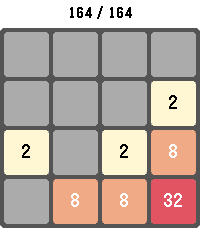
2048 Touch
GamesPlay the classic 2048 sliding-tile puzzle on your Pebble. Combine matching numbered tiles to add them together and work your way up to the 2048 tile — and beyond. Swipe to move on touch-capable Pebbles, or use the physical buttons on every other model. Your board, score, and high score are saved automatically, so you can put the watch down and pick the game back up anytime. Long-press SELECT to start a new game, long-press BACK to exit. Supports Pebble Classic, Pebble Time, Pebble Time Round, Pebble 2, Pebble Time 2, Pebble 2 Duo, and Core Devices Pebble.